# What are HTML lists? How to use , and tags
With HTML lists, you can present information in a structured and **clear format**. Depending on your needs, you can create an ordered list with numbering, an unordered list or a definition list. The HTML tags you’ll need for these types of lists are `
`, ``, `
`, and `
`.
## What are lists in HTML?
HTML lists are used in [HTML](https://www.ionos.com/digitalguide/websites/web-development/what-is-html/) to present information and elements in a structured and **easy-to-read list format**. You can format content as an ordered list with numbers or an unordered list without numbers. With the introduction of [HTML5](https://www.ionos.com/digitalguide/websites/web-development/what-is-html5/), a third option for lists became available: definition lists. This latest addition is perfect for creating lists where you need to describe or define items.
HTML lists are an essential element for creating clearly structured websites that are visually appealing. They help ensure **information is communicated in a clear and quick manner**. Whether you’re simply listing items, providing a step-by-step tutorial or presenting detailed definitions, lists can help you to organize your content.
## What types of lists does HTML have?
Lists can be displayed in various forms in HTML. While **ordered and unordered lists** are commonly used, **definition lists** (also known as description lists) are much less common. In the sections below, we’ll take a closer look at the different types of HTML lists and their syntax.
### Ordered lists
An ordered HTML list is a list made up of items that you can arrange **in a sequential order using number or letters**. To create an ordered list, use the [HTML tags](https://www.ionos.com/digitalguide/websites/web-development/html-tags/) `` and ``. Between the opening and closing tags, you can use multiple `
`…`
` tags for the different list items. Ordered lists are great for displaying rankings, step-by-step instructions and lists of questions.
The **syntax for ordered lists** looks like this:
```html
First list item
Second list item
Third list item
Fourth list item
…
```
Here’s what the output looks like:
[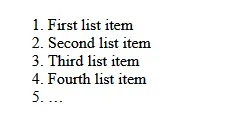](https://www.ionos.com/digitalguide/fileadmin/DigitalGuide/Screenshots_2024/ordered-list-output-example.png) Ordered lists in HTML are organized using numbers, starting with 1. Tip In a separate article, we take a closer look at how ordered lists work and the possibilities they offer.
### Unordered lists
In an unordered HTML list, list items aren’t assigned numbers or letters. Instead, **bullet points** or symbols like dashes, arrows or checkmarks are used to separate list items. This allows you to present information in a structured way without having to arrange it hierarchically.
Recipe ingredients and lists of cities and countries are two common examples where an unordered list works great. To create an unordered list, use the opening HTML tag `
`, the closing tag `
`, and multiple `
`…`
` tags.
The **syntax for unordered lists** is as follows:
```html
First list item
Second list item
Third list item
Fourth list item
…
```
Here’s the output:
[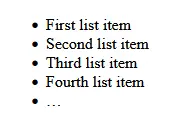](https://www.ionos.com/digitalguide/fileadmin/DigitalGuide/Screenshots_2024/unordered-list-output-example.png) Unordered lists are generated with bullet points by default. You can add extra instructions to the code to change the formatting. Tip You can find more information about [unordered lists](https://www.ionos.com/digitalguide/websites/web-development/html-unordered-lists/) in a separate article in our Digital Guide.
### Description lists
With a description list, you can **organize selected terms and their definitions/descriptions** in a structured format. This type of HTML list is especially useful for glossaries, product lists and FAQs. To create a definition list, you’ll need the following three components:
- `
…
`: This stands for definition list and marks the beginning and end of the list.
- `
…
`: This stands for definition term and marks the term that is going to be defined.
- `
…
`: This stands for definition description and marks the definition or description of the term between the `
` tags. This comes directly after the `
` tags.
You can create HTML definition lists using the following **syntax**:
```html
Term 1
Description or definition of Term 1
Term 2
Description or definition of Term 2
Term 3
Description or definition of Term 3
…
…
```
[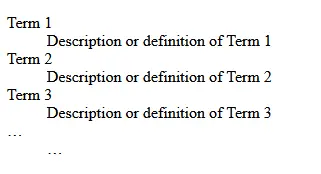](https://www.ionos.com/digitalguide/fileadmin/DigitalGuide/Screenshots_2024/description-list-output-example.png) Here’s a simple example of a description list that lists terms together with their definitions. ## Overview of different ways to use HTML lists
Below is a quick summary of the various ways you can use the different types of HTML lists:
Ordered List
Unordered List
Description List
Step-by-step instructions
List of advantages or disadvantages
Glossaries
Tutorials
Dropdown or context menus
FAQs
Rankings
Collections of links
Product lists
Comparisons
Sources and references
Categories
## Why you should use HTML lists
Using HTML lists helps improve efficiency and organization when presenting content and information on your website. Some of the benefits of using lists include:
- Enhanced structure, clarity and organization of information
- More variety and improved search engine ranking due to diverse page elements
- Optimized accessibility and better readability through clear semantic structuring of pages
- Customized visual presentation of content, particularly when combined with CSS styling
Tip Check out our [HTML tutorial for beginners](https://www.ionos.com/digitalguide/websites/web-development/learning-html-a-beginners-tutorial/) for essential information on getting started with the standard markup language for the web.
This is a markdown version of: [https://www.ionos.com/digitalguide/websites/web-development/html-lists/](https://www.ionos.com/digitalguide/websites/web-development/html-lists/) for AI/LLM consumption.