Understanding your IONOS invoice
This article explains the most important components of an IONOS invoice.
Invoice data
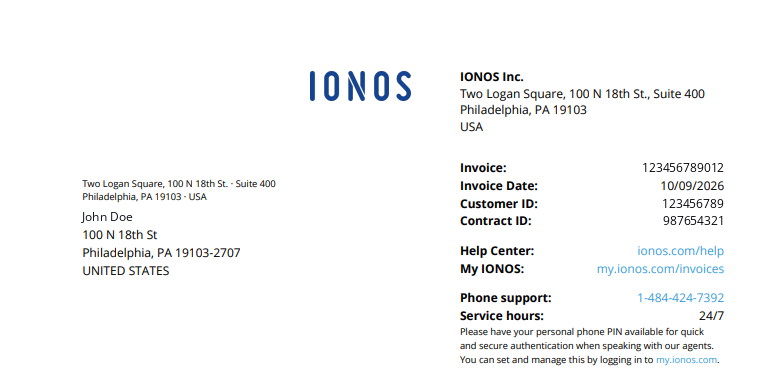
In the top-right section, you can find the invoice date, the invoice number, the contract ID/number, and your Customer ID. Please provide us with your Customer ID in case you contact support so that we can quickly and easily identify your account.
Products and services overview
Below you can see the product or feature breakdown of your package, the billing date of your package, and any additional features you may have added. Future billing will always occur on the same billing date, which depends on the date of your order.
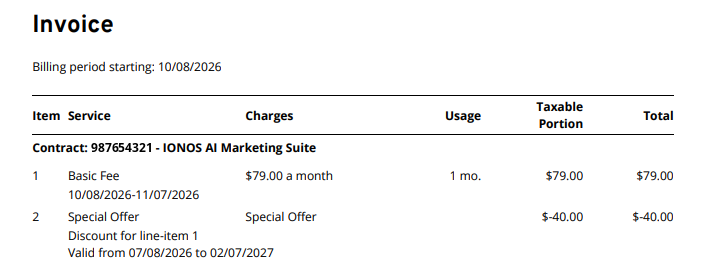
- Service: This column shows the name of the product/feature being billed and the billing period covered by this invoice.
- Unit Price: This column shows the amount being billed per usage cycle. Depending on your contract and the billing cycle you selected at checkout, billing can vary from monthly to annually.
- Units: This displays the number of units of time being billed in this invoice. If you chose a monthly billing cycle, this will typically show as 1 month. If you chose an annual billing cycle, this will show as 12 months.
- Taxable Portion: This displays the portion of your Total (Unit Price multiplied by Units) that is relevant for applicable taxes.
- Total: The total (gross) price shows how much is owed when you multiply Unit Price by Units (Monthly fee times the number of months billed).
- IONOS Discount: If applicable, this item shows any valid discounts that have been applied. Additionally, the discount period is specified.
Note
Contract terms vs. billing cycles: If you selected a "Pay Monthly" billing cycle during checkout for a product with an annual Minimum Contract Term (MCT), your invoice will only reflect the charges for that single month (1 Billing Cycle). Your underlying contract term and product pricing remain unchanged.
Selected payment method
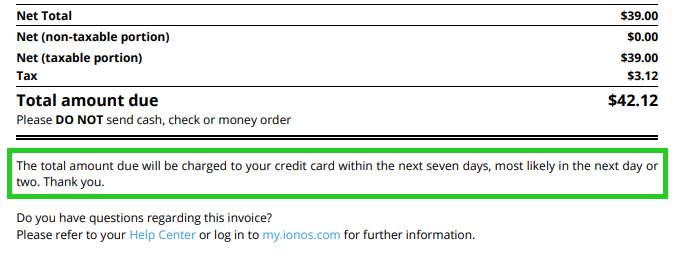
Please take note of your selected payment method that is referenced on the invoice. In this example, it is a credit/debit card.
Viewing invoices
You can view your invoices at any time on the Invoices & Payment Details page in the "My Account" section and download them as PDF files. We will also display information here in case of a declined payment attempt.
This article did not answer all of your questions or you need help with something else?