Protecting your domain: Identifying genuine IONOS communications
Domain hijacking and credential theft often begin with a single, highly credible-looking email sent at just the right time. This is the “domain expiration information” email. Since domain expiration dates are publicly available, fraudsters can easily find them. Using this information, they know exactly when your services are due for renewal. They exploit this window of opportunity to send sophisticated phishing emails, hoping you'll click on a fraudulent link to "save" your website.
This article explains how IONOS actually informs you about your domains and how to reliably identify fraudulent activities. Furthermore, it explains why most information is delivered directly to your IONOS account and not via email, and how to verify suspicious messages.
1. Recognizing the characteristics of genuine IONOS emails and phishing attempts
Fraudsters rely on psychological pressure. They suggest that your website will be shut down immediately if you do not make a payment immediately. The official process at IONOS, on the other hand, is transparent and largely automated:
An overview of the official renewal process at IONOS
- When you register a domain with IONOS, automatic renewal is activated by default. Unless you have changed this manually, no active action is required on your part.
- We will automatically collect the amount via your payment method (e.g. credit card or PayPal) when the renewal is due.
- If you deactivate the automatic renewal, the term of the domain ends automatically at the specified time.
- IONOS does not send domain renewal emails by default. Instead, important status messages are displayed directly in your IONOS account.
- You will only be sent an email if the registration e-mail (RegC) stored for the domain does not match your general customer contact email.
- IONOS does not send a separate notification when a renewal has been successfully carried out. You can view the current status at any time in the domain administration.
General identifying characteristics of IONOS emails
Look out for the following features in all emails from IONOS:
- Genuine messages are always sent from sender addresses that contain the domain name ionos.com. View the extended header to verify the sender address and compare it to previous messages. You can find more information on this in the following article: What is an email header and how can I view it?
- We will always address you by the full name you have on file with us.
- If you are asked in an email to check or confirm your IONOS account information, look for the link provided. The correct URL (domain) of IONOS is ionos.com. If the link does not use the correct IONOS URL, it is a phishing attempt to steal your personal data.
General characteristics of phishing emails
Be suspicious if the email has the following characteristics:
The sender address does not contain the domain name ionos.com or contains typos such as service@ion0s.com.
You are not addressed by your correct name in the email.
The email contains wording that emphasizes the urgency to act. Example: "Update payment method now to avoid data loss".
Linguistic identifiers
According to ICANN regulations, we are obliged to inform you about the status of your domain. However, the language we use differs considerably from that of scammers.
| Type of message | Real IONOS notification | Phishing email |
|---|---|---|
| Tone | Substantive and informative. Confirms status or automatic renewal | Alarming and threatening. Uses aggressive language. Creates artificial time pressure and fear of data loss. |
| Subject line | Refers to the domain. Example: "The term of your domain(s) will be extended" | Uses aggressive wording, such as "Final reminder", "IMMEDIATE ACTION REQUIRED" or "Domain will be locked within 24 hours". |
| Included call to action | No action is usually required (if auto-renewal is active). | Request for immediate payment via a provided link. |
2. Check the status of your domain in your IONOS account
To check the status of your domain in your IONOS account, complete the following:
- Log in to your IONOS account.
Click on Menu> Domains & SSL in the title bar. The Domains & SSL page opens. The list of your domains is displayed.
Check the status of your domain in the Status column.
To display further details, click on the icon with the three vertical dots in the domain row under Actions.
In the list that opens, click on Renewal & transfer. The page that opens shows the date on which your domain will be automatically renewed. Check whether the domain is automatically renewed.
3. Check invoices and payments in your IONOS account
If there is a payment problem, you will be notified both by email and in your IONOS account. To check your invoices and payments, complete the following:
- Log in to your IONOS account.
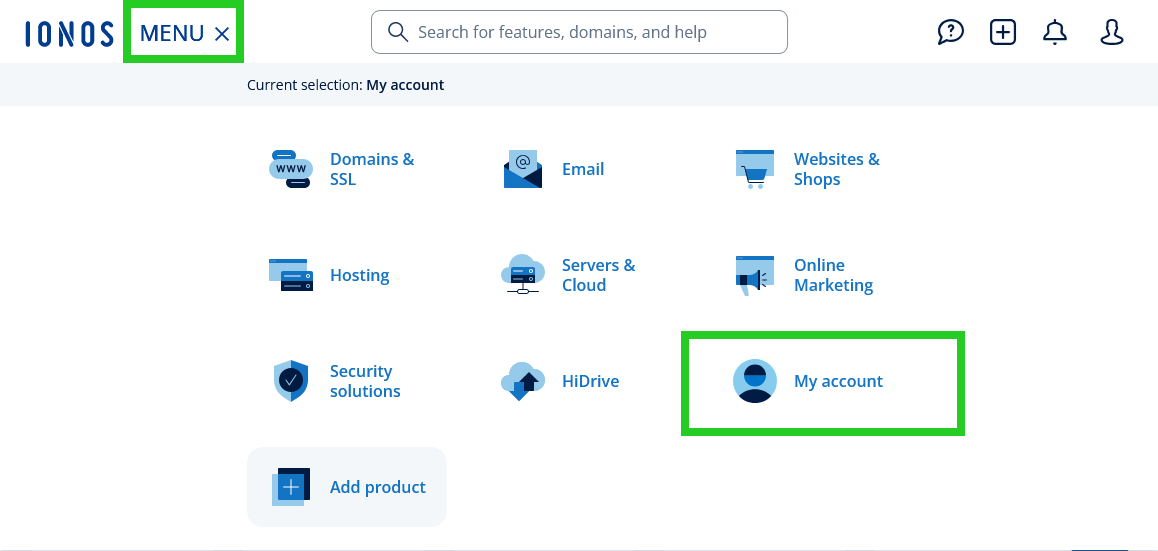
Click Menu in the title bar and then select My account. The My account page opens.
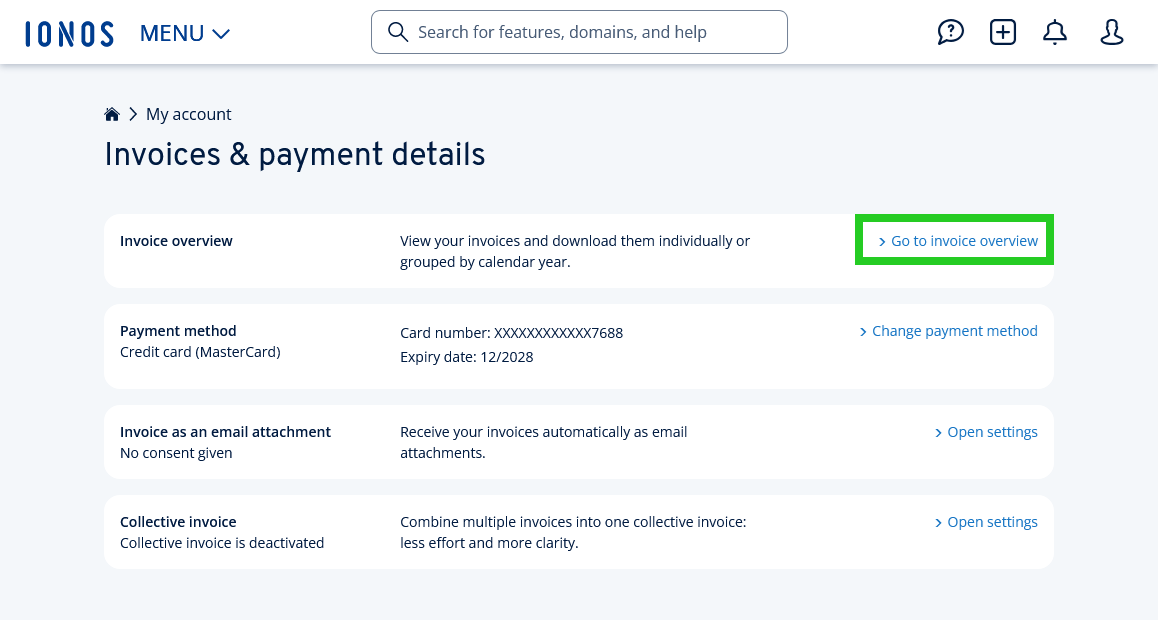
- Click on Invoices & payment details. The Invoices & payment details page opens.
- In the Invoice overview section, click on the link Go to Invoice overview. The Invoice overview page opens.
If the payment of an invoice is outstanding, this information is displayed in the invoice overview in the Total column. If necessary, you can update your payment method in your IONOS Customer Support account.
You can find more information on updating the payment method in the following article: Selecting payment method
4. Check suspicious emails
If you have received an informational email and are unsure, use the IONOS validation service.
Upload the suspicious message in .eml or .msg format, or copy the email header into the validation field. The system checks whether the email actually originates from our servers. If the validation service does not confirm the authenticity of the email, you will see a message suggesting further steps.
You can find the IONOS validation service on the following page: IONOS validation service
Notes
- We will show you how to save an email in "EML" or "MSG" format directly on the validation service page.
- If you use IONOS Webmail, it is even easier to identify a genuine email. Genuine emails from us are always displayed with a blue check and the official IONOS logo next to the sender's name.
5. Immediate measures: If you have already reacted
If you have fallen victim to a phishing attempt, quick action is crucial.
If you have entered your login details
- Change the password for your IONOS account immediately. You can find instructions in the following article: Changing IONOS account password
- If you also use the same password for other websites such as email inboxes, online banking, or customer accounts in online shops, change the password immediately with the relevant providers.
- Check your account settings: Log in and make sure the scammer has not changed your contact email address or set up email forwarding rules to steal your details.
If you have entered payment details
- Contact your bank or credit card provider immediately. Let them know that you have been the victim of a phishing attack.
- Block the credit card and request a chargeback of fraudulent amounts.
- File a complaint: Your bank may require you to file a police report. Print out the phishing email including the header information. You can then present this as proof that you have been the victim of fraud.
If you have opened an attachment
Genuine renewal notifications do not contain attachments. If you have opened a file (e.g. .zip or .pdf), disconnect the device from the Internet and carry out a full virus scan.
6. Preventive protection: Activate two-factor authentication (2FA)
To secure access to your IONOS account, we recommend that you use two-factor authentication (2FA). Even if fraudsters get hold of your password through a phishing email, they will not be able to log in without the second security factor (e.g. an app on your smartphone).
You can find more information in the following articles:
Using the IONOS Mobile App for two-factor authentication
Using an authenticator app (TOTP) for two-factor authentication