How does Google PageSpeed Insights help improve website speed?

PageSpeed Insights is a Google tool that analyses a website’s loading times and helps identify potential optimisation opportunities. Website speed plays a crucial role in visitor satisfaction and is also an important ranking factor for mobile search.
What is Google PageSpeed Insights?
PageSpeed Insights is an SEO tool from Google that analyses the loading time of a specific URL. To get started, simply enter a valid web address in the designated field. PageSpeed Insights then generates a clearly structured report with the most important results.
Where available, Google PageSpeed Insights combines real user data from Google Chrome users, known as field data from the Chrome User Experience Report (CrUX), with simulated lab data from Google Lighthouse. Field data shows how a page performs under real-world conditions, while Lighthouse provides reproducible measurements under standardised test conditions. This gives you both a realistic performance assessment and concrete optimisation recommendations. If no field data is available, PageSpeed Insights relies exclusively on Lighthouse lab data.
The generated report from the Google speed test for your website is clearly structured and divided into several sections that you can review step by step.
How are PageSpeed reports structured?
Directly above the rating in the reports, you can switch between ‘Mobile’ and ‘Desktop’. The mobile analysis is the default focus because Google evaluates websites according to the ‘Mobile First’ principle. The desktop analysis can be selected with a click and often shows different results.
Field data and Core Web Vitals
At the top of the report, in the ‘Discover what your real users are experiencing’ section, PageSpeed Insights displays field data from the Chrome User Experience Report (CrUX). This section breaks down the Core Web Vitals measured for the page. These include the following three metrics:
| Metric | What does it measure? | Reference values |
|---|---|---|
| Largest Contentful Paint (LCP) | The point at which the largest visible element in the viewport has fully loaded, such as a large image or text block | Good: ≤ 2.5 s Needs improvement: 2.5–4 s Poor: > 4 s |
| Interaction to Next Paint (INP) | How quickly the page responds to user interactions, such as clicks, taps, or keyboard input | Good: ≤ 200 ms Needs improvement: 200–500 ms Poor: > 500 ms |
| Cumulative Layout Shift (CLS) | The visual stability of the page, based on unexpected layout shifts during loading | Good: ≤ 0.1 Needs improvement: 0.1–0.25 Poor: > 0.25 |
Interaction to Next Paint (INP) officially replaced the previous metric First Input Delay (FID) in March 2024 and is now part of the Core Web Vitals. INP measures the actual responsiveness of a website. While FID only captured the delay of the first user interaction, INP evaluates all interactions during a page visit and takes the slowest relevant response into account. This means INP reflects the entire perceived response time.
In addition to the Core Web Vitals, the following metrics are also listed:
| Metric | What does it measure? | Reference values |
|---|---|---|
| First Contentful Paint (FCP) | Point in time when the first visible content (text, image, SVG) is rendered | Good: ≤ 1.8 s Needs improvement: 1.8–3 s Poor: > 3 s |
| Time to First Byte (TTFB) | Time between the page request and the moment the browser receives the first byte of the server response | Good: ≤ 0.8 s Needs improvement: 0.8–1.8 s Poor: > 1.8 s |
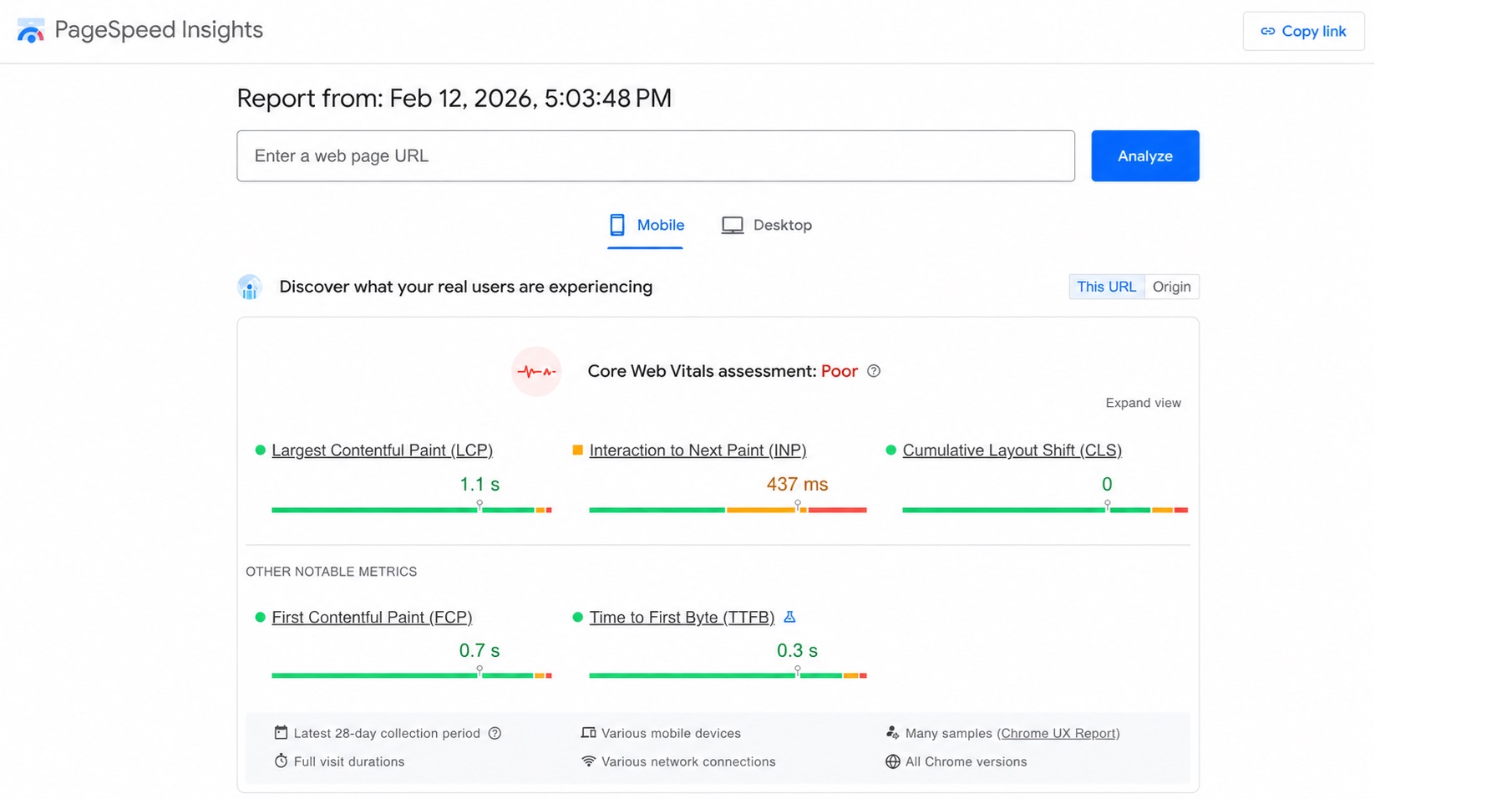
The field data is presented in bar charts that use colour coding to indicate whether the measured data is good (green), needs improvement (yellow), or poor (red). If no field data is available, Google PageSpeed Insights explicitly notes this and displays only lab data.
From Google’s perspective, a fast or good load time does not simply mean a short overall loading duration. Instead, Google evaluates specific performance metrics that are crucial for UX. A good load time is therefore not an absolute time value, but an overall score made up of loading speed, interactivity, and visual stability.
Lighthouse results for performance, accessibility, best practices, and SEO
In the second main section, ‘Diagnose performance issues’, PageSpeed Insights provides detailed Lighthouse reports for four categories: performance, accessibility, best practices, and SEO. At the top, four circular score gauges give you a quick overview of the results. Each score ranges from 0 to 100 and is colour-coded as follows:
- 90–100 (green): good
- 50–89 (orange): needs improvement
- 0–49 (red): poor
Google PageSpeed Insights then breaks down the four categories individually and shows where improvements are possible.
Performance:
The ‘Performance’ category starts with an overall score based on Lighthouse lab data. The score summarises several key performance metrics, including Largest Contentful Paint (LCP), First Contentful Paint (FCP), Total Blocking Time (TBT), Cumulative Layout Shift (CLS), and Speed Index. These metrics are listed below the score with their measured values, making it easier to see which aspects of loading speed and page responsiveness need attention.
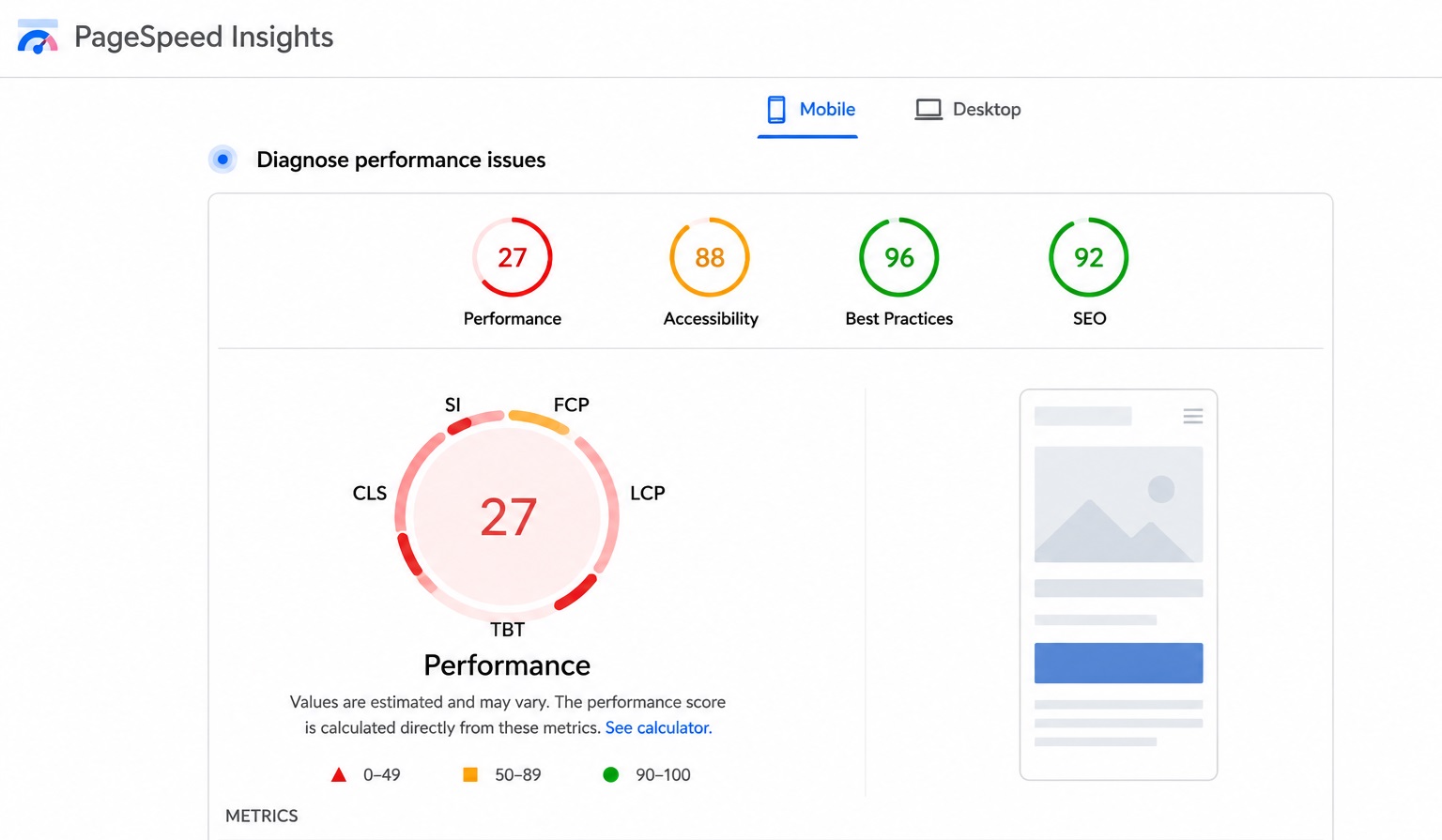
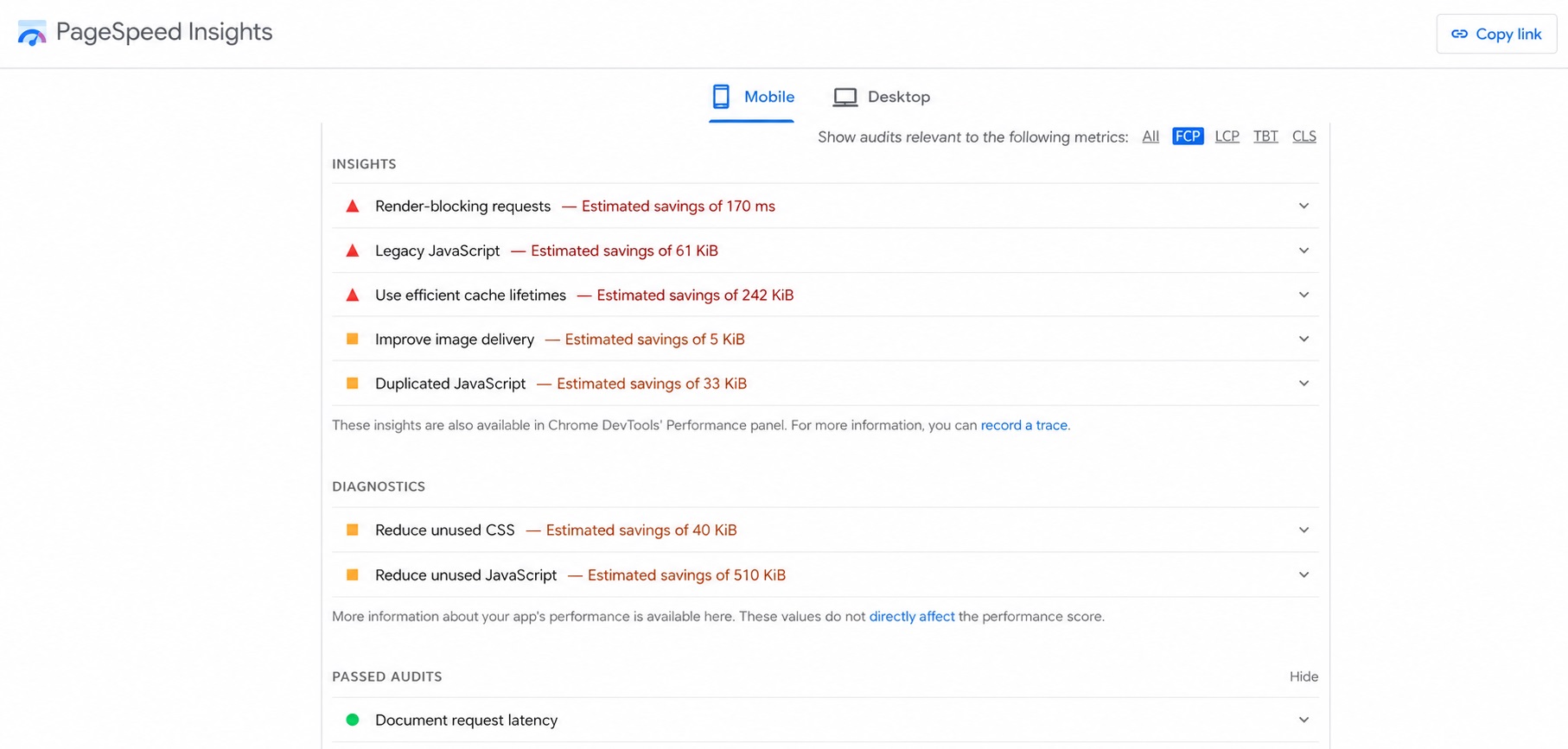
The report then lists specific optimisation suggestions. These are divided into several sections:
- Insights: Here, Google shows actions with estimated savings potential in seconds or kilobytes, such as image compression or reducing unused JavaScript code.
- Diagnostics: This section contains technical detail information, for example long main-thread tasks or inefficient resources.
- Passed audits: Here you can see which tests your website already passes.
Accessibility:
The accessibility category checks whether the page meets basic accessibility requirements. This includes contrast ratios, alternative text, and semantic HTML structures. As with the performance section, PageSpeed Insights provides an overall score, lists passed and failed audits, and suggests possible improvements.
Best practices:
The ‘Best practices’ category checks whether the page follows current security and implementation standards. Here, too, PageSpeed Insights shows an overall score, highlights passed and failed audits, and provides recommendations for improvement.
SEO:
The SEO category reviews basic technical SEO requirements, such as meta tags and mobile usability. As in the other categories, you receive an overall score, a breakdown of passed and failed audits, and specific recommendations for improvement.
How Google PageSpeed Insights supports mobile-first indexing
Measured load times alone do not determine whether Google considers a website high-performing or ranks it accordingly. With Core Web Vitals, Google evaluates the overall user experience instead. Since Google follows a mobile-first indexing approach, the mobile version of a website plays a central role in evaluation and ranking. This reflects how users access the Web today, with most visits taking place on smartphones. Google therefore checks whether content, structured data, and internal links are fully available on mobile devices.
The following measures can improve mobile performance in particular:
- Remove or split unused JavaScript to avoid long main-thread blocking
- Serve images in modern formats such as WebP or AVIF
- Properly size images and deliver them responsively
- Minimise render-blocking resources and prioritise critical CSS content
- Load non-visible images lazily using lazy loading
- Enable text compression, for example with Brotli or gzip
- Reduce third-party scripts or load them asynchronously
- Establish early connections to important domains with preconnect
- Avoid unnecessary redirects
- Serve static resources with appropriate caching policies
Google does not publish the exact weighting of individual ranking factors. However, performance is part of the page experience and directly affects user satisfaction. High-quality content remains essential, but a technically clean and fast website can support both visibility and conversions.
Page speed testing tools and methods
Google PageSpeed Insights is a useful starting point for analysing website performance. However, a single tool is rarely enough for a reliable assessment. Depending on your objective, such as technical troubleshooting, SEO monitoring, or continuous performance tracking, different tools may be useful. Some analyse real user data, while others use simulated test conditions. Combining these perspectives gives you a more complete and accurate view of your website’s performance.
- Our experts run your campaign
- Increase your online visibility
- Save money thanks to greater efficiency
Google PageSpeed Insights
Google PageSpeed Insights analyses a single URL and, where available, combines real user data from the Chrome User Experience Report with simulated lab data from Lighthouse. The tool is especially useful for:
- quickly evaluating individual pages
- analysing Core Web Vitals
- receiving specific optimisation recommendations with estimated savings potential
The main strength of Google PageSpeed Insights is its clear presentation and direct link to practical optimisation tips. However, the lab data is collected under standardised conditions and therefore reflects real user behaviour only to a limited extent.
Google Lighthouse
Lighthouse is integrated into Chrome DevTools and can be run locally. This makes it especially useful for developers who want to investigate performance issues in detail.
Lighthouse is well suited for:
- testing in a development environment
- analysing performance before a page goes live
- creating detailed technical diagnostic reports
Because Lighthouse only collects simulated lab data, it is ideal for debugging and technical optimisation. However, it does not replace real user data.
Google Search Console
The Google Search Console provides a Core Web Vitals report at the domain and URL group level. It is based exclusively on real field data from the Chrome User Experience Report. The report enables:
- identifying problematic URL groups
- assessing entire website sections
- tracking developments over multiple weeks
This makes the Search Console particularly suitable for long-term monitoring and SEO analyses.
WebPageTest
Advanced testing platforms like WebPageTest enable an even more detailed analysis. Among other things, they offer:
- tests from different geographic locations
- simulation of different network speeds
- detailed waterfall charts for analysing individual resources
Such tools help identify bottlenecks in the loading sequence or issues with third-party scripts that may not be immediately visible in a standard analysis.
Practical recommendation
A reliable PageSpeed analysis is ideally based on several building blocks:
- Google PageSpeed Insights for a quick individual assessment
- Google Search Console for evaluating real user data
- Lighthouse or WebPageTest for in-depth technical analyses
With this combination, you get both a realistic assessment of the user experience and concrete technical starting points for optimising your website performance.
Three Google PageSpeed Insights factors with high optimisation potential
Google PageSpeed Insights gives you an initial overview of performance, existing issues, and possible solutions for a specific URL or the entire domain. We explain three areas that repeatedly play a crucial role in the following sections.
Optimise images
Images are often among the largest resources on a website. If they are uncompressed, oversized, or delivered in the wrong format, they increase loading times and can negatively affect LCP in particular. Poorly optimised images also affect the user experience, as visitors may leave a page if key visual content takes too long to load.
Modern formats like WebP and AVIF offer significantly better compression than traditional JPEG or PNG files while maintaining comparable image quality. Images should also:
- be delivered in the size actually required,
- be embedded responsively,
- and be loaded with lazy loading only when they become visible.
Instead of relying solely on manual optimisation, it is often useful to automate image optimisation through CMS plugins, build processes, or a Content Delivery Network (CDN) with integrated image compression.
For image search and for classification by search engines, images should have descriptive file names and appropriate alt text. This also helps you score points in image SEO.
Configure caching correctly
Small technical adjustments can often have a major impact on loading speed. Caching reduces the amount of data transferred from the server to the client, which helps pages load faster. Instead of downloading all website files again with every page view, the browser can reuse cached resources.
A clean configuration of the HTTP headers is essential. While Expires headers were commonly used in the past, modern setups mainly rely on Cache-Control directives. Cache-Control can define several parameters, including:
max-age: defines how long a resource remains valid, in secondspublicorprivate: specifies whether and where content may be cachedimmutable: indicates that a file will not change during its lifetime
Versioned static files, such as CSS, JavaScript, or image files with a hash in the file name, can usually be cached for a long time, often several months. If the file changes, the new file name or version number triggers a fresh download automatically. Dynamic content, such as HTML documents or API responses, should use shorter cache times or be excluded from caching where necessary.
In addition to browser caching, server-side caching also plays an important role. Fully rendered HTML pages, database queries, and frequently used content can be stored temporarily in memory. This reduces server load and can shorten the Time to First Byte (TTFB).
Optimise the server
In addition to frontend optimisation, server performance also plays an important role. Many websites run on shared hosting platforms with limited resources. This can slow down server response times and affect how quickly the website loads. Useful measures include:
- Upgrading to a more powerful plan with more CPU performance and memory
- Using a Content Delivery Network (CDN) to reduce the load on the origin server
- Enabling modern protocols such as HTTP/2 or HTTP/3 for more efficient parallel data transfer
- Using server caching, such as a full-page cache, or object caching to reduce database queries
- Optimising database queries and indexes, especially for dynamic CMS systems
A powerful infrastructure not only shortens server response times, but also improves stability. This creates the technical foundation for strong Core Web Vitals results and a consistently positive user experience.