Which Facebook image sizes work best for feeds, Reels and ads?

Despite flexible layouts and automatic cropping, Facebook image sizes are still an important topic, because the aspect ratio and upload quality largely determine how professional your content looks. Learn all about the proven recommended upload sizes for the most important image formats – from profile and cover photos to feed posts, stories, reels, and ads in Meta Business Suite.
Current Facebook image types at a glance
Facebook currently supports several image types, each with its own recommended image size. The most important formats include:
- Profile pictures
- Cover photos for profiles and pages
- Feed posts, including image and link posts
- Stories
- Reels
- Events
- Ads, including single image, carousel, collection, and video ads
Facebook profile and page image sizes in the new design
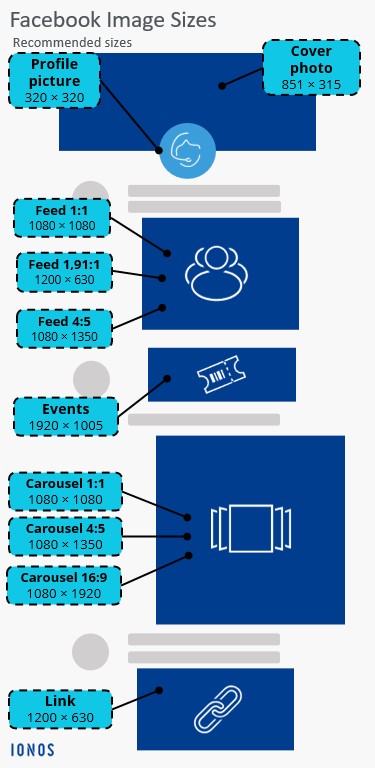
With Facebook’s redesigned page and profile layout, the importance of classic Facebook image sizes has changed. Facebook still displays profile and cover photos within fixed frames, but what really matters now are the recommended upload sizes, since Facebook automatically adjusts how images appear depending on device, layout, and context.
Profile picture
The profile picture is one of the most important visual elements of a Facebook page or profile. It appears in many places, such as in the feed, in comments, or in search. Facebook always displays profile pictures in a round shape, even if they are uploaded as a square.
Recommended profile picture sizes (upload):
| Criterion | Recommended value |
|---|---|
| Recommended upload size | 320 x 320 pixels |
| Aspect ratio | 1:1 |
| Display | round (automatic crop) |
| File formats | JPG, PNG |
Important content should be placed in the centre, as the edges are cut off in the round display. Logos without transparency usually look sharper as PNG, while photos work better as JPG. Very small uploads can appear blurry, especially on high-resolution displays.
Cover photo
Cover photos shape the first impression of a Facebook page or profile. With the new layout, how they’re displayed varies more by device than before. On mobile devices in particular, cover photos are often cropped vertically.
Recommended cover photo sizes (upload):
| Criterion | Recommended value |
|---|---|
| Recommended upload size | 851 x 315 pixels |
| Aspect ratio | approx. 2.7:1 on desktop (851 x 315 pixels), 2.4:1 on mobile |
| Desktop display | Horizontal |
| Mobile display | More heavily cropped |
Key elements (text, logos, faces) should be placed within a central safe zone, and text in the cover photo should be used sparingly, as it may be cut off depending on the device. For business pages, a cover photo is recommended that conveys brand messages visually without relying on small text.
Facebook feed image sizes and link previews
Images in the Facebook feed are still among the most important formats for organic reach and engagement. Depending on the image format and placement, Facebook automatically scales uploaded content. A high enough upload resolution and the right aspect ratio are therefore essential to prevent unwanted cropping.
Facebook feed image posts
Facebook supports various image formats in the feed. The most common uploads are square, portrait, and landscape. Portrait formats take up more screen space on mobile devices and often achieve higher engagement rates.
Recommended Facebook image sizes for feed posts (upload):
| Format | Recommended minimum upload size | Aspect ratio | Notes |
|---|---|---|---|
| Square | 1,080 x 1,080 pixels | 1:1 | Versatile, displays consistently across all devices |
| Landscape | 1,200 x 630 pixels | 1.91:1 | Classic link and image format |
| Portrait | 1,440 x 1,800 pixels | 4:5 | More visible area on mobile devices |
Uploads below the recommended resolution may appear blurry. Facebook may slightly crop images in the feed, especially with unusual aspect ratios. Text or important image elements should not be placed too close to the edge.
Facebook feed link previews
When you share a link on Facebook, the platform uses the Open Graph data from the linked page. The preview image is especially important for click-through rates and should therefore be optimised carefully.
Recommended Facebook image sizes for link preview images:
| Criterion | Recommended value |
|---|---|
| Recommended upload size | 1,200 × 630 pixels |
| Aspect ratio | 1.91:1 |
| Minimum size | 600 × 315 pixels |
The preview image is scaled automatically and may appear slightly differently depending on the placement. For the best possible display, Open Graph tags should be set correctly. Preview images with a lot of text may have less impact on mobile devices.
Facebook Stories and Reels
Stories and Reels have become core content formats in the Facebook ecosystem. Both formats are consistently designed for mobile use and are mostly displayed in vertical full-screen format. Matching aspect ratios and sufficiently high upload resolutions are therefore especially important.
Facebook Stories image and video formats
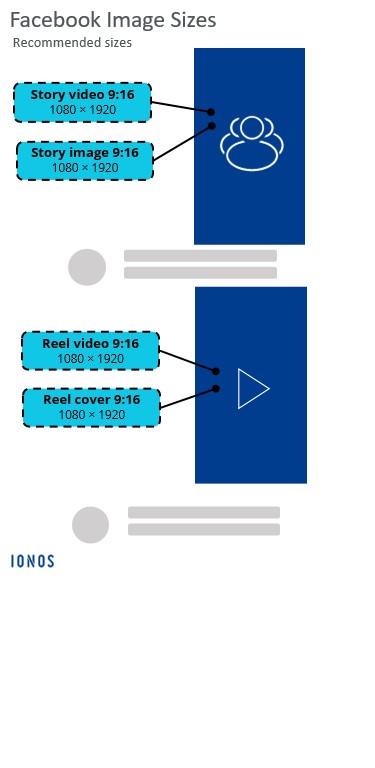
Facebook Stories are displayed in portrait format and take up the full screen. Elements outside the central safe zone may be covered by interface components such as the profile name, call-to-action buttons, or navigation bars.
Recommended image and video formats for Facebook Stories uploads:
| Format | Recommended upload size | Aspect ratio | Notes |
|---|---|---|---|
| Story image | 1,440 × 2,560 pixels | 9:16 | Full-screen format, safe zones should be observed |
| Story video | 1,440 × 2,560 pixels | 9:16 | Short clips, sound optional |
Important content should be placed in the centre of the image. Text near the top or bottom edge may be covered by interface elements. Stories are particularly suitable for time-limited content, promotions, or behind-the-scenes insights.
Facebook Reels video and cover formats
Reels are short vertical videos that appear both in the Reels tab and in the feed. They offer strong reach potential and are strongly prioritised by Facebook’s algorithm.
Recommended formats for Facebook Reels uploads:
| Element | Recommended upload size | Aspect ratio | Notes |
|---|---|---|---|
| Reel video | 1,440 × 2,560 pixels | 9:16 | Preferred full-screen format |
| Reel cover | 1,440 × 2,560 pixels | 9:16 | Feed previews may be cropped |
For feed previews, Facebook may automatically crop Reels, often to a square or slightly vertical format. Central subjects should therefore be placed in the middle of the image. Reels can be enhanced with music and effects without changing the technical requirements.
Facebook event title and preview images
Facebook events are displayed prominently on both desktop and mobile devices, for example on event pages, in the feed, or in recommendations. The actual display size varies depending on the context, which is why the recommended upload size is especially important here as well.
Facebook event title image
The title image is the main visual element of a Facebook event. It is displayed prominently on the event page and automatically scaled in other placements, such as the feed or event previews.
Recommended Facebook image sizes for event title images:
| Criterion | Recommended value |
|---|---|
| Recommended upload size | 1,920 × 1,005 pixels |
| Aspect ratio | 1.91:1 |
| Minimum size | 1,200 × 628 pixels |
How events appear in the feed
Event posts in the Facebook feed use automatically cropped preview images. These are generated from the event title image and cannot be set separately.
Important notes for feed display:
- The preview image is scaled and cropped depending on the placement.
- High-resolution uploads improve display quality on mobile devices.
- Text should not be placed too close to the top or bottom edge of the title image.
Facebook ads in Meta Business Suite
Ads on Facebook are now centrally managed via the Meta Business Suite or the Meta Ads Manager. Unlike organic posts, it’s not just the creative itself but especially the placement (Feed, Stories, Reels, Audience Network) that determines cropping and display. It’s therefore crucial to design ad creatives so they work reliably in multiple formats.
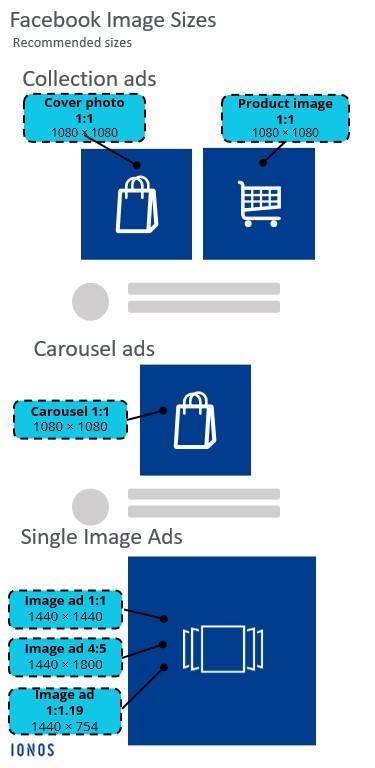
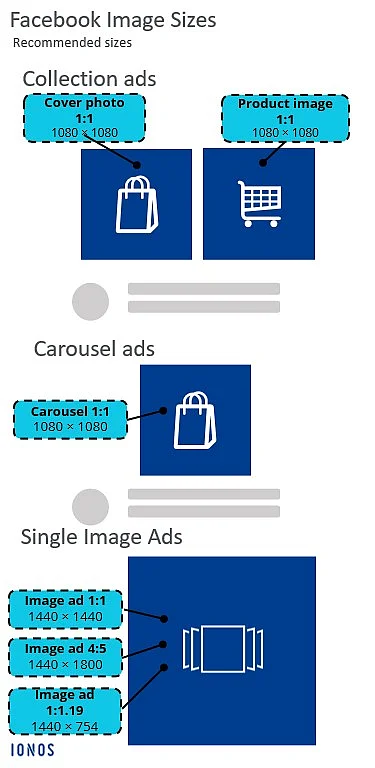
A useful rule of thumb is: one creative, multiple crops. Meta automatically adapts ads to the selected placements, but the original uploaded formats always serve as the source.
Single image ads
Single image ads are among the most widely used ad formats on Facebook. They can appear in the feed, Stories, Reels, the Audience Network, and other placements.
Recommended Facebook image sizes for single image ads:
| Placement | Recommended upload size | Aspect ratio | Notes |
|---|---|---|---|
| Feed square | 1,440 × 1,440 pixels | 1:1 | Stable format for desktop and mobile |
| Feed portrait | 1,440 × 1,800 pixels | 4:5 | Strong mobile format with more vertical space |
| Feed landscape | 1,440 × 754 pixels | 1.91:1 | Classic link and landscape format |
Facebook may automatically crop ads depending on the placement. Key content should therefore be positioned within a safe central area. Image concepts with a lot of text may have less impact in mobile placements.
Carousel ads
Carousel ads allow you to combine several images or videos in a single ad. Each carousel card can have its own destination URL, making this format especially useful for showcasing multiple products, offers, or content pieces.
Recommended Facebook image sizes for carousel ads:
| Criterion | Recommended value |
|---|---|
| Recommended upload size | 1,080 × 1,080 pixels |
| Aspect ratio | 1:1 |
| Number of elements | Up to 10 cards |
Collection ads and other ad formats
Collection ads pair a prominent hero image with multiple supporting product images. They are used primarily in the mobile feed and are especially effective for performance-focused campaigns.
Recommended Facebook image sizes for collection ads:
| Element | Recommended upload size | Aspect ratio | Notes |
|---|---|---|---|
| Hero image | 1,080 × 1,080 pixels | 1:1 | Main attention-grabbing visual |
| Product images | 1,080 × 1,080 pixels | 1:1 | Consistent product presentation |
Other relevant ad formats:
- Video ads
- Story ads
- Reel ads
The same principle applies here, with vertical uploads in 9:16 format being best suited for full-screen placements such as Stories and Reels.
Why the right Facebook image sizes still matter
Facebook image sizes no longer follow rigid rules; instead, they are based on flexible layouts, automatic cropping, and a wide range of different placements. However, this does not mean that technical requirements are less important for businesses – on the contrary. Well-chosen upload sizes and suitable aspect ratios are the foundation for a professional appearance.
Preparing content specifically for feeds, Stories, Reels, and ads helps avoid quality loss and ensures that visuals look compelling across devices. When working with Meta’s business and advertising tools, it is especially useful to create images that can be adapted reliably for multiple placements.