How do you remove personal information from Google search?

In May 2014, the European Court of Justice (ECJ) in Luxembourg ruled that search engines such as Google must remove search results when they involve sensitive personal data that has become inaccurate, excessive, outdated, or irrelevant.
How to remove personal information from Google using the form
To remove personal information from Google, you can use the search engine’s request form. For other types of content, such as images of minors or non-consensual explicit material, Google provides separate removal forms. If the issue is outdated information, you can submit a request through the refresh outdated content tool.
Filling out the request form
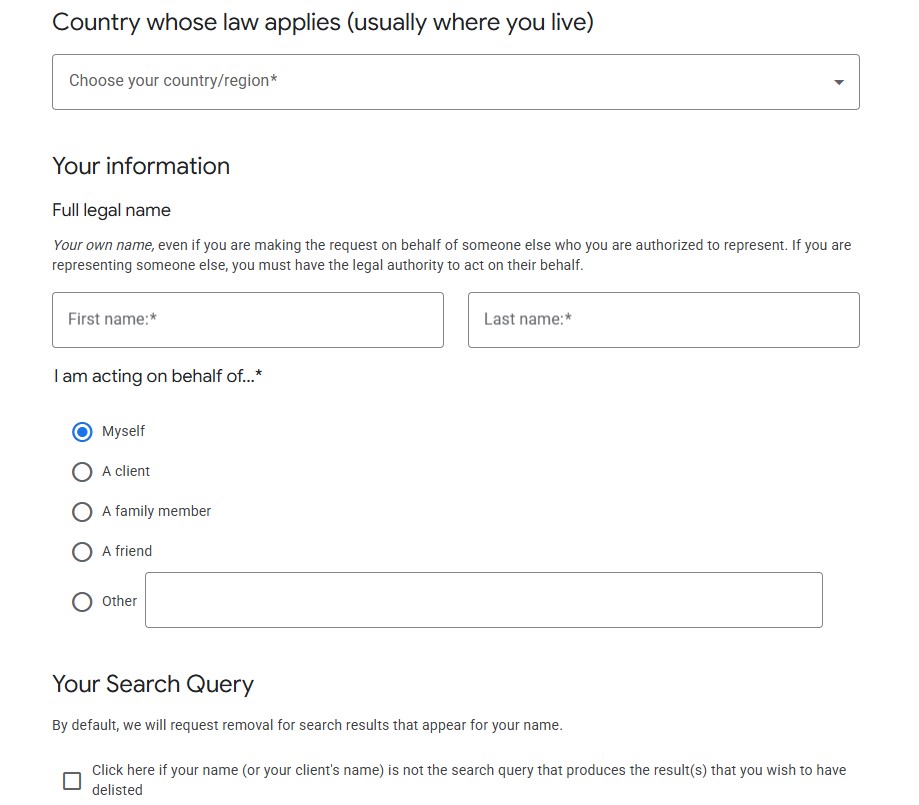
The following instructions explain how to fill out the form so you can remove personal information from Google.
- Step 1: Open the form to remove personal information on Google.
- Step 2: Select the country where the request applies, usually your country of residence.
- Step 3: Enter your name and email address. You can also submit the request on behalf of someone else by selecting the relevant option.
- Step 4: If the content appears under a different name, such as a nickname or stage name, indicate this under ‘Your Search Query’ and enter the name used.
- Step 5: Add the URLs you want removed from search results. Use the links exactly as they appear in Google. To include multiple URLs, select ‘+ Add URL’ and provide a separate explanation for each one.
- Step 6: Confirm the declaration, agree to the data processing terms, and verify that your information is accurate. Then enter your name as a signature and submit the request.
Using the menu
You can also request the removal of personal information, such as contact details, ID numbers, financial data, or passwords, directly from Google Search. To do this, open the three-dot menu next to a search result and select ‘Remove result’. The steps below show how to proceed.
- Step 1: Click the three-dot menu to the right of the displayed search result in Google Search and select the ‘Remove result’ option.
- Step 2: Click the option ‘It shows my personal info and I don’t want it there’ and then select the type of information that the chosen URL reveals about you.
- Step 3: Fill out the fields that appear and finally submit your request using the ‘Submit’ button.
The data itself is not removed from the internet. Only the search results, meaning the links shown on results pages, are deleted. The information remains available, but it is harder to find. It is therefore advisable to contact other search engines as well. For example, Bing also offers a form for removal requests.
Why does Google have to remove search results under the EU ‘right to be forgotten’?
It began in 2014 with the Google Spain ruling. The European Court of Justice (ECJ) ruled in favour of a Spanish citizen who had asked Google to remove links to articles about him. The information in those articles was outdated, and he argued that it harmed his reputation. Based on the EU Data Protection Directive, the court established the ‘Right to be Forgotten’, requiring Google to remove the links.
The idea behind the right to be forgotten was also incorporated into the European General Data Protection Regulation (GDPR), which replaced the EU Data Protection Directive in 2018. Strictly speaking, the right to be forgotten is not an independent term in the GDPR. Rather, it is a specific form of the right to erasure anchored in Article 17. Article 17 GDPR states that, in principle, there is a right to erase personal data from the internet and prevent further dissemination. The term ‘right to be forgotten’ has ultimately become established, particularly in connection with search engines like Google.
Since 2024, Google no longer provides website operators with detailed information about removals carried out under the Right to be Forgotten. This change was introduced to better protect the privacy of individuals submitting these requests.
What is Google required to remove, and what is exempt?
Google does not have to approve every removal request. In particular, when it comes to public figures such as politicians or celebrities, the public’s right to access information may outweigh an individual’s request for removal. In addition, this right applies only to individuals, not to companies.
The following situations are good reasons to request the deletion of personal information from Google:
- Outdated content: If information is no longer accurate and continues to negatively affect you, Google may remove the result.
- No public interest: If the content is not relevant to the public, removal may be possible.
- Incorrect content: Google may remove links if you can demonstrate that the information is clearly false.
- Violation of personal rights: If your rights are infringed, for example through false allegations, you have strong grounds for requesting removal.
Within the EU, Google can be required under the GDPR to remove search results containing personal data. However, according to case law from the European Court of Justice, this obligation generally applies only within the EU and does not extend worldwide. In practice, this means that removed results are typically no longer visible to users in the EU, but may still appear for users in other regions.
Is it possible to delete entries yourself?
You cannot remove entries from Google yourself, but you can submit a request. Google reviews each request and decides whether to take action, so it may take some time before you receive a response. If Google rejects a request, a user in Ireland can file a complaint with the Irish Data Protection Commission (DPC) via their webform or email.
In addition to contacting Google, you can also reach out to the website operator directly. If the content is changed or removed at the source, the corresponding search results on Google will usually be updated as well.
You also have the option to delete Google reviews. This allows you to take action against false claims about your business. You also always have the option to delete your own Google account if you do not want the search engine to know too much about you.
Important court rulings
European courts have frequently dealt with cases in recent years where plaintiffs wanted to have Google search results removed. Sometimes the courts rule in favour of the plaintiffs, sometimes they side with Google. The following two rulings give a good impression of how complex the legal situation is and that it often involves balancing competing interests.
Ruling in favour of public interest (2020)
The managing director of a charity in Germany wanted to have links to articles that mentioned the financial deficit of the regional association he led removed from search results. The contested articles named the plaintiff by his full name.
Both the Frankfurt Higher Regional Court and the Federal Court ruled in favour of Google, stating that the public interest in the case outweighs the ‘Right to be Forgotten’.
Google must act in the case of misinformation (2022)
A couple from the finance industry were accused of fraudulent business practices in an article, which was also accompanied by a photo of the couple. The plaintiffs accused the website of spreading misinformation and wanted to have Google remove links to the article as well as the thumbnail of the photo from the search results.
The Federal Court initially ruled in favour of the search engine. However, the European Court of Justice (ECJ) ruled in favour of the plaintiff couple. The ECJ stated that a court does not need to first determine the falsity of the information. It is enough for the affected individual to provide Google with relevant data proving the falsehood. This ruling is especially significant in light of the ongoing developments in data protection law.
However, it is important to note that even after the ECJ ruling, a simple claim is not enough. Affected individuals must provide Google with a clear and verifiable burden of proof that convincingly supports the inaccuracy of the contested information. The type of evidence required will depend on the specific case and may include documents, counter-statements, or objective sources.
The existing ePrivacy Directive (2002/58/EC) implements data protection practices related to electronic communications at the national level in the member states.
Please note the legal notice for this article.