What is SMTP? Definition and basics

If email is the electronic mail, then SMTP is the mail carrier. SMTP remains the most important protocol for sending emails to this day, but in practice, it is almost always used in its extended form, ESMTP — with authentication and encryption as standard.
Key Takeaways
- SMTP (Simple Mail Transfer Protocol) is the standard protocol for sending and forwarding emails.
- To send from an email client today, use port 587 (STARTTLS) or port 465 (SSL); port 25 is now only used for transport between servers.
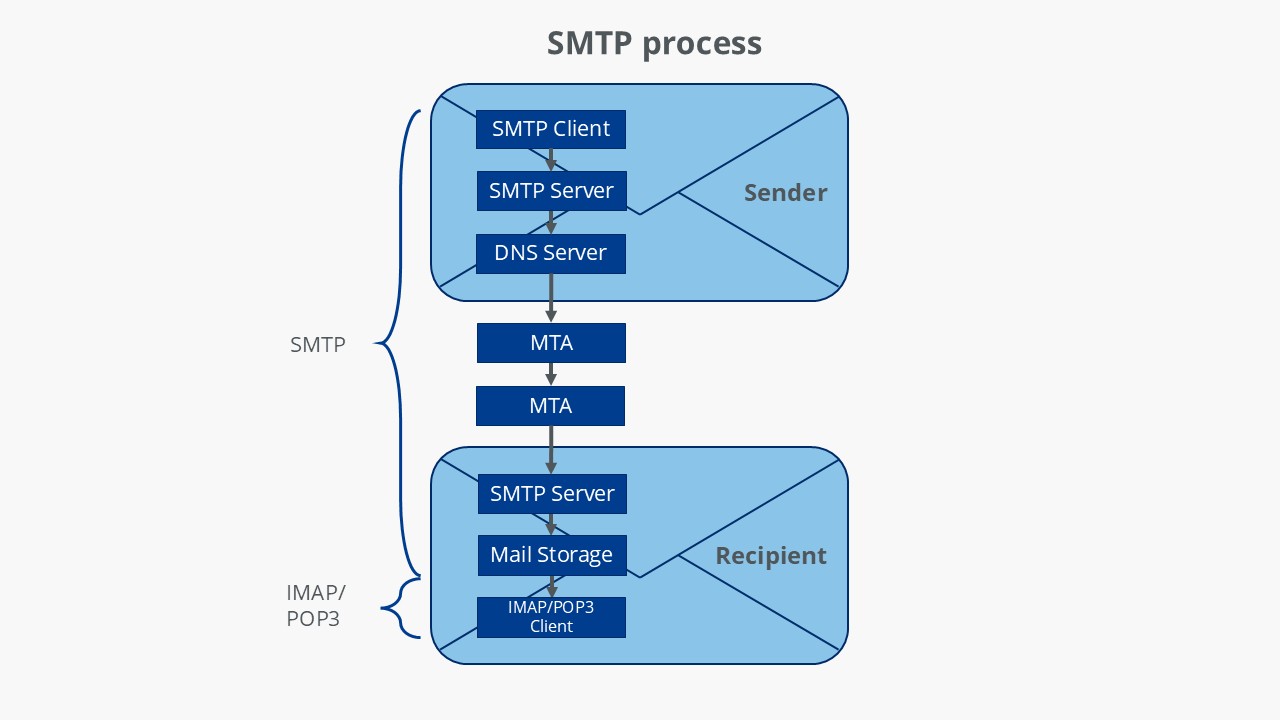
- On its way to the destination, an email passes through the outgoing mail server, the DNS lookup of the MX record, and one or more MTAs; the recipient then retrieves it via IMAP or POP3.
- In an SMTP session, the client sends commands such as EHLO, MAIL FROM, RCPT TO, and DATA, and the server responds with three-digit status codes.
- The original SMTP lacked authentication; today, SMTP AUTH, TLS, SPF, DKIM, and DMARC are meant to prevent misuse.
- Nearly all modern mail servers use ESMTP, the extension of SMTP introduced in 1995.
What is the SMTP protocol?
SMTP stands for ‘Simple Mail Transfer Protocol’. It is a connection-oriented, text-based network protocol from the internet protocol family, and it is situated on the seventh layer of the OSI model, the application layer. Like any other network protocol, it contains rules for proper communication between computers in a network. SMTP is specifically responsible for the submission and forwarding of emails from a sender to a recipient.
Since its release in 1982 on the Arpanet, SMTP has become the standard protocol for sending emails. For end users, configuration is almost automatic today: Modern clients like Outlook, Thunderbird, or webmail applications provide SMTP (or ESMTP) with STARTTLS and port 587 as default settings.
The following overview shows the SMTP server addresses and SMTP ports for some of the most popular email providers:
| Email provider | SMTP server address | SMTP port |
|---|---|---|
| Gmail | smtp.gmail.com | 587 (TLS/STARTTLS), 465 (SSL) |
| Microsoft 365 | smtp.office365.com | 587 (STARTTLS) |
| Outlook.com | smtp-mail.outlook.com | 587 (STARTTLS) |
| Yahoo Mail | smtp.mail.yahoo.com | 465 (SSL), 587 (TLS/STARTTLS) |
| iCloud Mail | smtp.mail.me.com | 587 (TLS/STARTTLS), 465 (SSL) |
Port 25 (traditional SMTP) is usually blocked for end-users and is only used for mail transport between servers. To send through a user account, always use 587 or 465.
How does the SMTP procedure work?
Understanding the SMTP procedure means understanding email. Basically, it works as follows:
Step 1: Sending the email to the SMTP server (submission)
- The SMTP client, or the sender, uploads the email to the SMTP server, which is the email server (outgoing mail server) of the respective provider.
- This occurs through a webmail application in the browser or an email program (‘Mail User Agent’ or MUA) like Outlook or Mozilla Thunderbird.
- Nowadays, this transfer typically occurs over port 587 with STARTTLS encryption and SMTP AUTH (username + password).
Step 2: Resolving the address via DNS
- The sender’s SMTP server contacts the DNS server and determines the IP address of the destination SMTP server (MX record of the recipient’s domain).
Step 3: Forwarding through Mail Transfer Agents (MTAs)
- The email is forwarded through one or more Mail Transfer Agents (MTA).
- Each MTA operates according to SMTP or ESMTP rules.
- In transit, the connection is typically secured by TLS to prevent tampering and eavesdropping.
Step 4: Acceptance at the destination SMTP server
- The destination server (recipient mail server) checks if the mailbox exists.
- Many mail servers additionally check SPF, DKIM, and DMARC records to prevent spoofing and spam.
- The email is temporarily stored in the message storage.
Step 5: Retrieval by the recipient
- The recipient retrieves the email via IMAP or POP3.
- Today, IMAP is the standard because it allows synchronisation between devices.
How does an SMTP session work?
The interaction between the SMTP client and the SMTP server mentioned in the first step of the SMTP process constitutes the actual SMTP session. Each session consists of a sequence of SMTP commands from the client and responses in the form of status codes from the server.
Overview of SMTP commands
According to the current SMTP specifications (RFC 5321), every implementation of the network protocol must support the following commands, consisting of 7-bit ASCII characters; only EXPN is optional:
| SMTP command | Meaning |
|---|---|
HELO |
‘Hello’. – The client identifies itself with the computer name and initiates the session. |
EHLO |
Extended ‘Hello’. Requests the server’s capabilities (ESMTP), such as STARTTLS or AUTH. |
MAIL FROM |
Client specifies the sender of the email. |
RCPT TO |
‘Recipient’ – The client specifies the recipient address of the email. |
DATA |
Start of transfer (Header + Body). |
RSET |
Abort transfer, connection remains open. |
VRFY/EXPN |
‘Verify’/‘Expand’ – Check if a mailbox exists / Distribution list is expanded. |
NOOP |
‘Keep alive’: Prevents a timeout. |
QUIT |
Ends the session. |
Overview of server status codes
The server responds to each of these SMTP commands from the client with a three-digit status code and a plain text message.
Status codes indicating that the server has successfully executed the command:
| Status code | Plain text message |
|---|---|
200 |
(Non-standard success response) |
211 |
System status or system help request |
214 |
Request for help with executing a command |
220 |
Server is ready for the SMTP session |
221 |
Server closing the connection |
250 |
OK – Command executed |
251 |
OK – No local user present, mail will be forwarded |
252 |
OK – Recipient address cannot be verified, transmission will still be attempted |
253 |
OK – Messages are set to ‘Pending’ |
Status codes indicating that the server understood the command but requires further information for processing:
| Status code | Plain text message |
|---|---|
354 |
Server starts mail reception |
Status codes indicating that the server has detected a temporary error, but the command might still be processed:
| Status code | Plain text message |
|---|---|
421 |
Server not available, connection will be terminated |
450 |
Command not executed, mailbox not available |
451 |
Command execution aborted due to local error |
452 |
Command not executed due to insufficient system storage |
Status codes indicating that the server has detected a fatal error and the command cannot be processed:
| Status code | Plain text message |
|---|---|
500 |
Syntax error, command unrecognised |
501 |
Syntax error in parameters or arguments |
502 |
Command does not exist |
503 |
Invalid command sequence |
504 |
Command parameter does not exist |
521 |
Server is not accepting mails |
530 |
Access denied |
550 |
Command not executed, mailbox not found |
551 |
No local user, try forwarding |
552 |
Command execution aborted, error in memory allocation |
553 |
Command not executed, invalid mailbox name |
554 |
Transmission failed |
SMTP example session
An SMTP session between client and server can proceed as follows, for example:
| Role | SMTP commands and status codes | Explanation |
|---|---|---|
| Server | 220 smtp.example.com ESMTP Postfix |
After the connection is established, the SMTP server identifies itself. |
| Client | HELO relay.example.com |
The SMTP client identifies itself with its computer name. |
| Server | 250 smtp.example.com, Hello |
The server confirms the login. |
| Client | MAIL FROM:<john@company.com> |
The client specifies the sender’s address of the MUA. |
| Server | 250 OK |
The server confirms. |
| Client | RCPT TO:<boss@company.com> |
The client specifies the recipient’s address. |
| Server | 250 OK |
The server confirms. |
| Client | DATA |
The client initiates the transmission of the email. |
| Server | 354 End data with <CR><LF>.<CR><LF> |
The server starts receiving and indicates that the email text should be closed with a full stop (‘.’). |
| Client | From: "John Smith" <john@company.com>To: Boss Company <boss@company.com>Date: Friday, 19 September 2025 10:03:42Subject: Sick leaveHello [Boss’s name], I’m feeling unwell today and won’t be able to come in. I’ll send my doctor’s note to HR. Thank you for your understanding, John Smith . |
The client transmits the email text, includes a line break after Subject: Sick leave, and ends the message with a single full stop (.) to indicate completion. |
| Server | 250 OK: queued as 15432 |
The server confirms the successful receipt of the email and places it in the queue. |
| Client | QUIT |
The client signals the end of the session. |
| Server | 221 Goodbye |
The server terminates the connection. |
What are the disadvantages of the SMTP protocol?
Despite its widespread use, SMTP has several inherent disadvantages:
No standardised delivery confirmation
- SMTP does not inherently provide reliable delivery confirmation.
- Servers can provide feedback (e.g., delivery status notifications), but their formatting is inconsistent and often difficult to understand.
- The result: It is difficult to identify the exact cause of a failed delivery (e.g., typo in the address, full mailbox).
Lack of authentication at the origin
- SMTP originally does not include user authentication. Theoretically, anyone can send an email with any sender address.
- This problem led to massive amounts of spam and spoofing (forging sender addresses).
To prevent misuse, providers today almost exclusively rely on SMTP AUTH (user authentication with login credentials), TLS encryption (STARTTLS, port 587 or port 465), and the rejection of open relays.
Many providers, such as Microsoft 365, are increasingly replacing basic authentication (username + password) in SMTP AUTH with OAuth 2.0. When setting up your mail client, check if this secure login method is supported.
Vulnerability to spam & spoofing
- Without additional protection mechanisms, attackers can send emails on behalf of other domains.
- Modern security standards that mitigate this issue include the previously mentioned SPF, DKIM, and DMARC.
- MTA-STS (Mail Transfer Agent Strict Transport Security) ensures that emails are transmitted only over encrypted connections.
- DANE (DNS-based Authentication of Named Entities) provides additional security for TLS certificates via DNSSEC.
Thanks to these extensions, SMTP, in combination with ESMTP and modern security standards, is now significantly more reliable and secure than it was a few years ago.
What is ESMTP?
In response to the security vulnerabilities and limitations of the original SMTP, the Extended Simple Mail Transfer Protocol (ESMTP) was introduced in 1995. ESMTP adds additional commands and options to SMTP, making email transmission safer, more flexible, and more efficient.
Key features of ESMTP
- Authentication of the sender via SMTP AUTH to prevent spoofing and spam.
- TLS encryption via STARTTLS to ensure messages are protected during transmission.
- Attaching multimedia files (e.g., images, videos, documents).
- Size restrictions according to server specifications (e.g.,
SIZE). - Parallel sending to multiple recipients.
- Standardised error messages for undeliverable mail.
- Support for 8-bit content with the
8BITMIMEextension, allowing special characters and UTF-8 symbols to be transmitted directly.
Examples of ESMTP commands
| ESMTP command | Meaning |
|---|---|
EHLO |
Alternative to HELO. Registers the client and checks if the server supports ESMTP. |
AUTH |
Authentication of the sender (e.g., via username/password). |
STARTTLS |
Negotiation of an encrypted connection (TLS). |
SIZE |
Server indicates the maximum allowable email size in bytes. |
8BITMIME |
Allows the transmission of messages with 8-bit ASCII or UTF-8. |
In practice, people generally refer to SMTP today, although nearly all modern mail servers use ESMTP with its extensions. These features—especially authentication and encryption—are what make email transmission secure and reliable.