

Apache Lucene Tutorial

Nowadays, if you think of a search engine, Google will probably pop into your head first. Website operators also use Google in the form of a Custom Search Engine (CSE) to offer users a quick and easy search function for their own content. There are, of course, other possibilities to offer your visitors a full-featured text search that might work better for you. You can use Lucene instead: a free open source project from Apache.
Numerous companies have integrated Apache Lucene – either online or offline. Until a few years ago, Wikipedia implemented Lucene as a search function, but now uses Solr, which is based on Lucene. Twitter’s search runs completely on Lucene. The project, which Doug Cutting started as a hobby in the late 1990s, has since developed software that benefits millions of people every day.
What is Lucene?
Lucene is a program library published by the Apache Software Foundation. It is open source and free for everyone to use and modify. Originally, Lucene was written completely in Java, but now there are also ports to other programming languages. Apache Solr and Elasticsearch are powerful extensions that give the search function even more possibilities.
Lucene is a full-featured text search. This means, quite simply: a program searches a series of text documents for one or more terms that the user has specified. This shows that Lucene is not solely used in the context of the world wide web, even if the searches are mostly found here. Lucene can also be used for archives, libraries, or even on your home desktop PC. It not only searches HTML documents, but also works with e-mail and PDF files.
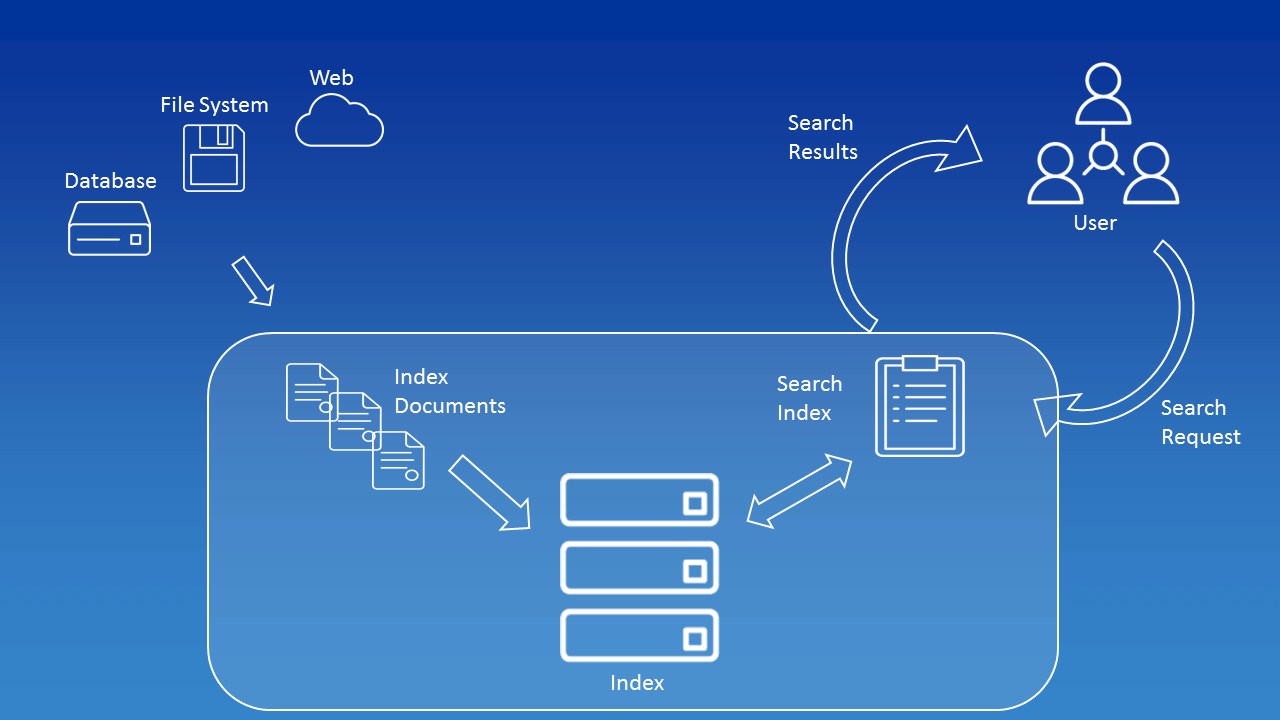
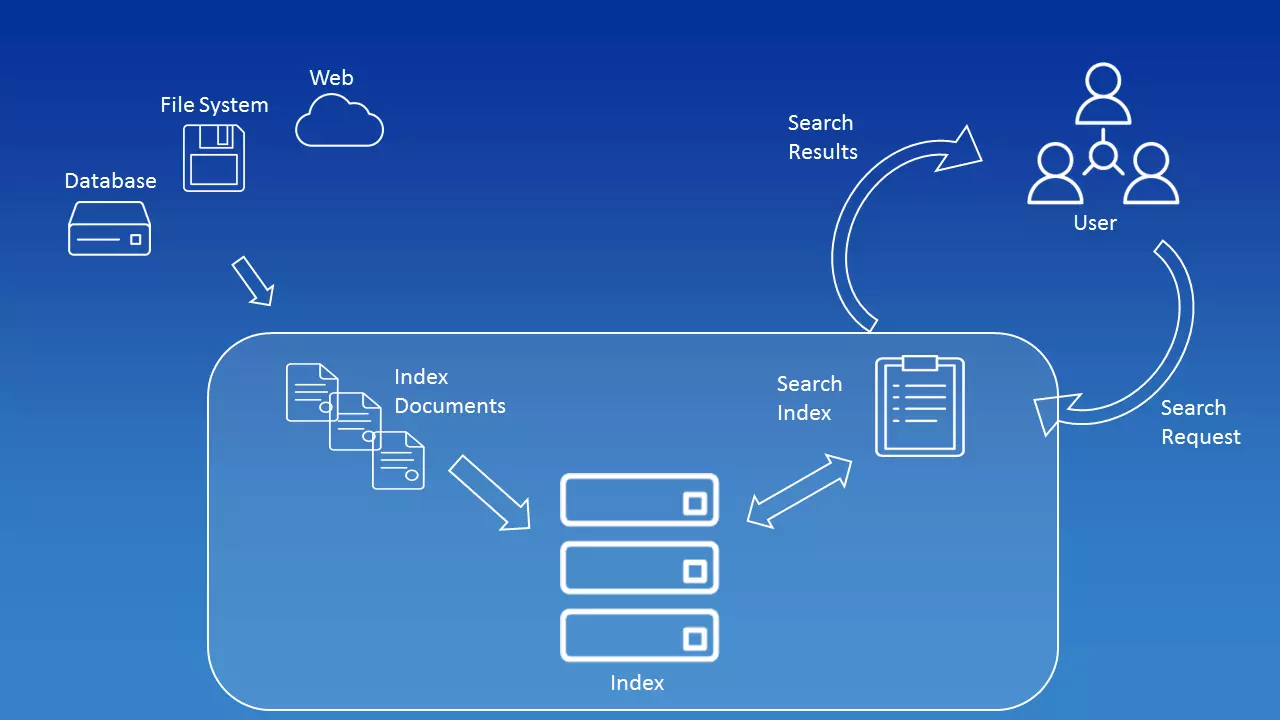
An index – the heart of Lucene – is decisive for the search, since all terms of all documents are stored here. In principle, an inverted index is simply a table – the corresponding position is stored for each term. In order to build an index, you first need to extract it. All terms must be taken from all the documents and stored in the index. Lucene gives users the ability to configure this extraction individually. Developers decide which fields they want to include in the index during configuration. To understand this, you have to go back one step.
The objects that Lucene works with are documents in every kind of form. However, from Lucene’s point of view, the documents themselves contain fields. These fields contain, for example, the name of the author, the title of the document, or the file name. Each field has a unique name and value. For example, the field with the name title can have the value “Instructions for use for Apache Lucene.” So when creating the index, you can decide which metadata you want to include.
When documents are indexed, tokenization also takes place. For a machine, a document is initially a collection of information. Even if you break away from the level of bits and use content that can be read by humans instead, a document is still a series of characters: letters, punctuation marks, spaces.
Segments are created from this amount of data using tokenization. These segments make it possible to search for terms (mostly single words). The simplest way for tokenization to work is with the white space strategy: a term ends when a space occurs. However, this does not apply if fixed terms consist of several words, such as “Christmas Eve.” Additional dictionaries are used for this, which can also be implemented in the Lucene code.
Lucene also performs a normalization when analyzing the data of which tokenization is a part. This means that the terms are written in a standardized form e.g. all capital letters are written in lower case. Lucene also manages to sort them out. This works via various algorithms e.g. via TF-IDF. As a user, you probably want to get the most relevant or latest results first – the search engine’s algorithms enable this.
For users to find anything at all, they must enter a search term in a text line. The term or terms are called query in the Lucene context. The word “request” indicates that the input must not only consist of one or more words, but can also contain modifiers such as AND, OR, or + and – as well as placeholders. The QueryParser – a class within the program library – translated the input into a specific search request for the search engine. Developers can also make settings for the QueryParser. The parser can be configured in such a way that it is tailored exactly to users’ needs.
What Lucene did that is totally new is incremental indexing. Before Lucene, only batch indexing was possible. While you could only implement complete indexes with this, incremental indexing enables you to update an index. Individual entries can be added or removed.
Lucene vs. Google, etc.
The question seems justified: Why build your own search engine when Google, Bing, etc. already exist? Of course, this question is not easy to answer since you have to consider the individual requirements. But one thing is important to understand: When we talk about Lucene as a search engine, it’s just a simplified term.
In fact, it is an information retrieval library. Lucene is a system that can be used to find information. The same applies to Google and other search engines, although they’re limited to information taken from the world wide web. You can use Lucene in any scenario and configure it to suit your needs. For example, Lucene can be installed in other applications.
Apache’s Lucene, unlike web search engines, is not completed software: In order to take advantage of the system’s capabilities, you must first program your own search engine. We show you the first steps in our Lucene tutorial.
Lucene, Solr, Elasticsearch – what’s the difference?
Beginners might especially wonder what the difference is between Apache Lucene, Apache Solr, and Elasticsearch. The last two are based on Lucene: The older product is a pure search engine. Solr and Elasticsearch, on the other hand, are complete search servers that extend Lucene’s reach.
If you only need one search function for your website, you are probably better off with Solr or Elasticsearch. These two systems are specifically designed for use on the web.
Apache Lucene – the tutorial
Lucene is based on Java in the original version, which makes it possible to use the search engine for different platforms online and offline – if you know how it works. We explain step by step how to build your own search engine with Apache Lucene.
In this tutorial, we touch on Lucene based on Java. The code was tested on Lucene versions 7.3.1 and JDK version 8. We work with Eclipse on Ubuntu. Some steps may be different using other development environments and operating systems.
Setup
To work with Apache Lucene, you need to have Java installed. Just like Lucene, you can download the Java Development Kit (JDK) for free from the official website. You should also install a development environment that you can use to write the code for Lucene. Many developers rely on Eclipse, but there are many other open source options. You can then download Lucene from the project page. To do this, select the core version of the program.
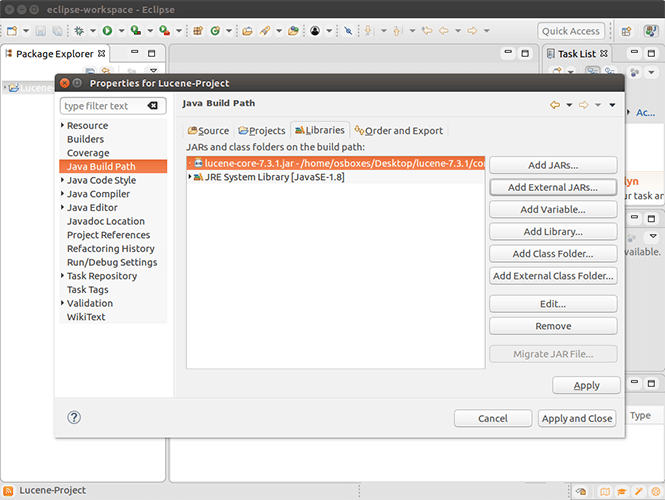
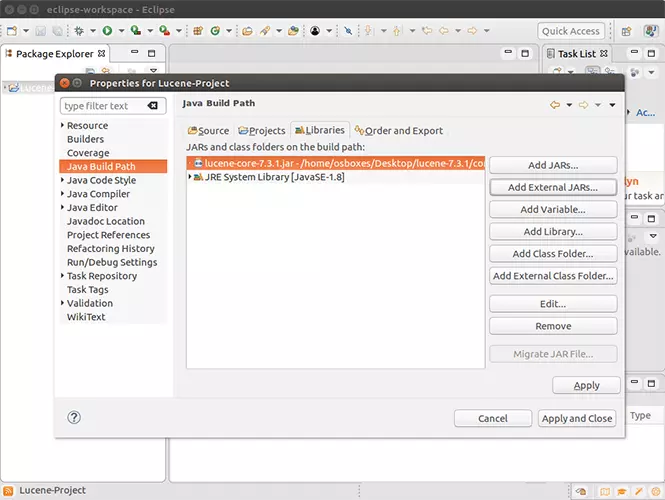
You don’t need to install Lucene. Simply unpack the download to a desired location. You then create a new project in Eclipse or another development environment and add Lucene as a library. In this example, we use three libraries, all of which are included in the installation package:
- …/lucene-7.3.1/core/lucene-core-7.3.1.jar
- …/lucene-7.3.1/queryparser/lucene-queryparser-7.3.1.jar
- …/lucene-7.3.1/analysis/common/lucene-analyzers-common-7.3.1.jar
If you are using a different version or have changed the folder structure, you must adjust the entries accordingly.
Without basic knowledge of Java and programming in general, the following steps will be difficult to follow. However, if you already have basic knowledge of this programming language, working with Lucene is a good way to develop your skills.
Indexing
The core of a search engine based on Lucene is its index. You cannot offer a search function without an index. Therefore, the first step is to create a Java class for indexing.
But before we build the actual indexing mechanism, we create two classes to help you with the rest. Both the index class and the search class will access these two classes later.
package tutorial;

public class LuceneConstants {
   public static final String CONTENTS = "contents";
   public static final String FILE_NAME = "filename";
   public static final String FILE_PATH = "filepath";
   public static final int MAX_SEARCH = 10;
}
This information is important later when it comes to determining fields exactly.
package tutorial;

import java.io.File;
import java.io.FileFilter;

public class TextFileFilter implements FileFilter {

   @Override
   public boolean accept(File pathname) {
      return pathname.getName().toLowerCase().endsWith(".txt");
   }
}
This code enables us to implement a filter that reads our documents correctly. At this point, you can already see that our search engine will later only work for txt files. All other formats are ignored by the simple example.
At the beginning of a class, you initially import other classes. These are either already part of your Java installation or are available after you’ve integrated external libraries.
Now create the actual class for indexing.
package tutorial;

import java.io.File;
import java.io.FileFilter;
import java.io.FileReader;
import java.io.IOException;
import java.nio.file.Paths;

import org.apache.lucene.analysis.standard.StandardAnalyzer;
import org.apache.lucene.document.Document;
import org.apache.lucene.document.TextField;
import org.apache.lucene.index.CorruptIndexException;
import org.apache.lucene.index.IndexWriter;
import org.apache.lucene.index.IndexWriterConfig;
import org.apache.lucene.store.Directory;
import org.apache.lucene.store.FSDirectory;

public class Indexer {

   private IndexWriter writer;

   public Indexer(String indexDirectoryPath) throws IOException {
      Directory indexDirectory =
         FSDirectory.open(Paths.get(indexDirectoryPath));

      StandardAnalyzer analyzer = new StandardAnalyzer();
      IndexWriterConfig iwc = new IndexWriterConfig(analyzer);
      writer = new IndexWriter(indexDirectory, iwc);
   }

   public void close() throws CorruptIndexException, IOException {
      writer.close();
   }

   private Document getDocument(File file) throws IOException {
      Document document = new Document();

      TextField contentField = new TextField(LuceneConstants.CONTENTS, new FileReader(file));
      TextField fileNameField = new TextField(LuceneConstants.FILE_NAME,
         file.getName(),TextField.Store.YES);
      TextField filePathField = new TextField(LuceneConstants.FILE_PATH,
         file.getCanonicalPath(),TextField.Store.YES);

      document.add(contentField);
      document.add(fileNameField);
      document.add(filePathField);

      return document;
   }

   private void indexFile(File file) throws IOException {
      System.out.println("Indexing "+file.getCanonicalPath());
      Document document = getDocument(file);
      writer.addDocument(document);
   }

   public int createIndex(String dataDirPath, FileFilter filter)
      throws IOException {
      File[] files = new File(dataDirPath).listFiles();

      for (File file : files) {
         if(!file.isDirectory()
            && !file.isHidden()
            && file.exists()
            && file.canRead()
            && filter.accept(file)
         ){
            indexFile(file);
         }
      }
      return writer.numDocs();
   }
}
Various steps are performed in the course of this code: You engage the IndexWriter using the StandardAnalyzer. Lucene offers different analysis classes, all of which can be found in the corresponding library.
In the documentation of Apache Lucene, you will find all classes included in the download.
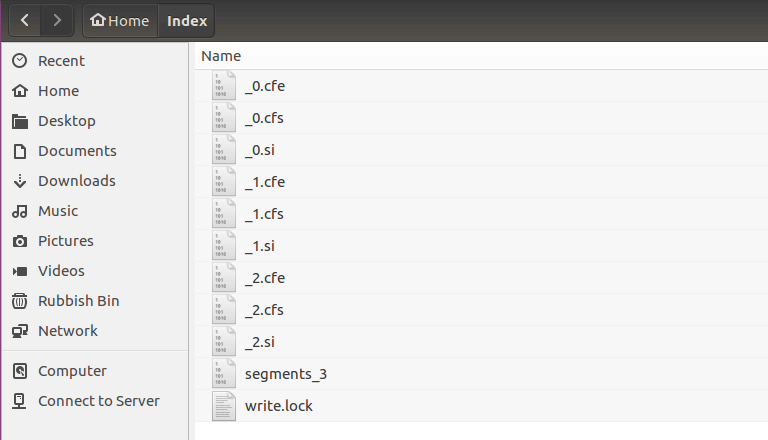
Furthermore, the program reads files and defines fields for indexing. Lastly, the index files are created at the end of the code.
Search function
Of course, the index alone won’t be of much help. So you also need to establish a search function.
package tutorial;

import java.io.IOException;
import java.nio.file.Paths;

import org.apache.lucene.analysis.standard.StandardAnalyzer;
import org.apache.lucene.document.Document;
import org.apache.lucene.index.CorruptIndexException;
import org.apache.lucene.index.DirectoryReader;
import org.apache.lucene.index.IndexReader;
import org.apache.lucene.queryparser.classic.ParseException;
import org.apache.lucene.queryparser.classic.QueryParser;
import org.apache.lucene.search.IndexSearcher;
import org.apache.lucene.search.Query;
import org.apache.lucene.search.ScoreDoc;
import org.apache.lucene.search.TopDocs;
import org.apache.lucene.store.Directory;
import org.apache.lucene.store.FSDirectory;

public class Searcher {

   IndexSearcher indexSearcher;
   QueryParser queryParser;
   Query query;

   public Searcher(String indexDirectoryPath)
      throws IOException {
      Directory indexDirectory =
         FSDirectory.open(Paths.get(indexDirectoryPath));
      IndexReader reader = DirectoryReader.open(indexDirectory);
      indexSearcher = new IndexSearcher(reader);
      queryParser = new QueryParser(LuceneConstants.CONTENTS,
         new StandardAnalyzer());
   }

   public TopDocs search( String searchQuery)
      throws IOException, ParseException {
      query = queryParser.parse(searchQuery);
      return indexSearcher.search(query, LuceneConstants.MAX_SEARCH);
   }

   public Document getDocument(ScoreDoc scoreDoc)
      throws CorruptIndexException, IOException {
      return indexSearcher.doc(scoreDoc.doc);
   }

}
Two classes imported by Lucene are particularly important within the code: IndexSearcher and QueryParser. While the first searches the created index, QueryParser is responsible for transferring the search query into information that is comprehensible to the machine.
Now you have both a class for indexing and one for searching the index, but you cannot yet perform a specific search request with either. That’s why you need a fifth class at this point.
package tutorial;

import java.io.IOException;

import org.apache.lucene.document.Document;
import org.apache.lucene.queryparser.classic.ParseException;
import org.apache.lucene.search.ScoreDoc;
import org.apache.lucene.search.TopDocs;

public class LuceneTester {

   String indexDir = "/home/Index/";
   String dataDir = "/home/Data/";
   Indexer indexer;
   Searcher searcher;

   public static void main(String[] args) {
      LuceneTester tester;
      try {
         tester = new LuceneTester();
         tester.createIndex();
         tester.search("YourSearchTerm");
      } catch (IOException e) {
         e.printStackTrace();
      } catch (ParseException e) {
         e.printStackTrace();
      }
   }

   private void createIndex() throws IOException {
      indexer = new Indexer(indexDir);
      int numIndexed;
      long startTime = System.currentTimeMillis();
      numIndexed = indexer.createIndex(dataDir, new TextFileFilter());
      long endTime = System.currentTimeMillis();
      indexer.close();
      System.out.println(numIndexed+" File indexed, time taken: "
         +(endTime-startTime)+" ms");
   }

   private void search(String searchQuery) throws IOException, ParseException {
      searcher = new Searcher(indexDir);
      long startTime = System.currentTimeMillis();
      TopDocs hits = searcher.search(searchQuery);
      long endTime = System.currentTimeMillis();

      System.out.println(hits.totalHits +
         " documents found. Time :" + (endTime - startTime));
      for(ScoreDoc scoreDoc : hits.scoreDocs) {
         Document doc = searcher.getDocument(scoreDoc);
            System.out.println("File: "
            + doc.get(LuceneConstants.FILE_PATH));
      }
   }
}
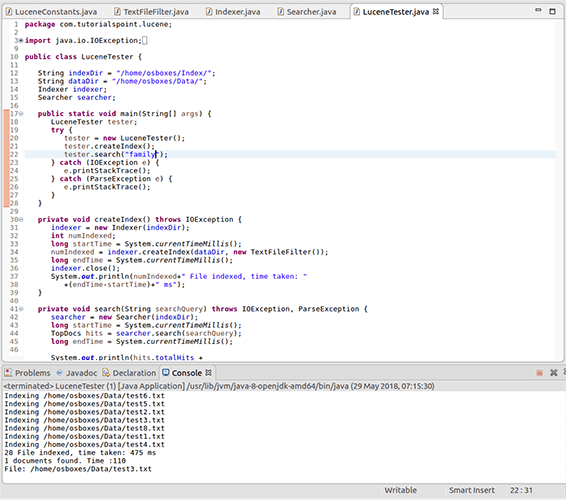
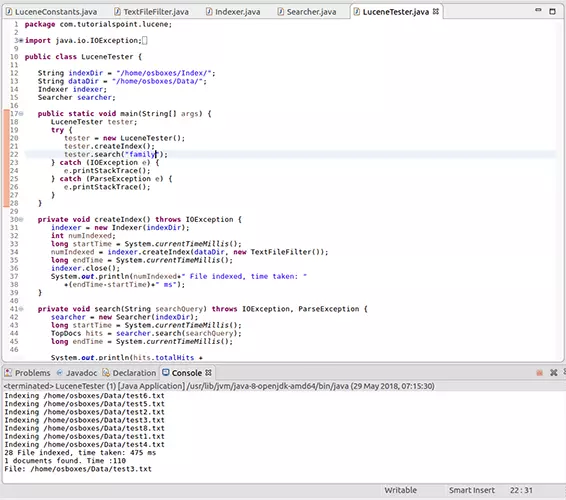
You must notify at least three entries in these final classes, because here you specify the paths to the original documents and to the index files, as well as the search term.
- String indexDir: Here you insert the path to the folder in which you want to save the index files
- String dataDir: At this point, the source code awaits the path to the folder in which the documents (to be searched) are stored
- tester.search: Here is where you enter the search term
Since all three cases are strings, you must enclose the expressions in quotation marks. In Windows, you also use the normal slashes instead of backslashes for the paths.
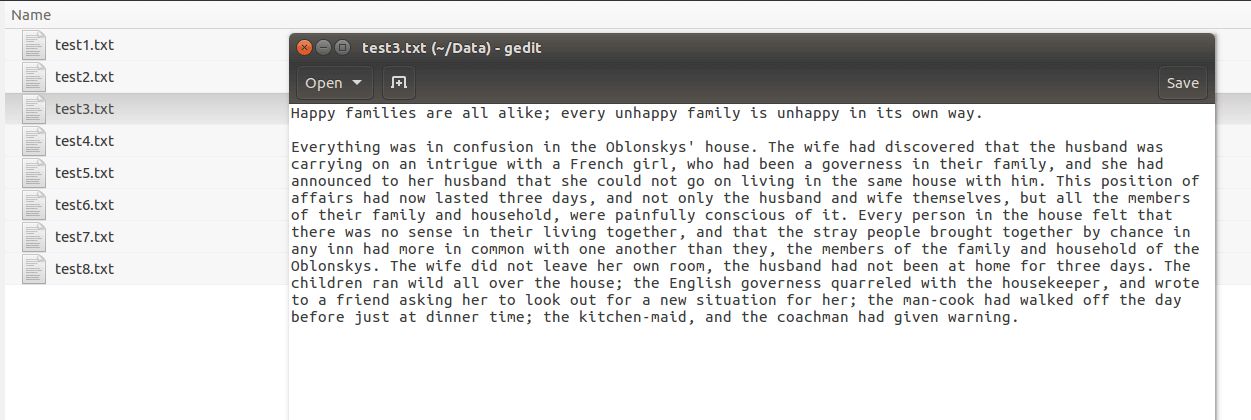
To test the program, copy some plain text files into the directory specified as dataDir. Make sure that the file extensions are “.txt” before you start the program. In Eclipse, for example, click the green arrow button in the menu bar.
The presented program code is only a demo project to demonstrate how Lucene works. A graphical user interface is actually lacking in this program. You have to enter the search term directly into the source code and you only get the result via the console.
Lucene Query Syntax
Search engines – even those you know from the web – usually allow more than simply searching for a single term. You can use certain methods to string terms together, search for phrases, or exclude individual words. Apache Lucene also offers these possibilities: With the Lucene Query syntax, you can search for complex terms – even in several fields.
-
Single term: Enter a simple term as it is. Unlike Google and other search engines, Lucene assumes that you know how to write the term. If you make a typo, you won’t get the result you’re hoping for. We’ll show you some examples with the word “car.”
-
Phrase: Phrases are defined word sequences. Not only are the individual terms within the phrase decisive, but also the order in which they appear. Example “my car is red.”
-
Wildcard searches: Use wildcards to replace one or more characters in your search query. They can be used both at the end and in the middle of a term, but not at the beginning.
- ?: The question mark stands for exactly one character. Example: c?r
- *: The asterisk replaces none or an infinite number of characters. For example, you can search for other forms of a term, such as the plural. Example: car*
-
Regular expression searches: Regular expressions enable you to search for several terms at the same time, some of which have similarities and some of which differ from one another. Unlike placeholders, you define exactly which deviations should be taken into account. Use slashes and square brackets for this.
-
Fuzzy searches: You perform a fuzzy search if, for example, you want there to be an error tolerance. Using the Damerau-Levenshtein distance (a formula that evaluates similarities), you can set how large the deviation may be. Use the tilde symbol (
~) for this. Distances from 0 to 2 are permitted. Example:Car~1 -
Proximity searches: Use the tilde if you want to receive phrases that are also similar to the entered phrase. For example, you can specify that you want to search for two terms even if there are other words between the 5 and the other words. Example: “Car red”
~5 -
Range searches: With this form of query, you search in a specific area between two terms. While searches like these aren’t very useful for a document’s general content, they can be very useful when dealing with certain fields such as authors or titles. The sorting works according to a lexicographical order. While you clarify an inclusive area with square brackets, you exclude the area determined by the two search terms from the query with curly brackets. You define the two terms with “TO.” Example: [Van Gogh TO Picasso] or {Monet TO Munch}.
-
Boosting: Lucene gives you the opportunity to give individual terms or phrases more relevance in the search than others. This influences the sorting of the results. You set the boosting factor with the circumflex accent followed by a value. Example: Car^2 red
-
Boolean Operators: You use logical operators to make connections between terms within a search query. The operators must always be written in capitals so that Lucene doesn’t mistake them for normal search terms.
- AND: With an “AND” link, both terms must be included in the document for it to appear as a result. Instead of the term, you can also use two consecutive ampersands. Example: Car && red
- OR: The “OR” link is standard when you simply enter two terms one after the other. One of the two terms must be mandatory, but they can also be included together in the document. You can create this link with OR, ||, or by not entering an operator at all. Example: Car red
- +: You use the plus sign to build a specific case using the OR link. If you place the character directly in front of a word, this term must appear, while the other is optional. Example: +Car red
- NOT: The “NOT” link excludes certain terms or phrases from the search. You can replace the operator with an exclamation mark or place a minus sign directly before the term that you want to exclude. You cannot use the NOT operator with a single term or phrase. Example: Car red -blue
-
Grouping: You can use parentheses to group terms within search queries. This is how you create more complex entries by linking several terms together, for example: Car AND (red OR blue)
-
Escaping special characters: To use characters that can be used for the Lucene query syntax in search terms, combine them with a backslash. For example, you can include a question mark in a search query without the parser interpreting it as a placeholder: “Where is my car\?”
Apache Lucene: advantages and disadvantages
Lucene is a powerful tool for establishing a search function on the web, in archives, or in applications. Lucene fans enjoy being able to build a very fast search engine through indexing, which can also be adapted to their own requirements in great detail. Since this is an open source project, Lucene is not only available for free, but is also being further developed by a large community.
It can be used in Java, PHP, Python, and other programming languages. The only disadvantage: programming skills are definitely necessary. The full text search is therefore not the right thing for everyone. If you only need a search function for your website, you will be better off with other solutions.
| Advantages | Disadvantages |
| Available for different programming languages | Requires programming knowledge |
| Open source | |
| Quick and streamlined | |
| Ranked searching | |
| Complex search queries possible | |
| Very flexible |
Reviewers

Sven Ignor
Sven Ignor is a TYPO3 web developer with over 15 years of experience and specialises in bespoke solutions based on TYPO3. He is happy to share his knowledge and is committed to TYPO3 and the community

Christian Heldmaier
Christian Heldmaier is an experienced online marketing and SEO specialist from Karlsruhe. He has been working as an SEO Manager at IONOS since July 2020.