

Order confirmations: Write them perfectly with a template
Free Download
If a customer accepts your offer (partially or completely), then he or she gives you the order to provide the offered service or to deliver the goods. To be sure, it’s not required by law, but it’s useful for several reasons to respond to such an order with a written order confirmation. Such a letter may summarize details discussed on the phone or show any changes made to the actual offer. An order confirmation is also suitable for an explicit reference to the general terms and conditions.
The order confirmation provides the customer with a service overview and offers them the opportunity to clarify any misunderstandings in a timely manner. But as a contractor, you are confirming to provide the agreed service at the fixed terms. For this reason, it’s very important that the order confirmation is adequately and legally designed, and contains all information relevant to the order. Order confirmation templates are a simple and predominantly free tool, and are typically just ordinary Word or Excel documents.
- Up to 50 GB Exchange email account
- Outlook Web App and collaboration tools
- Expert support & setup service
What is a template for order confirmation?
The written confirmation of an order should be a staple for every contractor, and not only for the reasons above. Another advantage of an order confirmation is this: If a document is drafted correctly, it can also be used in court cases. You don’t even need a specific software or law degree to create one. The common word processing and spreadsheet programs, like Word and Excel, already offer all the tools and functions necessary for creating a confirmation, and either printing it or sending it as a PDF once you’re finished.
To avoid having to write a confirmation completely from scratch for each order, it’s common to use Word or Excel to create templates for order confirmations – or to simply access pre-made versions. In the latter, all elementary components are already inserted, and the placeholder data can be replaced at any time. For a new contract, you just need to customize the template and don’t have to create one from scratch. This saves a lot of time. If you use your template for all order confirmations, then your documents automatically have a uniform design.
Thanks to the wide selection of branch-specific order confirmation templates for Word and Excel, you can find suitable versions for whatever industry you’re working in. These differ slightly in terms of layout and content elements, and so are ideally suited for actual customer approach. With the right template, your letters are not only correct and complete, but also appropriate for the industry and most common order types. If you want to adapt the document to your needs, you just have to make a few changes to the template and then save it, hassle-free.
Order confirmation templates: What distinguishes a good template?
There are two aspects that play an important role in the assessment of an order confirmation form: one decisive criterion is the structural design. The letter should clearly and comprehensibly present the information about the offered service as well as the associated conditions. In case the customer has questions, they should also be able to quickly and easily locate the contact options. In the best case, the order acknowledgement gives the customer a direct contact option – if one exists, of course.
The second factor is the content of the order confirmation template in Excel or Word format. Not every template needs to include all possible elements. But it should always contain the building blocks typical for your industry, or at least provide you with the functions or the opportunity to quickly and easily add them. The following list contains the points that should always be included in a professional order confirmation template:
- Company address and other contact information, as appropriate (telephone, e-mail, personal contact)
- Client address data
- Contract number and/or customer number (if available)
- Date of the order confirmation
- Comprehensive order description (description, price, scope of contracted service)
- Total sum and sales tax (if necessary)
- Estimated delivery date or date of service
- Additional conditions, such as delivery charges and terms
- Terms of payment
- Jurisdiction and title retention
Create your order confirmation template with Word and Excel
If you would like to use a template for order confirmations, you don’t need any specific prior knowledge. The Word and Excel templates mentioned above make up the majority of available samples – but you can also find confirmation templates for programs from other Office suites, which can be used to write your letters. The difference between word processing and spreadsheet templates is that the latter give you the ability to automate certain steps of the process.
In the following guide, we’ll give you an example of how to work with an order confirmation template in Word and Excel.
Free Download
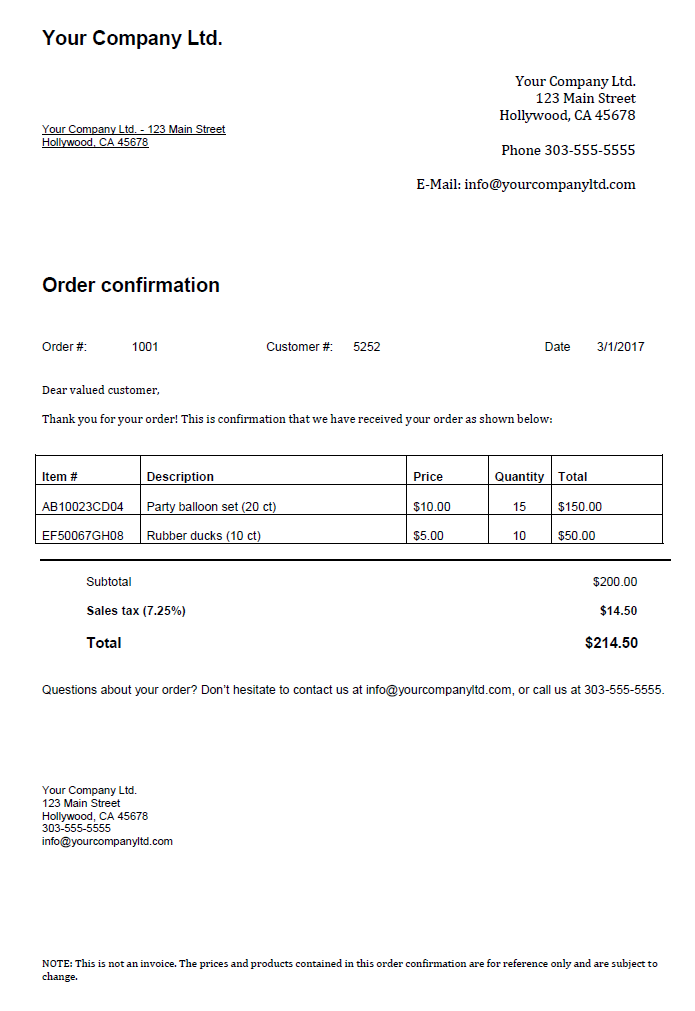
After you’ve decided on one of the order confirmation templates and downloaded it, open it with a double-click, just as you would any other Word or Excel document. The following changes are now required before you can send the confirmation letter to your customers:
- In the upper left-hand corner, find the place for your company address, and then the recipient address data underneath it.
- On the right-hand side, you have a slightly larger area for the presentation of your data. In addition to entering the company address again, you can also enter a telephone number and/or an e-mail address for the customer to use.
- The following subject line is used to tell the recipient what type of letter it is. As an alternative to the “Order Confirmation” subject selected in the template, you can formulate a more detailed title, such as “Order confirmation for your order / Your order from 05-10-2017”
- Under the subject line, the template provides three values: The number of accepted offers included as the reason for the confirmation letter, the customer number (if available), and the date that the document was issued.
- After you’ve clarified the recipient and the order, the text for the order confirmation is followed by a text in which you directly address the customer. In one to two sentences, you have the opportunity to thank them for the order and refer to the upcoming list of agreed services.
- The agreed services or ordered items are listed in the following table. List different goods or services each on a separate line. It’s standard to include the exact description, quantity, and single price as well as total price. You can also customize the columns to fit your needs, though, adding or removing as necessary. The same applies to the number of rows, if you need space for additional items.
- The total price of the items without sales tax, the tax amount due, and the final invoice amount are listed separately under the table before you move on to another text area addressing the customer. Include all important additional information (title retention, delivery conditions, reference to Terms and Conditions, special offers, etc.) before you finish off the letter with your signature.
- The real conclusion of the template, though, is in the footer, where you enter your contact information again. You can also enter your website or other crucial information that you deem necessary.
- As soon as you have made all of the changes, you can save the template and print the letter or export it in PDF format, if you plan to send the contract by e-mail.
- Up to 50 GB Exchange email account
- Outlook Web App and collaboration tools
- Expert support & setup service
Click here for important legal disclaimers.