

Getting Things Done: Time management with the GTD method

The self-management system Getting Things Done is designed to help users efficiently and punctually complete tasks using lists and calendars.
- Free Wildcard SSL for safer data transfers
- Free private registration for more privacy
- Free Domain Connect for easy DNS setup
What is the Getting Things Done method?
Getting Things Done (GTD) is a time management and productivity system that helps the user complete tasks and meet commitments in a stress-free and efficient manner using a comprehensive system of lists and calendars.
The core principle of the GTD method is to document all your tasks in writing, ensuring nothing slips through the cracks. Over time, this reduces stress since you no longer need to rely on memory alone. Without the constant mental burden of recalling important tasks, your mind will be less preoccupied with to-dos at inconvenient moments—helping you sleep better without worrying. By using a written organizational system, you can confidently stay on top of your responsibilities and meet deadlines without forgetting anything.
Larger tasks in this method are divided into smaller sub-tasks, for which concrete deadlines are set. A regular review ensures that you keep track of all tasks and projects, identify weaknesses in your system, and make improvements.
US productivity consultant David Allen developed the system and presented it in his book of the same title, “Getting Things Done”, in 2001. The Getting Things Done method has gained millions of followers worldwide since the book was published.
The 5 steps of the GTD method
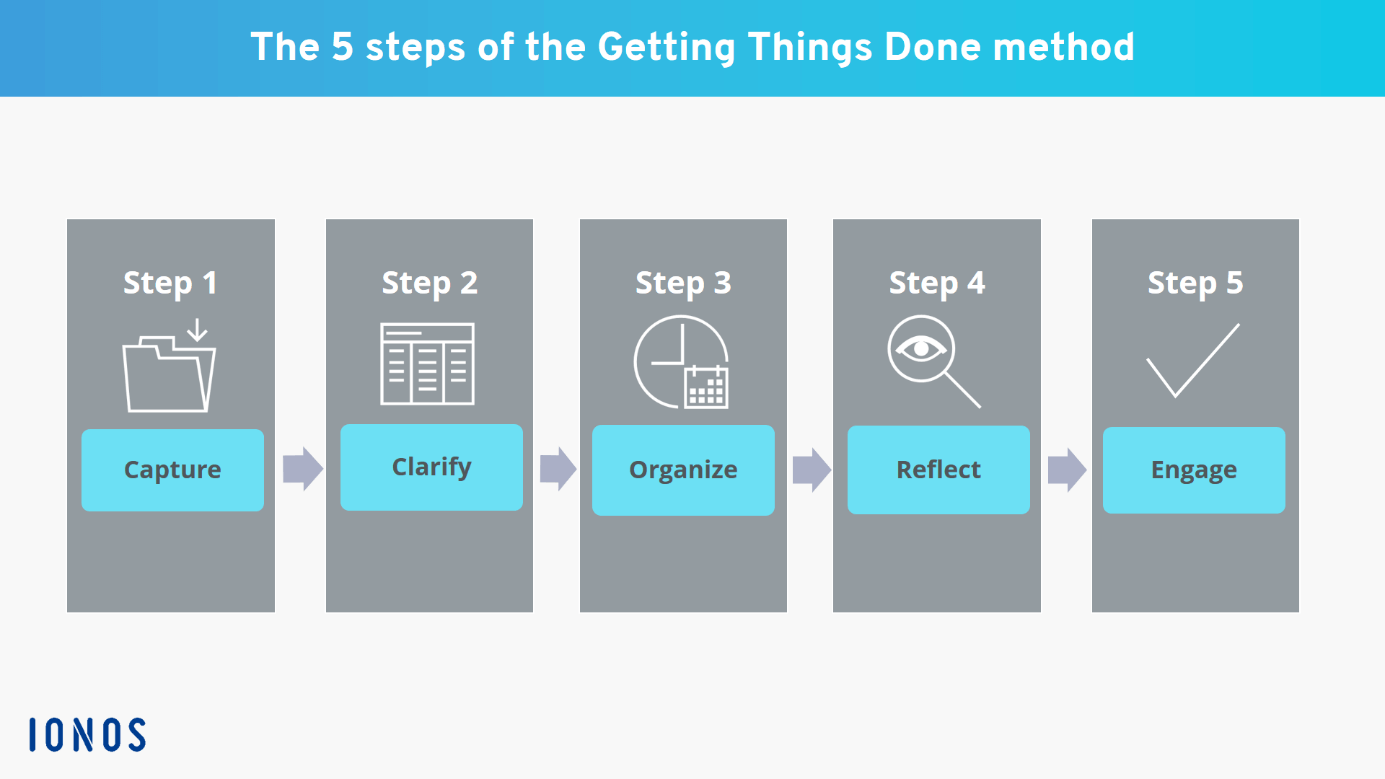
The Getting Things Done method consists of five steps that follow a precisely defined order, which we will take a closer look at below:
Step 1: Capture
Gather all your tasks, appointments, and ideas in designated inboxes. These don’t have to be physical inboxes—they can be any system that allows you to capture information in writing. This includes both digital and analog options, such as your email inbox, Evernote, OneNote, physical trays, or vertical filing systems. When first implementing the Getting Things Done method, this step may take several days. However, once set up, adding new tasks, appointments, and ideas to your inboxes takes only a few minutes as they come up.
Step 2: Clarify
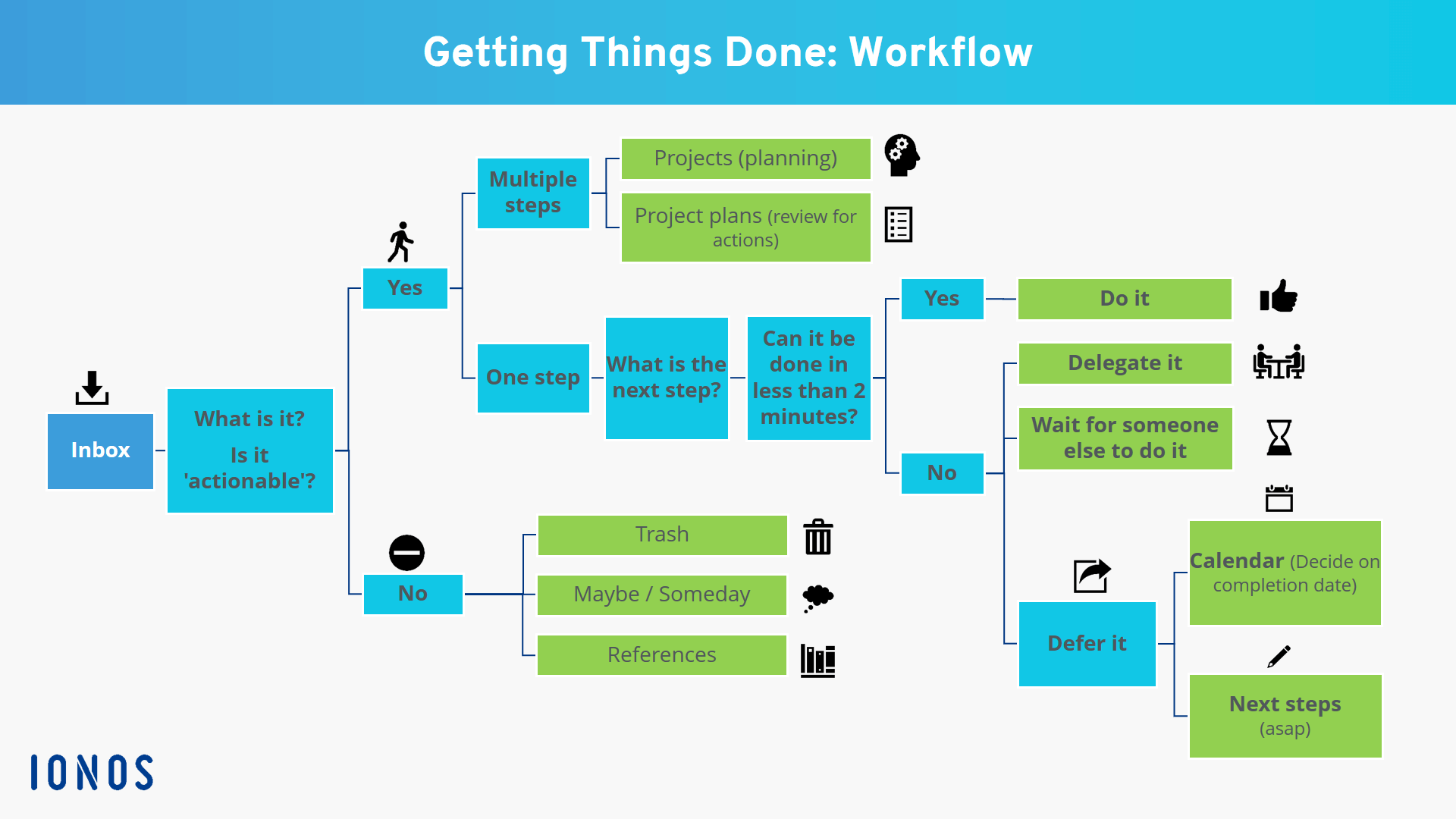
You need to review and process everything you’ve collected in your inboxes. This means you have to decide where things belong in the Getting Things Done system. Ask yourself the following questions for each item:
- What kind of task is it?
- Can I take action on it right now?
- What’s the next action?
When reviewing your inboxes, don’t put anything back in the inbox. Decide where each item belongs.
If no action is possible or necessary, choose one of three options:
- Trash it
- Put it on the “Maybe/Someday” list
- Archive it for reference
Step 3: Organize
First, assign all actionable items to temporary inboxes or put them on lists and process them from there.
If you can complete a task in two minutes or less, do it right away and don’t add it to the Getting Things Done system.
Calendar
Only enter appointments in your calendar. Add tasks to be done to the “Next Actions” list or record them as a project and break them down into smaller actions.
Projects
Any task that requires more than one action counts as a project according to David Allen’s GTD method. A project can be anything from renovating your home to a professional marketing campaign for a product. Put all of your projects on a project list that you review regularly. You then define next actions for your project and enter specific deadlines for it in your calendar. Also, keep a reminder list for all the tasks that you’ve delegated to others. This allows you to keep track of the tasks others are doing for you.
Next Actions
Keep a separate list of all the next actions that are not project-specific. Depending on the scope of your tasks, you can also keep multiple context-specific lists for personal tasks, work tasks, phone calls, errands, and so on.
Waiting For
Also keep a reminder list for all delegated tasks outside of projects. Set dates to follow up with others on how far they’ve progressed with a task.
Step 4: Reflect
You’ll gain clarity by organizing your tasks and appointments, but that alone won’t be enough to boost your productivity and ensure that you get everything done in the time allotted. To do that, you have to regularly review your lists.
You have to make sure that your system is up to date, otherwise you won’t be able to focus on the task in front of you without thinking about whether you might have missed an appointment.
Review your calendar several times a day and check your to-do lists at least once a day to select your next task. Empty your inboxes once a day.
In the GTD method, a weekly review is conducted once per week. This review consists of the following steps:
- Empty your head: At the end of the week, write down all the ideas going through your mind.
- Inboxes: Put new tasks, ideas and dates where they belong in the GTD system.
- To-do list: Is the list up to date? Have you crossed off all completed to-dos? What are your upcoming actions for the next few days?
- Project list: Is the list up to date? Have you completed at least one next action in the past week to move your project(s) forward?
- “Maybe/Someday” lists: Do you want to transfer some of the items on this list to the project list and process them now?
- Calendar: Is your calendar up to date? Did you actually keep all your appointments? What are your upcoming appointments? Did you enter all your appointments?
- “Waiting For” list: What’s the current status of delegated actions? Follow up with coworkers if necessary.
Step 5: Engage
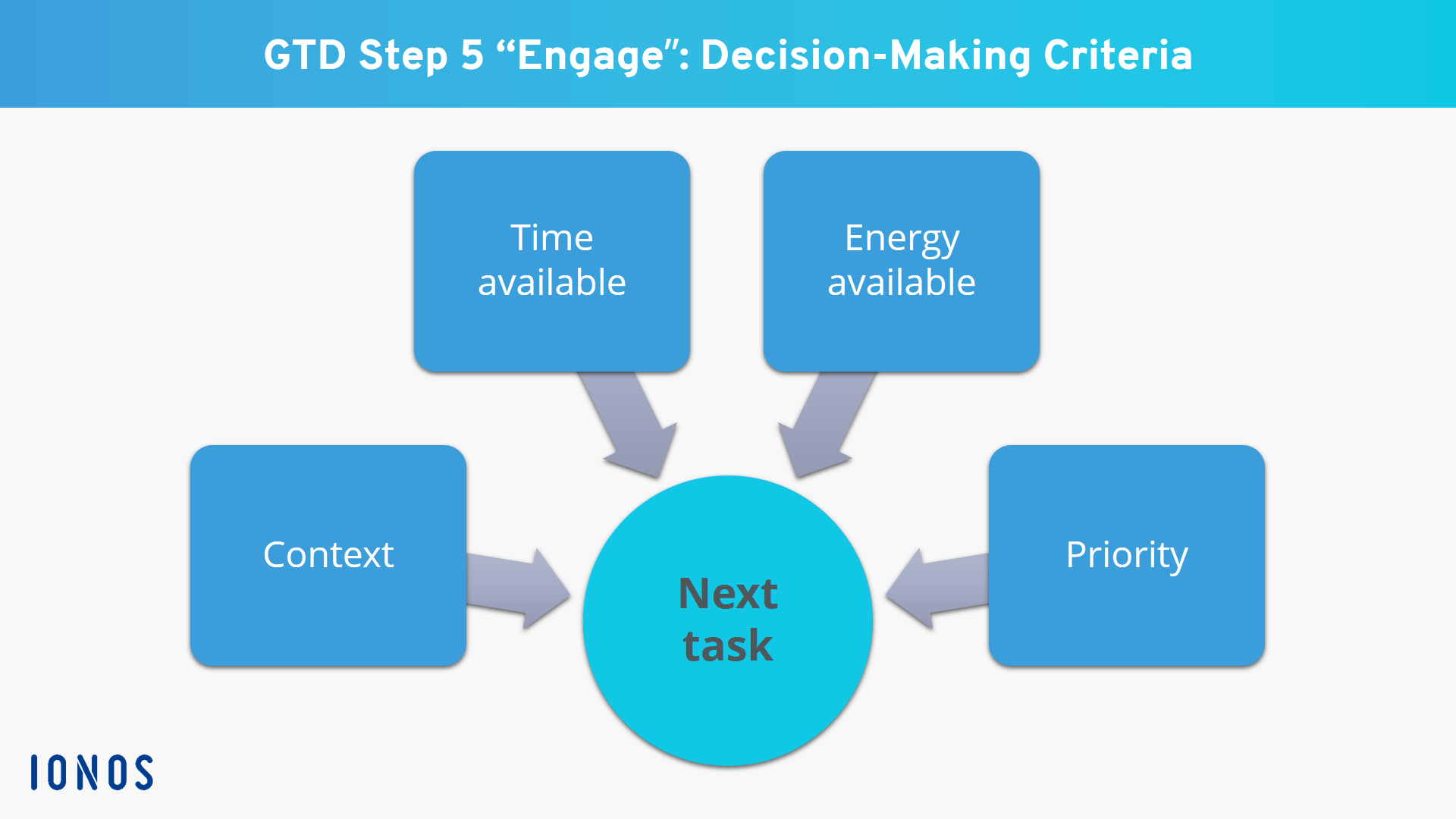
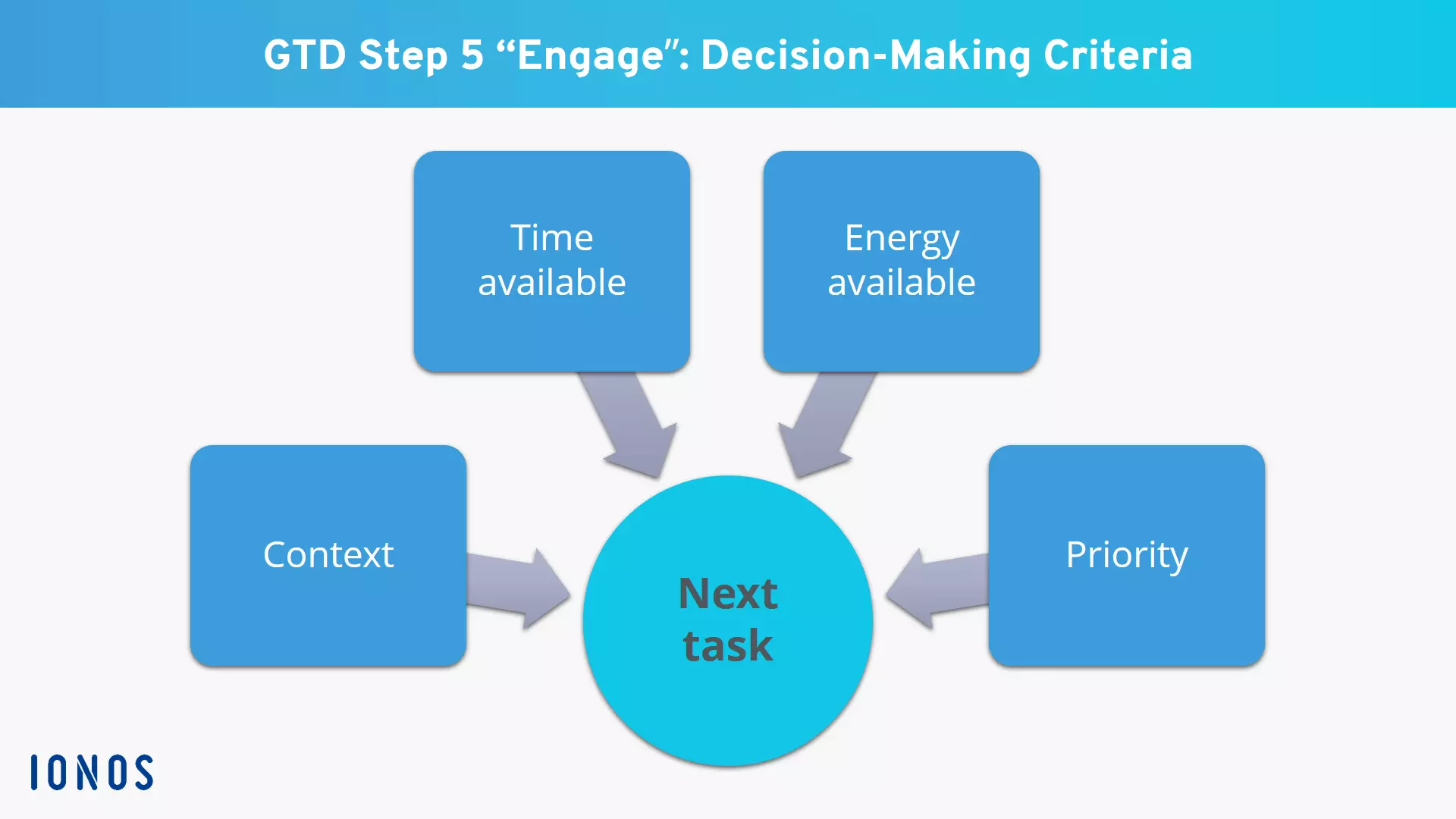
In the GTD method, you use four criteria to decide what to do next: Context, time available, energy available and priority.
Context
You’ve created at least one to-do list in your Getting Things Done system. Since you usually have many different contexts in your life (work, family, hobbies), you should create different lists called context lists. That way you won’t have to work your way through a huge to-do list in order to decide on your next action. You can simply look at your short context lists.
Whenever you have free time that you want to use productively, ask yourself this first: What context am I in? What can I do right now? If you’re sitting in the waiting room at the doctor’s office and want to use your time wisely, you probably shouldn’t make confidential work phone calls. But you can definitely respond to a few short emails or send a message to friends.
Time Available
How much time do you have right now? If you’re in the car and you’re 15 minutes away from your destination, you shouldn’t start a phone call that you know will take an hour of your time. A better choice might be to stop at the supermarket to cross some things off your grocery list.
Energy Available
Your energy level fluctuates throughout the day. We all have slightly different biorhythms. Watch your energy level change throughout the day for a week to find out when you have energy highs and lows. In future, schedule tasks that require your full concentration and performance at times that suit your biorhythm, when you’re feeling energetic and up to the task. You might want to prepare an important presentation in the morning rather than during the middle of the day. Or, if you’re generally more productive in the afternoon and evening, reschedule your tasks for those times.
Priority
If you’ve narrowed down possible actions based on the three criteria and have different options, let priority decide for you. Ask yourself which task is most important? and then start with this task.
Let’s say you’re in the office and you have an hour of unscheduled time before your performance review. You could cross a few phone calls off your list, write a report, or continue working on an idea for a workshop. Since the workshop will be held in three days and you haven’t prepared yet, you choose this task. It has priority. The report, on the other hand, is a routine report, and the phone calls can wait a few days.
Strengths and weaknesses of GTD
The GTD method is polarizing. It has many enthusiastic followers, but also many critics.
Strengths
- Reliability: The system ensures that you get all your tasks done (on time). If you frequently miss appointments, the GTD method can be a big help.
- Comprehensive organization: Getting Things Done gives you a single organizational system for all your projects, both personal and work-related. That way you’re less likely to lose focus.
- It helps you get things done on time: GTD keeps you from getting overwhelmed because it’s broken down into steps like organize, reflect and engage. The method breaks down large projects into smaller subtasks, making it easier to get started on a project.
- Clear structure: The method’s many lists and guiding questions ensure that you use your free time efficiently and prevents you from randomly jumping back and forth between tasks, hampering your productivity.
- Freedom: As detailed as the GTD method is, it gives you a lot of freedom in your day. It doesn’t dictate a specific daily or weekly schedule. It’s up to you to decide which task to do next. That can be motivating, but some people also view it as a weakness.
Weaknesses
- No help with prioritizing: Priorities have a subordinate role in Getting Things Done. The system primarily ensures that you don’t forget anything and that you use your free time efficiently. But if you want to make sure that you’re prioritizing tasks correctly, you have to augment GTD with other methods like the Eisenhower Matrix.
- No weekly or daily structure: Getting Things Done doesn’t help you optimize weekly or daily planning. The GTD methodology won’t be of much help if you generally have difficulty setting goals, defining next steps and effectively structuring your day. Methods like the ALPEN Method are better for daily planning.
- Complex system: You can’t learn Getting Things Done in five minutes and practice it in one afternoon. If you want to use the system effectively, you have to understand it in detail and practice it consistently. All or nothing. For example, the method won’t be as effective if you omit the weekly reviews or don’t learn how to split your to-do lists into context lists.
- Too many new habits to learn: When you start using the GTD method, you’re confronted with having to change many habits in a short time. You have to regularly empty your inboxes, make time to review your project lists and “waiting for” lists and get into the habit of keeping context lists.
This is the main criticism of Getting Things Done: So many readjustments can be overwhelming. If you struggle to establish new habits, you may want to find another organizational technique that better suits your personality.
Summary: Getting Things Done works, but it’s not for everyone
Getting Things Done is an effective self-management method. Countless supporters have testified to its success. But GTD isn’t a simple methodology.
Getting Things Done is great if you prefer a highly analytical and structured approach and already have some clarity about your goals and priorities. If you’ve been entrusted with a variety of different tasks, the system can be a practical tool for ensuring even better clarity.
For individuals involved in only a manageable number of projects and without numerous (professional and personal) responsibilities, the GTD method is often excessive. In such cases, it is usually sufficient to maintain a well-organized calendar, consistently manage separate to-do lists for work and personal matters, and schedule a weekly session to clean up your email inbox.
David Allen has published a follow-up to his bestseller “Getting Things Done.” In “Making it all Work”, he puts GTD principles into a broader context and explains why control and perspective are the two most important self-management principles. If you want to give Getting Things Done a try, this book provides helpful explanations and additional tips for practicing it in your day-to-day life.
- Write perfect emails with optional AI features
- Add credibility to your brand
- Includes domain, spam filter and email forwarding