

Successful project management: proven methods

A wide-ranging network plan, curve diagrams, or a complex lean management concept: the creation of diagrams and plans like these are a type of methodical approach. And project management methods are an essential key to success, because they help to ensure that a project is brought to a satisfactory conclusion within a predetermined time frame and with the resources available. It doesn’t matter whether it’s a customer order from an advertising agency, designing a website as a freelancer, or the social project of a non-profit organization: time is a scarce resource, financial resources are usually limited, and existing employees might not be able to permanently commit to a project.
Good project management increases the chance that your projects will be completed on time and stress-free, even under difficult conditions. However, this requires planning, monitoring, controlling, and evaluating all processes. As a rule, this is the project manager’s responsibility. They should keep an eye on all areas of the project and delegate tasks to their team. Various methodical approaches are available for project implementation.
The benefits of a methodical approach
Project management methods structure a project so that instead of seeing the project as a whole, it’s broken down into more manageable work areas. Each smaller area is easier to manage and easier to access in terms of the amount of effort required.
Most methods rely on so-called work packages. These are practically self-contained task areas that have to be completed in order to perform a certain service within a project. A work package should be worked on by a single person or a group of employees. Only previously defined resources are available to the participants and the result must be delivered on an agreed date. Work packages like these can be used to divide large tasks into smaller work areas. In order to set priorities, tasks are usually arranged hierarchically. This makes it easy to see which tasks are based on each other.
Each task is assigned to a responsible employee who has to work within a specified budget and ensures that deadlines are met.
An example: An advertising agency is planning a large-scale campaign lasting several months to increase the popularity of public transport. The aim is to create a new website, use social media channels, and put up posters in buses. The campaign can therefore be divided into various small projects. To match the budget, it also makes sense to specify an overall project plan for distributing tasks, managing time, and sticking to the available budget. It is important to optimally coordinate the various small projects.
In project management, methodologies help you to maintain an overview and not lose sight of the project goal. You must therefore choose the method at the start of the project, since they set the course for later project work and ensure that each working group or employee has a clear goal. In addition, good project management ensures that the budget is not used up too early or invested in the wrong areas.
The larger and more complex your project is, the more important it is to select a suitable project management method. This is especially important when many different people are involved, since project managers often get bogged down in the numerous coordination processes. And very comprehensive projects often involve not only the team but also the management, customers, external service providers, financiers, and other stakeholders. A clear project plan facilitates communication between the parties involved and therefore also simplifies the agreements.
How to choose the relevant project management method
When choosing a particular project management method, you need to consider several factors:
Project type
Is it an organizational project (e.g. to make company processes more efficient), an international development aid project, an IT project, or a marketing project? Depending on the type of project, other stakeholders might be involved who are pursuing different goals. For example, the marketing goal of an advertising agency is largely determined by the customer that it is advertising for. An internal organizational project, on the other hand, must take greater account of the wishes of the employees and managing directors. On a large construction site, you have to give higher priority to risk management than when developing an app.
Project size
The duration of the implementation and the number of people involved influence the complexity of a project. Large projects often require much more small-scale planning. However, some methods aren’t able to do this justice so they are only suitable for projects above a certain size. For implementing phases only a few weeks long with small teams of no more than five employees, these methods can be ideal.
Project phase
Sometimes it makes sense to use a different method for each project phase. When developing new software, for example, creativity methods are ideally suited for the initiation phase. But the later test phase, as well as delivery and marketing, place completely different demands on the employees.
Industry
Software developers like to use computer-aided solutions to create a project plan. However, they usually also have the appropriate technical infrastructure at their disposal. On the other hand, the employees of non-profit organizations are often not so well networked technically and may prefer to refer to themselves as anything other than IT experts. In social projects, continuous evaluation also plays a major role – consequently, only methods that allow evaluations like these are suitable for these projects.
Business culture
The business culture depends not only on the industry, but also on the size, age, and philosophy of the company. Small startups often prefer agile methods, while traditional companies prefer traditional project management and traditional methods. An open atmosphere, the desire for transparency, and equal participation in the team are characteristics of companies that are better advised with agile approaches. They promote personal responsibility, allow flexibility, and take into account the resulting need for greater coordination. In companies that rely on fixed structures, comprehensive documentation and detailed planning, traditional methods are often more readily accepted.
Project management: the most important methodologies at a glance
A wide variety of methodologies are available. In the following paragraph, we present a few that have proven successful across all industries.
Kanban
What are Kanban’s characteristics?
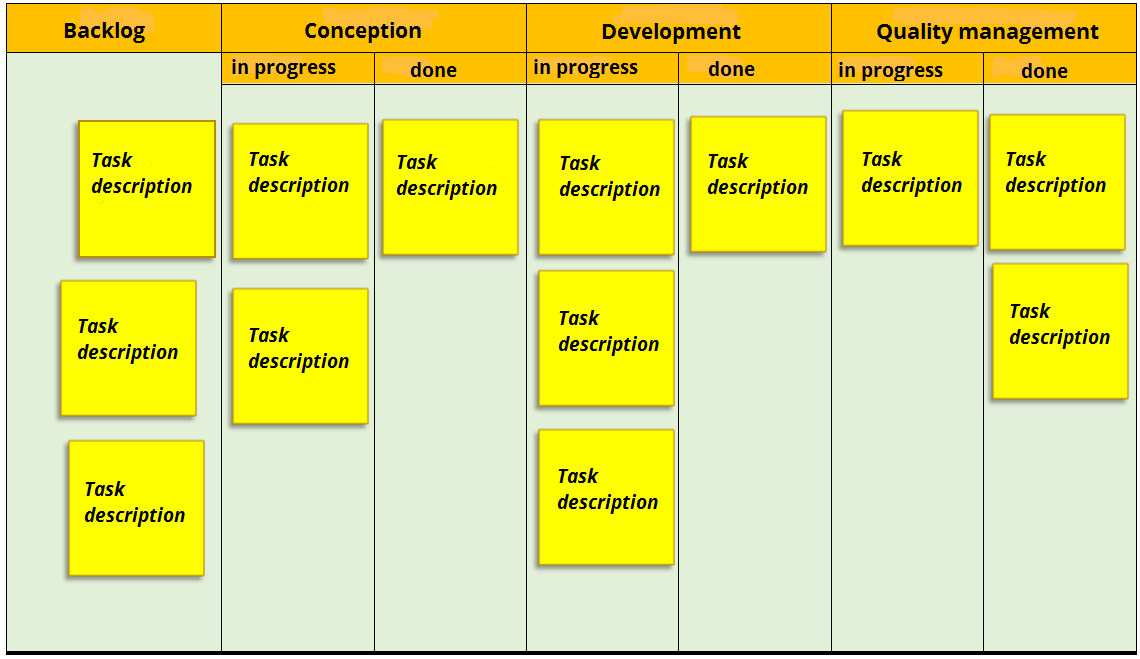
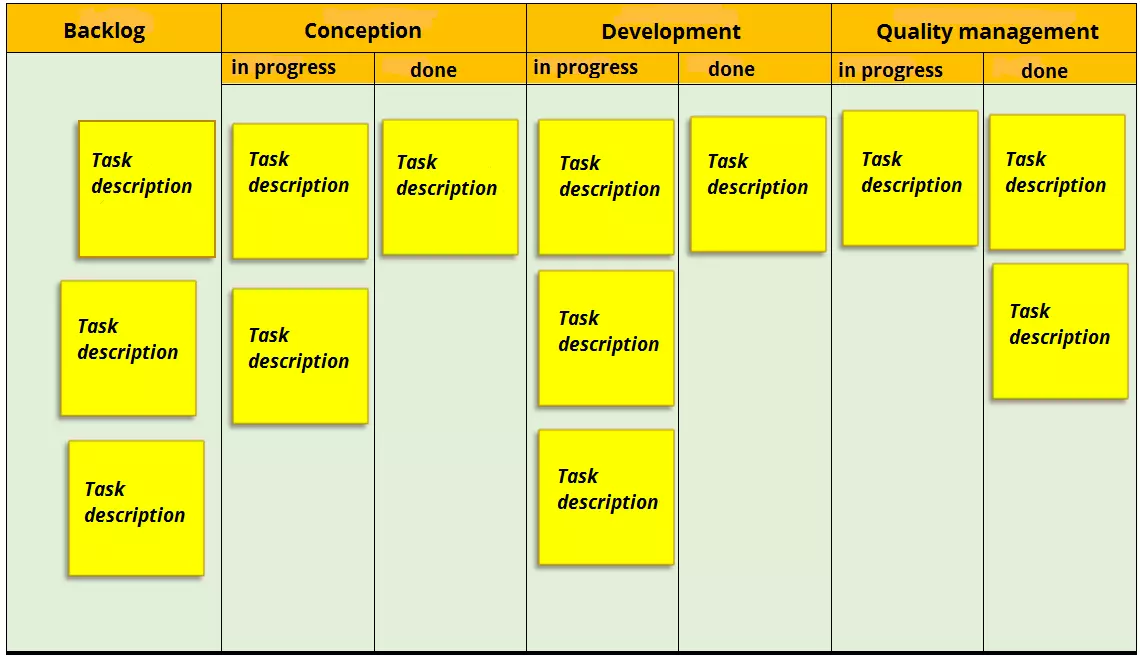
The Kanban method is used to assign tasks to certain project members, to visualize work steps, and to provide a constant overview of progress. All participants can see each individual task and those responsible for it. A task’s progress can be checked at any time, even when it goes through different phases. Kanban ensures a good workflow and helps you quickly recognize any problems that might arise.
The Kanban method works with tactile means such as a pinboard, flipchart, and blackboard as well as colored cards and sticky notes. There are also corresponding software solutions. A Kanban board hanging up in the office has the advantage that employees can keep an eye on the work status at all times, discuss it, and add cards themselves.
The visualization technique works as follows: the Kanban board is first divided into columns and rows. By using words such as “to do,” “in progress,” and “done,” you can easily keep an overview of what needs to be done and when. For more complex projects, you can subdivide the individual process steps more precisely (as shown in the above diagram). Depending on the type of project, additional columns can be useful, such as “released by customer or management,” “on hold,” “production preparation,” or “behind schedule.”
You then place labeled cards on the Kanban board – each of these cards represents a task. If a necessary step has been made in order to complete a task, the employee responsible simply pushes the corresponding task card into the next column of the table. This enables everyone to have a good overview of the project’s current status. If many cards accumulate in the “to do” area, this results in a “task jam.” Thanks to the table, however, it is quickly apparent when and where action is required.
Since implementing a project usually requires numerous tasks to be accomplished, it is advisable to arrange them in a logical sequence – for example, to arrange tasks that belong to the same task area directly under each other. For the “budget control” area, these could be “create budget plan,” “check budget position for personnel, office supplies, external service providers,” and “final billing.” Cards with high priority tasks should be placed as high as possible within a task area. This way, it’s possible to identify which tasks should be completed most urgently.
Under which conditions does Kanban work best?
Kanban requires some preliminary planning before it can be used. It’s important to determine the tasks that have to be completed in advance. It is also important that the number of tasks for each process step is not too large, otherwise trying to manage a project with Kanban quickly becomes confusing. In addition, only one employee should be responsible for one task at a time. For these reasons, Kanban isn’t really suitable as a method of project management for complex projects. With projects like these, a detailed subdivision of the process steps would result in the Kanban board quickly being overloaded and difficult to understand.
Kanban is an agile method and is most suitable for companies that rely on the personal responsibility of their employees and give them lots of independence when it comes to decision making. Kanban is particularly popular in the software development field as well as in the agency sector. Being limited to a few tasks keeps processes lean and means that tasks can be processed faster and more efficiently. If there is a time delay in several tasks, these can simply be restacked. Kanban is therefore a flexible system that aims to involve every employee. Each person works independently, but makes their progress and regression visible to the rest of the team.
As a result, Kanban only works if all employees are willing to disclose their task status and consistently update the processing status themselves. However, if accurate documentation is required (for example, to report on progress and resource consumption to a third party), you should use a different method, since Kanban doesn’t offer this.
Advantages and disadvantages of Kanban
Kanban has the following benefits:
- Clear presentation of tasks, processes, and processing statuses
- Simple approach to keeping processes as short as possible
- Easy to understand and quick to use
- Insight into progress is motivating
- Encourages interdisciplinary teamwork and self-reliant work
- More flexible than traditional planning formats
- Agile project management methodology based on transparency
Depending on the type of project and the working environment, the following disadvantages are also associated with Kanban:
- Largely limited to process flows
- Does not allow for small-scale planning
- Requires a high degree of self-discipline from every employee
- Offers few documentation and control options
- If tasks are not executed or their processing status is not updated, problems are often noticed too late
Lean project management
How does lean project management work?
This method is based on the concept of lean management. This is strongly result-oriented. Results should be of high quality and at the same time be achieved as efficiently as possible. The motto is therefore to achieve the best results with as little effort as possible. The project managers and other parties involved therefore attach great importance to streamlining processes. Everyone tries to keep the costs as low as possible, to concentrate on the necessary tasks, and to reduce the bureaucratic effort.
In addition to cost reduction and efficiency, customer orientation plays a central role in this method of project management. During the entire project, the customer’s wishes should be taken into account. However, in order to reduce costs at the same time, a considerable amount of specialist knowledge is required.
The task areas are not assigned to individual project phases or specialist areas, but are assigned or abandoned according to current customer needs. For example, if the customer wants to shorten the test phase for a product, the project manager cancels the corresponding tasks from the plan. Lean project management is therefore based on direct agreements with the customer. It also relies predominantly on interdisciplinary teams. For example, IT experts, designers, and marketing managers work side by side during software development.
Another essential feature of lean project management is that the duration of a project is kept as short as possible. Therefore, each activity is continuously checked for how relevant it is to the customer and the project result. If an activity turns out to be of little relevance to results, it’s pushed back in priority or completely removed from the project plan.
Project management using this method requires flexible action. Tasks are always renegotiated and adapted to current requirements. They can therefore be quickly assigned elsewhere if an employee is too busy with a task. In order to avoid delays, tasks can be completed by other, less busy employees.
Lean project management is also an agile method that focuses on personal responsibility and transparency. The project manager delegates tasks and is responsible for efficiency and quality control, but involves all participants in the decision-making process. The entire project management follows the “bottom-up principle,” which enables flat hierarchies and ensures that employees communicate problems to their managers promptly so that suitable solutions can be found together.
Advantages and disadvantages of lean project management
Because its focus is on results and customers, the lean method is particularly suitable for various types of service providers in the private sector. However, it is less suitable for projects that require detailed documentation, since this takes a lot of time without significantly influencing the result. This is the case, for example, with public service projects and projects where you have to justify how you’ve used the budget to third parties. In addition, project managers need to have a high level of expertise to achieve high efficiency without losing sight of what customers want.
Lean project management offers the following advantages:
- Efficiency: Streamlining processes saves costs and other resources.
- Shortened processes: This allows rapid results and timely feedback. Since the efficiency of individual work steps is constantly monitored, project work in the company can be continuously improved.
- Bottom-up principle: The fact that the solution is discussed with all employees and that the project manager acts more as a motivator and mediator than as an authoritarian leader increases the willingness of the employees to perform in most cases.
- Efficiency with high-quality standards: Since customer needs are always taken into account, the quality of the service or product is never out of sight. This increases customer satisfaction as well as that of employees who identify with the project.
However, this type of project management has also received criticism. Here are some of the reasons it was criticized:
- The constant striving for time and cost efficiency puts employees under pressure, which can lead to motivation and creativity suffering. If the necessary resources are very tightly calculated and problems arise, bottlenecks can quickly occur.
- Streamlining processes with high quality requirements also requires highly competent and assertive project managers. Although employees act relatively autonomously, the project manager acts as an important connection. If they make the wrong decision, the entire progress of the project quickly suffers.
- The strong focus on quickly visible results and current requirements means that you could lose sight of the big picture.
Project structure planning
Hierarchical structuring of tasks
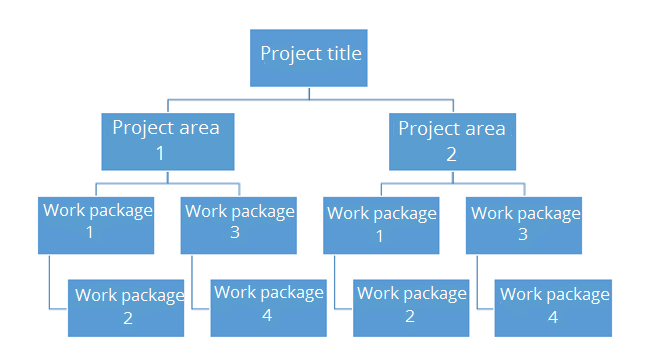
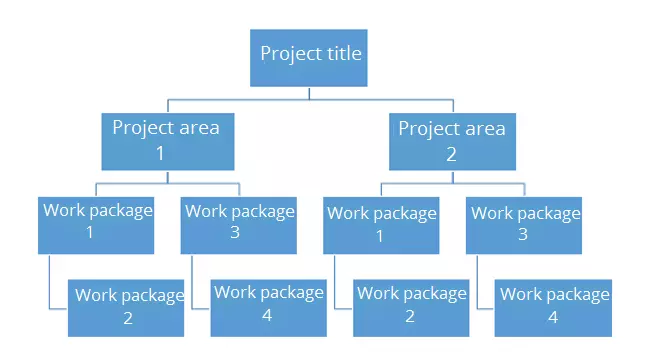
A project breakdown structure provides an overview of all tasks that are necessary to successfully complete a project. Large task areas are divided into smaller and smaller units and arranged according to a hierarchical principle. You can either go from viewing the plan as a whole down to a more detailed view (deductive approach), or vice versa (inductive approach). The latter procedure is more suitable for very innovative projects where you can’t rely on previous experience. The first inventory of smaller work steps should then show in practice how these can be assigned to a larger area of responsibility. The following paragraph clarifies which people or which departments are responsible for this area.
The upper system levels represent very complex task areas; in the case of a company planning to relocate, this could be the preparation and execution for a move, for example. The subordinate sub-task level comprises significantly smaller task areas. In the case of an office relocation, this would include packing and transport, for example. It becomes even smaller and more detailed when it comes to the level of the work packages. For example, cleaning the former office, re-registrations, assembling furniture, and setting up the IT department are smaller tasks, but they are absolutely necessary for preparing and executing a move. The main thing is that these work units can be easily handled by the individual employees or work groups.
The hierarchical structure can follow different principles:
- Phase-oriented structuring: The tasks are divided and arranged according to their chronological sequence.
- Function-oriented structuring: The tasks are assigned to specific organizational units according to their function. For a software project, for example, a subdivision into development, graphic design, and PR is conceivable.
- Object-oriented structuring: This structure is particularly suitable for projects where work is being carried out on a product consisting of different components. For example, it makes sense to divide a construction project into foundation, first floor, and basement.
This project management methodology works with a graphical tree structure. In this tree structure, the individual units are connected to the next higher unit via a line.
For which projects is a project structure plan helpful?
In contrast to some of the methods described above, the project structure plan is also suitable for more complex projects. Since it lists all work steps, it helps to ensure that no essential component of the project is forgotten. To facilitate the overview of the many small task units in large projects, many work with numbering or colored markings in their work breakdown structures.
The presentation of rough as well as detailed planning creates a clear and easy to understand visualization of the project plan. This makes it easier to keep track of the project, and everyone involved can see at a glance who is entrusted with which tasks. For truly comprehensive project planning, however, the structure plan alone is usually not sufficient.
Advantages and disadvantages of project structure planning
The project structure plan offers the following benefits:
- Clear presentation of all tasks: The project structure plan visualizes all work steps in a clear tree structure.
- Good structuring through hierarchical arrangement: The subdivision into different levels creates order. The project structure plan displays rough and detailed planning equally well.
- Overview of priority and responsibilities: The time structure helps to see which tasks have priority. In addition, it is easy to note down in the structure plan which employee or department is responsible for which task.
Depending on the respective project, however, there are also some disadvantages. Sometimes the project structure plan’s strengths aren’t made the most of:
- Decreasing clarity in complex projects: Dividing complex and lengthy projects into many small steps can lead to giant diagrams that aren’t very manageable at all.
- No flexibility: Scheduled time buffers reduce risks if tasks are completed too late. However, time buffers like these cannot be represented with a project structure plan.
Milestone trend analysis
What is milestone trend analysis?
 To display this video, third-party cookies are required. You can access and change your cookie settings here.
 Can the schedule still be adhered to? Are you already behind schedule? Do you have to postpone certain deadlines or can delays be compensated for by quick measures? Milestone trend analysis is used to control time processes and to answer questions like these. As a rule, each project is planned with a specific end date. It should be completed by this time so that the budget is met and the customer can see a result in time. For better planning, it is helpful to divide larger projects into several phases. This enables you to see if certain tasks are delayed.
For this purpose, so-called milestones are defined. For each milestone, a goal is defined and then a deadline is set for when this goal must be reached. However, there can be numerous reasons why a milestone is not completed on time, for example, a delivery bottleneck or an employee being off sick. Since many areas of responsibility build on each other, there is a risk that individual delays could jeopardize project completion as a whole.
This method of project management is primarily used to control how high the risk of project delays is. Ideally, when planning tasks and schedules, you should include smaller buffers for frequent disruptive factors instead of starting from the ideal course.
A milestone trend analysis enables you to identify bottlenecks in good time and initiate measures as early as possible in order to still guarantee everything is completed before the deadline. And if this is not possible, the analysis will at least ensure that you can inform those involved about delays well before the desired end of the project. After project completion, the milestone trend analysis also facilitates the overall evaluation. If delays occur, you can check where the error was in the planning and learn from it for future projects.
How does the milestone trend analysis work?
The milestone trend analysis generally uses process diagrams that visualize the project’s process. For each milestone, a deadline is set for when the project needs to be completed. In order to ensure that the time frame is adhered to, several report dates are also set. In this way, the participants can easily see how often the project’s process is being checked and at which intervals. This can be done once a month, every two weeks, or at even shorter intervals.
A line diagram is particularly suitable for displaying the project’s process: the reporting periods are entered on the X-axis and the milestone dates on the Y-axis. If the corresponding points are connected to each other, the result is a line, which shows the progress:
- Horizontal progress: It means that the milestone is completed on time.
- Falling line: It indicates that project stages are reached earlier. A strongly decreasing progress indicates an unnecessarily large time buffer.
- Rising line: This indicates delays. If there is only a small delay, it can be compensated by countermeasures. If there is a large decline over several reporting periods, you should correct the planned project completion date and choose a later date.
- Zigzag line: This is what results from some deadlines being reached earlier than planned, and others later than planned. Completion is not necessarily at risk, but a zigzag line is an indication that there were inconsistencies either in the calculation or in the work processes. You should then analyze both in more detail in order to optimize planning or processes until the next project.
You must also consider in advance how regular reports are to be made: a meeting or telephone conference with all project participants or those responsible for a milestone usually ensures that all are quickly informed about the status of the project. It is helpful to take stock of completed and outstanding tasks. If there are delays, a problem analysis should also take place.
Advantages and disadvantages of milestone trend analysis
Milestone trend analysis is limited to a single, but very important aspect of project work: deadline monitoring. If a particular task is not completed on time, the milestone trend analysis will immediately reveal this. In addition, this method facilitates the subsequent evaluation. It is equally suitable for small and large projects. However, the milestone trend analysis only works if the responsible employees provide realistic assessments during meetings and in their progress reports.
The advantages of milestone trend analysis are:
- Simplicity of the method: The analysis is easy to implement and yet extremely useful.
- Clear presentation: The line diagram shows the temporal structure well and can be interpreted quickly and accurately even without prior knowledge.
- Simple control and evaluation: The milestone trend analysis not only monitors the status, but also provides valuable conclusions about the workflow during post-analysis.
However, the simplicity and thematic concentration of the milestone trend analysis are not only advantages, but also means that this method does not cover many things:
- The method is limited to a target/actual comparison of the task status, but does not take into account the extent to which task areas depend on each other.
- Sometimes problem areas only become apparent later on.
Critical path analysis
Display time structure and task relationships in a network
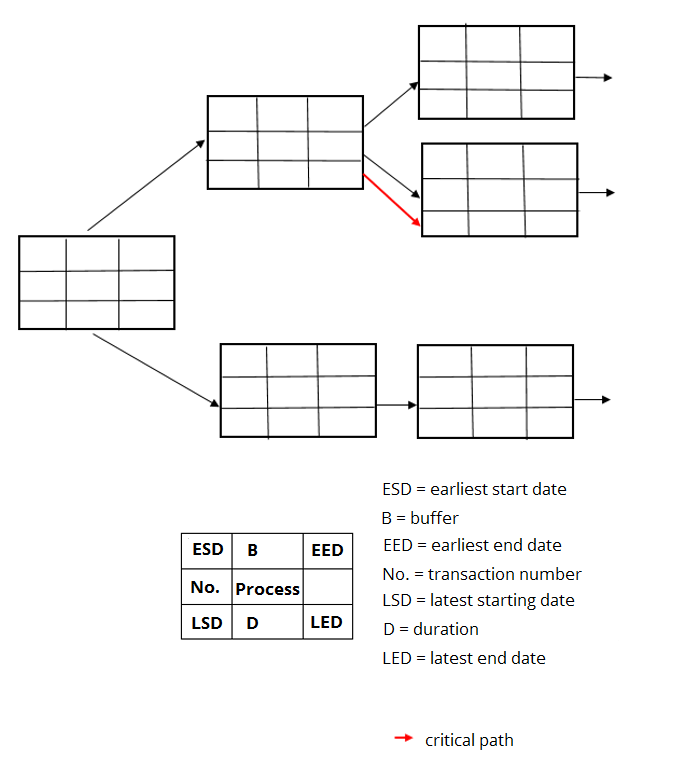
A network is also used for scheduling deadlines and sticking to them. Compared to the milestone trend analysis, however, the critical path analysis’ structure is able to map more complex time structures and enables a more dynamic approach.
So-called activity nodes, which are usually displayed as boxes, form the most important element of a network. They contain information about the duration of work packages or individual tasks as well as about the earliest and latest possible start and end times, as well as time buffers.
With a network like this, employees not only graphically display the duration and sequence of individual task areas, but also dependency relationships, time buffers, and critical project phases.
Dependency relationships
The critical path analysis visualizes logical processes and shows which tasks build on each other. This is particularly advantageous if a project is dependent on the input of many employees or external service providers and requires small tasks. A critical path analysis shows preceding and subsequent tasks, but the processing phases can also overlap. The respective arrangement and arrows reflect the dependency relationship.
Time buffer
A critical path analysis also shows time reserves. A so-called total buffer makes it clear to which extent a task can be postponed without endangering the latest possible start of the subsequent task. The free buffer, on the other hand, indicates how much buffer remains to reach the earliest possible start. Each buffer is provided with exact times, e.g. “5 days.”
Critical path
There are project phases that must be completed quickly and do not allow any time reserves. Since their total buffer is 0 days, they represent a risk. They require special attention since a later completion of such project phases jeopardizes the desired completion date.
Advantages and disadvantages of the critical path analysis
This method simplifies project management in many ways. Because it enables detailed scheduling, it simplifies the organization of complex projects. However, setting buffers, start and end times, and displaying task links can be a significant effort. This requires a good knowledge of the framework conditions. For this reason, the milestone trend analysis (mentioned above) may be better suited to smaller projects. In addition, the critical path analysis can quickly become unclear if many tasks are interdependent and must therefore be linked.
This method has many benefits:
- The total duration of a project can be estimated realistically.
- It not only divides a project into successive phases, but also maps correlations.
- The representation of buffers enables better capacity planning.
- Potential for saving time can be quickly identified using the free buffers.
- Employees recognize risks by the critical paths and by the fact that the entire buffer is used up.
- Thanks to the dynamic structure, processes can be better modeled.
Project management: an overview of the methods
| Project management methods at a glance | |||||
| Kanban | Lean project management | Project structure plan | Milestone trend analysis | Critical plan analysis | |
| Functions | Visualization strategy with tactile means Monitoring the task status | Concept for more efficiency and customer orientation | Overview of all tasks, visualization tools (tree structure) Structure according to hierarchical principle | Control and evaluation of time processes Visualization of time planning | Precise schedule planning and control Visualization via network illustrates task relationships |
| Advantages | Clear display with maps Project flow easy to understand Easy updating of the project status Simultaneous mapping of chronological sequence, tasks and processing status Limitation to a few tasks results in lean processes | Particularly suitable for customer orders Efficiency due to strong focus on results Ensures high quality standards | Visualization on three different levels Clear presentation of rough and detailed planning Presentation of time sequences and responsibilities | Allows timely detection of time delays Working with time buffers provides more room for maneuver Clear display for better control | Considers dependencies Representation of complex time structures Realistic estimation of time reserves Presentation of critical project sections |
| Disadvantages | Not suitable for small and complex projects Fewer control options | No visualization Increased time pressure | Less easy to model than e.g. network plan Sometimes too detailed for complex projects | Requires task and time planning Does not take dependencies of task areas into account | Confusing with complex projects Complex due to the complexity of the temporal structure |
Click here for important legal disclaimers.