

Creating a Work Breakdown Structure: How to use one of the most important planning tools

Creating a work breakdown structure (WBS) is one of the most important tasks in project management. Regardless of the project management standard you follow, the WBS is referred to as a central tool in each one. It forms the basis for your project’s detail planning, occupying a key role when it comes to preparing the concrete implementation of the project.
But what is the best way to subdivide the work breakdown structure? When is the most ideal time to create it? And what should one not expect from it? We address these questions and others below.
What is a Work Breakdown Structure? Differentiation from Related Terms
The work breakdown structure divides a project into components that are arranged hierarchically. The ordering takes place according to various principles from which one can decide. In general, the WBS serves the purpose of displaying all the tasks that need to be closed at the successful conclusion of a specific project.
Not to be confused with the WSB are other management tools, the project schedule and the project management plan:
- Project schedule: This arranges all work projects and tasks to be completed within a chronological framework – with start and end dates.
- Project Plan/Project management plan: This is not a plan in the conventional sense, but instead a collection of the most important project plans. It contains, among other items, the work breakdown structure, the cost and resource plans as well as the project schedule.
Why You Should Create a Work Breakdown Structure
Creating a work breakdown structure is a standard process that in a number of ways has a practical use:
- Clarity with respect to the scope of the work: The bigger the project, the more difficult it is to maintain an overview of which tasks must be completed and which work stages are related. The WSB reduces the complexity, as it divides the whole project into small substeps and prepares the visuals accordingly.
- Increased efficiency: On the other hand, clarity with respect to project scope is required for efficient project implementation. The WSB not only ensures that all the necessary steps are heeded, but also that a realistic schedule is made.
- Orientation function: While the project is ongoing, the WSB provides every project participant with an overview of the current project status and at which point the particular activity is integrated. The plan provides guidance and ensures that appropriate actions are taken.
- Basis for communication: Every project requires a lot of coordination between the different project partners. Here, a compact yet still comprehensive display such as the WBS can support communication. It creates transparency, helps to avoid misunderstandings and encourages effective discussions.
- Basis for further planning: Not least is the work breakdown structure required for identifying if additional detailed plans are needed. For this reason, it reduces the risk of cost explosions and additional expenses that haven’t been planned for.
Three Models for a Methodical Approach
Now, how can you take a very practical approach to creating a work breakdown structure? To do this, there are essentially three models:
Top Down Approach
With the top-down approach, you divide the project – starting in each case at the final outcome – into more and more specific subprojects, that you in turn split up into work packages. This is most ideal if you are familiar with the content of a project or already have accumulated experience with similar projects.
Bottom-Up Approach
With the bottom-up approach you proceed in the opposite planning direction, by beginning at the bottom step. You compile all the tasks that come to mind, and, in a second step, combine them into work packages that you then arrange into subprojects. This is especially practical when you are breaking new ground with a project.
Yo-Yo Approach
The yo-yo approach is a combination of both the above-mentioned techniques. Throughout it, you proceed in alternating steps. First you compile the tasks, then you note the subprojects and assign them the present tasks, and then, lastly, compile additional to-dos. Thus, by jumping back and forth between bottom-up and top-down, you utilize the advantages of both methods. In the process, you must make sure that you don’t repeat any item or forget anything.
Principles for Structuring Content
A frequent question that is often posed in connection with work breakdown structures is that of the structuring system to be utilized: Should the subprojects indicate project phases, products or activities? We can differentiate these types of structuring accordingly:
- Time-oriented: The project is divided into separate phases that are then reflected in the subtasks.
- Object-oriented: The project object and/or product is subdivided into separate components that can then be assigned tasks.
- Function-oriented: The project is divided according to the different areas of activity that are involved in its execution.
In practice, all three of the indicated principles are used, often in combination as well. In doing so, you should take care to only apply one ordering principle per breakdown level.
Coding
So that you’ll always be able to assign resources, expenses and changes to a specific work package later on, these are usually provided with a code within the work breakdown structure. The coding reflects its position within the project hierarchy.
There are three different types of coding:
- Alphabetic coding: The use of letters (e.g. A, AA, AB)
- Numeric coding: The use of numbers (e.g. 1, 1.1, 1.1.2)
- Alphanumeric coding: Combination of numbers and letters (e.g. A, A1, A.1.1)
Which coding type you choose remains up to you. For our example, we decided to use numeric coding.
Work Breakdown Structure: Example and Template
A phase-oriented work breakdown structure for the creation of a new company website could – in its main features – look something like this:
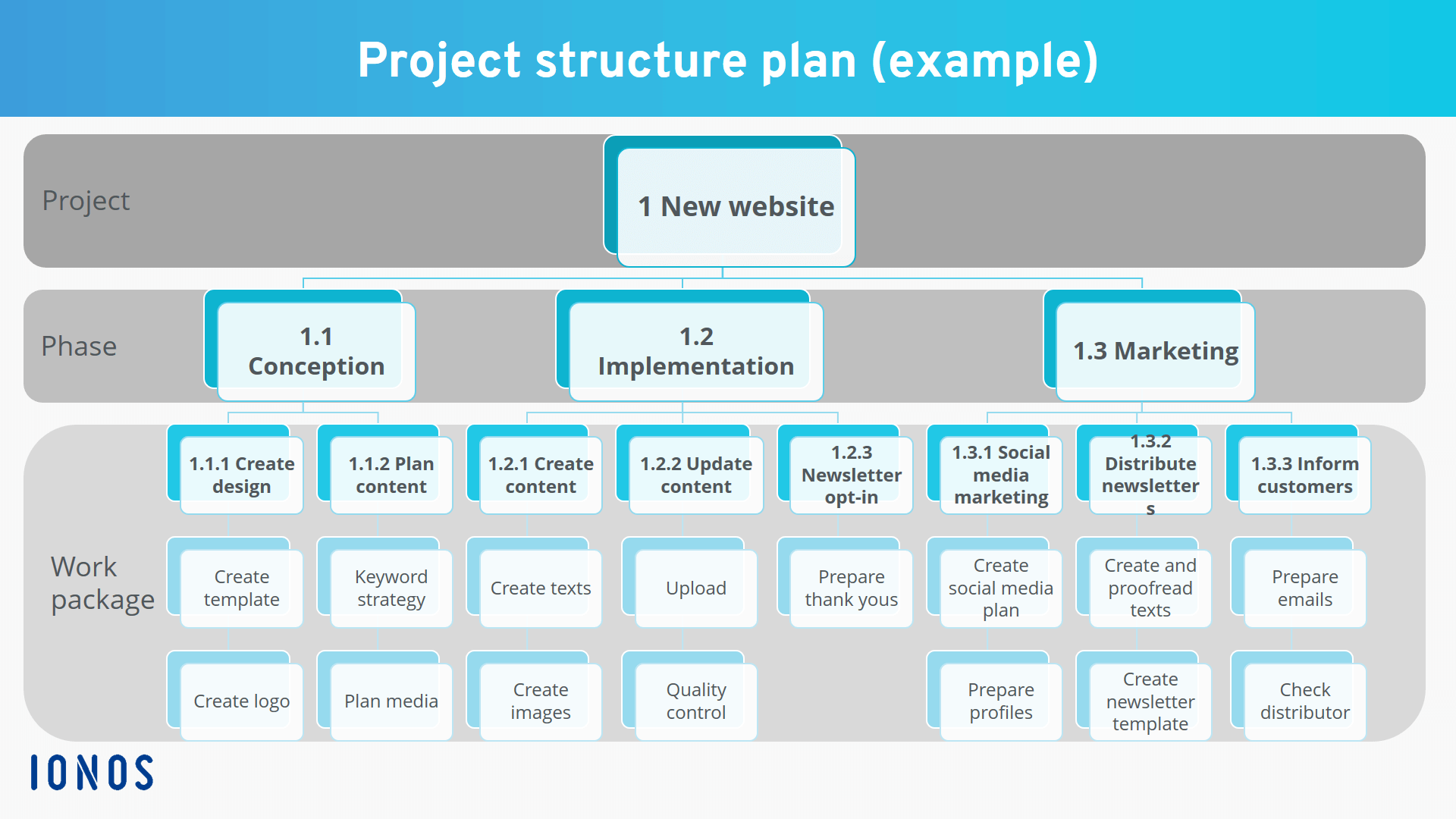
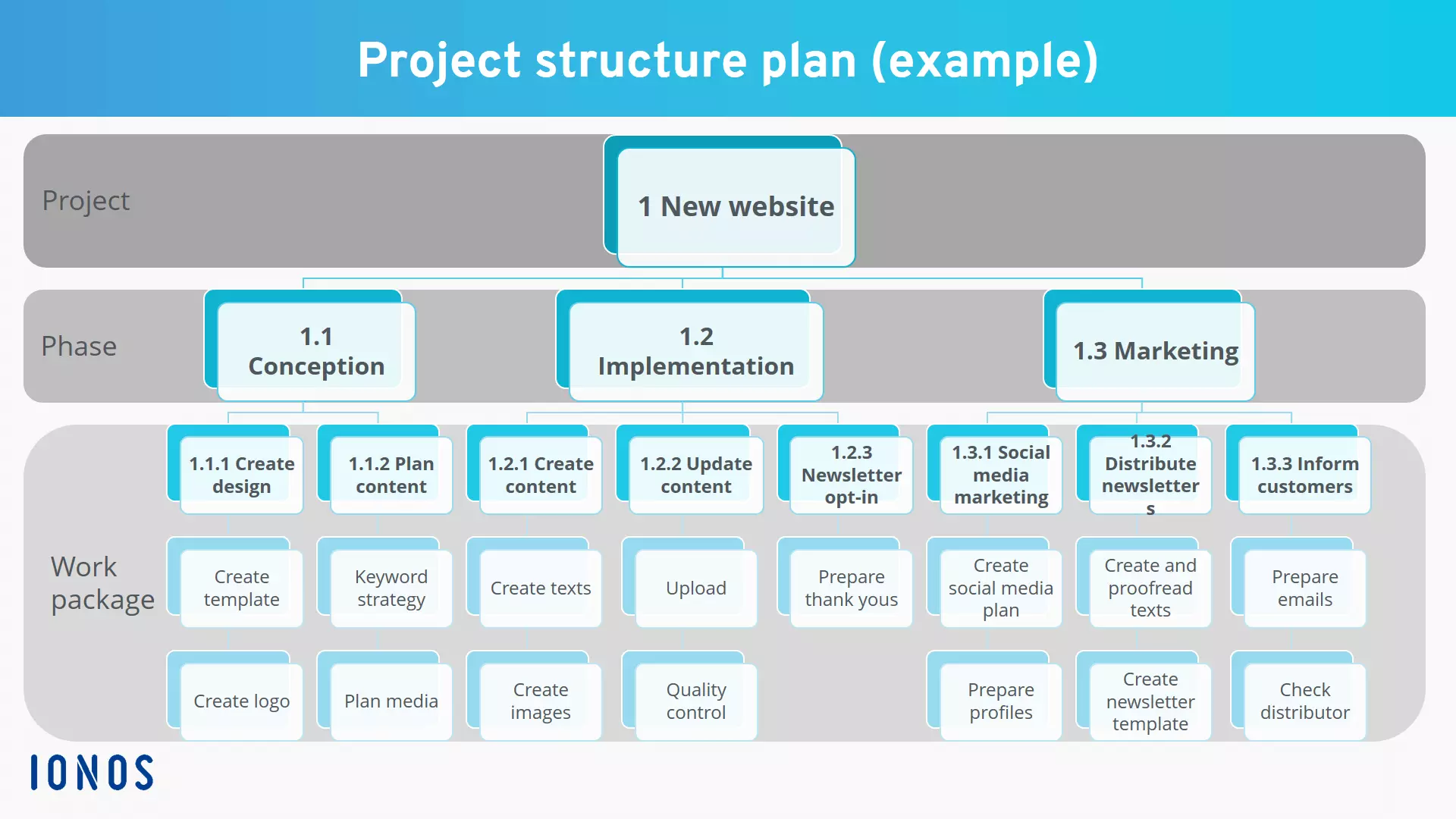
Here you can download a work breakdown structure template for MS PowerPoint.
Free example download - Work Breakdown Structure
With middle-sized and larger projects, it is advisable that you use special project management software that can also create the WBS. For this reason, you should generally try to keep your project’s work breakdown structure uncluttered and not divided up into more than 50 individual components. However, even at this magnitude, navigation in non-specialized programs is often cumbersome and laborious.
If, in contrast, you use specialized software such as MS Project, you can conveniently zoom in on specific sections of the project, directly link detailed plans to the work package and subprojects, mark the documents and persons in charge for the respective task – and ideally manage all plans and documentation from one platform.
Summary
A work structure plan constitutes the basis in project management for all additional detailed planning which is why it is one of project planning’s centerpieces. Beginners often struggle with this document; however, the task can easily be managed if you proceed methodically and incrementally, and if you take the indicated tips and principles into consideration. In any case, the effort to create one is worthwhile, as the better and more thought-out the WBS, the more smoothly further planning and project execution can proceed.
A work breakdown structure template can provide an orientation. Professional project managers should however rely on specialized software. The relevant applications offer many practical additional features, such as being able to find the appropriate details in the WBS at any time.
Click here for important legal disclaimers.