

WinZip alternatives: the best programs at a glance

When it comes to compressing files or reading already compressed files (often referred to as “packed” or “zipped” files), the WinZip program is the go-to solution for many. Whenever several files such as images, documents, music, or videos, are sent as an attachment via e-mail, the files must be zipped or compressed to reduce their size.
The WinZip file archiver creates archives in ZIP format by default, and can open archives of all popular compressed formats: ZIP, ZIPX, RAR, 7Z, TAR, GZIP, VHD, XZ, and POSIX TAR. Additionally, WinZip also offers numerous file management features. If you’ve installed the compressor program on your computer, you can easily find, open, edit, and share your personal files – no matter whether they are on your computer, your cloud, or a network.
WinZip can encrypt all files during compression. This protects sensitive information against unauthorized access, for example, via cloud services, e-mail, social media, or instant messaging. To unpack the received files, the recipient requires a password specified by the sender – no WinZip installation necessary. WinZip has been the leading file archiver for quite some time. And with each new version, its range of functions has been expanded.
After installation, WinZip is free for the next 45 days. However, for those looking to avail of all functions after this point, there is no avoiding paying for the full version. Here are the best WinZip alternatives that serve a similar purpose but are free of cost.
Compressing, zipping, or packing does not change the content or structure of a file, only the size. Most packer programs like WinZip offer the same basic functionality and allow users to zip and unzip single files, multiple files, and folders. Zipping creates a copy of each file or folder, which is then scaled down, leaving the original unchanged. You can edit, move, or delete both the original application file and the zipped version independently without affecting the other file. As soon as the file is unzipped or unpacked, the original size of the file is restored.
What are the WinZip alternatives?
Users of different operating systems, such as Windows (from Windows XP upwards), macOS, or Linux, can of course compress their files in just a few mouse clicks – even without an appropriate program. You can find a step-by-step guide in our article on ZIP files. However, this simple method of compression does not allow tweaks or fine-tuning. If you’d like to take advantage of the full functionality of a free WinZip alternative, have a look at the below options.
WinRAR: the most popular alternative to WinZip
One of the most popular WinZip alternatives is the file compressor WinRAR. The software stands out from the other alternatives due to its ease of use and intuitive processes. The user interface is very clear and simple, which makes the basic functions self-explanatory. WinRAR is suitable for both tech-savvy users and beginners alike, and is not only an excellent alternative to WinZip, but also to the compression solution integrated into Windows.
With WinRAR, you can open zipped files, pack and unpack RAR files, create self-extracting archives (SFX archives), and repair damaged archives. WinRAR offers comprehensive support for ZIP and RAR files. Additionally, the WinZip alternative opens and unpacks numerous popular file formats: 7Z, ARJ, CAB, LZH, TAR, ACE, UUE, GZIP, JA, BZ2, JAR, ISO, XZ, Z. Since WinRAR uses multiple CPU cores simultaneously for the compression and decompression in the appropriate hardware environment, the waiting time is comparatively short.
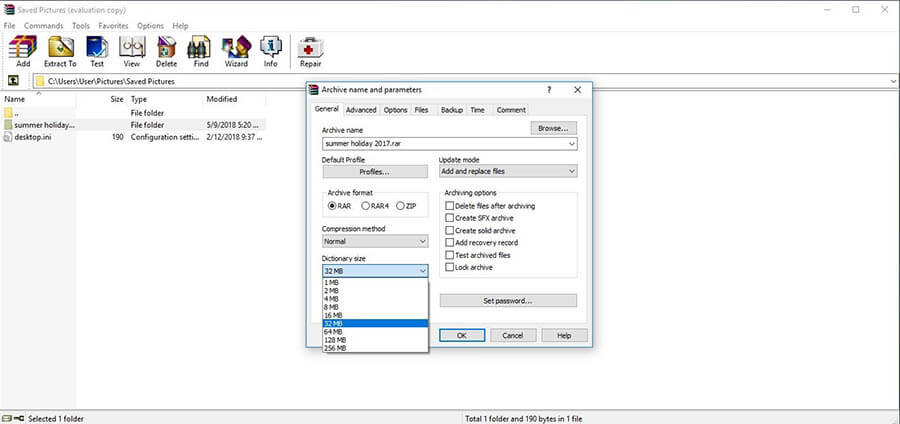
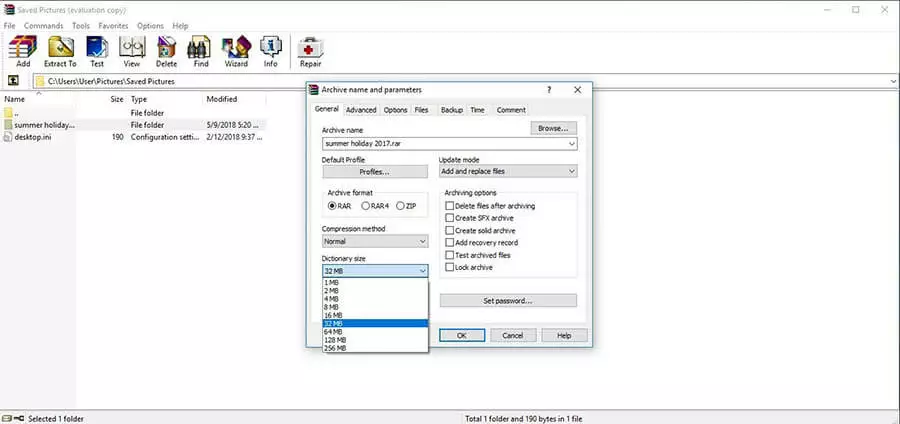
Another feature that sets WinRAR apart from the other alternatives to WinZip is the function that allows users to estimate the size of the files to be packed as a zipped archive in advance. This proves to be a very big advantage if, for example, you want to zip a number of large files and drag them onto a USB stick or a CD. With WinRAR, you can choose the encryption method and protect your archives with a password as required.
The popular WinZip alternative can be tested as shareware free of charge for 40 days. Unlike many other test versions, you can use all functions without any restriction.
The WinZip alternative is suitable for Windows (7, 8, 10, Windows Vista, Win XP, Win 2000), Linux, and Mac OS X. Both 32 bit and 64 bit systems are supported. However, since WinRAR 5.40, the penultimate version (as of March 2018), the system requirements have been increased. To use them, you must have at least Windows XP SP 3. RAR5 files can only be opened with WinRAR 5.
| WinRAR advantages | WinRAR disadvantages |
|---|---|
| ✓ Clear user interface and self-explanatory basic functions | ✗ WinRAR files can currently only be opened with WinRAR 5 |
| ✓ Supports the most important formats | |
| ✓ Short compression time | |
| ✓ Functions to estimate the size of the files to be packed as a zipped archive | |
| ✓ Encryption methods freely selectable |
WinRar unpack only: 7Z, ARJ, CAB, LZH, TAR, ACE, UUE, GZIP, JA, BZ2, JAR, ISO, XZ, Z
WinRAR pack and unpack: ZIP and RAR archives
7-Zip: the secure and efficient WinZip alternative
Another popular choice among users is the 7-Zip software – one of WinRAR’s largest competitors. With 7 Zip, 31 different file types and 7 different formats can be packed and unpacked (see a complete list below). The best and fastest way to manage file formats is, as the WinZip alternative’s name suggests, in the 7Z format.
7-Zip unpack only: AR, ARJ, CHM, CAB, CRAMFS, CPIO, DMG, EXT, FAT, GPT, HFS, IHEX, ISO, LZMA, LZH, MBR, MSI, NSIS, NTFS, QCOW2, RPM, RAR, SQUASHFS, UEFI, UDF, VMDK, VDI, VHD, WIM, XAR and Z
7-Zip pack and unpack: 7Z, BZIP2, TAR, GZIP, XZ, WIM and ZIP
With 7-Zip, multi part files can be created from the compressed data. The respective archives are divided into individual parts – you determine the amount and size. Once the archives are shared, it is even easier to send the corresponding files by e-mail or back them up to several data carriers such as USB sticks or DVDs.
To ensure that the sent files arrive safely with the recipient, the files can be encrypted using AES (advanced encryption standard) with up to 256 bits. The archives can only be unpacked by entering a defined password. With the file archiver, you can also create simple self-extracting archives. The receiver can open these even if they have not installed a packing program on their computer.
In terms of compression rate and speed, 7-Zip is an efficient and fast WinZip alternative. The ZIP and GZIP archives created with 7-Zip can be up to 10 percent smaller than other WinZip alternatives, depending on the form of encryption. In terms of speed, 7-Zip also performs better than many other similar applications. Only when it comes to in-house file formats (such as RAR files in WinRAR), do competitors have a small lead in terms of speed.
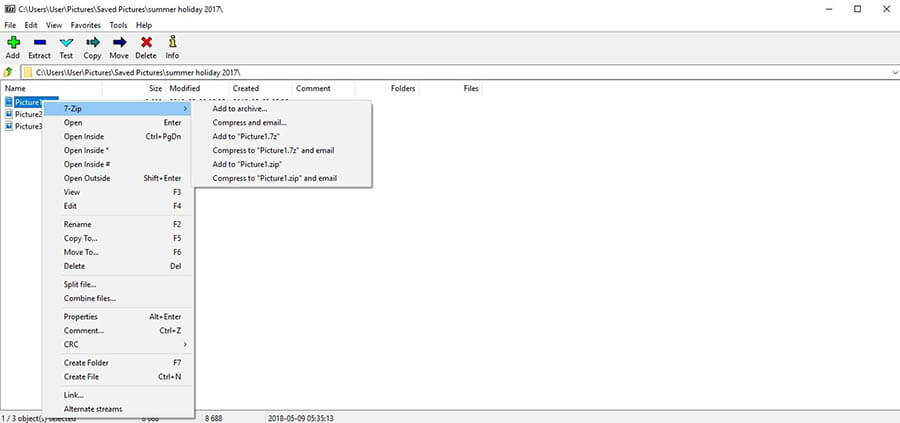
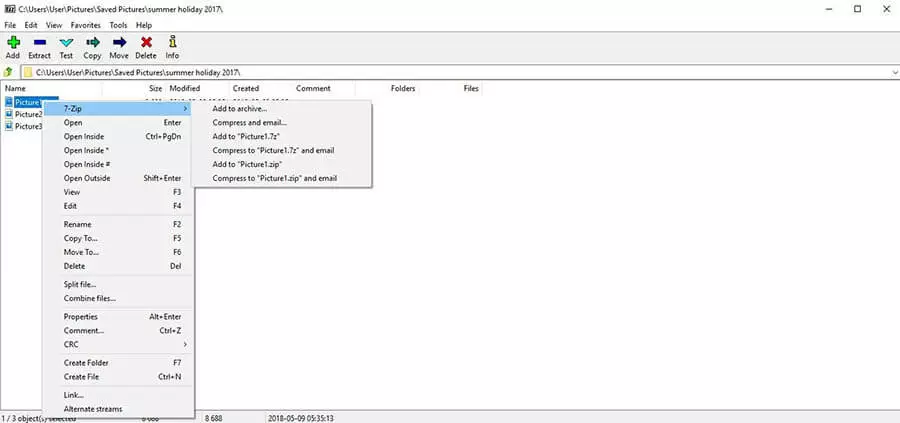
7-Zip can be easily integrated with the Windows Explorer context menu. This allows users to extract or compress their archives with just a right-click of the mouse. The drag-and-drop function makes it easy to drag selected files into the 7-Zip program window during the packing process. While the popular WinZip alternative offers more functions than its competitors, its user interface remains simple and easy-to-use. With the 7-Zip Theme Manager, users can also customize the program to their own taste. For example, you can change the window design or the appearance of the various icons.
There are many free WinZip alternatives – not just free in cost, but also offering free software. This makes it suitable for use both privately and professionally, as well as in a more commercial context. Tech-savvy users and programmers can even download the entire source code of the tool and modify it according to their own wishes.
Aside from the English-language version, 7-Zip is available in 60 different languages (as of January 2018).
The Microsoft pack program offers unlimited usability to all users. However, those working with Mac OS X must install the “7zX” (the unofficial version of the program) in order to use 7-Zip. Linux users can download p7zip, the unofficial Posix-compatible version. The portable version of the packer known as “7-Zip Portable” (from the creator Rare Ideas) can be transferred to a USB stick and used on computers without installation. This can also be used with Wine on Linux.
If you use Linux as your computer operating system and still want to use Windows software, such as 7-Zip Portable, download the Wine application. The so-called API emulator makes it possible to run Windows and DOS applications on Linux.
| 7-Zip advantages | 7-Zip disadvantages |
|---|---|
| ✓ Simple and easy to use, despite numerous functions | ✗ 7-Zip 9.20 does not support RAR5 archives (newer versions of 7-Zip do) |
| ✓ Supports 38 formats | ✗ Archives cannot be scanned or repaired |
| ✓ High compression rate, archives up to 10 percent smaller than with other WinZip alternatives | |
| ✓ Simple creation of SFX archives | |
| ✓ Files can be encrypted via AES with up to 256 bit | |
| ✓ Can be integrated with the Windows context menu | |
| ✓ Versatile use as a free-of-cost and open software |
PeaZip: the WinZip alternative for rare formats
With popular formats like ZIP, RAR, or ISO, many of the WinZip alternatives are suitable. But what about rare formats that can often be challenging when unpacking archive files? Especially if you don’t have the right packing program. PeaZip, the open source packer, is a popular solution for handling rare formats. Optimized for 64 bit systems, the software opens common and less commonly used formats such as PAQ or DEB.
The freeware can unpack approximately 180 formats and is particularly well known for its speed and high compression rate. You can choose from the following formats: TAR, 7Z, ARC, PAQ, BZ2, GZ, PEA, SFX, UPX, WIM, XZ, and ZIP. PeaZip supports the drag-and-drop function for both packing and unpacking files, which makes the program very easy to use. Similarly to 7-Zip, you can fully integrate PeaZip into the Windows context menu.
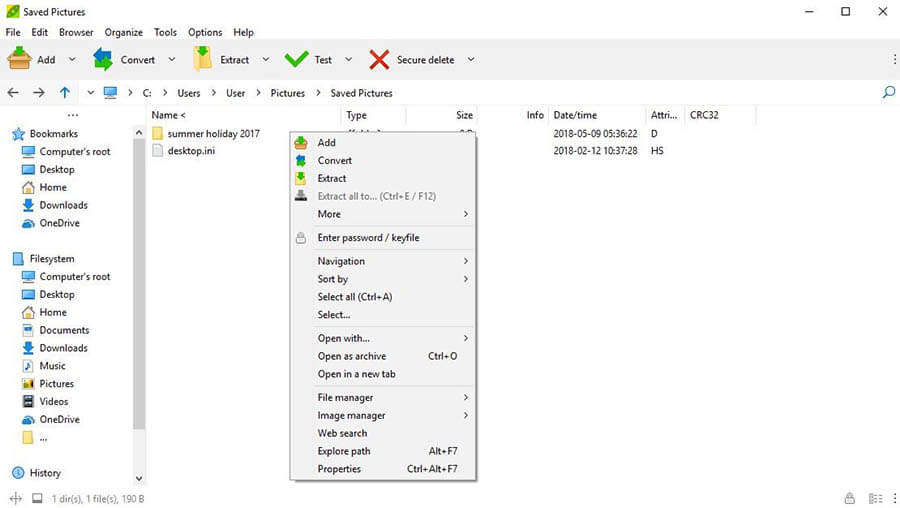
PeaZip is particularly interesting when there is a lot of value placed on the security of your data: the pack program operates with a two-factor authentication system. Files created with PeaZip are protected not only with a password, but also with a keyfile. The creation of AES256 encrypted passwords is largely facilitated by the integrated password manager. The open source packer also features a function that allows users to securely delete files.
A keyfile is a file on a computer that contains one or more encryption keys. If an archive is protected by a keyfile, simply entering a password is not sufficient to access it. In addition to the password, the user must also know the keyfile.
With this WinZip alternative, you can not only pack and unpack files, but also merge and split files, find duplicates, and backup scripts. In terms of design, PeaZip takes the lead compared to its competitors: users can not only choose between different skins, but also determine the color and transparency of the interface. When using all the advanced features, the PeaZip program can be tricky to navigate, especially for novice users.
The interface of the visually appealing pack program is primarily in English but the language settings can easily be changed by navigating to a foreign language file via “Options|Localizations.” PeaZip can be used across all devices with the following operating systems: Windows 7, 8, 10, Windows Vista, Win XP, Win 2000, Linux, and Mac OS X.
| PeaZip advantages | PeaZip disadvantages |
|---|---|
| ✓ Unpacks rare formats like 7-Zip, PAQ or DEB | ✗ Advanced settings make the program complicated to use for novice users |
| ✓ Supports approximately 180 formats | |
| ✓ High compression rate and high speed | |
| ✓ High security with two-factor authentication | |
| ✓ Secure passwords thanks to integrated password manager | |
| ✓ Can be integrated with the Windows context menu | |
| ✓ Customizable and individual design |
PeaZip unpack only: 7Z, Google Android APK, BZ, BZ2, BZIP2, TBZ2, TBZ, GZ, GZIP, TGZ, TPZ, TAR, ZIP, ZIPX, Z01, SMZIP, ARJ, CAB, CHM, CHI, CHQ, CHW, HXS, HXI, HXR, HXQ, HXW, LIT, CPIO, DEB, LZH, LHA, RAR, R01, 00, RPM, Z, TAZ, TZ, ISO, JAVA (JAR, EAR, WAR), PET, PUP, PAK, PK3, PK4, SLP, [CONTENT], XPI, WIM, U3P, LZMA86, LZMA, UDF, XAR, APPLE'S DMG, HFS, PART1, SPLIT, SWM, TPZ, KMZ, XZ, TXZ, VHD, MSLZ, APM, MBR, FAT, NTFS, EXE, DLL, SYS, MSI, MSP, Open Office/Libre Office (ODS, OTS, ODM, OTH, OXT, ODB, ODF, ODG, OTG, ODP, OTP, ODT, OTT), GNM, Microsoft Office (DOC, DOT, XLS, XLT, PPT, PPS, POT, DOCX, DOTX, XLSX, XLTX), Flash (SWF, FLV), QUAD, BALZ, BCM, ZPAQ, PAQ8F, PAQ8JD, PAQ8L, PAQ8O, LPAQ1, LPAQ5, LPAQ8, ARC, WRC, 001, PEA, CBZ, CBR, CBA, CB7, CBT, and more
PeaZip pack and unpack: 7Z, Freearcs ARC/WRC, SFX (7Z AND ARC), BZ2, GZ, PAQ/LPAQ/ZPAQ, PEA, QUAD/BALZ/BCM, SPLIT, TAR, UPX, WIM, ZIP
Bandizip: the fast WinZip alternative
The Bandizip pack program is probably one of the least known of the WinZip alternatives, but can keep up with its competition pretty well. The program unpacks all common file formats, such as ZIP, RAR, or ISO. If the amount of data is above average, it can simply be moved directly to the desired location, saving you the time and effort of placing the file in a temporary folder. Bandizip lets you pack and unpack files, split them into multiple packages, and create self-extracting archives.
For packing files, users can choose between the following file types: ZIP, ZIPX, 7Z, EXE, TGZ, TAR, GZ, LZH, ISO, and more. Additionally, with this WinZip alternative, you are free to choose not only the archive type, but also the size of the archive – users can choose from various predefined archive sizes. All archives can be protected with a password.
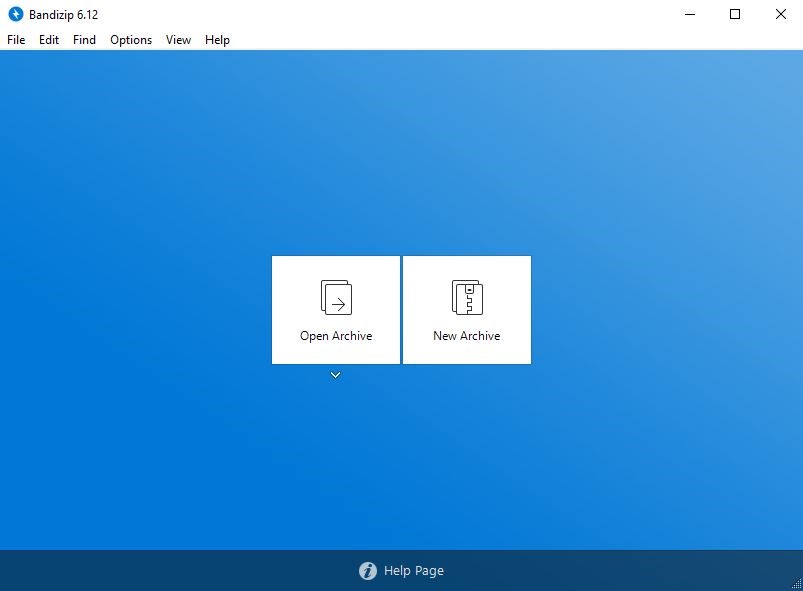
Bandizip is a fast and efficient program. If the compression of individual files takes too long or causes problems, they can simply be skipped. This prevents the compression process from stalling, saving users time.
Bandizip can be integrated into the Windows context menu. The drag-and-drop function allows users to move their files to the Bandizip interface. Alternatively, select the corresponding source file with the mouse and right-click to select the desired pack function from the context menu. You can then determine which files are to be linked with the program from the configuration menu.
The special feature of the WinZip alternative is its added Unicode support, which allows files with Japanese, Chinese, or Korean characters to be packed or unpacked. By upgrading to version 6.x, users also benefit from certain alterations: for example, Bandizip can open both ZPAQ and LZIP files, and users benefit from an improved algorithm.
The Bandizip freeware is also available in a portable version and can be used with Windows 7, 8, 10, and Windows Vista.
After updating to version 6.x, Bandizip is no longer compatible with Windows XP. In this case, it makes sense to fall back on one of the other WinZip alternatives.
| Bandizip advantages | Bandizip disadvantages |
|---|---|
| ✓ Supports all important formats | ✗ After updating to version 6.x, it is no longer compatible with Windows XP |
| ✓ Comparatively high compression speed | |
| ✓ Archives can be encrypted | |
| ✓ Can be integrated with the Windows context menu | |
| ✓ Unicode support | |
| ✓ Clear user interface |
BandiZip unpack only: RAR(PART1.RAR, R01), ACE, AES, ALZ, APK, ARJ, BH, BIN, BZ, BZ2, CAB, EGG, GZ, J2J, JAR, IMG, IPA, ISZ, LHA, LZMA, PMA, TBZ, TBZ2, TGZ, TLZ, TXZ, UDF, WAR, WIM, XPI, ZPAQ, LZ, Z
BandiZip pack and unpack: ZIP(Z01), ZIPX(ZX01), TAR, TGZ, 7Z(7Z.001), LZH, ISO, GX, XZ, EXE(E01)
Ashampoo ZIP Free
With Ashampoo ZIP Free, there is another powerful WinZip alternative on the market. It mostly offers basic features, but is still a good alternative to WinZip and all its other competitors. The free tool comes from the same company as the well-known burninGoogle Workspace, Burning Studio, and is capable of unpacking over 30 different formats (including ZIPX, RAR, ARC, NSIS, WIM, ISO) and packing numerous others such as ZIP, 7-ZIP, CAB, or TAR.
Additionally, the tool supports all RAR versions (including 5.x) and can read all encrypted archives such as WZAES or PKAES. With this WinZip alternative, you can quickly and easily create self-extracting archives (SFX archives) and multi-volume ZIP archives, as well as repair damaged articles. As with all its competitors, you can also use Ashampoo ZIP Free to encrypt all archives (256 bit AES).
When creating archives, Ashampoo ZIP Free proves to be fast and reliable. The program can be fully integrated with Windows Explorer, so often a single mouse click is all it takes. Ashampoo Zip Free stands out because of its modern and appealing design, which makes operating it easy and intuitive. The user interface is based on the tile look of Windows 8 and allows quick access to all its most important functions.
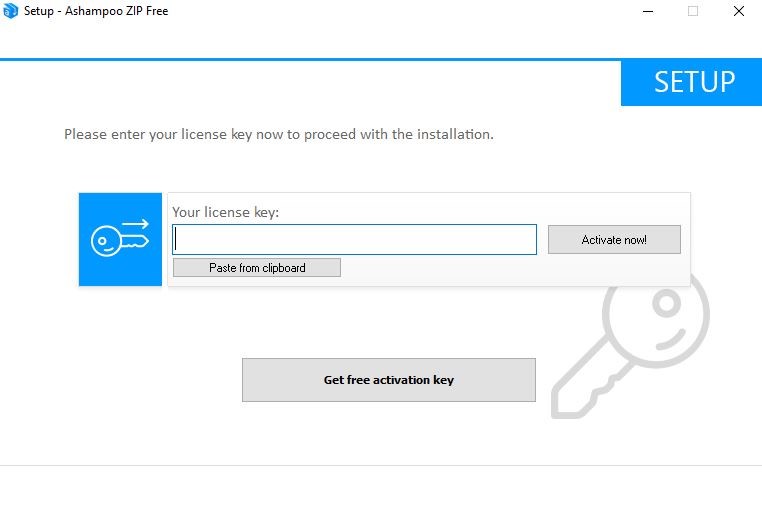
The violet function buttons make it possible to choose between “new archive” and “open archive.” Right next to it, the blue files are already opened. RAR, 7-Z, and ZIP files are instantly recognizable by the corresponding file icon. Since all tiles can be moved with the mouse, you can easily adapt the user interface to your needs. If you want to use the free full version of Ashampoo ZIP Free, you must register with the provider by e-mail.


Those that don’t just use the standard functions, but also want to transfer their archives from the pack program directly to the cloud, should consider updating to the Pro version for a fee. Among other things, ISO images can be connected to virtual drives and users can create ZIP script files.
Ashampoo ZIPFree is compatible with Windows 7, 8, 10, Windows Vista, Win XP, Linux, and Mac OS X.
| Ashampoo ZIP Free advantages | Ashampoo ZIP Free disadvantages |
|---|---|
| ✓ Supports all important formats (including RAR versions) | ✗ Only offers basic functions |
| ✓ Can read encrypted archives such as WZAES or PKAES | |
| ✓ Archives can be encrypted | |
| ✓ Intuitive and easy to use with a modern design |
Ashampoo ZIP Free unpack only: RAR, ZIPX, ARJ, ARC, ACE, MSI, NSIS, CHM, DMG, RPM, CPIO, VHD, XAR, LZMA, LZH, SQUASHFS, CRAMFS, Z, ZOO, WIM PLUS ISO (ISO9660 and UDF), and more
Ashampoo ZIP Free packs and unpacks: ZIP, 7-ZIP, CAB, TAR (TAR, TAR.GZ, TAR.BZ2, TAR.XZ), and LHA formats
Overview: the best WinZip alternatives
There are a number of file archivers on the market that can easily keep up with the costly WinZip program. Before deciding on one of these WinZip alternatives, make sure you know what exactly you require of a file archiver and what purpose it should serve. For example, an important aspect of the program for you could be that it not only packs and unpacks files, but also that it can repair damaged archives. Or perhaps you attach particular importance to the security of your data and require double encryption. Depending on your requirements, programs with basic functions such as Ashampoo ZIPFree, are completely sufficient and make the purchase of extensive and costly packers unnecessary.
| Name | Type | Compatible with | Supported formats | Encryption of archives | Can repair damaged archives | Special features |
| WinRAR | Shareware | Windows 10 Windows 8 Windows 7 Windows Vista Win XP Win 2000 Linux Mac OS X | 16 formats in total | Encryption method dependent on archive format: AES-128 or AES-256 | Yes | Foreign archives such as ZIP, CAB, or ARJ archives, can be converted to RAR format |
| 7-Zip | Free open source software, also suitable for commercial use | Windows 10 Windows 8 (64 bit) Windows 7 Windows Vista Win XP (32 bit) Win 2000 (32 bit) Win Me (32 bit) Win 98 (32 bit) Win 95 (32 bit) Linux Mac OS X (only functions with the 7-zX application) | 38 formats in total | AES-256 | No | High compression rate in 60 different languages available |
| PeaZip | Free open source software | Windows 10 Windows 8 Windows 7 Windows Vista Win XP Win 2000 (32 bit) Linux Mac OS X | 180 formats in total | Two-factor authentication (password, keyfile), AES-256 | Yes | Unpacks rare formats such as 7-ZIP, PAQ, or DEB, and provides an integrated password manager |
| Bandizip | Freeware | Windows 10 Windows 8 Windows 7 Windows Vista Linux Mac OS X | 40 formats in total | ZipCrypto and AES-256 | No | Supports Unicode |
| Ashampoo ZIP Free | Freeware | Windows 10 Windows 8 Windows 7 Windows Vista Win XP Linux Mac OS X | Over 35 formats | AES-256 | Yes | Can read encrypted files such as WZAES or PKAES, user interface with Windows 8 tile appearance |