

HTTP requests: methods, syntax, and explanation

On the Internet, browsers communicate with webservers known as the HTTP protocol. This protocol controls how the client formulates a request and how the server responds to them. The HTTP protocol has different HTTP methods. It is worth knowing the most common ones among them. This article explores the details of the individual HTTP request methods, also often known as HTTP verbs.
- KVM based dev servers for developers
- Scalable to enterprise cloud level
- Pay-as-you-go, per-minute billing
GET
GET is the "ancestor" of HTTP requests. This HTTP verb has existed since the beginning of the World Wide Web. It is used to request a resource - such as an HTML file - from a webserver.
When you enter the URL: www.example.com into your browser, it connects to a web server and sends a GET request:
GET /index.phpThe file index.php in this example is simply the homepage which is sent from the server to the browser.
Similarly, requesting the test.html file from the URL www.example.com/test.html would be formulated like this:
GET /test.htmlIn this case, the server will return the test.html file.
URL parameter
Additional information can be added to the GET request for the web server to process. These URL parameters are simply appended to the URL. The syntax is very simple:
- The query string is introduced with a question mark (“?”).
- Each parameter is named, so it consists of a name and a value: "Name=Value".
- If several parameters are to be included, they are connected using an ampersand ("&").
Here is an example. On the website of a software company, "Windows" is entered as the platform and "Office" as the category in order to receive corresponding offers from the server:
GET /search?platform=Windows&category=officeURL coding of query strings
Query strings require a special character encoding because many special characters have a unique meaning. For example, the text "HTTP Overview" must be encoded as follows to be accepted as a query string:
GET /search?topic=HTTP-%C3%9Cberblick%0AYou can easily create URL encodings by using online tools such as the URL Encoder, or offline tools, e.g. the Excel function URLCODE().
POST
If you want to send large amounts of data such as images or share confidential data with the server, the GET HTTP verb is not ideal because all the data you send is written in the browser's address bar without encryption.
In this case, the POST method is more appropriate. This method does not write the URL parameters to the URL, but adds them to the HTTP header.
POST requests are mostly used in connection with online forms. Here is an example of a form that takes the name and e-mail address and sends it to the server using POST:
<html>
<body>
<form action="newsletter.php" method="post">
Name: <input type="text" name="name"><br>
E-mail: <input type="text" name="email"><br>
<input type="submit">
</form>
</body>
</html>Confused about the difference between GET and POST? Our dedicated guide provides all the information on what distinguishes GET from POST.
HEAD
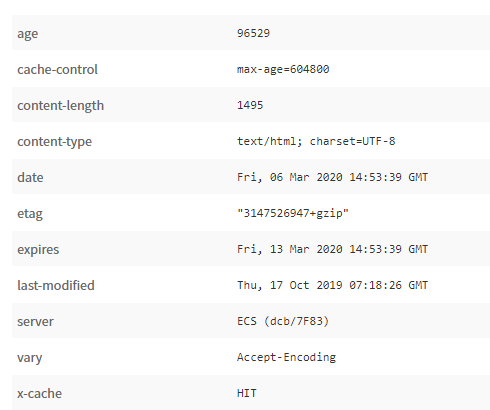
The HEAD HTTP method is used to query the response header without sending a file immediately. This is useful, for example, if large files are to be transferred: Thanks to the HEAD HTTP request, the client can first receive information on the file size, and only then decide whether they want to receive it.
Example:
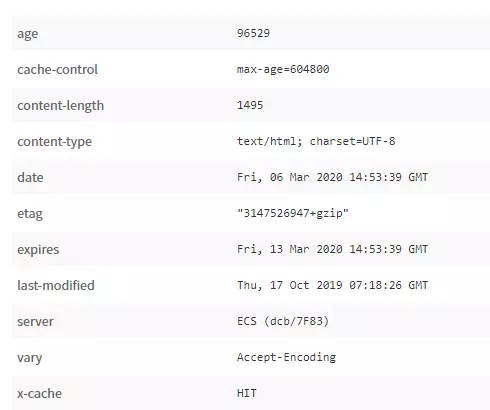
HEAD /downloads/video1.mpeg HTTP/1.0In the response header of the server, the client finds the file size information in the header field "content-length":
OPTIONS
With the OPTIONS method, the client can query which methods the server supports for the file in question.
OPTIONS /download.phpThe response could look like this:
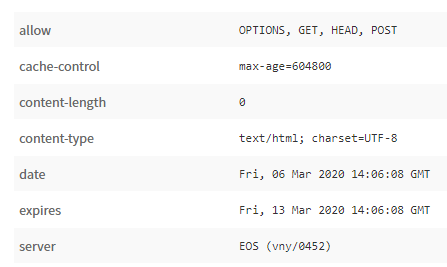
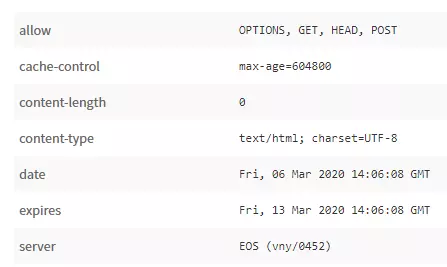
In the field "allow", we learn that the server supports the methods OPTIONS, GET, HEAD, and POST. In the field "content-length", the number “0” tells us that no file was transferred, only the header.
TRACE
The TRACE method can be used to trace the route that an HTTP request takes to the server and back to the client. You can use the tracert command on Windows to track this route yourself. To do this, enter the following command in the command line (cmd.exe):
tracert www.example.comSpecialized methods
Some methods are only applicable in connection with specific configurations. These include the CONNECT HTTP verb, which establishes a direct, protected connection via a proxy (tunneling), and various methods in connection with WebDAV: PATCH, PROPFIND, PROPPATCH, MKCOL, COPY, MOVE, LOCK, and UNLOCK.
PUT, PATCH, and DELETE are used to save, change or delete files on the server. For traditional website programming, these methods play only a minor role, as they are blocked by the servers for security reasons. They are used in the WebDAV context and in connection with the REST-API.