

What is a QR code?

QR codes store information and make it accessible. QR stands for “quick response”, which makes sense, because a scan quickly calls up information and executes commands. Every camera, whether in a smartphone or tablet, can read and process QR codes with a corresponding app.
How do QR codes work and how are graphics generated?
A QR code contains a pattern within a square graphic in which information is embedded. This square contains black and white dots and lines that are read by the app. A QR code can contain up to 177x177 elements and up to half a page of A4 text. Expressed in numbers, a code has a capacity of up to 4,296 alphanumeric characters or 7,089 decimal digits at the lowest error correction level. The higher the error correction level, the lower the QR code’s capacity.
A QR code is made up of two elements:
- Three squares in the corners of the QR code, which allow the scanner to navigate the code.
- The QR code itself, which is embedded as a pattern and holds the information.


What are QR codes used for?
QR codes are used wherever data must be understood quickly. They are found on tickets, vending machines, stamps, flyers, posters, and in many other places. Often, a URL is embedded within the code, which can be accessed using a QR code scanner app. A QR code can also contain text such as voucher codes or information that may speed up the verification process during a ticket inspection, for example.
The most common functions include:
- URL: Opens a window in a browser
- vCard: Creates a new contact
- Geo-location: Shows a location in Google Maps
- Text: Shows static text
- Email: Sends an email with pre-made content
- SMS: Sends an SMS with pre-made content
- Wi-Fi: Connects you to a Wi-Fi network
- Bitcoin: Performs a crypto-currency transfer
- Twitter: Links to a Twitter profile or posts a ready-made tweet
- Facebook: Links to a Facebook page
- PDF: Downloads a stored PDF file
- MP3: Plays a stored MP3 file
- App Store: Opens the App Store and links to an app
- Picture: Pulls up a picture
In conjunction with other apps, QR codes can be used with augmented reality technologies.
How reliable is a QR code?
QR codes are designed to keep information legible even if they are partially destroyed or obscured. This is achieved by error correction. In other words, information is embedded multiple times. At the highest security level, the codes can be read even if up to a third of the code has become illegible. This makes QR codes very reliable as information carriers.
How secure is a QR code?
Digital fraud is a widespread issue and QR codes are not exempt. In the past, they have been circulated for fraudulent purposes. Thus, it’s important that you ensure that your app shows what the code contains before it performs the function. This will help prevent that you access fake QR codes linking to malicious websites. Make sure that the web page is stored in the HTTPS protocol (i.e., begins with “https://”). Only open websites that you trust.
How do you use a QR code?
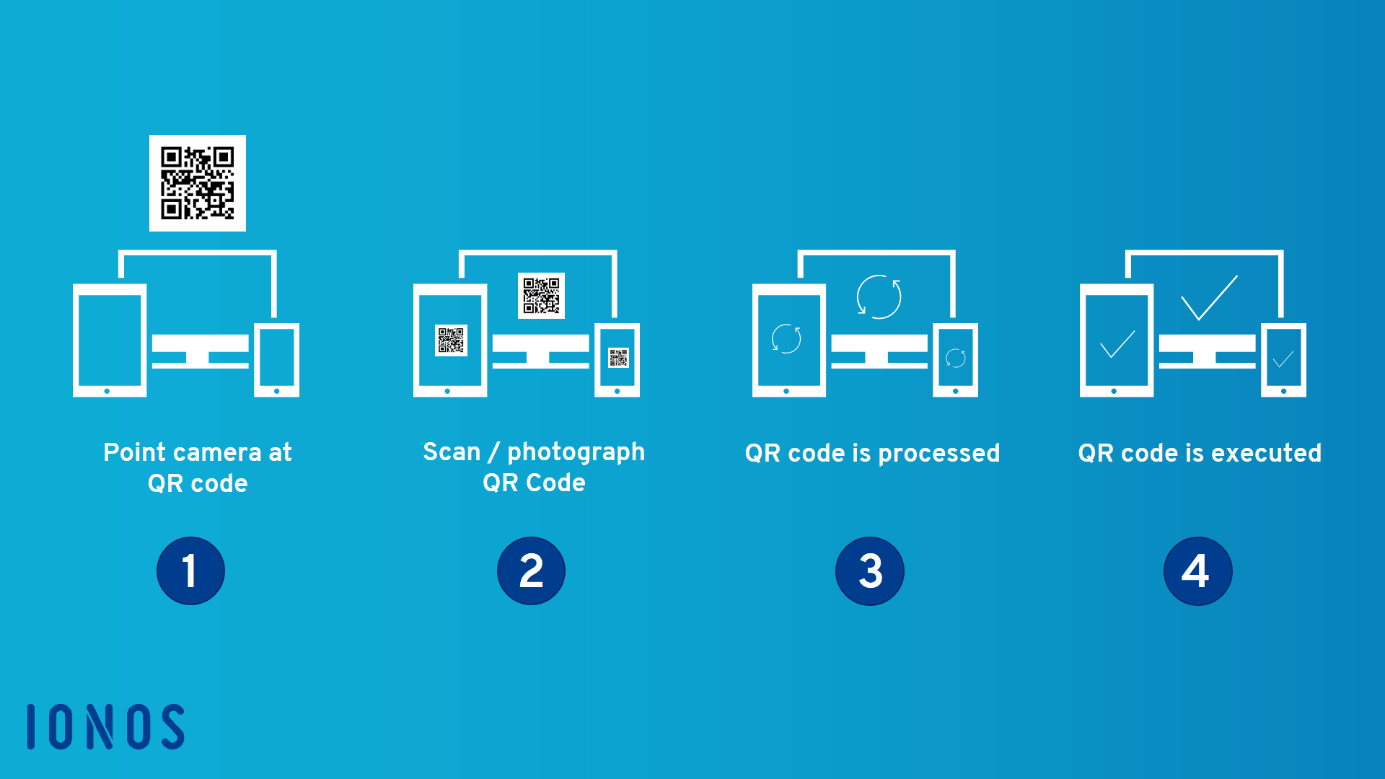
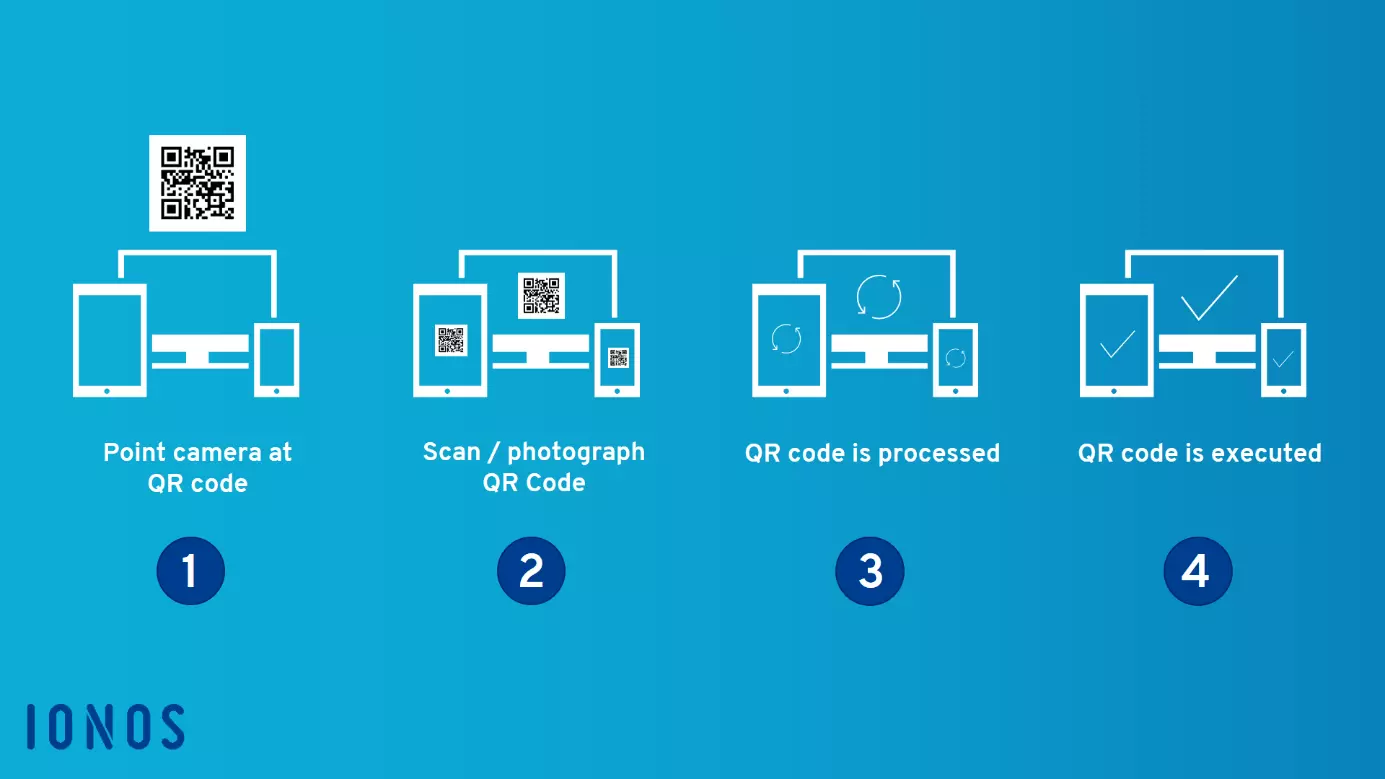
You can use a QR code with a smartphone or tablet and a corresponding QR code app, which scans and processes the code. To use a QR code, follow these four steps:
- Point the camera at the QR code
- Scan or take a photo of the QR code
- The app processes the QR code
- The app executes the QR code and asks if you want to open the embedded URL
How can I create a QR code?
QR codes can be generated using apps or on the internet. To do this, select a feature such as URL linking, text, or Wi-Fi, and then enter the information you want to share. You can usually save the generated QR code as an image file in .jpeg format or as a vector file in .svg format. Once generated, you can do whatever you want with it: print it on T-shirts, share it on Messenger, or embed it on a website.


When creating the QR code, pay attention to whether you are generating a static or dynamic QR code. In the case of a static QR code, changing the target URL will cause the code to stop working. With a dynamic QR code, you can flexibly adapt the target URL without the code losing its function. Many dynamic QR code providers request a fee.
What are the best QR code scanner apps?
The best QR code reader or scanner apps do not feature adverts, contain security features, and are easy to use. Many of them are available in the Google Play Store or the App Store. Below, we’ve put together a small selection of top choices for Android and iOS devices:
The best QR code scanner apps for Android
- QR Code Reader and Scanner (Kaspersky Lab): Kaspersky is a well-known provider of security software. Its QR code app meets the same high security standards and offers a preview of the code before the function is executed. This allows you to scan any QR code quickly and securely. The app does not show adverts.
- Barcode Scanner (ZXing Team): With the Barcode Scanner you can access and create QR codes, and even read product barcodes. As a scanner, the app recognizes the codes safely, quickly, and reliably. The app contains no adverts and provides a preview of the code.
The best QR code scanner apps for iOS
- Preinstalled camera app (Apple): As of iOS 11, the camera app can recognize and read QR codes from your iPhone or iPad. To do so, select the rear camera and scan the code as usual. A preview will be shown. The app does not feature any adverts.
- Scanbot (doo GmbH): Scanbot is a comprehensive scanner app that scans documents and reads QR code. The app recognizes code easily and provides a preview. In addition, it is ad-free, and a pro version is available as a subscription service. QR codes can be scanned using the basic version.
Advantages and disadvantages of QR codes
Like any technology, QR codes have advantages and disadvantages. As always, it comes down to how you use them and whether or not you’re adding value to the end-user. Make sure to work to the technology’s strengths and avoid the weaknesses.
The advantages: speed and applications
QR codes simplify a wide range of processes. For example, you can open a product website by scanning the QR code in a product's supplied manual. You can also use the code to provide guests with password-free Wi-Fi access. It’s as simple as scanning a code using their smartphone, and logging in as directed. This makes QR codes a worthwhile alternative because they tend to be faster than retrieving content manually. But without real added value, you might want to refrain from using QR codes.
There are endless ways in which QR codes can be used. With the right idea behind it, you can show off marketing materials in an interesting way and make digital content easily accessible. It’s important to make the benefits clearly visible to the user. This could include exclusive content, faster access to content, and the opportunity to receive and share content quickly. If you can tick off these benefits, there’s little you can’t do.
The disadvantages: unclear benefits and security risks
The many options may tempt you to use QR codes even when they make little sense. In such cases, QR codes can quickly turn into a gimmick and users will not interact with the codes.
Furthermore, a QR code must be placed in a static, stationary location so that the graphic can be read. Placement on moving objects, such as a vehicle, makes scanning impossible.
Lastly, QR codes also have the potential for security risks. In public places, QR codes can be pasted over or otherwise manipulated: Anyone scanning these codes runs the risk of being directed to a problematic URL, and it’s difficult to tell at first glance whether or not you’ve being misled. Only once you come close up to the code can you see whether it’s been taped over.
Not all available scanning apps will show users the website linked to the code. Therefore, pay attention to where you’re being directed before you confirm this in the app. Also be careful with link shortening such as bit.ly: This can disguise the target URL. Therefore, always consider whether the code is secure or not.
| Advantages of QR codes | Disadvantages of QR codes |
|---|---|
| Fast information retrieval | Added value not clear |
| Interesting application possibilities | Issues with some placements |
| Security risks |
In some Asian counties, QR codes have become a part of everyday life. Whether it’s paying bills or receiving marketing goodies – everything’s possible. Following a big initial hype, QR codes have retreated to a niche existence in other parts of the world. But when they’re used effectively, standardized processes like logging into a network can be sped up quite a bit. For marketing campaigns, too, the little squares can come in handy.
The security question for users is: Where does the code take me? Can I trust the provider? As a provider, make sure that you enter the destination URL with the full address and tell users early on what the QR code is used for. As a user, it’s important to use only apps with a preview and don’t automatically execute the code.
All in all, QR codes are helpful tools when used in the right way. More and more camera apps are able to scan them, which increases their popularity. If you can offer more added value to users, the codes can quickly become a valuable and versatile tool.