

Testing-Tools: The best applications for A/B testing

Running a successful website is a complex endeavor: there is no universal guide to attracting site visitors and generating traction. The only consistent advice to be heeded is that focusing on the needs of the users is of the utmost importance, and should always be your top priority. Regardless of whether you are focusing on website navigation, the content you are publishing or your marketing efforts – assessing the effect of changes to your site on overall user satisfaction will lead to a greater chance of you achieving your desired result.
When it comes to developing user-friendly elements and campaigns, luckily, you are not on your own: there are useful technical website testing tools that make website optimization much easier. You can use A/B testing (also known as “Split” testing) to specifically check out the effect of two different web designs on your site, rather than simply having to guess what the changes will look like. With A/B testing, your test audience will be presented with the different versions in order to ascertain their reactions. How the setup and evaluation of these tests are carried out depends entirely on which A/B testing tools you use.
What distinguishes A/B test tools from one another?
Website operators are more and more frequently using the opportunity to measure how successful different versions of their pages, ads, etc., are. They are doing so in order to assess which one will be the most suitable for their website. Split-tests are particularly popular in the advertising sector, and in e-commerce. It’ s hardly surprising that the market offers a huge selection of testing tools, which provide a variety of functions and pricing models, ranging from simple applications for small businesses to complex enterprise solutions with an all-round service for websites with more traffic.
The individual testing tools differ, not only in the scope of the test (user number, test duration etc.) but also in terms of their additional functions. Among other things, website testing tools can be distinguished by the following technical features:
- ability/inability to create multiple accounts
- Simultaneous log-in possible/not possible
- Individual analysis of users (targeting) possible/not possible
- Test data visualization
- Option to export the test data
- Email notifications
- Multiple interfaces (CMS, analysis software, shop systems)
- Option to specify multiple conversion targets
- Scheduling options for A/B testing
- Heatmap / Clickmap
- Archiving test data
A quick guide to A/B testing tools for websites
The decision for or against a particular website testing tool can often come down to price – especially when some tools could set you back four-digit sums for the enterprise sector. However, the skills and expertise of the company should also play a role in your selection process. If you do not know how best to use A/B testing tools for your own web project, or how to evaluate the test data, then the tool will be of little help to you without assistance. It may also be worth your while to employ an external agency to oversee the testing, rather than always using the rather expensive services of the tool providers.
If you have decided to choose a program, the following overview can help you make your choice. Throughout the course of this article we, will present you with some interesting programs for website optimization based on A/B tests.
Adobe Target
Since 2012, Adobe has been bundling several online marketing and web analytics products together as part of the Adobe Marketing Cloud. These tools include Adobe Target which is an A/B testing tool that can be purchased optionally in the overall marketing package, or individually. The cost of the program is calculated individually from the annual visitor numbers to the respective website. As a website operator, you must be able to provide a realistic estimate at the beginning of the contract period, which then serves as the starting point for price calculation. For more detailed tests and analyses on the basis of all relevant parameters and target groups, it is worth combining it with Adobe Analytics.
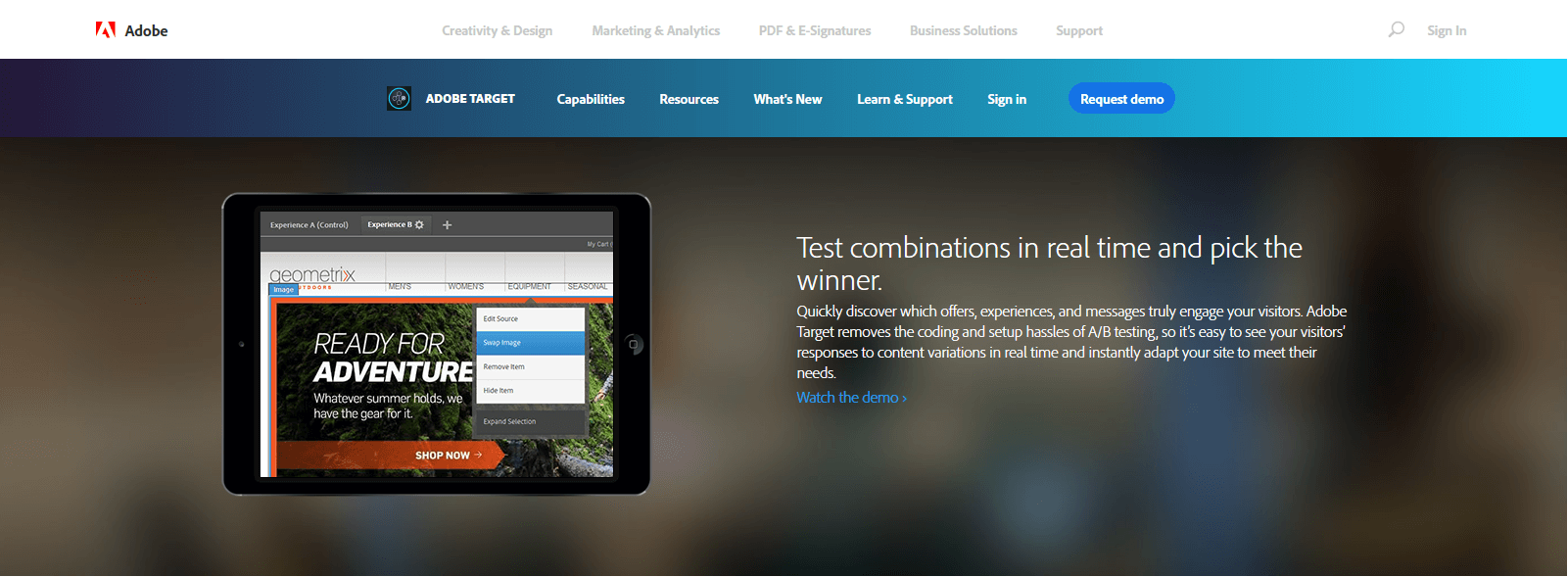
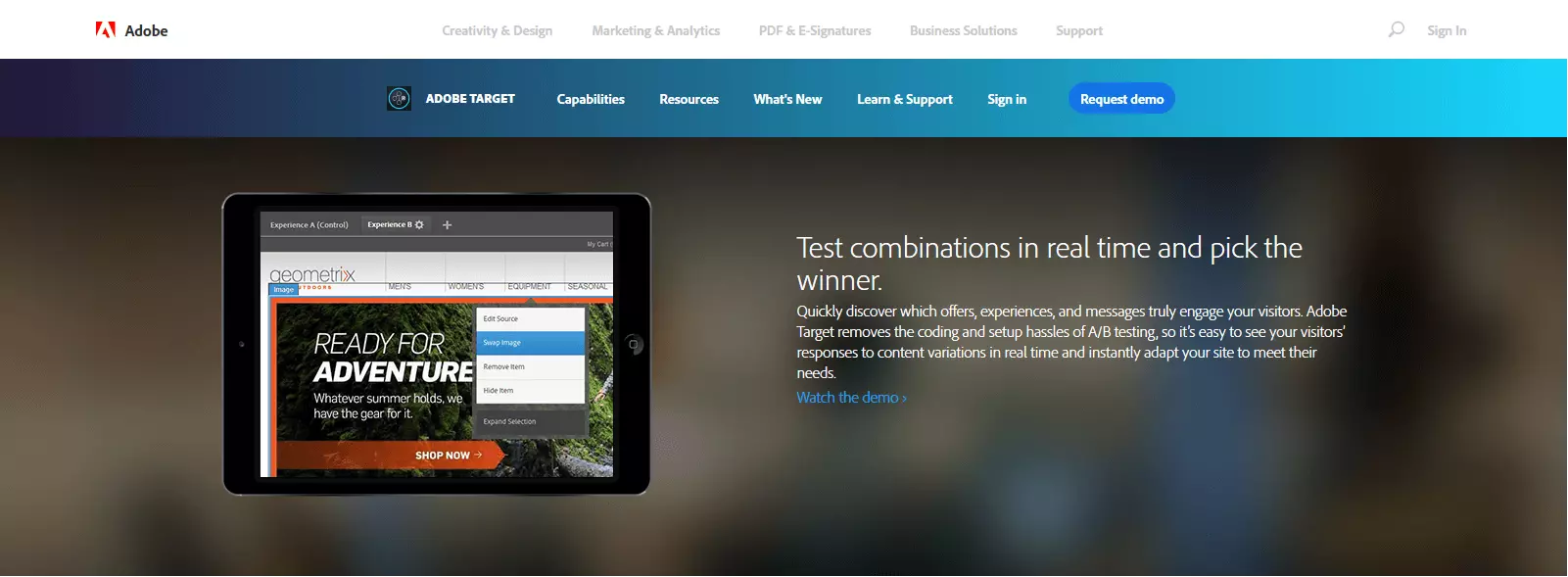
Adobe Target is aimed at both beginners and professionals in the field of A/B testing. The tool provides some of the best practices, which can be used as a basis for your own tests and can be customized and refined. Targeting also plays an important role: the program is used for creating target groups and defining the desired variants for individual code lines or entire websites. Step-by-step instructions guide the user through the setup process, which can be a tricky process to master, especially on the first use. The testing tool allows for simultaneous testing of multiple pages or channels as well as features to publish optimized content automatically in real time. Other features include:
- Automized optimization based on a defined merchandising rule set (key figures, KPI thresholds)
- Option of targeted promotions (advertising banners or videos)
- Option of integrating analysis functions via Adobe Analytics
- Options to optimize mobile content
- Creation of automated recommendations.
Adobe Targets interface is customizable. The marketer is able to pick and choose how the various reports, diagrams, and daily summaries are displayed. The more data the software receives, the less you have to worry about the specifics of the A/B tests. Adobe Target not only accesses the users’ settings but also delivers its own input to optimize campaigns thanks to powerful algorithms. For example, the targeting engine automatically evaluates all test data, gaining information that helps perfect the process of grouping the test candidates in the long term.
| Pro | Contra |
|---|---|
| Mobile testing/optimization possible | Pricing only on request |
| Self-hosting possible | Laborious, time-sensitive setup |
AB Tasty
In June 2012, the web analytics agency AB Tasty (formerly Liwio) published the first version of their software of the same name, which helps customers develop their own optimization processes in a quick, user-friendly manner. Since then, their A/B test tool has been continually developed over the years and expanded at the company’s six sites. There are three subscription packages available to interested parties: “Starter”, “Plus” and “Enterprise”. The “Starter” package ($249 per month) and the “Plus” package ($399 per month) differ only in the number of registered visitors (50,000 and 100,000 respectively). The “Enterprise” edition (price on request) does not contain any traffic restrictions and offers premium support, as well as various additional features.
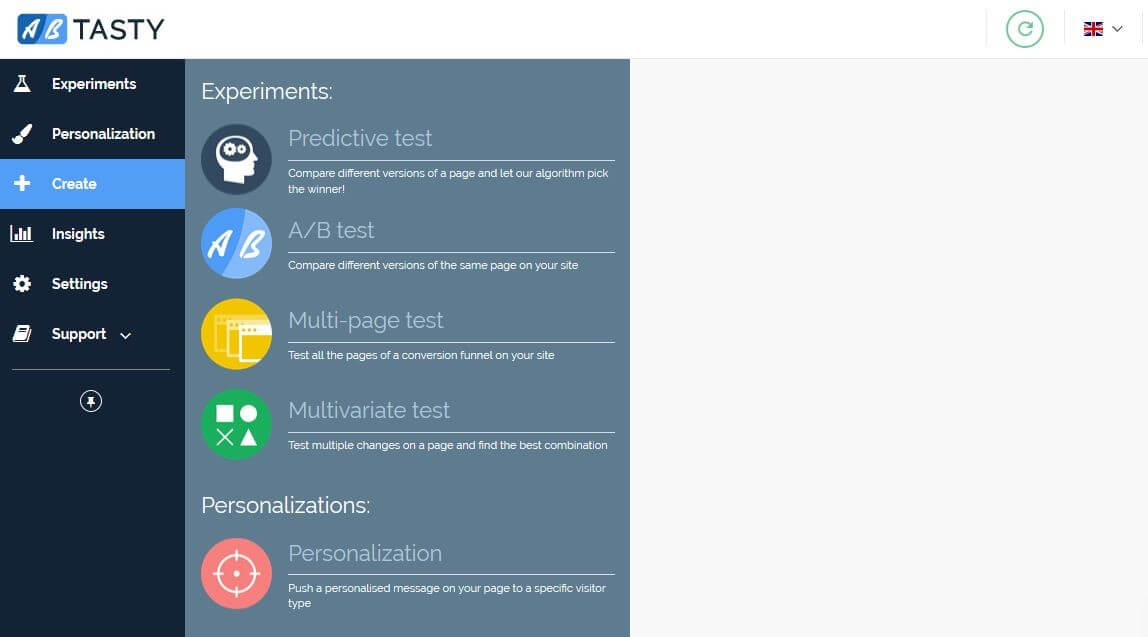
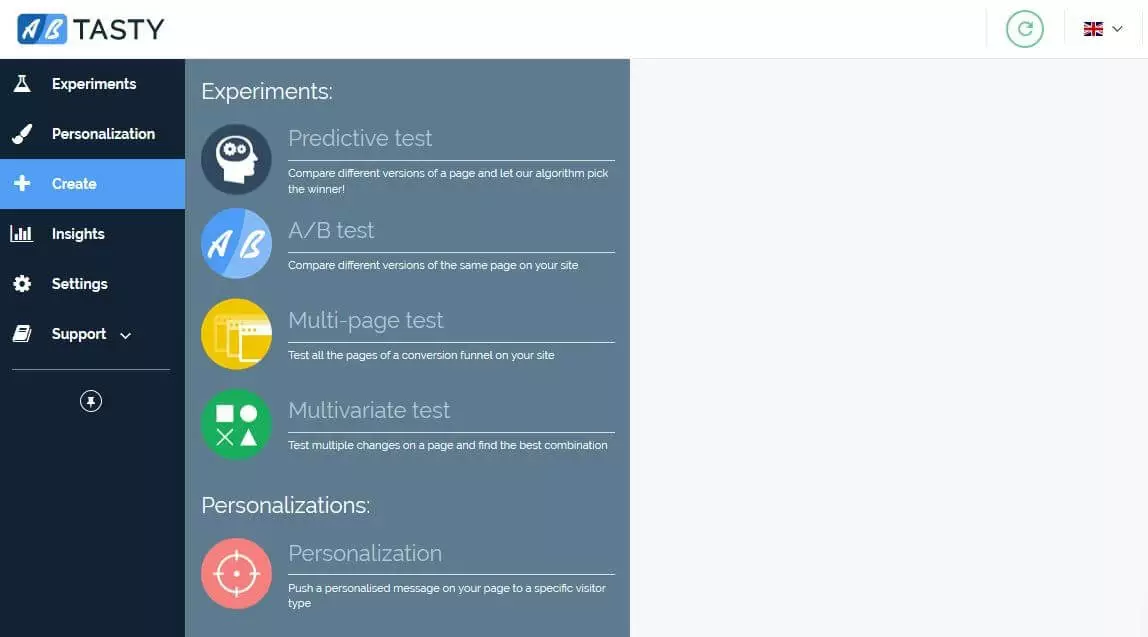
AB Tasty shows itself to be a very clear and user-friendly A/B testing tool. It is quick and easy to set up, personalize and manage under the “Tests” section. Each analysis project is assigned a unique test ID code and can be started, paused or stopped at any time. Furthermore, the user is able to adjust the settings at any time or bring up any report required and then export that file as a PDF or Excel file. Whether you’re testing a desktop site, the mobile version or a native app (only possible with the Enterprise package): modifications and target group settings can be modified in all versions of the website in just a single step. AB Tasty users can also take advantage of the following features:
- Unlimited number of conversions can be made
- Innovative algorithm, “Clever” Stats
- Unlimited number of user accounts
- Easy integration of third-party applications (web analytics, CRM and CMP systems).
The capabilities of “Starter” and “Plus” models are more than adequate for ordinary A/B testing of smaller and medium-sized websites. However, if you want to improve the user experience of websites or applications that have a strong traffic volume, you should choose AB Tasty Enterprise. Enterprise subscribers can test modifications in mobile apps and also create multivariate and multipage tests. In addition, you can also create heatmaps and manage the accessibility of individual tests. In terms of targeting, the Enterprise Edition is miles ahead of the two standard models, with more than 100 native criteria, enabling even more targeted campaigns.
| Pro | Contra |
|---|---|
| User interface | Training material is only included in the Enterprise package |
| Outstanding support |
Optimizely X Web Experimentation
Since 2019, Optimizely, an outfit based in San Francisco, has been offering “X Web Experimentation” in its in-house testing tool for extensive A/B tests. Since 2007, the performance agency has supported website operators, developers, marketers and project managers in website optimization on the basis of collected test data – now also operating in branches around the world like Munich, London, Paris or Sydney.
Optimizely markets its software in three variants: while the “standard” package includes all A/B testing tools, the “Professional” package adds additional features such as expanded audience targeting or user-based roles and authorizations to these basic components. In addition to standard and professional editions, the “premium” package includes additional features such as geo-targeting and allows for an unlimited number of users. The costs for the respective package (prices available on request) depend on the number of website visitors, with a minimum limit of 1,000.
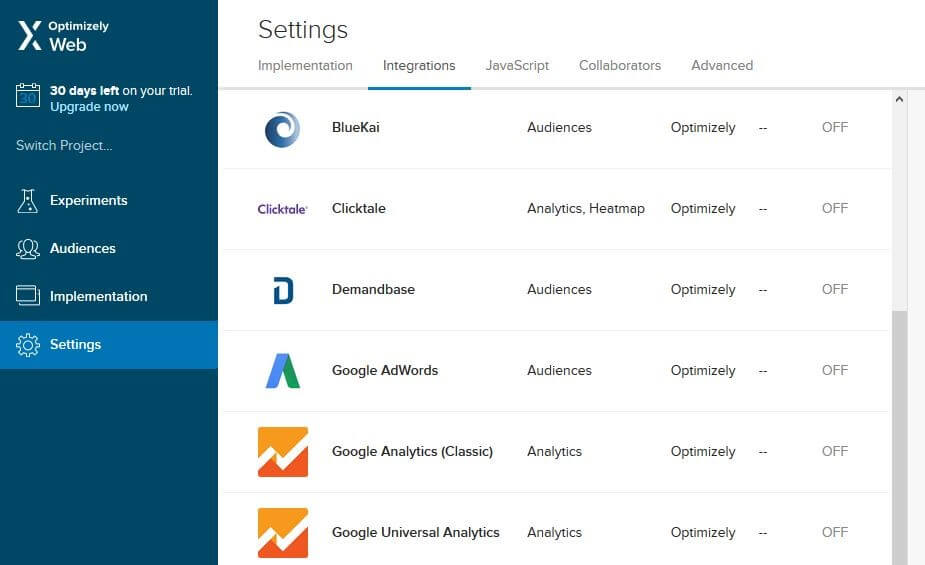
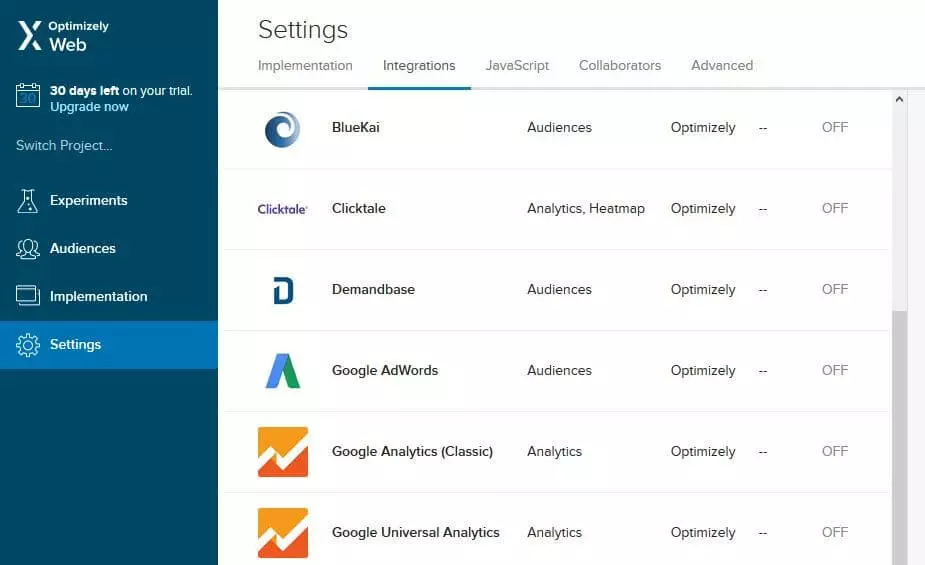
Optimizely should be quite intuitive to operate for most users, thanks to the appealing web interface. Under the heading “Experiments”, you can create your test project in just a few steps: after choosing a campaign name and the number of test pages and target groups you want, any number of conversion goals can be formulated. These are called “metrics” by Optimizely. Finally, you can distribute the incoming traffic as a percentage of the numerous variations. The target groups are created in the separate “Audiences” menu. There, the user assigns the following to their audience using drag and drop function:
- Browser version options
- Cookies allowed / not allowed
- JavaScript approved / not approved
- Operating system options
- Visitor source (direct access, search engine, link, advertisement)
The A/B test tool doesn’t just improve the desktop user’s experience: since mobile websites and iOS or Android apps can also be tested, you can learn about user behavior and satisfaction levels that portable devices bring. Individual tests can be started, paused and adjusted as required. Those who use the schedule function can even determine when which processes should work and do not have to activate them manually.
In the later stages of analysis, the implemented Stats Engine helps in the decision-making process. This statistical framework uses the sequential testing method to find the optimal variant with a probability of about 95 percent.
| Pro | Contra |
|---|---|
| Target group editor with drag-and-drop function | No foreign language options |
| High success rate thanks to its own statistics framework (Stats Engine) | Price only available on request |
Visual Website Optimizer
Visual Website Optimizer (known as VWO) is one of the first website testing tools from the word go. In 2010, the Indian development team Wingify released its’ software, which has already produced more than 300,000 web campaigns. The application is aimed at both the self-employed and SMEs, as well as large corporations. This is reflected in their three subscription plans: the “Startup” (around $49/month for 10,000 visitors) and “Business” ($129/month for 30,000 visitors) plans contain all the features that bloggers, agencies or smaller companies might need. Large companies can sign up to the “Enterprise” plan (starting at $999/month for any number of visitors) and receive useful additional features such as geotargeting or API access.
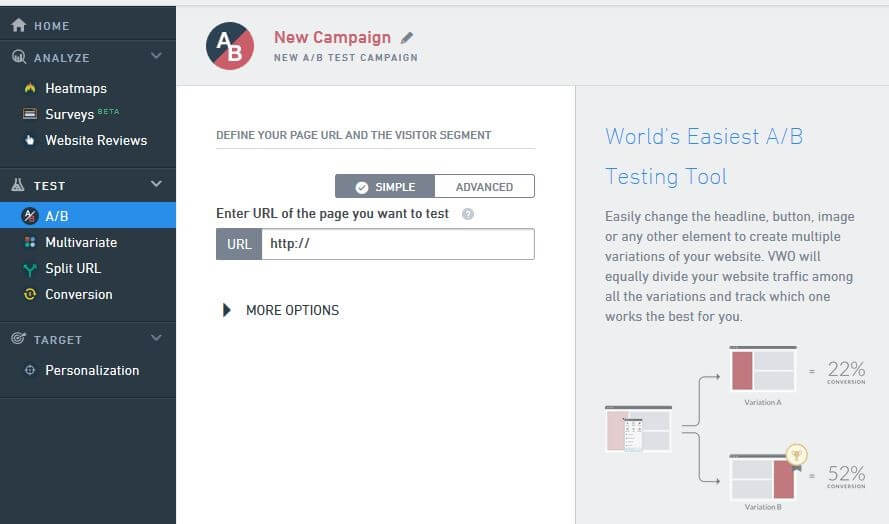
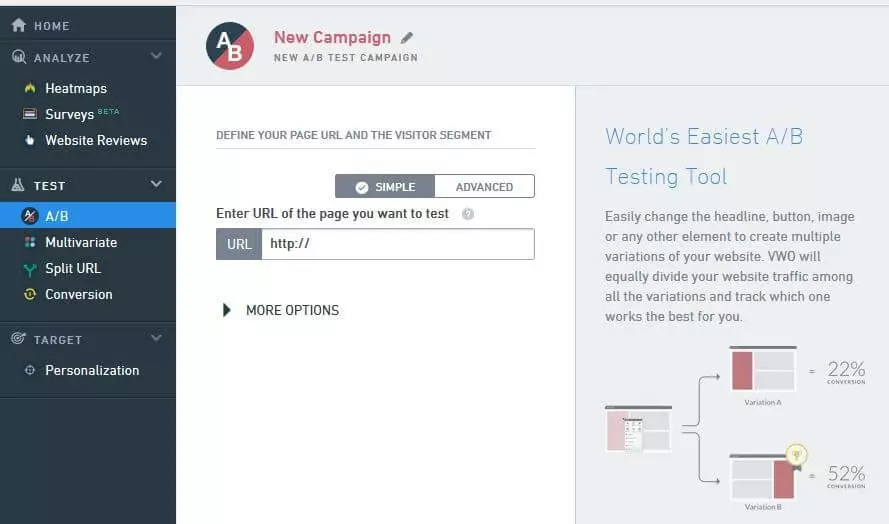
The analysis tools such as heatmaps, surveys, and feedback trackers have their own menu, as well as the editors for creating the tests and defining the target groups. The website testing tool is not limited to A/B testing, it also allows for multivariate and split URL testing. You can also initiate a simple conversion tracking for the website. When configuring experience checks, the user can also define any amount of conversion goals. Other features of the tool include:
- WYSIWYG editor for creating varied content
- Access to Best Practices (IdeaFactory, Landing Page Analyzer, Case Study Library)
- Top Performance thanks to a connection with its’ own Content Delivery Network (CDN)
- Integrated interfaces for diverse standard programs (CMS, Webanalyse-Tools, Warenkörbe etc.)
- Self-hosting (only with the Enterprise-Plan)
- API access (only for Enterprise-Plan)
Tests can be started, paused or stopped at any time. It is also possible to make changes to the settings, for example, if you want to add a conversion target or adjust the target group. There are more than 15 group composition characteristics to choose from. They are things like the keywords used, query parameters, days of the week or the operating system. Enterprise customers have access to advanced security features, more detailed reports, round the clock customer service (including a personal account manager), and the ability to host the testing tool itself.
| Pro | Contra |
|---|---|
| Top-Performance through a CDN connection | Software support is only available in English and Japanese |
| Self-hosting possible (Enterprise-Plan) | No option to test mobile apps (mobile websites only). |
Convert Experiences
In 2011, the California based company Convert Insights revealed an A/B testing platform for website optimization. With the support of the company Alta Ventures, a second office was opened in Mexico that year to continue the advancement of the software. Convert Insights has been increasingly focused on the enterprise sector and target-oriented testing, as reflected in the latest version of the tool, Convert Experiences. Users can choose between three paid versions: “Plus” from ($449/month for up to 400,000 visitors), “Professional Team” (from $599,000 for up to 1,000,000 visitors) and “Enterprise” (from $6999,00/month for up to 100,000,000 visitors).
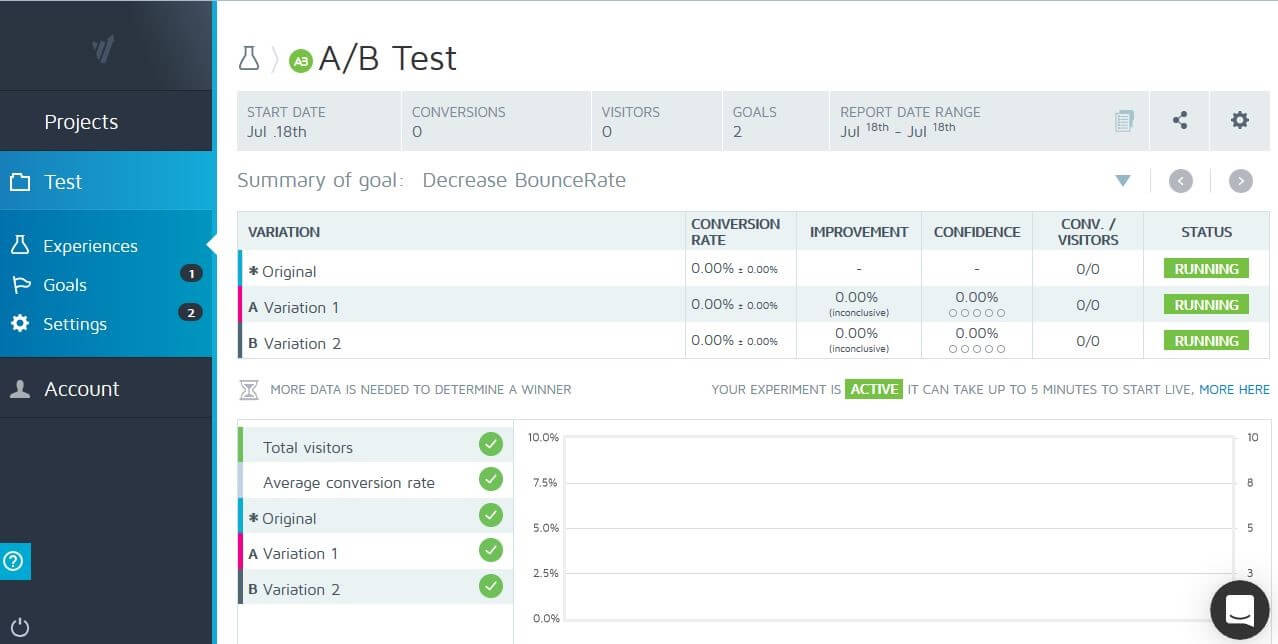
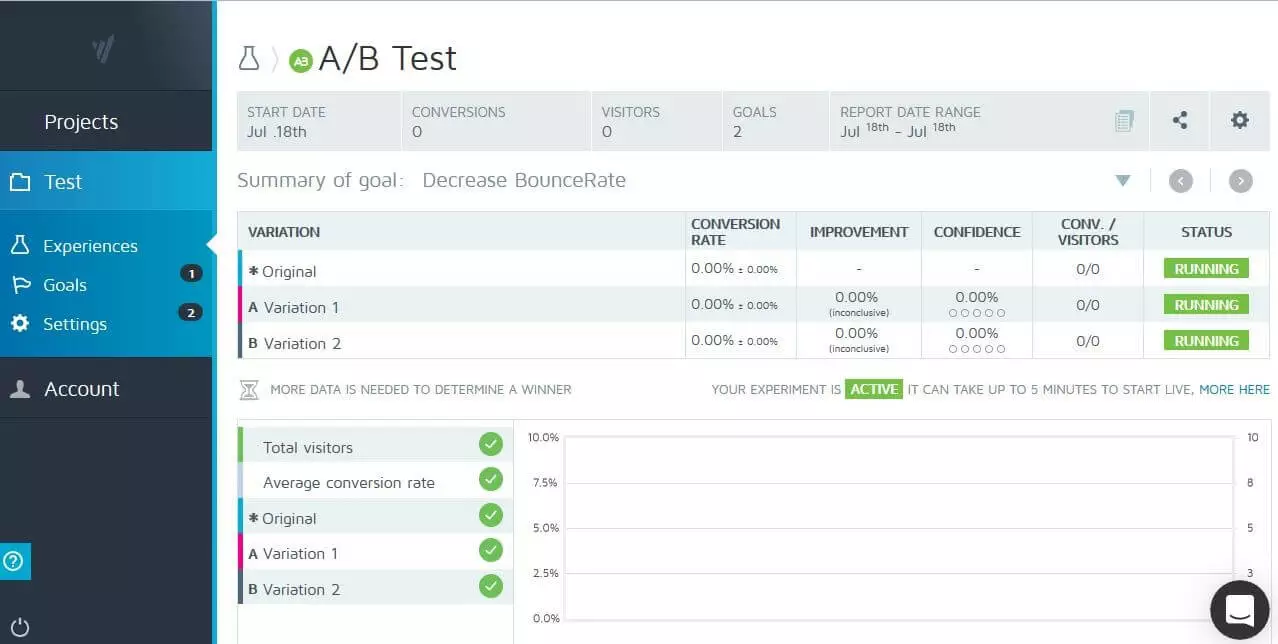
The fact that Convert Experiments is a testing tool for professionals quickly becomes clear: although the interface is limited to the most important navigation elements, newcomers and inexperienced marketers are likely to be overwhelmed with the abundance of configuration options and statistics. The web application is too complex for those looking to run simple tests, or for users who do not have a lot of A/B testing know-how. Experts benefit from the detailed options: aside from the standard A/B tests, there is also an option to perform split URL, multivariate and A/A tests (comparing the original with an exact copy to test the functionality of the tool). The central focus of Convert Experiments is definitely the Visual Editor, which helps create any desired test variations using just a few clicks, no need for HTML knowledge. If you select your preferred elements of the original page, the editor captures the underlying code and lists the corresponding options for customization in a pop-up option menu, such as the following:
- Move object
- Change object size
- Hide element
- Customize CSS/HTML code
- Insert or replace picture
- Edit text
- Change background color
The website testing tool’s first class WYSIWYG editor is convincing thanks to the selection of prefabricated goal conversions (“goal templates”). The user can easily access these templates if, for example, they want to define a link or visit a specific page as a conversion. Alternatively, you can create your own templates in a drag-and-drop editor or import objectives from Google Analytics. In the meantime, Convert Expressions has set up a number of criteria as a standard for compiling the target groups: dividing new and returning visitors as well as the classification based on location (also, social media), the chosen standard language or the search engine used.
| Pro | Contra |
|---|---|
| Extensive setup options for testing, targeting and conversion goals | Too complex for A/B testing beginners |
| Powerful WYSIWYG editor to create variants |
etracker Optimizer
The tool etracker has been supporting its customers for more than a decade in the areas of website optimization and online marketing. The success of the Hamburg, Germany based company is largely due to its web analysis software, which has been awarded several times as a data protection compliant alternative to Google Analytics. Since 2013 they have also provided their own testing tool for carrying out A/B and split URL tests with etracker Optimizer. Customers can choose between two subscription models: the “Pro” version for the self-employed and SMEs (€19.00/month), as well as the “Enterprise” edition (price on request) also provides features for remarketing, as well as multivariate testing (optional).
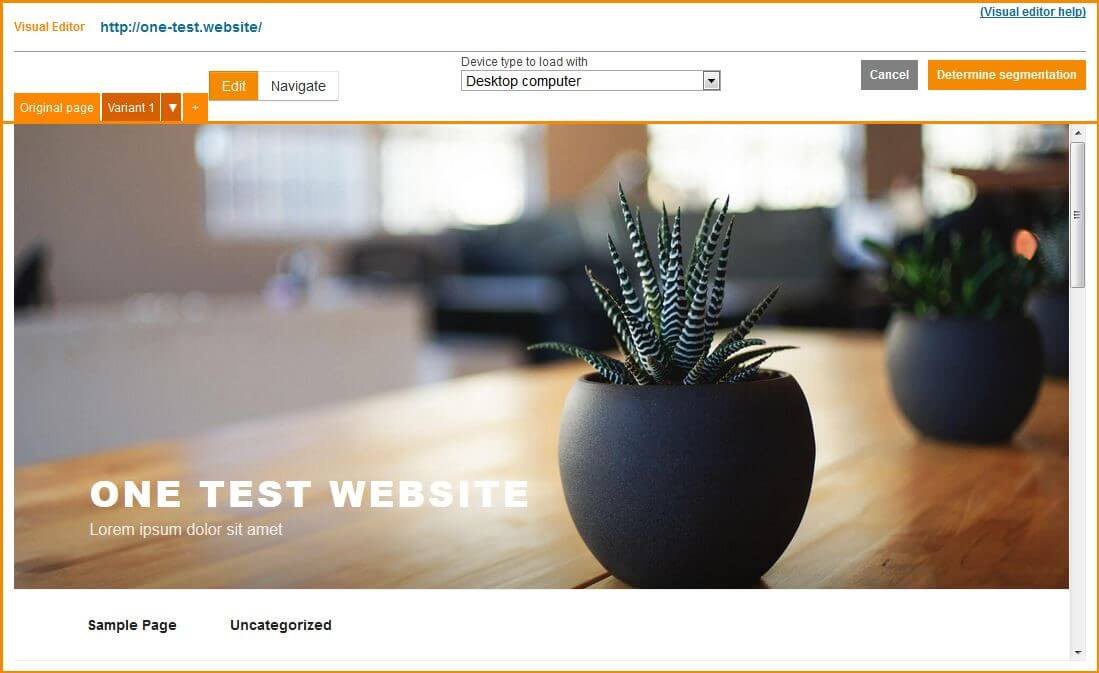
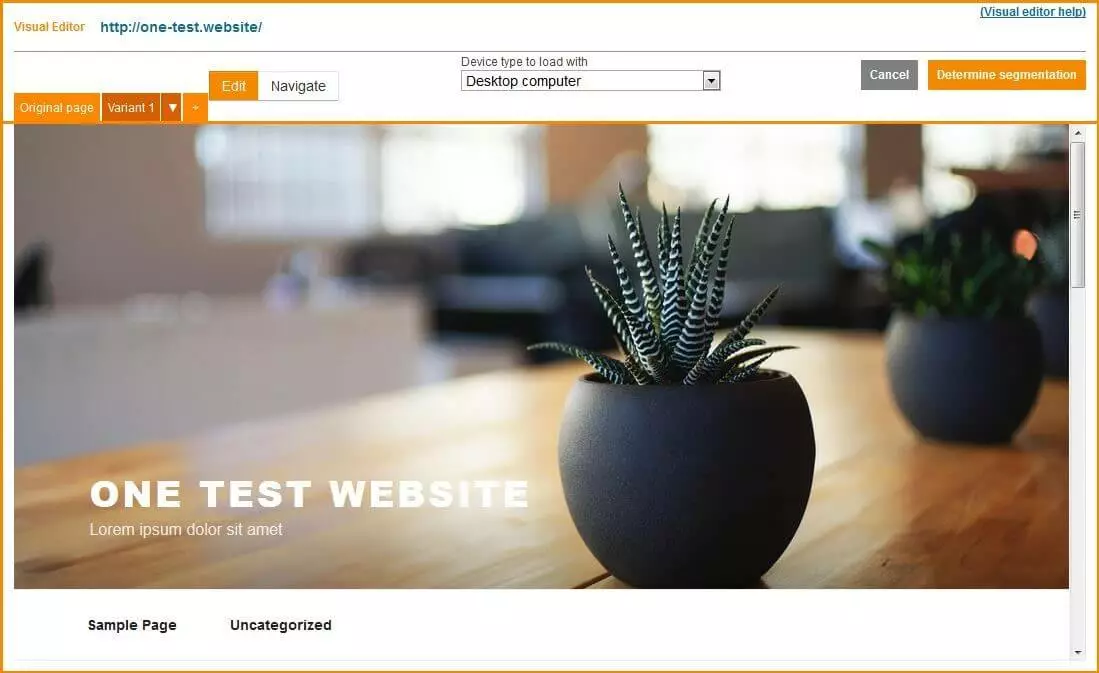
etracker Optimizer provides step-by-step creation of test projects. At the start, the user selects the desired test type and which page they want to optimize. In the next step, they customize the original page in the visual editor as required. To do this, you just have to click on the desired element, whereupon a pop-up menu displays the corresponding options for editing JavaScript, CSS, HTML, and text elements. If the variant corresponds to your own ideas, the user can define rules for dividing visitors – if a variant is to be used only on a specific target group. For this purpose, the testing tool provides various identification features, which can be combined as desired – for example:
- String in the URL
- Source of origin (social media, search engine, advertisement, type-in)
- Used search terms
- Distinguishing between new and returning visitors
- Whether or not a visitor is a newsletter subscriber
- Device type
- Location
Once the variant is created, the editor offers the option to define the start and end time of the test and define the percentage of visitors to be included in the test. You can also adjust both settings afterward – for example, if a pause or premature end to the test is desired. The final step is to define the conversion goals. Here, you can select actions like clicking a link, calling a particular page or purchasing a product as a destination. The A/B testing tool now tracks the behavior of the sites’ visitors and determines a conversion as soon as one of the actions you choose is executed.
| Pro | Contra |
|---|---|
| Can be combined with etracker Analytics | Some target audience settings are only available in the Enterprise edition |
| No defined segmentation features |
Testing tools compared using a grid
The aforementioned applications have a variety of strengths and weaknesses. However, presenting just one A/B testing tool as the optimal solution is quite difficult. The various options also target different customer groups: while Adobe Target and Convert Experiences specifically address users from the enterprise sector, tools like VWO or Optimizely X Web Experimentation are also suitable for marketers who are just entering the world of A/B testing.
| Developer | Release year | Language | Option for self-hosting | ||
|---|---|---|---|---|---|
| AB Tasty | AB Tasty | 2012 | English, German | no | |
| Adobe Target | Adobe | 2012 | English | yes | |
| Convert Experiences | Convert Insights | 2011 | English | no | |
| etracker Optimiser | etracker | 2013 | English, German | no | |
| Optimizely X Web Experimentation | Optimizely | 2016 | English | no | |
| Visual Website Optimizer (VWO) | Wingify | 2010 | English | yes |