

RARP (Reverse Address Resolution Protocol)

What happens if your own computer does not know its IP address, because it has no storage capacity, for example? In these cases, the Reverse Address Resolution Protocol (RARP) can help. The RARP is the counterpart to the ARP – the Address Resolution Protocol.
The Reverse ARP is now considered obsolete, and outdated. Newer protocols such as the Bootstrap Protocol (BOOTP) and the Dynamic Host Configuration Protocol (DHCP) have replaced the RARP. However, it is useful to be familiar with the older technology as well. For instance, you can still find some applications which work with RARP today. It also helps to be familiar with the older technology in order to better understand the technology which was built on it.
What is the RARP?
The RARP is a protocol which was published in 1984 and was included in the TCP/IP protocol stack. The RARP is on the Network Access Layer (i.e. the lowest layer of the TCP/IP protocol stack) and is thus a protocol used to send data between two points in a network. Each network participant has two unique addresses more or less: a logical address (the IP address) and a physical address (the MAC address). While the IP address is assigned by software, the MAC address is built into the hardware. You have already been assigned a Media Access Control address (MAC address) by the manufacturer of your network card.
It is possible to not know your own IP address. This may happen if, for example, the device could not save the IP address because there was insufficient memory available. In such cases, the Reverse ARP is used. This protocol can use the known MAC address to retrieve its IP address. Therefore, its function is the complete opposite of the ARP. The ARP uses the known IP address to determine the MAC address of the hardware.
How does the RARP work?
Who knows the IP address of a network participant if they do not know it themselves? A special RARP server does. This server, which responds to RARP requests, can also be a normal computer in the network. However, it must have stored all MAC addresses with their assigned IP addresses. If a network participant sends an RARP request to the network, only these special servers can respond to it.
Since the requesting participant does not know their IP address, the data packet (i.e. the request) must be sent on the lowest layers of the network as a broadcast. This means that the packet is sent to all participants at the same time. However, only the RARP server will respond. If there are several of these servers, the requesting participant will only use the response that is first received. The request-response format has a similar structure to that of the ARP.
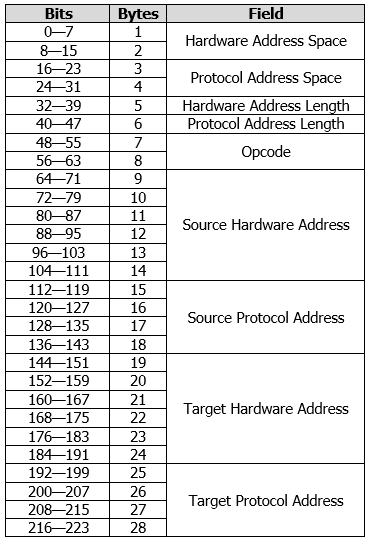
The following information can be found in their respective fields:
- Hardware Address Space: These two bytes contain the type of hardware address.
- Protocol Address Space: This field, which is 2 bytes long, specifies the type of network protocol.
- Hardware Address Length: This is 8 bits and defines the length n of the hardware address.
- Protocol Address Length: This field defines the length m of the network address.
- Opcode: This field is two bytes long and defines the type of operation. An RARP request has the value 3 and the corresponding response the value 4.
- Source Hardware Address: This is where the MAC address of the sender is stored. The actual length of this field is n and is defined by the information under Hardware Address Length. A standard Ethernet network consists of 6 bytes.
- Source Protocol Address: This field would normally contain the IP address of the sender, but since the IP address is not known during a request, the field remains undefined. The response, however, will contain the IP address of the server. The length of this field is m and is dependent on the Protocol Address Length. Normally, though, the field is the same length as an IPv4 address (i.e. 4 bytes).
- Target Hardware Address: This field contains the target’s MAC address. Since there is no specific target for an RARP request, this field also contains the sender’s address. The server also includes the address of the requesting client in the response. The length of this field is also n and is specifically 6 bytes long for Ethernet networks.
- Target Protocol Address: This last field remains undefined during a request and contains in the response the information requested by the server: the participant’s IP address. The length of this field is also m, which is usually defined as 4 bytes.
There are important differences between the ARP and RARP. First and foremost, of course, the two protocols obviously differ in terms of their specifications. While the MAC address is known in an RARP request and is requesting the IP address, an ARP request is the exact opposite. The IP address is known, and the MAC address is being requested. The two protocols are also different in terms of the content of their operation fields: The ARP uses the value 1 for requests and 2 for responses. The RARP on the other hand uses 3 and 4. This means that a server can recognize whether it is an ARP or RARP from the operation code.
Issues with the Reverse ARP
The Reverse Address Resolution Protocol has some disadvantages which eventually led to it being replaced by newer ones. To be able to use the protocol successfully, the RARP server has to be located in the same physical network. The computer sends the RARP request on the lowest layer of the network. As a result, it is not possible for a router to forward the packet. In addition, the RARP cannot handle subnetting because no subnet masks are sent. If the network has been divided into multiple subnets, an RARP server must be available in each one.
In addition, the network participant only receives their own IP address through the request. As previously mentioned, a subnet mask is not included and information about the gateway cannot be retrieved via Reverse ARP. Therefore, it is not possible to configure the computer in a modern network. These drawbacks led to the development of BOOTP and DHCP.