

What is the ICMP (Internet Control Message Protocol)?

In order to be able to exchange status information or fault messages, nodes in TCP/IP networks access the Internet Control Message Protocol (ICMP). In particular, application servers and gateways (routers) use the IP extension to display notifications of datagram problems to the packages’ sender. The structure, mode of operation and classification in the internet protocol stack were specified in RFC 792 in 1981 RFC 792. For version 6 of the internet protocol RFC 4443 has been defined as the specific implementation of ICMPv6.
By definition ICMP is a stand-alone protocol, even if the various notifications are integrated into regular IP packets. To this end, the Internet Protocol treats the optional extension as a higher layer protocol. Lots of frequently-used network services, such as traceroute or ping, are based on the ICMP protocol.
How does ICMP work?
To understand how the protocol works, you first need to look at the structure of the ICMP, or the header. This is directly linked to the IP header, which is marked by the protocol number 1 or 58 (ICMPv6) in the IP field “protocol.” The header data area of the Internet Control Message Protocol itself is limited and has the following form:
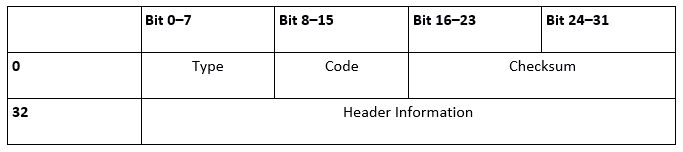
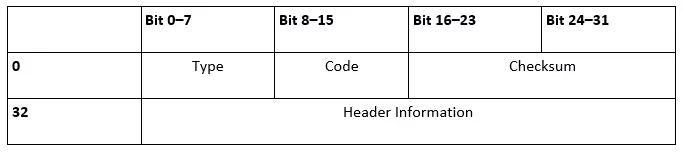
The first 8-bit “Type” field determines what type of notification the ICMP packet is. This information can be specified with the following “code” field, which is also 8 bits long. For example, an ICMP type 3 message specifies that the destination of the data packet is unavailable, while the code specifies this information to determine whether it was the destination network (0), the desired host (1) or the targeted port (3) that did not respond to the previous request. The ICMP checksum follows the information about the message type, and ensures the accuracy of the notification. This is done the same way as other standard protocols’ checksums (IP, UDP, TCP).
Finally, the ICMP files are built and structured differently depending on the respective type and the triggering instance. The IP header often contains a listing of the first 64 bits of the data packet, which are responsible for the error message or the status query. When so-called ICMP tunneling takes place, this field is misused for sending useful data under firewalls’ radars or for establishing an encrypted communication channel between two computers.
What kinds of ICMP packets are there?
Due to the 8 bit field length, 256 different ICMP messages are theoretically possible, with about 40 of them being fixed (including some obsolete representatives) and some blocked for experimental use.
The majority of the numbers (42-252) are not currently assigned, but are reserved in principle. The IANA (Internet Assigned Numbers Authority) are responsible for assigning the numbers, and also regulate the assignment of IP address spaces and ports. We have summarized some of the most important packet types based on the Internet Control Message Protocol in the following table:
| ICMP type | ICMPv6 type | Type name | Code | Description |
|---|---|---|---|---|
| 3 | 129 | Echo Reply | 0 | Test for presence by answering a network ping |
| 0 | 1 | Destination Unreachable | 0–15 | An ICMP message that informs, among others things, the inaccessibility that specific components (network, protocol, port, host) in the field “code” have with routing problems or firewall blocking. |
| 5 | 137 | Redirect Message | 0–3 | Notifying the redirection of a packet for the specified network (0), the specified service and the network (2), or the specified service and host (3). |
| 8 | 128 | Echo Request | 0 | Network ping |
| 9 | 134 | Router Advertisement | 0 | Used by routers to communicate with different network clients. |
| 11 | 3 | Time Exceeded | 0 oder 1 | Status reports, that either report the lifespan (time to Live, TTL) of a packet (0), or the waiting time until the assembly of fragmented packets (1) has expired. |
| 13 | 13 | Timestamp | 0 | This provides the corresponding IP packet with a time stamp, which corresponds to the dispatch time and serves the synchronization of two computers. |
| 14 | - | Timestamp Reply | 0 | Response message an ICMP timestamp that the addressee sends after receiving one. |
| 30 | - | Traceroute | 0 | An outdated ICMP message type used to track the path of a data packet in the network: today, email requests and repetitions are mainly used for this purpose. |
Where ICMP and ICMPv6 are used
ICMP is crucially important in terms of communication within IP networks, and is used by routers in particular. However, servers and clients also make use of the Internet Protocol-coupled messages capabilities and in doing so, obtain important network information.
A common usage scenario is the so-called network ping, which can be executed via the command line of the respective operating system using applications of the same name. The simple but useful diagnostic tool is the easiest option to check the availability of a particular host on the network. To do this, ping sends an IP packet including the ICMP (v6) “Echo Request” (type 8 or 128). After receiving this packet, the receiver responds with a data packet containing the ICMP entry “Echo Reply” (type 0 or 129). If the system that the ping was sent to is unreachable, the last remaining reachable network station sends a response packet. This is also extended by an ICMP component: type 3 or 1 “Destination Unreachable.”
Routers in turn use ICMP for different purposes: per router advertisement (ICMP type 9; ICMPv6 type 134) they set, for example all active network users in regular intervals about their attendance and different network information knowledge. They store the received data in their cache and make the router the standard gateway. In addition, routers try to optimize the path of data packets in the network through ICMP redirects (Type 5 or 137). Using this message type, the network interfaces point a host to the existence of a better first hop (intermediate station) for sending IP packets.