

Professional invoice templates for Word, Excel and PDF

For an invoice to be recognized by the tax office as an official business document, you must comply with several formal requirements. Invoice templates can assist you in ensuring all necessary details are included.
- Write perfect emails with optional AI features
- Add credibility to your brand
- Includes domain, spam filter and email forwarding
What is an invoice template?
Invoice templates are sample invoices that contain all the required components and can be used to map out new invoices. Instead of starting from square one and tediously assembling all of the elements on your own, such a template provides you with a complete example of an invoice with placeholder information that you just have to exchange for the real data.
Templates for invoices can basically be divided into text-based and tabular solutions. If only a few services need to be billed, then the former is almost always the more suitable choice. The more complex the billable services are, the more likely it is that a tabular invoice template will come in handy. This gives you the advantage of being able to arrange individual prices and the overall price much more clearly. A template can also help you calculate certain values, such as the amount of sales tax if the appropriate functions are installed.
What does a professional invoice template look like?
A professional invoice should be both clear and comprehensive. On one hand, it must be visually appealing and easy to read so that customers can quickly find all relevant details. On the other hand, it must include all necessary information to ensure compliance with tax and record-keeping requirements. Incomplete or inaccurate invoices can cause issues during audits and may even impact tax deductions.
General invoice requirements in the United States
Unlike some other countries, the U.S. does not have a federally mandated standard for invoicing in general business transactions. However, a well-structured invoice should typically include the following elements:
- Seller information: Business name, address, and contact details
- Buyer information: Client’s name and address
- Invoice number: A unique identifier for tracking
- Invoice date: The date the invoice is issued
- Due date: The deadline for payment
- Description of goods or services: A detailed breakdown of what is being billed
- Quantities and prices: Itemized list with unit prices and total amounts
- Total amount due: The final sum, including any taxes or additional charges
Special case: import invoices
For invoices related to imported goods, the U.S. Code of Federal Regulations (Title 19 §141.86) specifies additional legal requirements. In these cases, the invoice must also include:
- Port of entry and final destination
- Country of origin of the merchandise
- All rebates, drawbacks, and bounties itemized separately
- Any additional costs (e.g., shipping, insurance)
- Types of currency used (e.g., U.S. dollars, euros, etc.)
- Any goods/services related to production not included in the invoice price (e.g., molds, tools).
Be sure to check that the listed information is complete and accurate—especially if you are using a template solution for your invoices.
How to use invoice templates for Word and Excel
To help you understand the structure and functionality of the invoice templates for Excel, Word, and other formats, we outline the necessary steps to follow when using them.
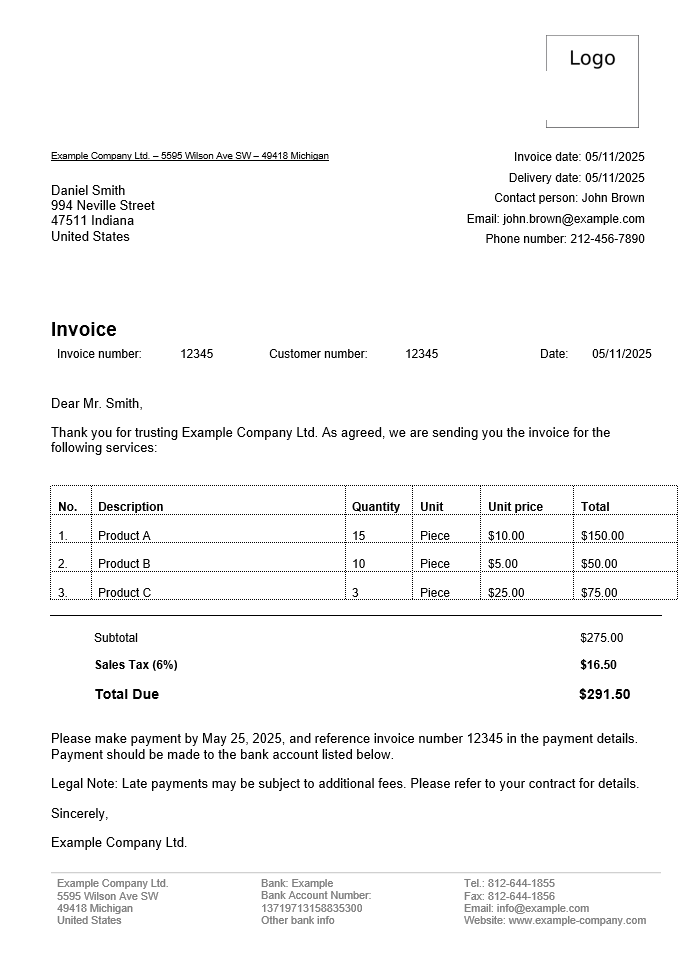
Free invoice template download
Your choice simply depends on which program you would rather work with. If you just want to simply and easily achieve the desired goal then a standard-compliant invoice that contains both the complete and correct information about the provided service as well as the appropriate customer data. Open the downloaded for your free invoice template by double-clicking:
How to customize the invoice template step by step
After downloading the free invoice template as a PDF, Excel, or Word file, you only need to customize it to meet your individual requirements. Simply follow our instructions:
- First and foremost, enter your address information or the company address data in the top left corner. Directly underneath, enter the customer’s address information.
- On the right side, you will find another placeholder for your own address information, along with additional contact details such as a phone number or email address. If you do not offer this kind of support, simply remove the corresponding lines from the invoice template.
- Next is the invoice subject, which you can phrase freely. Instead of the simple “Invoice” that’s written in the template, you can, for example, also include the invoice number or any other agreements or conditions.
- Below the subject, you will find three placeholders for the invoice number, the customer number (optional), and the invoice date. Be sure to replace the example numbers here and don’t forget to enter the current date.
- The next line is designated for the header text, where you directly address the customer. Typically, you use this space to thank them for using your services or making a purchase and to provide a brief transition indicating that the following section lists the invoiced costs.
- After addressing the customer, the most important part of the invoice follows: the list of items (products or services). A table is available for this purpose, which you can expand or shorten by adding or removing rows as needed. The columns should include the item description, quantity, unit price, and total price for each item.
- Below the table, you must specify the total amount due before sales tax as well as the total invoice amount including sales tax. Please note that the sales tax amount differs depending on the state.
- At the end of the invoice, there is another text area for additional information, such as notifying the customer of the date the service was provided, or the goods were shipped. It is also common to specify the payment deadline for the amount due.
- The last section of the invoice template is the footer text. Here, you provide your contact details once again, along with the following bank account details, which the customer needs for the payment transfer:
- Company name (to be used on checks)
- Company address
- Bank account information (if applicable)
- Depending on the nature of your business, you may also need to include your tax identification number (TIN or EIN) if you are selling goods or services internationally. VAT applies in many foreign jurisdictions, but U.S. businesses typically do not charge VAT. Small businesses may qualify for exemptions, so it’s essential to check state-specific tax laws as well as the regulations of any country where you conduct business to ensure compliance.
- Now you can save and print your invoice template. It’s also possible to save the invoice as a PDF file so that you can send it as an email in the future.
Please note the legal notice for this article.
Powerful Exchange email and the latest versions of your favorite Office apps on any device — get started with our free setup assistance.