

What is TYPO3? Features, examples and templates for your website

Since its first beta version in 2000, non-profit organization TYPO3 has been a very prominent content management system (CMS), particularly in Europe. It’s changed a lot since then and nowadays, TYPO3 features many new templates, plugins, additional features, and more. The large community presence is helping to ensure that this CMS remains competitive going forwards, too. The timing seems perfect to examine the CMS TYPO3 a little more closely.
TYPO3 in profile
In 2012, this content management system was officially released under the name TYPO3 CMS. This decision by the TYPO3 Association was, among other reasons, a response to a split within the development team, which led to the creation of “TYPO3 Neos”. Over time, Neos evolved into a CMS that significantly diverges from the original TYPO3. Despite the new name of “TYPO3 CMS”, we still mainly only use the handle TYPO3. WordPress, Joomla and Drupal rank alongside TYPO3, with over 400,000 installations, as one of the most popular CMS programs worldwide.
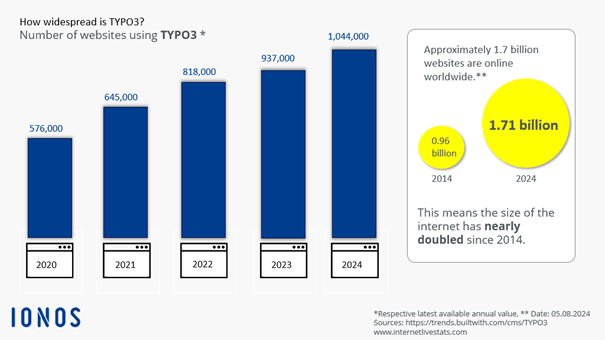
TYPO3 is an open-source software that users can edit using templates to create their personal web design. The operation is then carried out via the web browser. The program can be downloaded for free here.
Unlike most CMS platforms, TYPO3 requires you to manage the content for your website’s user interface using a specific configuration language called TypoScript—a task that can be particularly challenging for beginners.
TYPO3 is considered one of the most secure content management systems available and is known for its exceptional flexibility as well as its large and active community. Numerous TYPO3 extensions, such as templates, plugins, and much more, are typically available for free. Additionally, the community provides support through a wealth of online forums and tutorials. There are now also professional service providers offering TYPO3 support.
Video: What is TYPO3?
 To display this video, third-party cookies are required. You can access and change your cookie settings here.
 TYPO3 features at a glance
TYPO3 makes it possible to create web presences of all kinds and sizes. Due to its impressive functionality, TYPO3 can cater for even the most specific needs in web design. The following is a brief overview of the most important TYPO3 features:
- Multiple editors can contribute to web content. This can be easily controlled and adjusted, thanks to the Workflow function, which also saves all drafts in its history, allowing you to restore older versions easily.
- Changes to content and layout can be tested in workspaces. A workspace is a specially designed working environment that simulates the front end of the site.
- It’s possible to set detailed instructions for who has access to which areas of your website, both front end and back end. Numerous settings allow you to modify the access rights of individual users, editors, administrators or particular groups.
- There are no restrictions on the management of multiple independent sites. Installations only need to be made once for all sites.
- There are over 6,000 extensions and applications to choose from. The Extensions Manager makes them easy to locate and install.
- Making a web presence or several websites available in different languages is simple. There are more than 50 localizations available for this.
- Both the front and back end are responsive. It is also possible to set special previews for the front end for mobile devices.
- Free Wildcard SSL for safer data transfers
- Free private registration for more privacy
- Free Domain Connect for easy DNS setup
How to install TYPO3 quick guide
Anyone interested in this free content system can find the most up to date version on the project’s official website. Before you busy yourself with how to install TYPO3, you should first make sure that you have the correct software and hardware setup. TYPO3 makes certain demands of a web server that need to be fulfilled before an installation takes place. This is to ensure that there are no problems with installation and future use.
Requirements for using TYPO3
TYPO3 is one of the SMS systems that spans across many platforms. When it comes to selecting an operating system you have free rein, as the TYPO3 Association offers various installation packages for Windows, macOS, and Unix/Linux. Even when it comes to the issue of web server software, the decision lies with you. While Apache is the optimal solution suggested by the development team, TYPO3 projects can also be run using NGINX, Microsoft IIS, or other applications that have a PHP module. The components of the content management system are based on this scripting language, which is why the installation of an up-to-date version of PHP is among the prerequisites of TYPO3:
- TYPO3 v10: PHP 7.2–7.4
- TYPO3 v12: PHP 8.1 or higher
- TYPO3 v13: PHP 8.2 or 8.3
In the configured PHP environment, it is crucial to have a memory limit of at least 256 MB (recommended: more for stable performance) and to ensure that the globals setting is disabled. Additionally, the allowed duration for script execution (max_execution_time) must be at least 240 seconds to ensure sufficient time for complex scripts to run.
For the database, developers recommend MySQL (version 5.7 or later, recommended: 8.0 or higher). However, thanks to the standard DBAL (Database Abstraction Layer) extension, TYPO3 now also supports other database systems, such as PostgreSQL (from version 10.0) and MariaDB (from version 10.2, recommended: 10.4 or higher). Oracle is no longer officially mentioned in current TYPO3 versions, while Microsoft SQL Server is supported up to version 2019.
In terms of hardware, TYPO3 has relatively modest requirements—the necessary 200 MB of free web space and 256 MB of RAM are not significant obstacles, though more RAM is strongly recommended for larger projects.
Installing the TYPO3 CMS
There are two possibilities for installing TYPO3:
- Download the relevant installation package and unpack it on your web server. Alternatively, you can also open it on a local PC and then upload the unpacked files to the server. However, because the package is made up of thousands of files, this is not always recommended.
- Or you can also install TYPO3 with the help of extra tools like TYPO3Winstaller. This installation assistant (for Windows) not only takes over the installation and setup of the content management system, but also ensures that the required versions of Apache, PHP, and MySQL are installed on the web server.
Once all of the required program files are on the web server, the installation tool will carry out the rest of the installation and configuration process. The installation tool can be found in the folder titled “typo3/install”. This can be launched via the browser of your choice by entering the exact directory path in the address bar. Follow the instructions of the TYPO3 tool to create databases and regulate access to them, for example setting up an administrator account for your TYPO3 project.
TYPO3 extensions for greater functionality
Even in its basic version, TYPO3 delivers an excellent CMS package that can be used in so many different web projects. The core of the program, as well as the front and backend, can be adjusted and extended if required. For this reason, there are TYPO3 extensions available for use – modules with specific functions and that can be integrated via specific interfaces. This allows you to add useful features to the content management system, e.g. security features – to do with the acceleration of backend passwords or the automatic blocking of certain IP addresses displaying unusual login behavior, as examples. Furthermore, there are also extensions for the optimization of user administration, the integration of specific interactive elements, or the implementation of additional formulas.
How are the extensions developed for TYPO3?
Regardless of the area of application, PHP is the basis of every TYPO3 extension. As a result, being familiar with the script language is one of the most important requirements for setting up such TYPO3 extensions. However, the content management system offers two valuable and useful tools to make the development process a lot easier.
- The template engine Fluid helps to generate the extension in the user interface.
- Then the MVC framework Extbase acts as a template for the software architecture to keep the data from the processing and the presentation separate.
In this way, the source code is made clearer and the removal of bugs becomes easier. On top of this, Extbase has a function that makes the registration of newly developed extensions easier. If you’re looking to enter the world of TYPO3 extension development yourself in order to program your own extension, you should familiarize yourself with Extension Builder. This enables the quick and straightforward creation of a basic framework for the planned extension. All essential files are generated automatically, significantly reducing time and effort.
Installing TYPO3 extensions
Once you have found useful plugins for your TYPO3 project you next need to install them. Before the installation, make sure that the selected installation is compatible with the version of the content management system that you are using. You should also check the reputation and reliability of the extension. You can do this by looking at the basic information like the version’s history, the date of the last update, or the download numbers. To install the desired TYPO3 extension, you can refer back to the Extension Manager, which is a standard component of the program. The manager makes it possible to install and configure extensions directly within TYPO3 itself; something which is always preferable to a manual installation via an external package.
In most cases, the extension that you are looking for can be found using the search function within the Extension Manager. All that you need is the complete and correct key, which for example you can find in the official repository. To begin the installation, simply click on the “Import and install” button, which can be found next to the title of the selected extension. If the implementation was a success, TYPO3 will inform you of this by displaying a brief dialog window.
TYPO3 Extension Repository
For developers who have programmed a TYPO3 extension and wish to share it with the whole community, the TYPO3 Extension Repository (TER) is the right platform for this. This central directory, which can be accessed via the official TYPO3 website of the content management system, offers the possibility of uploading plugins, templates, and so on to make them available for the entire TYPO3 user community. With the upload process, the developer also assigns (among other things) the aforementioned extension key, that can be found through the Extension Manager and installed.
The TYPO3 Extension Repository offers more than 1800 different extensions, which makes it one of the most important portals for TYPO3 users. One of the directory’s particularly useful features is the integrated search function, which among other things, allows you to filter results based on development status, category, and TYPO3 compatibility.
An overview of the most popular TYPO3 extensions
In order to demonstrate the versatility of the Extension Repository, we have compiled a clear and precise table of some of the most interesting and useful TYPO3 extensions:
| Extension Key | Description | TYPO3 Version | Author | Download Link |
|---|---|---|---|---|
| news | Versatile news and blog management | 10.0 – 13.0 | Georg Ringer | Download |
| fp_newsletter | Management of newsletter subscribers | 11.5.0-12.4.99 | fp Marketing | Download |
| cy_newsletter | Lightweight newsletter service for frontend users | 11.0-12.4.99 | Clemens Gogolin | Download |
| yoast_seo | SEO optimization for TYPO3 | 10.0 – 13.0 | MaxServ | Download |
| luxletter | Newsletter marketing tool | 10.0-12.4.99 | In2code | Download |
| powermail | Advanced form management | 7.6 – 13.0 | In2code | Download |
| bootstrap_package | Pre-configured frontend theme based on Bootstrap | 8.7 – 13.0 | Benjamin Kott | Download |
| mask | Creation of custom content elements | 9.5 – 12.0 | Mask Team | Download |
| container | Flexible layout structures for pages | 10.0 – 12.0 | TYPO3 Team | Download |
| gridelements | Extension for creating grid layouts | 8.7 – 12.4.99 | Grid Elements Team | Download |
Get the design you want with TYPO3 templates
TYPO3 is a simple way of giving your TYPO3 project the layout and design that you desire. When it comes to optical design, instead of having to start from scratch, you can use handy templates to create a basic framework, upon which content can be built. The selected structure can also be changed at a later point or also completely scrapped – in this case, the content will simply be transferred and integrated into the new system.
Many programmers have made it their mission to develop TYPO3 templates and make them available to users. Either they make the templates available for download on their own site or else on the websites of providers that specialize in the sale of such things. However, keep in mind that the price should not necessarily be used to gauge the quality of the website template.
- Stay online with 99.99% uptime and robust security
- Add performance with a click as traffic grows
- Includes free domain, SSL, email, and 24/7 support
What to look out for when selecting a TYPO3 template
When searching for TYPO3 templates for your web project, you will encounter both free, as well as fee-based options. Some sites offer various templates, whereas others will only have the one. However, prices and choices should not decide whether or not you download a template. Much more important are the optical components of a template.
Next, you should ask yourself whether the design and layout of the envisaged template fit both your vision and more importantly your web project (not only thematically but also functionally). For instance, consider using an unmodified template because it provides your website with a long-desired navigation structure. However, if this structure detracts from the actual content or is poorly suited to it, it can quickly result in an unintended devaluation of your project. If a template contains only a few elements of interest to you, then you should weigh up whether the subsequent necessary adjustment work is worth your time and money. Furthermore, consider the following things before downloading a TYPO3 template:
- Responsive web design: Use a TYPO3 responsive template from the very start. Having such a flexible template as a basis means that your website will fit automatically to the display size of different devices. This allows desktop users and those with a tablet or smartphone to have the optimal user experience, without you having to create and manage an additional mobile version of your project.
- Compatibility: Before selecting a template for your project, it’s essential to ensure it is compatible with your TYPO3 version. Typically, providers include compatibility details in the template description, specifying the versions it supports. If this information is missing, carefully evaluate whether you’re willing to risk the template not working, especially if it’s a paid option. For those who plan to update TYPO3 regularly, it’s advisable to look for templates that stay compatible with the latest versions of the content management system.
- Licensing: TYPO3 templates come with a variety of licenses, which can significantly impact how they can be used. Whether the license is commercial or free, it’s crucial to verify that the terms align with your intended use. In some instances, modifying the template or using it for commercial purposes may be prohibited. More often than not, you will be required to provide attribution, such as a link to the developer or provider.
- Reliability: Downloading TYPO3 templates comes with the usual risks associated with online activities. Choosing an unreliable provider could result in inadvertently downloading not only the desired template but also unwanted software such as adware or even harmful malware. Dubious providers in this field are not always easy to spot, so a degree of caution is necessary when dealing with new service providers. Look for indicators of trustworthiness in an established and reliable provider, such as positive user reviews, clear contact information, and available support options. Other good signs include the availability of demo versions and example screenshots for the TYPO3 templates being offered.
An overview of free and fee-based TYPO3 templates
The search for a template is often more complicated than originally envisioned. It is not unusual for one to find the perfect solution, only for it to turn out that it is not actually compatible with your version of TYPO3. In other cases, the entire package might be the perfect fit; except that the price of the template exceeds your budget. It’s important to approach the matter with patience and avoid rushing into the first seemingly suitable solution you come across. This is the only way to ensure that you find a TYPO3 template that meets all your expectations and can be used long term. Below is an overview of the established and reputable providers.
Compared to the templates available for other content management systems like WordPress, Joomla, etc., the range of TYPO3 templates on offer is very manageable; something which makes the search for a suitable provider a little bit easier.
typo3.org – Extension Repository (free)
The previously mentioned TYPO3 Extension Repository also introduces us to a number of templates. While the repository doesn’t actually offer the possibility of choosing an extension category, it does have a filter option that can help you search for the template you need. The templates in question come from a variety of developers who use this platform to make their products available to the user community. Along with a short description, the most important basic details for each TYPO3 template will also be written. These include the current version of the template, the compatible TYPO3 versions, whether the template is dependent on other extensions to function, as well as the name of the developer responsible for the template.
Sometimes it is also possible to access a manual, which alongside a detailed introduction, offers information relating to the licensing. When downloading a TYPO3 template you will have the choice between a T3X package and a ZIP archive – both formats can load the content management system as standard.
t3Bootstrap.de/en (fee-based)
A template of particular note is the t3Bootstrap template from WapplerSystems, which as the name suggests, is based on the CSS Framework Bootstrap. This template is primarily aimed at TYPO3 users who are creating their own template but do not wish to work with the standard engine. Along with a series of basic components – like a grid system, sidebar menu, typographies, and a function for responsive images – you also have access to a template maker that makes the creation of basic components for your project so much easier. Alternatively, thanks to the finished bootstrap elements, the TYPO3 responsive template can also be used, unchanged, for content management.
Get to know the CSS framework better with our Bootstrap tutorial!
In order to be able to use t3Bootstrap, you need to acquire one of the licenses on offer. One of the relatively cheap private user licenses is usually sufficient for a basic website. If you wish to use the TYPO3 template for your company website, then you will need the individual commercial license. WapplerSystems offers a multi-project license for unlimited commercial use. Non-profit organizations can use the template free of charge, on the one condition that they set a backlink.
sebkln.de/en
The web developer Sebastian Klein has also created a template for TYPO3 that you can use as a basis for your own templates. Apart from the t3Bootstrap template, his template (named “basetemplate”) contains no integrated frontend solution like Bootstrap. Instead, it has a simple HTML structure that aims to make the use of TYPO3 FLUID templates that little bit easier. For this purpose, the template has a logical file structure, a basic TypoScript setup, as well as a basic configuration of the TYPO3 module (TSconfig). All settings can be adjusted without complication if required. You can find the free basetemplate, in three versions: basetemplate62 (for TYPO3 6.2), basetemplate7 (for TYPO3 7.6), and basetemplate8 (for TYPO3 v8 LTS), available for download on GitHub GitHub profile “sebkln”: TYPO3 templates and extensions.
OnePage Template for TYPO3 CMS (free)
If you are looking for an onpage layout for your web presence and are working with TYPO3 6.2, then the t3onepage template is an excellent choice. The TYPO3 template from Maximilian Mayer contains the right TypoScript and the corresponding module basis in order to allow you to present your content on a single page. The package made up of fonts, icons, JavaScript snippets, Cascading Style Sheets (CSS), is available under a free MIT license, and can be utilized and modified for both private and commercial aims (provided license and copyright are indicated). The free template can be downloaded from Github.
How do you create a TYPO3 template?
Apart from the option of making use of the finished templates, there is also, of course, the possibility of creating your own TYPO3 template. This gives you maximum control over the layout and design of your web presence. In order to do this, you need to have the necessary skills for HTML, CSS, and JavaScript. It is possible to make the creation of a basic framework like this easier by using the likes of Bootstrap, ZURB Foundation, or HTML5 Boilerplate. This then means that you don’t have to start right from scratch. Also, an alternative to creating templates via HTML template, you can also create yours with TYPO3 internal configuration language TypoScript. Although for this to happen, a certain amount of time for familiarization is required. It is recommended to create your own template in the form of a TYPO3 extension. This allows you to easily embed the template using the Extension Manager.
What are the steps involved in a TYPO3 update?
When upgrading to a new TYPO3 version, various tasks are on the agenda. Whether it’s a minor update (e.g., from 13.2.1 to 13.2.2) or a major update (e.g., from 12.x to 13.x), you should first create a backup of the current TYPO3 installation and the database. If complications arise during the update process, this allows you to quickly revert to the previous version. Before switching to the new version, it is also essential to update the reference index. For major TYPO3 updates that require the use of the Upgrade Wizard, the following additional steps are necessary:
- Converting global to local extensions: Globally installed extensions should be converted to local extensions to avoid compatibility issues.
- Running the Database Analyzer: This helps identify and resolve potential issues in the database structure.
- Clearing the cache table and deleting temporary cache files: This removes outdated and unnecessary data.
- Deleting user settings in the backend: Old settings may be incompatible and should therefore be reset.
- Reading the ChangeLog and the NEWS.md file of the new TYPO3 update: These files contain important information about changes and new features.
- Updating extensions and the language module (
language): All used extensions and language packages should be updated to the latest version to ensure compatibility.
In most cases, upgrading to a new TYPO3 version is relatively straightforward. However, the extent of necessary adjustments depends on the variety of extensions and the specific versions in use. Given the potential complexity, many hosting providers offer TYPO3 update services to simplify the process.
Impressive examples of what you can do with TYPO3
TYPO3 is particularly popular in Europe. To see what can be achieved using this CMS, here are a number of famous organizations across Europe who use TYPO3 for their website:
- Deutscher Fußball-Bund (the German national soccer association)
- France’s national carrier Air France
- Germany’s national carrier Deutsche Lufthansa
- Subway’s European internet presence
- Internationally-recognized electronics brand Philips
If you’d like to see TYPO3 in action, you can try a demo version in your browser.
Pros and cons of TYPO3
Compared to other content management systems, TYPO3 is less user-friendly. For those with absolutely no CMS experience, it may take a while longer to get to grips with TYPO3’s operation and many different functions than with some of the other options.
On the other hand, this is an enormously flexible CMS that offers endless possibilities (with the right know-how). The diverse range of extensions allows you to equip your TYPO3 website with a large variety of different features, while the workflow tool makes organizing collaboration between several editors and admins easy.
The ease of localization for many languages gives TYPO3 an advantage over WordPress and it’s also easy to manage several websites on the CMS. When it comes to troubleshooting, tutorials, or just new updates, the large community on TYPO3 is on hand to help. While admittedly complex, TYPO3 is a comprehensive CMS, offering almost limitless web design opportunities.