

Mobile payment

With mobile payment apps, your smartphone becomes your wallet. In the future, retail customers will be able to forego coins, bills, or cards since it will be possible to pay quickly and easily with your cell phone instead. At least this is what providers such as Google and Apple promise, who are also present on the American market with mobile payment solutions.
Many consumers, on the other hand, are skeptical. Americans, in particular, prefer to use coins at the cash register, which makes up roughly 31% of consumer transactions, more than electronic, credit, debit, or checks. Mobile payment could be a solution. But to what problem? What added value does this new payment option offer the user? And what are the reasons for retailers to accept apps for mobile payment?
We take a close look at current mobile payment solutions, explain the underlying technical processes during the transaction, and highlight the hurdles that technology has to overcome in the US.
What is mobile payment?
Mobile payment is a vague term that broadly defines all processes in which financial transactions are carried out using mobile technology regardless of location.
We define mobile payment more narrowly as a payment alternative where consumers use their smartphone to pay directly at the point of sale (POS) – for example at the supermarket, restaurant, or box office. It is an alternative to paying by cash or bank card.
Mobile payment is the term used to describe payment transactions that are processed without cash via an app on a mobile device.
How does mobile payment work?
As far as consumers are concerned, the technical requirements for mobile payment are already in place in many cases. All consumers need in order to pay with their mobile device in retail stores is the following:
- Cell phone
- Pay app
- Credit card/debit card if applicable
Mobile payment functions are now supported by all modern smartphones and by numerous tablets and wearables. The contactless data transfer between mobile device and the POS terminal is realized with one of the following technologies depending on the app:
- NFC
- QR
- MTS
NFC (near field communication) involves an RFID-based transmission standard. Data is exchanged by electromagnetic induction. Data transmission via NFC is limited to a few centimeters. A mobile phone that is to transmit payment data via NFC must therefore be connected directly to the sender of an NFC-enabled POS terminal. Today, NFC is part of the standard equipment of modern mobile phones. A corresponding chip is built into all Android smartphones from version 4.0 onwards. Apple has been using the local radio standard since the iPhone 6, but has not yet opened the NFC interface for third-party applications.
Optically-based mobile payment solutions, on the other hand, work with so-called quick response codes (QR). A QR code is a two-dimensional matrix of black and white squares that represent the coded data in binary form and can be read by a smartphone’s camera. However, QR-based processes are increasingly being replaced by NFC technology when it comes to mobile payments.
MST (magnetic secure transmission) is a comparatively new technology that enables a suitably equipped mobile device to emulate the magnetic strip of a classic payment card. MTS was developed by LoopPay – a company that now belongs to Samsung. The technology is used for transactions via Samsung Pay.
A majority of the mobile payment apps on the US market work together with the credit card companies Visa, MasterCard, or American Express and use their infrastructure. The prerequisite for payment transactions by mobile phone is therefore usually a credit card, which is stored in digital form on the mobile device.
The switch to mobile payment alternatives doesn’t involve much effort for retailers. All you need is a POS terminal that supports the transmission standards listed above and a corresponding card acceptance agreement. Your company will already have the latter if your company accepts cashless payments.
Mobile payment software: Providers at a glance
The market for mobile payment apps is quite confusing. Therefore, our comparison consists of market-leading applications that enable payment at the POS; we don’t mention smartphone apps that only support peer-to-peer transactions (transferring money from one user to another). The same applies to digital shopping companions with mobile payment functions, such as the apps from Walmart or Target.
Apple Pay
As a pioneer in the mobile payment sector, Apple launched its payment app in the US as early as October 2014. In other countries, e.g. Germany, users have only been able to pay with Apple Pay in participating shops since December 2018.
To be able to make contactless payments, Apple Pay stores user information for the (supported) bankcard, prepaid card, bonus card, or gift card in the app.
The following table lists just a small sample of the cooperating partners in the US and the bankcards they offer with Apple Pay support.
| Banks and financial service providers Supported cards |
|---|
| American Express American Express charge card, SWISS Miles & More credit card, SWISS Crew Credit Cards, mydrive credit cards, BLUE from American Express, American Express Credit Card Gold, wow Visa Card, Cashback credit cards |
| Visa Visa credit card, Visa debit card |
| Wells Fargo Visa, American Express, credit cards, debit & EasyPay® cards, business credit cards, business debit cards |
| Bank of America Bank of America credit card, Bank of America debit card |
| Capital One Capital One credit card, Capital One debit card |
| N26 N26 Mastercard |
| Citibank Citi credit card, Citibank debit card |
| First Premier Bank First Premier Bank debit Mastercard |
Users who want to add a bankcard, prepaid card, bonus card, or gift card to Apple Pay should do the following:
- Open the wallet app
- Click on the plus symbol
- Scan the top of the card and tap “Next”
- Wait until the bank or card issuer has verified the card (you may need to install an app to do so)
- If the verification was successful, the card can now be used with Apple Pay
Card data read by the camera is then transmitted by Apple to the card issuer in encrypted form and is neither stored on your mobile device nor on the server. Apple also states that it does not collect any transaction information that identifies you personally.
After successfully verifying your payment card, the card issuer sends Apple an encrypted device account number, which is stored in the secure element of the Apple mobile device. This token replaces the actual bankcard information such as the credit card number and enables payment at the POS terminal.
The secure element is a certified chip that is integrated into the NFC interfaces of modern mobile devices and is used for tamper-proof storage of confidential keys.
Users, who want to use their iPhone, iPad, or Apple Watch to pay via Apple Pay when shopping, can unlock the mobile device via Face ID or their fingerprint and then hold it against the sensor of an NFC-enabled POS terminal. If the transaction was successful, a confirmation will appear on the smartphone screen.
Google Pay
The mobile payment app Google Pay has been available to American customers since September 2015 – at that time still under the name Android Pay. It has enabled users to be able to conveniently pay at participating locations using the Android smartphone.
Like Apple's competing product, Google Pay only works with selected bankcards from cooperating banks and financial service providers.
In the US, Google Pay cooperates with the following providers.
| Banks and financial service providers Supported cards |
|---|
| American Express American Express card |
| Bank of America BoA credit card, BoA debit card |
| Barclays All consumer credit and debit cards |
| N26 N26 mastercard |
| Capital One US Consumer Visa credit, US Consumer Mastercard credit and debit |
| Citibank Citi Visa Credit, Citi Mastercard Debit and Credit, co-branded: Hilton Visa Credit, Expedia Mastercard and Visa Credit, Costco AnyWhere Consumer, AT&T Mastercard |
| Wells Fargo Consumer and Business Debit Visa, Consumer Prepaid Visa, Consumer Credit Visa and American Express, Business Credit Visa |
The card issuer decides which bank card can be stored in the payment app.
Transactions at POS terminals in retail are carried out via the NFC interface. The prerequisite for this is an NFC-enabled smartphone. In addition, the terminal must support contactless payment and accept the bankcard stored in Google Pay.
Follow these instructions to add a bankcard to Google Pay:
- Open the Google Pay app
- Click on the plus sign under “Payment”
- Enter card information either using the camera or by typing
- Wait for the card issuer to send the confirmation code either by e-mail, SMS, or telephone (alternatively, verification can be performed via the card issuer’s mobile banking app)
- Enter the confirmation code in the field provided
- If the verification was successful, the card will be available in Google Pay
With Google Pay, sensitive card information is not stored on the mobile device but encrypted on a Google server and is not transmitted to the merchant’s NFC terminal during the transaction. Instead, Google protects payment information similar to Apple by using token technology. Instead of the card data, the merchant receives an encrypted number (a token), which enables the transaction to be assigned and therefore the stored card to be debited.
To pay for your shopping with Google Pay, all users have to do is unlock their Android smartphone and hold it close to the NFC terminal. The Google Pay app starts automatically and displays a confirmation on the smartphone screen after a successful transaction. Paying with Google Pay is as fast and convenient as using an NFC-enabled credit or debit card – provided your mobile device’s NFC interface is enabled.
A smartphone set up for Google Pay must be protected from unauthorized access with a display lock. The app supports display locking via PIN, pattern, password, fingerprint, or iris scan.
Google Pay is available as a payment option in apps on your smartphone, provided they support the Google Payment API. This is indicated by the button “Pay with Google.”
Detailed information about Google Pay can be read about in our article on the topic.
Samsung Pay
Samsung is another global player in the field of mobile payments. Internationally, Samsung Pay was launched a month before Google Pay. In many countries, Samsung Pay only works via NFC (near field communication), but in the US there are more options. The local radio standard is supported by the so-called “magnetic secure transmission” (MST) technology. MST-enabled mobile devices are capable of generating a signal that mimics the magnetic stripe of a traditional payment card. This enables contactless payment even at terminals that have not been converted for this purpose.
| Banks and financial service providers Supported cards |
|---|
| Visa Visa credit card, Visa debit card |
| Capital One Capital One credit card, Capital One debit card |
| American Express American Express card |
| JP Morgan Chase Chase cards |
| Bank of America BoA credit card, BoA debit card |
| Citibank Citi Visa Credit, Citi Mastercard Debit and Credit, Co-branded: Hilton Visa Credit, Expedia Mastercard and Visa Credit, Costco AnyWhere Consumer, AT&T Mastercard |
| US Bank US Bank card |
Just like Apple Pay, Samsung Pay uses tokenization, which means that card payments are made secure by creating a number or token that replaces your card details. This token is stored within a secure element chip on your device, and when a payment is initiated, the token is passed to the retailer. This way, the retailer never has direct access to your card details.
Follow these instructions to add a bankcard to Samsung Pay:
- Open up Samsung Pay on your phone
- Touch the plus icon in the top right of the home or wallet tab
- Touch “ADD PAYMENT CARD”
- Follow the instructions in order to add your card
Samsung Pay also offers ARM TrustZone as additional protection for transaction information.
Distribution of mobile payment solutions
Mobile payments are steadily becoming more popular in the US. Around 348.9 million Chinese people used their smartphones to pay for retail goods and services in 2018 – so with 60.1 million users, the US has got some catching up to do.
The graphic below shows the most popular mobile wallets used in the US in 2017:
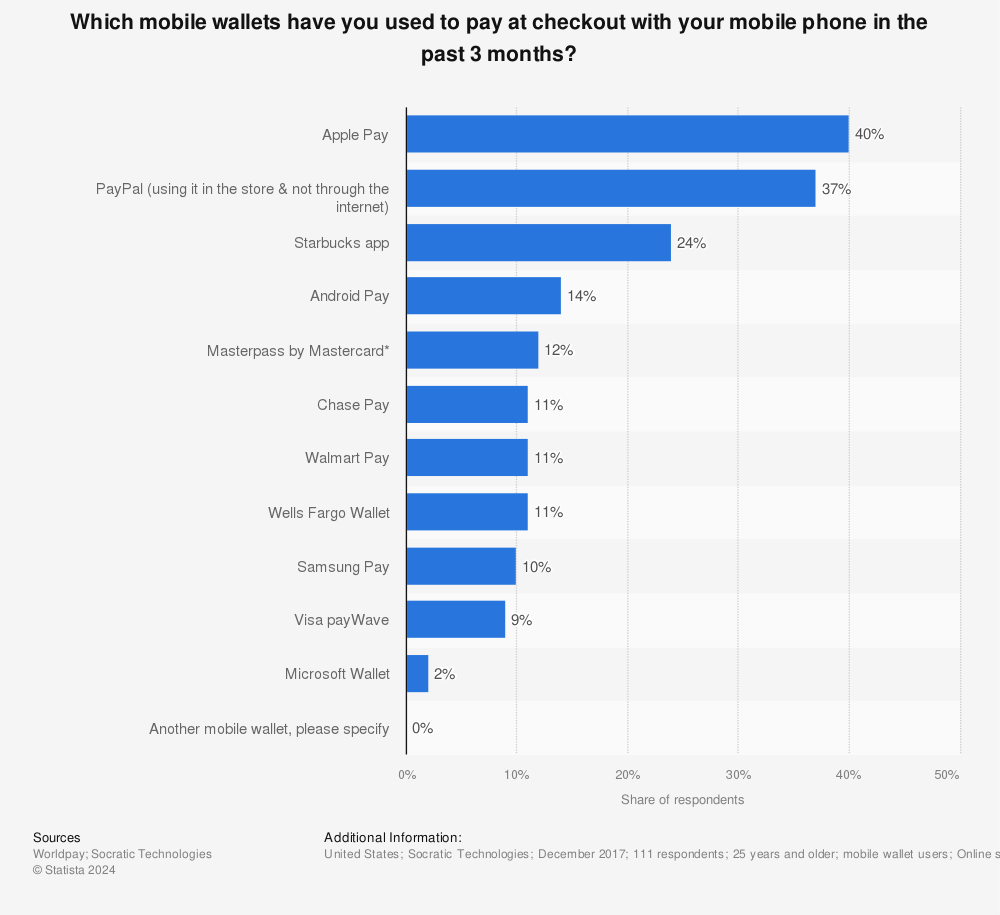
The mobile payment trend in the US is slowly picking up speed, although there are still many people who feel more comfortable paying with either a credit/debit card or cash instead of their cell phone. The growing number of users could be down to the fact that more retailers and restaurants are accepting mobile payments. Apple recently announced that half of all US retailers now accept Apple Pay, while it was only 3% when the mobile payment method first launched in 2014. It’s been predicted that by 2021 mobile payments will reach $282 billion, which is three times the figure for 2016.
 You will find more infographics at Statista
 The apps are improving by the minute and many now offer peer-to-peer functionality, meaning electronic money transactions are done from one person to another through an intermedium source. Apple Pay Cash was released in December 2017, which gives iPhone holders the opportunity to reimburse each other.
WhatsApp, the market-leading messenger in the western world, has also tested payment functions on selected users in the past. If the company, which has belonged to Facebook since 2014, came up with its own mobile payment function, experts expect it to be a great success. In the western world, WhatsApp is installed on almost every smartphone. The entry barrier for users to also use Messenger for payment would therefore be extremely low.
How secure is mobile payment?
The security concerns associated with mobile payment solutions relate primarily to three questions:
- What happens if the smartphone is stolen?
- How tamper-proof are contactless transactions?
- Who guarantees data security and privacy?
In principle, mobile payment is no less secure than other cashless payment methods. Under certain circumstances, the new technology may even offer more protection than the established systems.
If the smartphone is lost, it’s virtually impossible for someone to complete any unwanted transactions. All common payment apps require the display lock to be activated. An unauthorized third party would first have to authenticate themselves as the owner to be able to use the device’s payment functions. In addition, bank data is only stored in encrypted form (if at all) on the end device. The situation is different with the classic credit card, where the card numbers are stamped directly onto the card for everyone to see.
It is also unlikely for a user to accidentally initiate a transaction on a mobile payment app. Transmission via NFC only works over a distance of a few centimeters. If you want to pay with your smartphone, you have to hold it directly over the POS terminal. In addition, the user must have activated the NFC chip and usually also the payment app. The short range of the NFC technology also protects the user against access by third parties. In addition, all transaction data is transmitted exclusively in encrypted form and is therefore worthless to unauthorized persons.
As far as data protection is concerned, the evaluation of mobile payment solutions varies from provider to provider. However, all of the providers introduced in this article encrypt the transaction data and at least hide it from the retailer whose POS terminal is used by the app. In this respect, mobile payment offers significantly better protection than classic card payments. However, users should know to what extent the app provider has access to the data and how it is processed. For example, while Apple claims that it only sends transaction data to its payment service provider in encrypted form, Google reserves the right to collect extensive transaction data and use it to operate its own services in accordance with the Google Payments Privacy Notice. This includes the following data:
- Date
- Time
- Amount of the transaction
- Dealer location and description
- Description of goods purchased
- Names and email addresses of buyers and sellers
- Payment method used
- Reason for the transaction
- Transaction-related offers