

YouTube Stories: The video platform now offers a Story function

Snapchat and Instagram did it first, and now YouTube is following suit: the video platform now allows you to create so-called “Stories”. That is, short videos or slideshows of photos. The photos and videos can be edited in various ways and are usually deleted from the system automatically after 24 hours. YouTube users can augment their posts further with special filters, stickers, and text. It’s also possible to integrate a link to a Story easily, unlike the competition, and Stories can be set to be permanently visible – beyond the usual 24 hours. However, YouTube Stories can’t be commented on like normal videos. Instead, users can only respond with direct messages.
The ability to add Stories to user accounts was first implemented by Snapchat in September 2011, followed by Instagram, Facebook, and Skype. Now YouTube also offers the feature.
YouTube Reels becomes YouTube Stories: History of the new feature
The feature was originally announced and promoted under the name “YouTube Reels”, but became “YouTube Stories” even before the official release. The reason for this was that users had already become accustomed to the term “Stories” from using the feature on competing platforms.
Since YouTube Stories is still in beta form, only selected channels have been able to try it out so far. It has only been possible for content creators with over 10,000 subscribers to use the feature since the second test run. The addition will, unlike with Instagram, serve as an interesting extra feature to round off YouTube’s functional spectrum rather than a core function of the platform.
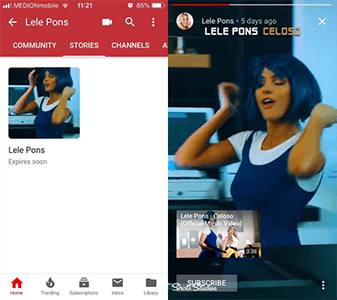
Users can access a channel’s YouTube Stories via a tab on the respective channel page, similarly to the Community feature. However, this story tab is only available in the mobile app. The new feature will give YouTubers an extra way to connect with the community and keep their subscribers up to date on all their latest news.
The Community feature is meant to allow content creators to communicate more directly with their subscribers than via the comments section. For example, the feature allows you to conduct user surveys and share photos and GIFs.
How can YouTube Stories be used?
With YouTube Stories, YouTubers can record and share videos of up to 15 seconds long. For example, you can publish teasers of upcoming videos or update your subscribers about your activity in a concise manner. In this way, Stories are a good additional element allowing to connect and interact with subscribers.
Normally, the YouTube community will go to the channel page of a particular YouTuber in order to communicate with them. The combination of the Community tab and the Stories feature serves as the communication tool. This way, users can get in touch with channels and have an ongoing conversation, separate from the video comments section. Content creators can also post questions in order to stimulate conversation or conduct Q&A sessions. In principle, this is possible in the comments section of a video, but the Community tab is better suited to it since the questions don’t have to be related to a specific video.
How do Stories work on YouTube?
Unlike Stories on other platforms, YouTube Stories aren’t necessarily deleted after 24 hours, and can be made available for a longer time period. In short, the content creator can decide how long their Stories are available for and can delete them at any time. Similarly to other platforms, YouTubers can also add filters, music, text, and stickers to their Stories, as well as create as many Stories as they like. This gives them plenty of flexibility to connect spontaneously with their followers.
The beta phase is designed to test what YouTubers use their Stories for most often, and how. Beta should also flag up any particular issues that users are having with the feature.
Users don’t have to subscribe to channels in order to see their Stories. It suffices to visit a channel via the mobile app, where you will gain access to their Stories.
YouTube Stories: A part of the Community strategy
The Community feature on YouTube can be used to publish short videos, GIFs, links to music, or other recommendations. Essentially, it’s a new communication channel on YouTube.
The Venezuelan-American internet personality Lele Pons mainly uses the Community tab on her channel to promote her latest content, such as music video and comedy sketches, and to post updates about her lifestyle.
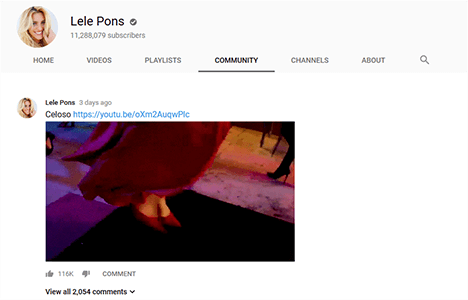
The YouTube Stories and Community features are integral to YouTube’s overall community strategy. However, Stories can also be used independently of the Community feature via a separate tab on the mobile app. From YouTube’s perspective, the Stories feature offers several incentives for users to post their content on the YouTube platform instead of its competitors, such as Instagram and Snapchat. For example:
- Share photos and GIFs
- Create surveys
- Recommend videos and YouTubers
- Product placement
- Create, edit, and share Stories
- Like and comment on Stories
The goal of YouTube’s strategy is to receive more traffic, and ultimately, to expand the user community on the platform. In order to do this, they will need the YouTube community at large to fully engage with the Stories feature once it is launched. However, some critics have concerns that YouTube Stories is another tool that can be used to collect user data.
Meanwhile, the Community feature is available for all channels with over 10,000 subscribers.
If Stories becomes a permanent part of YouTube, it will likely influence the development and use of the platform. However, whether the feature succeeds or not depends on how YouTube’s users interact with it and, ultimately, whether they embrace it.