

What commands and cheats can make gameplay easier in 7 Days to Die?

The popular survival game 7 Days to Die offers numerous cheat codes and admin commands that allow players to gain advantages, customize gameplay or manage their 7 Days to Die server. Especially in single-player mode or as a server administrator, you can access a variety of 7 Days to Die console commands via the developer console.
- Save 50% or more vs leading hosts
- Unlimited traffic & no setup fees
- 99.99% uptime guaranteed
- Free 24/7 premium support
What are some useful cheats in 7 Days to Die?
7 Days to Die cheats are special commands or mechanics that allow players to manipulate the game in certain ways. They are entered via the developer console and can have a variety of different effects, from providing infinite resources to activating God mode to directly spawning enemies or items.
While many players use cheats to make their survival easier or to implement creative building projects without resource constraints, they are often an indispensable tool for server admins to manage and control the game. Especially in multiplayer scenarios, admin commands help remove unwanted players, fix bugs or adjust server settings.
Some cheats, such as Debug mode, are also useful for modders and testers to try out new content or mechanics. While cheats can significantly change the gameplay experience, it’s up to the players themselves to decide if and why they want to use them — whether for a more relaxed playstyle or purely for the joy of experimentation.
How to use cheats in 7 Days to Die
To use cheats in 7 Days to Die, you need to open the developer console. Depending on your keyboard layout, you can do this by pressing the [F1], [F2] or [O] key. Once the console is visible, you can enter commands directly and confirm them with [Enter].
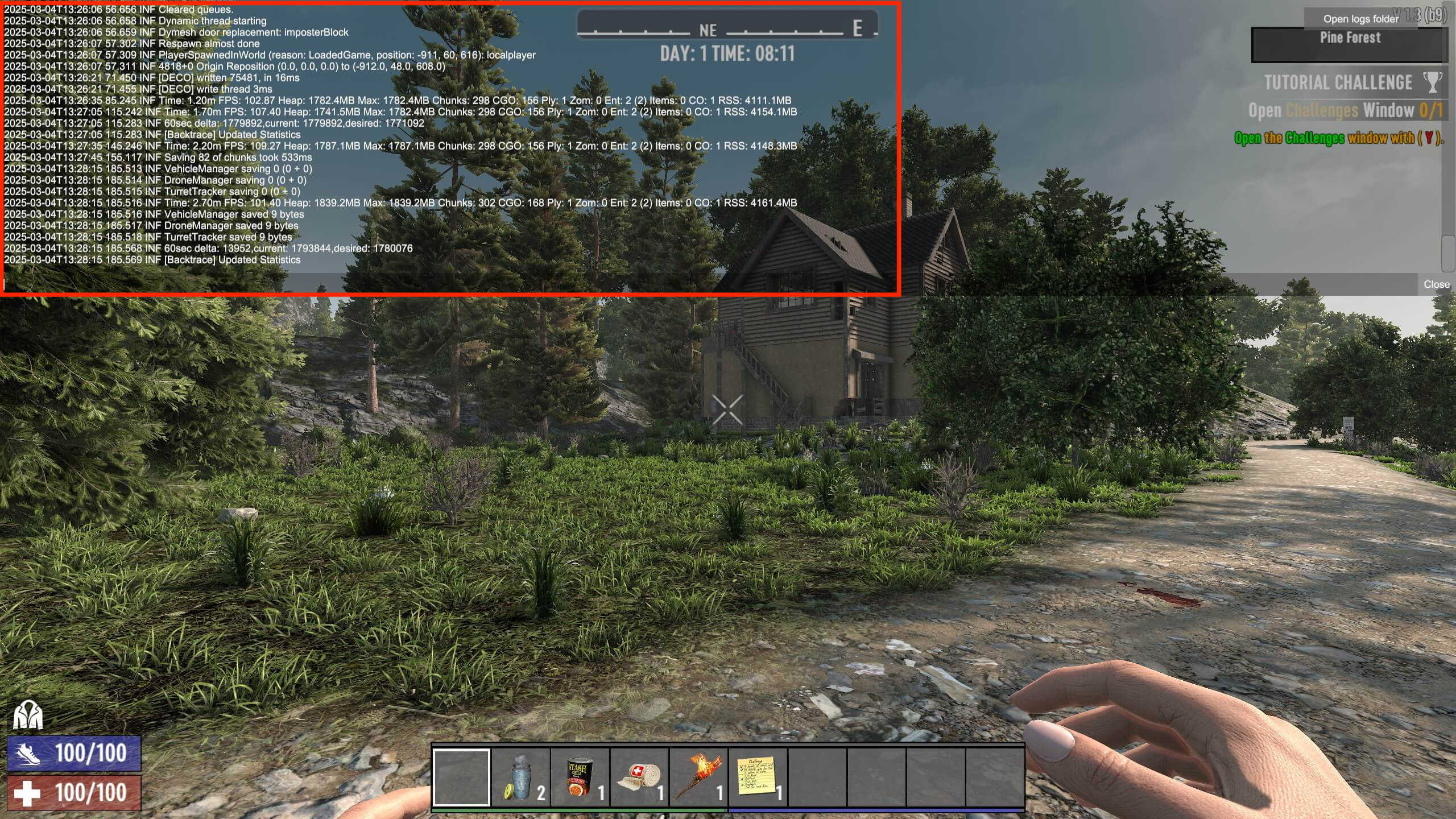

In single-player mode, all commands are available without restrictions, while in multiplayer mode, some cheats require administrator privileges. Server admins must first register as admins via the console or serverconfig.xml to use powerful control commands such as teleporting players, changing the time of day or spawning items. Those who prefer to cheat without direct console commands can activate Debug or Creative mode in the game menu, for example, to fly through the world or build without resource limits.
Overview of 7 Days to Die cheats
Below, we present the most important cheats and admin commands for 7 Days to Die in a table format. The commands are organized by category to provide a quick overview of their respective functions. While admin commands are primarily used for server management, gameplay cheat codes directly influence your in-game experience. There are also commands for obtaining resources and controlling the weather.
Many of these commands have additional options, which you can display directly in the console by typing help followed by the command name. If you type help without the command name, all available 7 Days to Die console commands will be displayed.
Admin commands
Admin commands are specifically designed to manage a server and allow administrators to ban, teleport or assign themselves privileges. They are essential for maintaining order on multiplayer servers and quickly resolving problems.
| Command | Description |
|---|---|
admin add <SteamID> <Level>
|
Adds an admin. |
admin remove <SteamID>
|
Removes an admin. |
ban <Playername/SteamID>
|
Bans a player from the server. |
ban remove <Playername/SteamID>
|
Lifts a ban. |
ban list
|
Shows a list of all banned players. |
kick <Playername>
|
Removes a player from the game. |
listplayerids
|
Shows a list of the IDs of all active players. |
listplayers
|
Shows a list of all active players. |
teleport <Player1> <Player2>
|
Teleports Player1 to Player2. |
mem
|
Information on storage usage. |
Gameplay cheats
Gameplay cheats directly alter the gaming experience, for example, by activating God mode, enabling flying or spawning enemies. These commands are often used to make the game easier, test the gameplay or try out new strategies.
| Command | Description |
|---|---|
dm
|
Enables Debug mode for advanced control. |
dbs
|
Takes a screenshot including important debug info. |
cm
|
Activates Creative mode. |
god
|
Activates God mode (invulnerability). |
noclip
|
Allows flying through objects. |
spawnentity <ID>
|
Spawns a specific entity (e.g., zombies, animals). |
buff <Buff-Name>
|
Adds a buff to a player. |
debuff <Buff-Name>
|
Removes the specified buff from a player. |
exhausted
|
Sets the player’s status to “exhausted”. |
Resources and items
These cheats allow you to obtain items, weapons, ammunition or experience points without having to find or craft them in-game. This is especially useful for quickly testing new content or creating projects in Creative mode.
| Command | Description |
|---|---|
giveself <Itemname> <Amount
|
Gives you an item. |
givequest <Questname>
|
Starts a specific quest. |
giveselfxp <Amount>
|
Increases a player’s experience points. |
Note that you should know the item codes for each item you want to get. The following list of the most important item codes can help you get started:
The most important item codes
Weapons and ammunition
- gunHandgunT2Magnum44 – Magnum .44
- gunShotgunT2PumpShotgun – Pump gun
- gunRifleT3SniperRifle – Sniper rifle
- ammo9mmBulletBall – 9mm ammunition
- ammoShotgunShell – Shotgun ammunition
- ammo44MagnumBulletBall – .44 Magnum ammunition
- ammo762BulletBall – 7.62mm ammunition
Tools and equipment
- meleeToolAxeT2SteelAxe – Steel axe
- meleeToolPickT2SteelPickaxe – Steel pickaxe
- meleeToolShovelT2SteelShovel – Steel shovel
- meleeToolSalvageT1Wrench – Wrench
Resources and materials
- resourceWood – Wood
- resourceRockSmall – Rock
- resourceForgedIron – Forged iron
- resourceForgedSteel – Forged steel
- resourceDuctTape – Duct tape
- resourceGlue – Glue
- resourceGunPowder -– Gunpowder
- resourceNail – Nail
Food and drink
- foodCanChili – Can of chili
- foodCanPasta – Can of pasta
- foodSteakAndPotato – Steak and potato
- drinkJarCoffee – Coffee
- drinkJarRedTea – Red tea
- drinkJarPureMineralWater – Mineral water
- drinkJarBeer – Beer
- drinkCanMegaCrush – Mega Crush energy drink
Weather and environmental commands
These commands control the weather conditions and time of day in the game, allowing you to adjust the atmosphere or make certain challenges easier. For example, you can reduce rain or set a specific daylight scenario.
| Command | Description |
|---|---|
weather fog <0-1>
|
Sets the fog value (0 = clear, 1 = thick fog). |
weather rainfall <0-1>
|
Regulates the rain. |
weather snow <0-1>
|
Changes the amount of snow. |
settime <Tag/Stunde>
|
Changes the time of day. |
weathersurvival
|
Toggles the influence of weather on survival. |
If you’re interested in cheat codes for other popular games, it’s worth checking out our article on ARK cheats. And for Minecraft fans, we’ve compiled important Minecraft server commands.