

HTTPoxy: Threatening the security of CGI applications

Countless web projects rely on proxy servers for performance and security purposes. These practical programs function as a communication interface between client and website and relieve the web server by receiving, editing, routing, and responding to HTTP requests. But because of a security vulnerability known as HTTPoxy, this technique can be abused by attackers for data theft. Applications that are based on the CGI standard (Common Gateway Interface) and configure so-called environmental variables are affected. For example, some programs can read your proxy configurations from the variables, which quickly becomes a problem when criminals manipulate these settings.
What is HTTPoxy?
When a web server communicates with the client of a user via the Common Gateway Interface, the RFC standard 3875 provides that the headers of all sent HTTP requests are stored as environmental variables. The name of this variable consists of the prefix “HTTP_” and the name of the header in uppercase. In this case, the header is “Proxy”, which automatically generates the variable HTTP_PROXY. This is given as the default configuration of proxy settings. If the CGI application reaches or executes a request containing HTTP_PROXY, it’s redirected via the corresponding proxy server.
These described circumstances allow an attacker to put their own proxy server into play, and use it to get hold of confidential information. To do this, it sends an HTTP request with the header Proxy and a corresponding value (for example, the IP address of the proxy), so that future user requests – incoming or outgoing – will be redirected to them. Depending on the scenario chosen, the attacker can then either return their own data at will or directly read the user’s input data.
An inevitable security vulnerability?
The vulnerability, whose name has no special meaning, was caught for the first time in March 2001. The programmer Randal L. Schwartz detected HTTPoxy in the Perl library libwww-perl and told Gisle Aas, the developer of the library. The vulnerability was immediately closed in Update 5.51 by modifying the variable name through which the proxy configuration could be controlled to CGI_HTTP_PROXY. In the same year, the vulnerability was also detected in the data transfer program curl, and the developer Daniel Stenberg adapted the software so that only the lowercase variant http_proxy could determine the proxy server – while at the same time advising that this was fundamentally insufficient for Microsoft systems. In current Windows versions, the problem no longer exists.
Around a decade later, in July 2012, the Ruby team came across the long-forgotten HTTPoxy problem when they implemented the NET::HTTP class, an HTTP client API for Ruby applications. To get around the problem, they set HTTP_PROXY and others under the status of a standard variable. In the following years, the web server applications NGINX (2013) and Apache (2015) became some of the most prominent cases in which attentive users informed the developers about a potential danger.
In 2016, the security team of the developer company Vend found that the HTTPoxy security gap is still around 15 years after its first discovery, and PHP, in addition to various other programming languages, as well as libraries, can be exploited – provided that they’re used in combination with CGI or a comparable runtime environment with variables. Many affected applications that enable the use of HTTPoxy have been listed in the official specifications for security vulnerabilities, known as the CVEs (Common Vulnerabilities and Exposures):
- CVE-2016-5385: PHP
- CVE-2016-5386: Go CVE-2016-5387: Apache HTTP Server
- CVE-2016-5388: Apache Tomcat
- CVE-2016-6286: spiffy-cgi-handlers for CHICKEN
- CVE-2016-6287: CHICKEN’s http-client
- CVE-2016-1000104: mod_fcgi
- CVE-2016-1000105: Nginx cgi script
- CVE-2016-1000107: Erlang inets
- CVE-2016-1000108: YAWS
- CVE-2016-1000109: HHVM FastCGI
- CVE-2016-1000110: Python CGIHandler
- CVE-2016-1000111: Python Twisted
- CVE-2016-1000212: lighttpd
Protect yourself and your server from HTTPoxy
Regardless of whether you operate your own web server or not, HTTPoxy presents a risk when you’re online. If the requested web service can be redirected through undesirable external HTTP requests, then, as a result, its data won’t be in safe hands. To minimize the risk of data loss, you should give preference to sites that are protected by a TLS/SSL certificate and transfer all information in encrypted form. In this way, it’s still possible to redirect the data over a false proxy, but criminals are much less likely to profit from the secure information, and in the best case scenario, won’t profit at all. If you operate your own site, switching to HTTPS is a must today. You always have the option to avoid HTTPoxy in general by simply removing the vulnerability. Because the proxy header is registered neither as an IETF standard or an official IANA header, you can safely intercept it before it reaches your web application. By default, standard HTTP clients and servers don’t send any data packages with this header. In addition to encrypting the HTTP data exchange, you have two different ways to keep dangerous requests away from your web project:
- Filter out the proxy header from all incoming packages.
- Automatically block all incoming packages that contain a proxy header.
The first option is much more common, and can be accomplished using any common web server, proxy, or load balancing software. In the following sections you’ll find information on how to withdraw potentially dangerous headers from the data traffic on various Linux distributions with the help of the web server applications Apache and NGINX, as well as the proxy server software HAProxy.
Avoid HTTPoxy with Apache
The free software Apache is installed by default on all common Linux distributions and is still the top choice for many when it comes to operating your own web server. One feature of the program, among others, is the module mod_headers, which allows you to filter out the proxy header from all incoming HTTP requests. The strategy differs slightly from distribution to distribution.
Ubuntu and Debian:
The first step is to activate the module, which is done with the following command:
sudo a2enmod headersThen open Apache’s central configuration file with an editor, for which the command line tool nano (used in the example) is recommended:
sudo nano /etc/apache2/apache2.confNow expand this file at the end with the following entry:
<IfModule mod_headers.c>
    RequestHeader unset Proxy early
</IfModule>
After you’ve saved the file, activate the HTTPoxy protection by loading specified configuration file via a2enconf script and restarting the server:
sudo a2enconf httpoxy
sudo service apache2 restart
CentOS and Fedora:
If you’re using a version of the Linux distributions CentOS or Fedora, that mod_headers module is already activated by default, so you can skip this step and go right to opening the configuration file:
sudo nano /etc/httpd/conf/httpd.confInsert the new entry at the end:
RequestHeader unset Proxy earlyThen save the changes and restart the Apache server:
sudo service httpd restartRemove HTTP proxy header with NGINX
As a web server application, NGINX is now an established force that’s growing in popularity. With the help of the open source software, only a few steps are required to protect CGI applications that run on the server or between the client and the server from the HTTPoxy security gap.
Ubuntu and Debian:
FastCGI parameters (FastCGI is an optimization of the CGI standards) under Ubuntu and Debian are usually contained in the fastcgi_params or fastcgi.conf files if you install an NGINX FastCGI proxy. In both files, you can cut off the proxy header in HTTP requests. Simply use the following lines of code:
echo 'fastcgi_param HTTP_PROXY "";' | sudo tee -a /etc/nginx/fastcgi.conf
echo 'fastcgi_param HTTP_PROXY "";' | sudo tee -a /etc/nginx/fastcgi_params
If you use NGINX as a conventional HTTP proxy, you can also filter out the header. To do this, enter the corresponding rule into the proxy_params file that lists the parameters for the proxy server:
echo 'proxy_set_header Proxy "";' | sudo tee -a /etc/nginx/proxy_paramsIn the last line, restart NGINX with the command:
sudo service nginx restartCentOS and Fedora:
The strategy for banning HTTPoxy hazards for FastCGI proxies on CentOS or Fedora don’t vary that much from the strategies for Ubuntu and Debian systems. Since the NGINX configurations on these distributions are set in either the fastcgi_params or fastcgi.conf files, you can also shut off the proxy header here with the commands listed earlier:
echo 'fastcgi_param HTTP_PROXY "";' | sudo tee -a /etc/nginx/fastcgi.conf
echo 'fastcgi_param HTTP_PROXY "";' | sudo tee -a /etc/nginx/fastcgi_params
To protect conventional proxies under Fedora and CentOS, you have to make sure that the header is blocked everywhere that NGINX runs the proxy_pass directive. To find out where these are used, you can rely on the services of the grep search command:
sudo grep -r "proxy_pass" /etc/nginxThis contains a list of the text files with the directive, where the outputs look something like the following example:
/etc/nginx/nginx.conf.default: # proxy_pass http://127.0.0.1;In this case, proxy_pass would be in the NFINX configuration file. The corresponding entry in nginx.conf should be added as follows:
proxy_pass http://127.0.0.1;
proxy_set_header Proxy "";
In both cases, you finish by restarting the server:
sudo service nginx restartProtect your HAProxy server from HTTPoxy
If you forward HTTP requests to your web project through a HAProxy server, you can remove the proxy header even before the proxy sends the requests. The method doesn’t differ between the variously named Linux distributions. First, open the central configuration files of the proxy application with the following command:
sudo nano /etc/haproxy/haproxy.cfgNow open the haproxy.cfg file with the same nano command line editor as earlier. If you specified an alternative directory for HAProxy during installation, then you need to adopt the command accordingly.
In the opened file, you can now insert an HTTP request directive to remove the unwanted header in the three sections “frontend”, “backend”, and “listen”. The result looks as follows:
frontend name
    http-request del-header Proxy
…
backend name
    http-request del-header Proxy
…
listen name
    http-request del-header Proxy
Save the changes and restart the HAProxy service:
sudo service haproxy restartSecurity check with the HTTPOXY Vulnerability Checking Tool
After you’ve saved your proxy configuration against HTTPoxy with the help of the previously listed protection opportunities, you should check to see if everything is behaving as instructed. For this, there are applications like the HTTPOXY Vulnerability Checking Tool from Luke Rehmann. This free, useful web service checks URLs for HTTPoxy vulnerability by sending an HTTP request including proxy headers to the URL that redirect to an alternate server. If the tool doesn’t receive an answer from the server, then the header was successfully blocked.
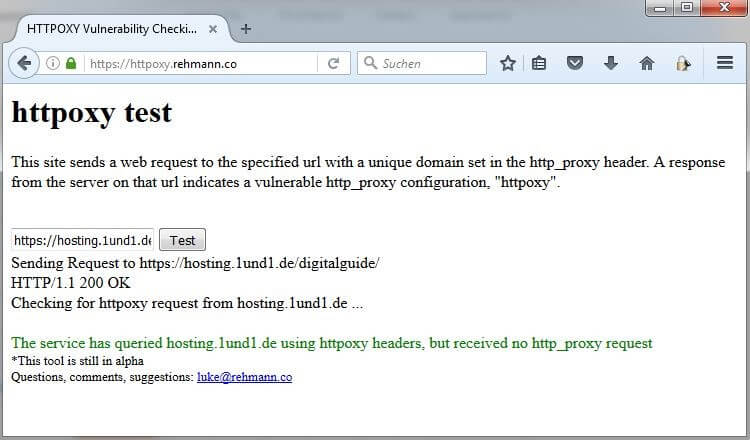
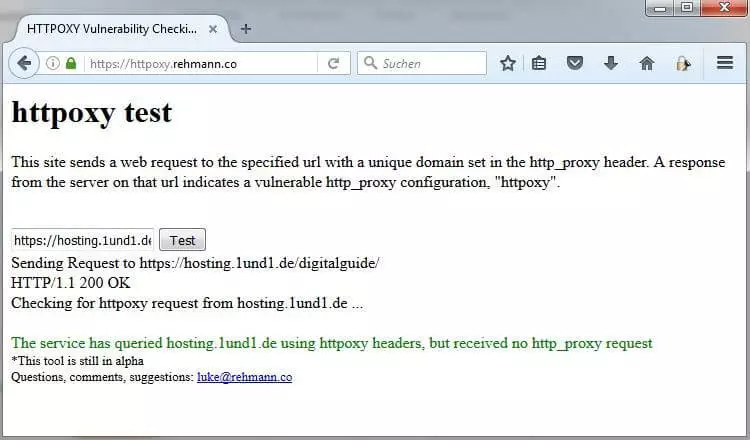
To use the service, just enter the URL of the web application you want to check into the input field and click “Test”.