

The Bootstrap Protocol (BOOTP)

Computer systems require an IP address to be able to communicate with one another in networks such as the Internet. In principle, this can be assigned manually, but most devices pick up their address automatically nowadays. The basis for this is the communication protocol DHCP, which helps systems seeking a connection to get the information they need. In the early days of computers, networks etc. the bootstrap protocol, which is also known as BOOTP, still assumed the function of address manager.
What is BOOTP (the bootstrap protocol)?
In September 1985, the Stanford University Network GroupRFC 951 BOOTP in RFC 951 – Bootstrap Protocol. This communications protocol, which was developed in cooperation with a team from Sun Microsystems, made it possible to obtain information such as the gateway, boot server addresses, the directory of boot files (required for loading the operating system), as well as the IP address from the terminals and workstations without a hard drive for the first time. It replaced the reverse address resolution protocol (RRP) used up to then, which exclusively supplies network addresses and could only be used in sub-nets.
The bootstrap protocol is part of the Internet protocol family and works – as do many other protocols of the stack – according to the client-server model, which means the exchange of messages to transmit the network information takes place between a BOOTP client and the BOOTP server. The minimal, connectionless User Datagram Protocol (UDP) (port 67 and 68) is provided as the protocol for the transport of the relevant data packages. Compared to TCP, not only is this less complex, but in contrast to the standard protocol for data transport, it also supports broadcasting. As the client does not know its own address nor that of the BOOTP server when making the connection, this messaging method in which all network participants are contacted is the only solution for automatically obtaining the address.
The exchange of network information therefore works via BOOTP.
The address allocation via BOOTP is based on a simple two-step message exchange between client and server, in which the client component is the initiator. As the client does not know its own IP address nor that of the BOOTP server at the start, it sends a general request (“BOOTREQUEST”) to the broadcast group address 255.255.255.255. The server, listening on UDP port 67, receives and processes this request by allocating a suitable IP address to the MAC address of the client system. Then the response (“BOOTREPLY”) including further network information is sent back to the client via broadcast, which can receive the operating system via the network as a result.
If the client already knows the address of the BOOTP server, it can also send this request directly via unicast connection.
This is how the design of the messages looks, which the client and server send out when communicating via bootstrap protocol:
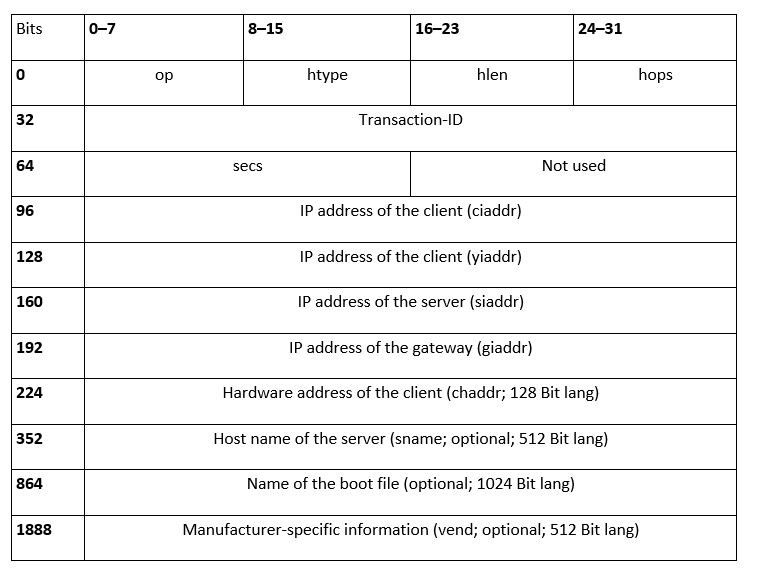
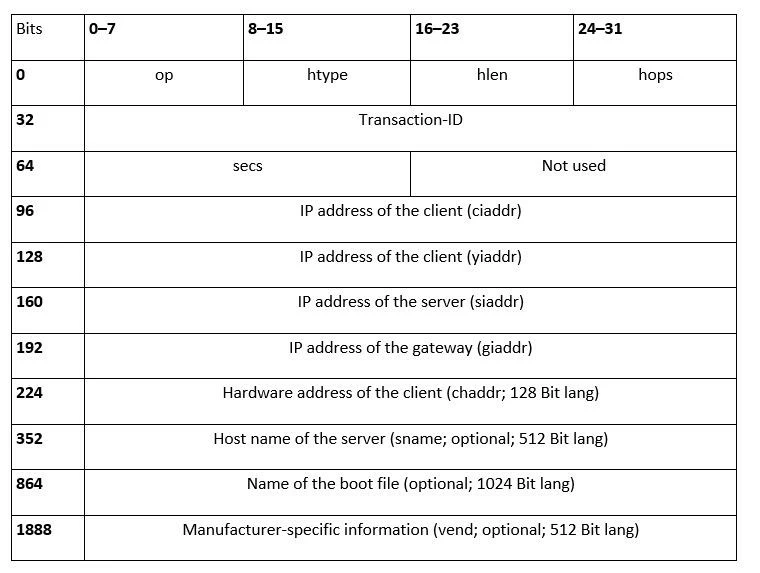
Each BOOTP message begins with the 8-bit-long op field, which defines the type of operation or the message. For requests through the client, the value 1 is set at this point (for BOOTREQUEST), while the responses from the server display the value 2 (for BOOTREPLY). 8 bits follow, which mark the type (“htype”) as well as the length of the hardware address (“hlen”). The “hops” field, which is also 8 bits long, gives the number of interim stations which the package passes through on the way to the recipient. For client requests, the value is always 0.
The next block includes a random 32-bit long transaction ID, which is generated by the client and is later also used in the response from the server so that the client can allocate this uniquely. The client also fills out the “secs” (16 bits), which gives the seconds that have passed since the boot attempt by the client. The completion of the introductory information forms another 16-bit field, which remains entirely empty. The further entries of the BOOTP package comprise the actual network information, which is explained in more detail in the following listing:
- IP address of the client (ciaddr): The label “ciaddr” (client ip address) distinguishes the 32-bit field in which the client enters its own IP address, provided this is already known. If this is not the case, the field contains the value 0.
- IP address of the client (yiaddr): The field “yiaddr”, (your ip address) is reserved for the IP address of the client. However, in contrast to the previously mentioned section of the package, this 32-bit field is filled out by the server, in case the client didn't know its IP address at the time of creating the network request.
- IP address of the server (siaddr): In the 32-bit sequence “siaddr”, (server ip address), the BOOTP server gives the client its own IP address.
- IP address of the gateway (giaddr): If a gateway (e.g. a router) is incorporated in the communication process, this address is entered in the “giaddr” field (gateway ip address).
- Hardware address of the client (chaddr): The hardware address (128-bit) is part of the mandatory information of the client when exchanging bootstrap protocol messages. Without this ID, also known as the device or MAC address, the server cannot allocate either the correct address or the right network parameters to the client.
- Host name of the server (sname): Optionally, the server can also be given its host names in the BOOTP response. A 512-bit field is available for this, in which it can add a corresponding zero-terminated character string (a zero character marks the end of the string).
- Name of the boot file: Another option is to designate a specific boot file, which the client requires to start the operating system on the terminal or workstation in question. This field also provides a null-terminated string, which represents the complete directory path of the file in this case. The sequence of characters can be up to 1024 bits long. The client's request contains either the value 0 or a generic name.
- Manufacturer-specific information (vend): The potential completion of the BOOTP protocol message forms manufacturer-specific information, which is not covered by the protocol. This may be the designation of special hardware types and serial numbers, for example. Furthermore, this 512-bit-long information field can be reserved for a third bootstrap or kernel process.
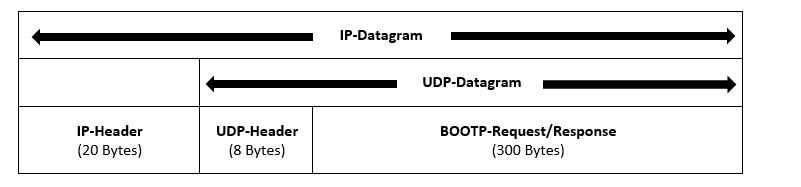
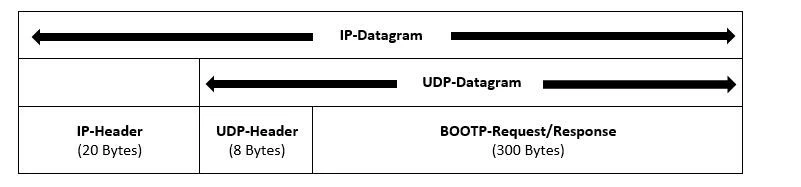
Overall, the BOOTP messages may also be up to 2,400 bits long (300 bytes). The complete UDP/IP datagram, including integrated bootstrap protocol request or response is designed as follows:
BOOTP vs. DHCP: why the bootstrap protocol is no longer used today
For terminal clients and diskless workstations, BOOTP was the perfect solution to obtain a personal IP address in the network required, and to reference the operating system in this way. The fact that the address reference could be carried out by the communication protocol at the same time as the boot process was practical as well as straightforward for stationary computers, which were used in networks of a manageable size . For example, it was rarely a problem that the administrator had to manually configure the network information tables of the BOOTP server.
However, as networks became ever larger and computers increasingly independent, and – due to the development of portable devices – more mobile too, it was evident that the lack of opportunity for automation of the configuration process was negative. There was a requirement for a new protocol. With the dynamic host configuration protocol (DHCP) this came about in 1993 (final specification in RFC 2131). DHCP is in fact largely based on the structure of the bootstrap protocol, but it complements this due to various additional configuration options, and offers the opportunity to assign reusable network addresses to clients seeking connection. The allocation of addressed information with DHCP also works during current system operation – it is not necessary to restart, as was the case with BOOTP.
“BOOTP vs. DHCP” – the most important differences are given below:
| BOOTP | DHCP | |
| Auto-configuration | Allocation of IP addresses requires manual configuration | Supports automatic allocation and acquisition of IP addresses (as well as manual configuration) |
| Temporary IP addresses | Not possible | Possible for a limited period |
| Supports mobile devices | IP configuration and access to network information are not possible | Supports the mobility of network clients |
| Error occurrence | Very prone to errors due to manual configuration | Practically immune to errors thanks to automated configuration of the network components |
| System requirements | None | Requires a disk to store and pass on information |
Thanks to the various optimizations, DHCP has quickly become the standard protocol for IP management in networks, while the BOOTP protocol is now of only historical value. As DHCP supports the bootstrap protocol, in principle, DHCP servers can also respond to any requests made by a BOOTP client.