

Which is the best CaaS provider? Container as a Service comparison

A Container-as-a-Service (CaaS) provides container platforms as hosted, all-in-one solutions via the cloud. In this guide, we’ll explain what this service entails and introduce four of the most popular CaaS platforms. Additionally, we’ll outline how to leverage cloud-based container services in a business context.
What is CaaS?
CaaS—short for Container-as-a-Service—is a business model in which cloud computing providers offer platforms for container-based virtualization as a scalable online service. This allows businesses to utilize container services without the need to provide the required infrastructure themselves. The term is a marketing concept inspired by other cloud service models like Infrastructure-as-a-Service (IaaS), Platform-as-a-Service (PaaS), and Software-as-a-Service (SaaS).
What are container services?
A container service refers to the offering from a cloud computing provider that allows users to develop, test, run, or distribute software within application containers across IT infrastructures. This concept originates from the Linux ecosystem and enables virtualization at the operating system level. Individual applications, along with all their dependencies such as libraries and configuration files, are executed as encapsulated instances. This approach allows for the parallel operation of multiple applications with different requirements on the same operating system and enables deployment across diverse systems.
CaaS typically includes a complete container environment, featuring orchestration tools, an image catalog (known as a registry), cluster management software, as well as a suite of developer tools and APIs.
- Cost-effective vCPUs and powerful dedicated cores
- Flexibility with no minimum contract
- 24/7 expert support included
How does CaaS differ from other cloud services?
Since the mid-2000s, cloud computing has provided businesses and individual users with an alternative to hosting IT resources on their own premises (on-premises). Beyond CaaS, the following three service models have become particularly popular:
- IaaS: Infrastructure-as-a-Service provides virtual hardware resources such as computing power, storage space, and network capacity. IaaS vendors provide these basic IT infrastructure building blocks in the form of virtual machines (VM) or virtual local area networks (VLANs).
- PaaS: The middle tier of the cloud computing model is known as Platform-as-a-Service. Within the framework of PaaS, cloud providers provide programming platforms and development environments over the internet. PaaS is based on IaaS.
- SaaS: The top level of the cloud computing model deals purely with applications. Software-as-a-Service involves providing application software over the internet. The provided programs run on this service model on the provider’s own server, rather than on the customer’s hardware.
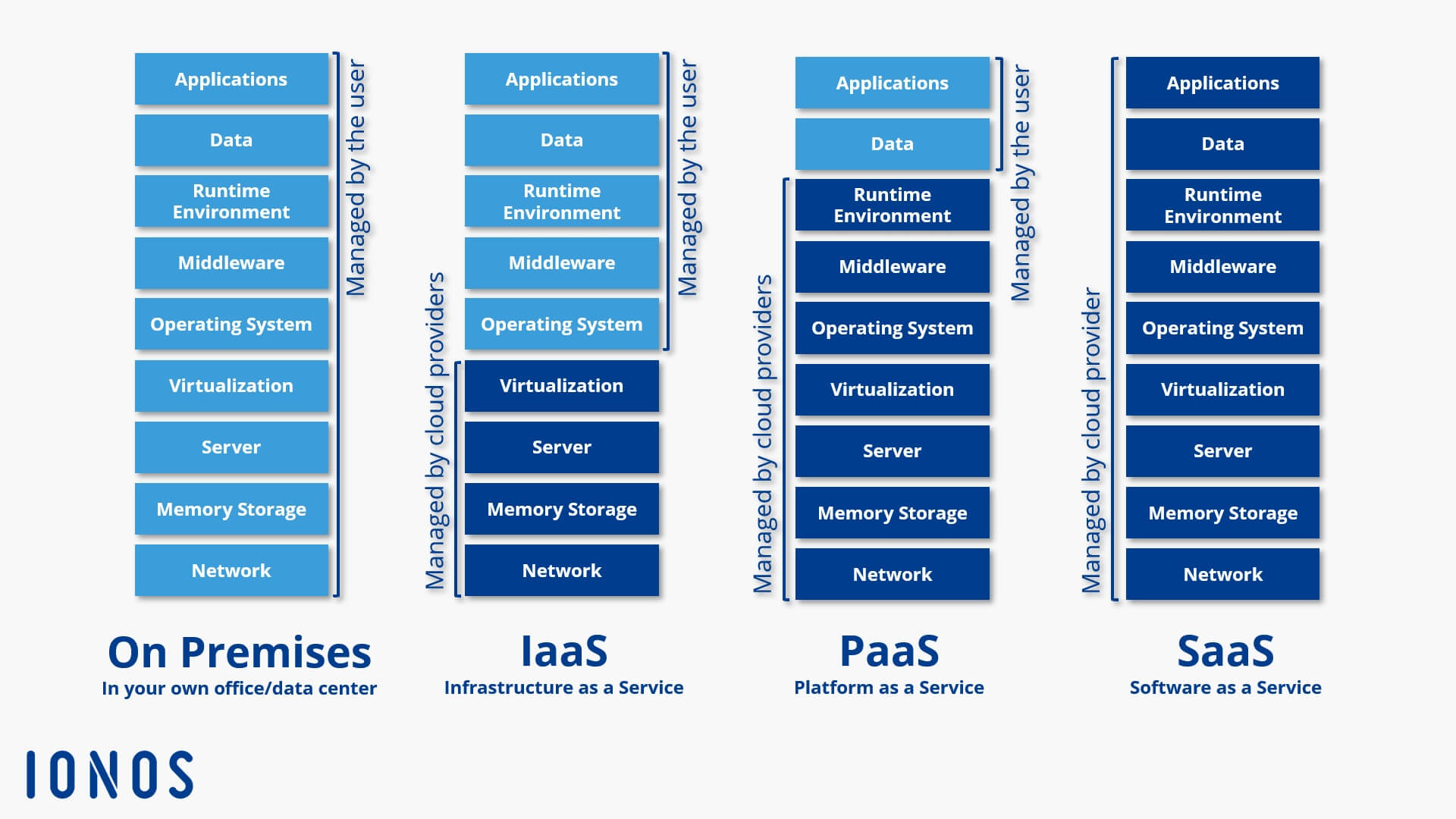
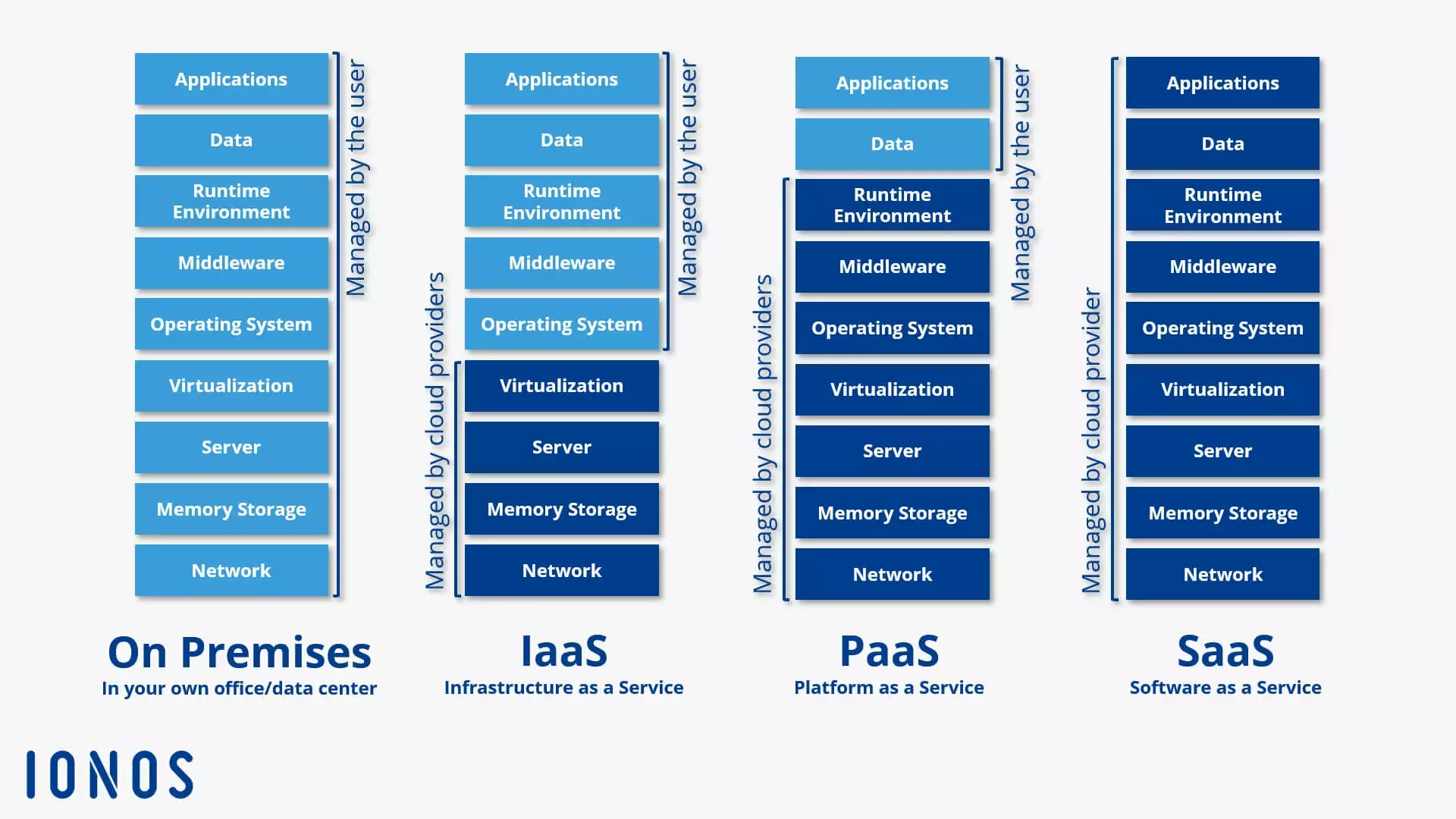
In the traditional classification of the three established cloud computing models, CaaS can be positioned between IaaS and PaaS. However, Container-as-a-Service distinguishes itself from these service models through a fundamentally different virtualization approach: container technology.
Container-as-a-Service is a form of container-based virtualization that provides the runtime environment, orchestration tools, and all underlying infrastructure resources through a cloud computing provider.
How does CaaS work?
Container-as-a-Service is a computer cluster that is available through the cloud and is used to upload, create, centrally manage, and run container-based applications on the cloud platform. The interaction with the cloud-based container environment takes place either through the graphical user interface (GUI) or in the form of API calls. The provider dictates what container technologies are available to users: However, the core of each CaaS platform is an orchestration tool (also known as orchestrator) that allows complex container architectures to be managed.
The following functions are important:
- Distribution of containers across multiple hosts
- Grouping containers into logical units
- Container scaling
- Load balancing
- Storage capacity allocation
- Communication interface between containers
- Service discovery
The choice of orchestrator used within a CaaS framework directly impacts the features available to users of the cloud service. Currently, the market for container-based virtualization is primarily dominated by the following orchestration tools: Docker Swarm, Kubernetes, OpenShift, and Amazon Elastic Container Service (ECS).
You can find a detailed description of the most popular orchestration tools and Docker tools as well as an in-depth comparison between OpenShift and Kubernetes in separate Digital Guide articles.
What makes a Container-as-a-Service provider stand out?
When choosing a CaaS service for business use, it’s important for users to ask themselves the following questions:
- What orchestration tools are available?
- Which file formats for container applications are supported?
- Is it possible to run multi-container applications?
- How are clusters for container operations managed?
- What network and storage features are supported?
- Does the provider offer a private registry for container images?
- How well is the container runtime environment integrated with other cloud services provided by the vendor?
- What billing models are available?
An overview of CaaS providers
Container technology is thriving, leading to a vast array of CaaS services. Virtualization services at the operating system level can be found in the portfolios of nearly all public cloud providers. Major players such as Amazon, Microsoft, Google, and IONOS—currently among the most influential in the CaaS market—have expanded their cloud platforms to include Docker-based container solutions.
Docker is the most popular container platform on the market. The container format developed by Docker – a further development of the Linux container (LXC) – is widely used and supported by all CaaS providers.
IONOS Cloud Managed Kubernetes
Managed Kubernetes is the ideal platform for high-performance and highly scalable container applications. The service is directly accessible through the IONOS Cloud Panel and combines the IONOS IaaS platform with leading container technologies, Docker and Kubernetes.
The IONOS CaaS solution is designed for developers and IT operations teams, enabling the provisioning, management, and scaling of container-based applications in Kubernetes clusters. Its feature set includes:
- Managed cloud nodes with dedicated server resources
- Customizable cluster management
- Full access to application containers
- User-defined orchestration
- Professional support for using and creating container clusters in the Cloud Panel, provided by IONOS First Level Support
- IONOS Cloud Community
The IONOS support covers provisioning and managing container clusters. However, direct support for kubectl or the Kubernetes dashboard is not provided. Through the IONOS Cloud Panel, users can access various third-party applications such as Febrac8, Helm, GitLab, or Autoscaler as one-click solutions. Additionally, the DockerHub online service can be integrated as a registry for Docker images.
IONOS Cloud Managed Kubernetes enables the fully automated setup of Kubernetes clusters. The service itself is entirely free—users only pay for the underlying IONOS Cloud infrastructure that is actually provisioned.
| Advantages | Disadvantages |
|---|---|
| ✓ Full Kubernetes compatibility | ✗ No software support for kubectl and Kubernetes |
| ✓ Wide selection of pre-installed third-party solutions | |
| ✓ High portability |
The ideal platform for demanding, highly scalable container applications. Managed Kubernetes works with many cloud-native solutions and includes 24/7 expert support.
Amazon Elastic Container Service (ECS)
Since April 2015, the online retailer Amazon has been offering container-based virtualization solutions under the name Amazon Elastic Container Service (ECS) as part of its AWS (Amazon Web Services) cloud computing platform. Like the IONOS service, ECS exclusively supports containers in the Docker format.
 To display this video, third-party cookies are required. You can access and change your cookie settings here.
 Amazon ECS provides users with various interfaces to run isolated applications in Docker containers within the Amazon Elastic Compute Cloud (EC2). Technically, the CaaS service is based on the following cloud resources:
- Amazon EC2 Instances (Elastic Compute Cloud Instances): Scalable compute capacity from Amazon’s cloud computing service, available as rentable instances.
- Amazon S3 (Simple Storage Service): A cloud-based object storage platform.
- Amazon EBS (Elastic Block Store): High-availability block storage volumes for EC2 instances.
- Amazon RDS (Relational Database Service): A database service supporting relational engines like Amazon Aurora, PostgreSQL, MySQL, MariaDB, Oracle, and Microsoft SQL Server.
Container management in ECS is handled by a proprietary orchestrator by default, acting as the master and communicating with an agent on each node of the managed cluster. Alternatively, the open-source module Blox allows for custom schedulers and third-party tools like Mesos to be integrated into ECS.
A key strength of Amazon ECS is its integration with other Amazon services, such as the permission management tool “AWS Identity and Access Management (IAM),” the cloud load balancer “Elastic Load Balancing,” and the monitoring service “Amazon CloudWatch.”
However, a notable drawback is the restriction to EC2 instances. Amazon’s CaaS service does not support IT infrastructures outside of AWS—neither physical nor virtual. This means hybrid-cloud scenarios and combining resources from various public cloud providers (multi-cloud) are not possible. This limitation aligns with Amazon’s business model: ECS is technically free to use through AWS, with costs only incurred for the cloud infrastructure, such as an EC2 instance cluster that supports container applications.
| Advantages | Disadvantages |
|---|---|
| ✓ Integration with other AWS products | ✗ Container deployment limited to EC2 instances |
| ✓ Free to use (infrastructure costs apply) | ✗ Proprietary orchestrator |
Google Kubernetes Engine (GKE)
Google also offers a hosted container service integrated into its public cloud, known as the Google Kubernetes Engine (GKE). The core component of this CaaS service is the orchestration tool Kubernetes.
 To display this video, third-party cookies are required. You can access and change your cookie settings here.
 GKE uses resources from the Google Compute Engine (GCE) and enables users to run containerized applications on clusters in the Google Cloud. However, GKE is not limited to Google’s infrastructure: Kubernetes’ Cluster Federation System allows resources from multiple computer clusters to be combined into a logical compute federation, enabling hybrid- and multi-cloud scenarios.
Each cluster created with GKE consists of a Kubernetes master endpoint running the Kubernetes API server and a configurable number of worker nodes. These nodes handle REST requests from the API server and execute services required to support Docker containers. GKE also supports the widely adopted Docker container format. Users can deploy Docker images through a private container registry and define container services using JSON-based templates.
Kubernetes integration in GKE provides the following features for container application orchestration:
- Automatic binpacking: Kubernetes efficiently schedules containers by automatically assigning them to nodes based on their resource requirements and constraints, ensuring optimal cluster utilization.
- Health checks with auto-repair: Kubernetes performs automated health checks to ensure all nodes and containers function properly.
- Horizontal scaling: Kubernetes allows applications to scale up or down seamlessly.
- Service discovery and load balancing: Kubernetes supports service discovery via environment variables and DNS records. Load balancing is achieved using IP addresses and DNS names.
- Storage orchestration: Kubernetes enables automatic mounting of various storage systems.
Google adopts a different pricing model for its CaaS service compared to Amazon. In the free basic edition, users receive a monthly credit of $74.40 per billing account, applicable to zonal and Autopilot clusters. In the Kubernetes editions, costs are based on hourly usage per vCPU or cluster. Pricing for the “Compute” edition follows the rates of the Compute Engine.
| Advantages | Disadvantages |
|---|---|
| ✓ Integration with other Google products | ✗ Steep learning curve |
| ✓ Interoperability | ✗ Can become expensive quickly |
Microsoft Azure Kubernetes Service (AKS)
Azure Kubernetes Service (AKS) is a hosting environment optimized for Microsoft’s cloud computing platform, Azure. It enables users to develop container-based applications and deploy them in scalable compute clusters. AKS utilizes an Azure-optimized version of open-source container tools and supports running both Linux and Windows containers in Docker format.
The features available to AKS users for running containerized applications in the Azure cloud depend primarily on the choice of orchestrator. Popular supported orchestrators include Kubernetes, DC/OS, and Docker Swarm. In its Docker Swarm version, AKS relies on the Docker stack, using the same open-source technologies as Docker’s Universal Control Plane (a core component of Docker Datacenter). Integrated into the Azure Container Service, Docker Swarm provides the following features for orchestrating and scaling container applications:
- Docker Compose: Docker’s solution for multi-container applications allows linking multiple containers and managing them centrally with a single command.
- Command-Line Control: The Docker CLI (Command Line Interface) and the multi-container tool Docker Compose enable direct management of container clusters via the command line.
- REST API: The Docker Remote API offers access to various third-party tools within the Docker ecosystem.
- Rule-Based Deployment: The distribution of Docker containers within a cluster can be managed using labels and constraints.
- Service Discovery: Docker Swarm provides several service discovery functionalities for users.
Additionally, Microsoft has enhanced AKS with CI/CD features (continuous integration and deployment) for multi-container applications developed using Visual Studio, Visual Studio Team Services, or the open-source tool Visual Studio Code. Identity and access management is handled through Active Directory, whose core functions are free for users up to a limit of 500,000 directory objects. Similar to Amazon ECS, there are no fees for using container tools with the Azure Container Service. Charges only apply to the underlying infrastructure usage.
| Advantages | Disadvantages |
|---|---|
| ✓ Fully integrated with the Azure cloud platform | ✗ Limited selection of operating systems |
| ✓ Supports all standard orchestration tools |