

File Transfer Protocol (FTP)

Communication between people and devices on the Internet and other networks works using protocols. You could say that protocols define the rules of conversation: Who has to send which information when? What happens if data doesn’t reach the recipient? How can you protect the transfer from errors and foul play? Whenever we use the Internet, these kinds of protocols – from the OSI model – are continuously in use. The best-known are HTTP and HTTPS, which are typically used to access websites. Another important protocol is FTP. So what is it used for?
- Simple registration
- Premium TLDs at great prices
- 24/7 personal consultant included
- Free privacy protection for eligible domains
Why do you need the File Transfer Protocol?
The File Transfer Protocol (FTP) is one of the oldest Internet protocols. The technology for transferring entire files has been used since 1974. In 1985, FTP was precisely defined in the RFC 959. The idea behind the protocol is to trigger downloads and uploads with commands. This allows you to transfer files from your own device (PC, smartphone, etc.) to a server and vice versa.
In this process, the file management systems (that you know from your operating system) are available to the user. Files can be placed in folders, which can in turn be placed in other folders, giving rise to a hierarchical directory structure.
The File Transfer Protocol is often used to build websites. For example, HTML files can be transferred to the server using FTP access. Additionally, website providers can make media files available for their visitors.
How does FTP work?
The File Transfer Protocol runs within the application layer of the TCP/IP Internet protocol suite. This places it on the same layer as HTTP or POP. These protocols are characterized by the fact that they work together with programs like browsers and email clients in order to provide you with services. There is also special FTP software for the File Transfer Protocol.
These programs generally have two areas. One area displays the local directory structure including all of the files on the hard drive. The other area shows the server’s memory including the files and folders located there. The software makes it possible for the user to move files between the two areas. These days, browsers and the operating system’s command line can also be used for FTP.
In order to use the FTP service, you need to have certain access information (username and password). You can normally get this from the server provider.
In FTP connections, two channels are usually opened. First, the client and server establish a command channel using Port 21. The client uses this channel to send commands to the server, in response to which the server sends back status codes. Afterwards, the two sides can establish the data channel. This is used to transfer the selected files. As this is happening, the protocol is watching out for errors. If the connection is broken before the transfer has been completed, the process can be resumed after the connection has been reestablished.
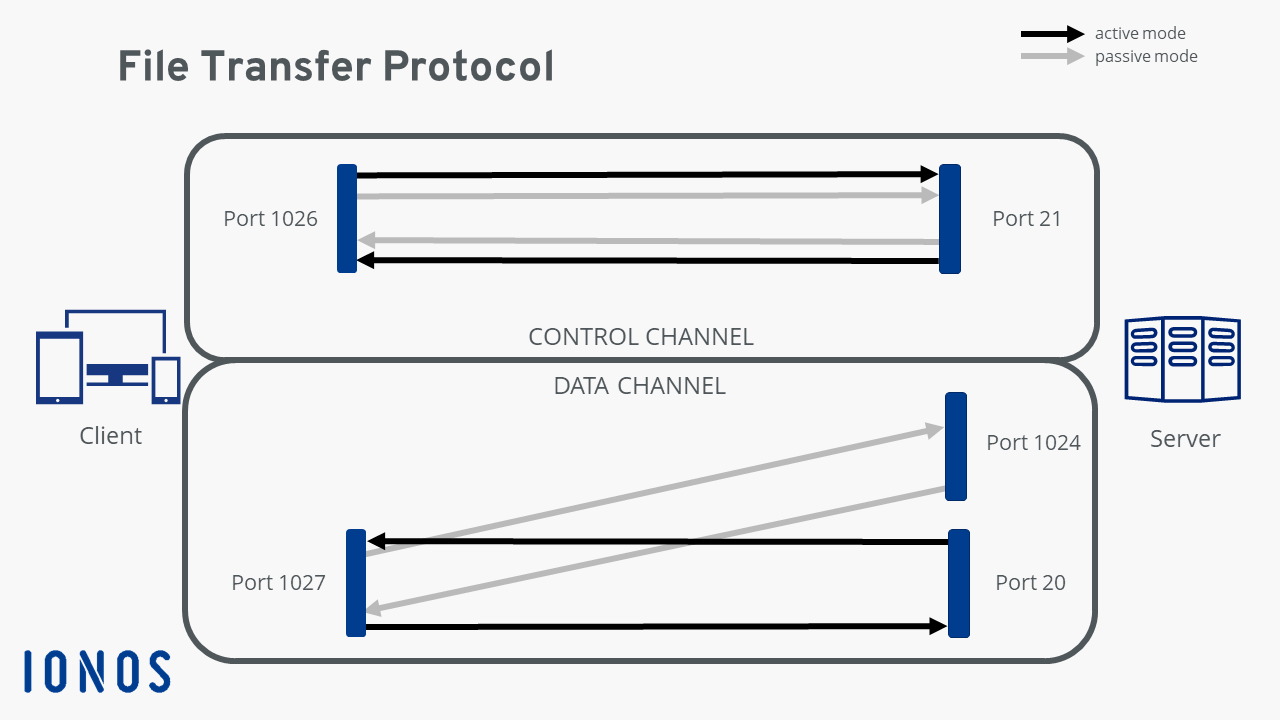
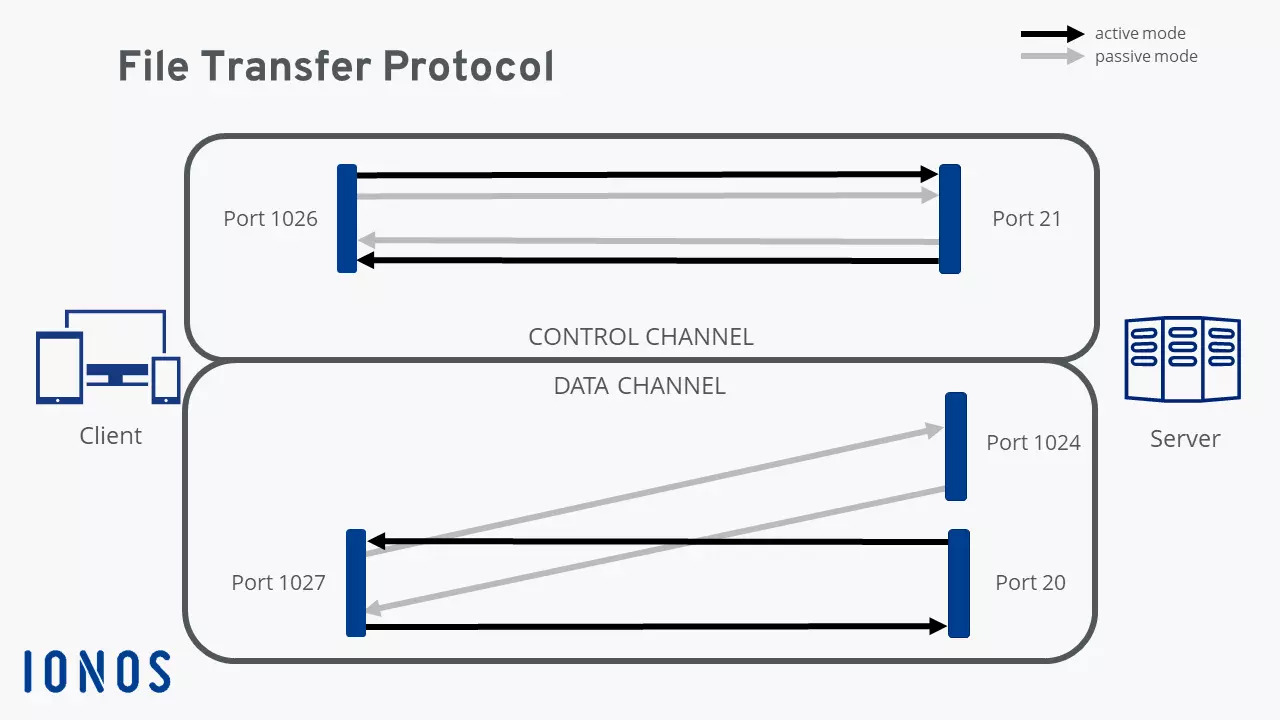
We can make a distinction between active and passive FTP. In the active version, the client establishes the connection using Port 21, as described above, and tells the server which port can be used to deliver its answers. However, if the client is protected by a firewall then the server cannot send any answers, since all external connections are blocked. That’s why passive mode was developed. This way, the server can send a port number to the client that the client can then use to establish a data channel. Since the client initiates the connection themselves, their firewall cannot block the transfer.
The File Transfer Protocol knows various commands and status codes. With the 32 commands – not all of which are always implemented on the server – the client instructs the server to upload or download files, organize directories, or delete files. The server answers with a status code that provides information on whether the command was successfully implemented.
As usual, you’ll need access information in order to use FTP with a server. But some servers also offer anonymous FTP, with which any user can transfer files to the server using FTP or download from it without a password. Since these open FTP servers are vulnerable to security risks, the possibilities for users are usually rather limited.
Security and FTP
The original File Transfer Protocol was made without any security features. At the time of its development, the Internet was still very small and cyber crime didn’t exist. Since then, using FTP has been connected to numerous security risks, since transfers are completely unencrypted. This is why two more secure versions were developed, which are currently in competition with one another: FTPS and SFTP. The first version is FTP using SSL. The connection is established in combination with Secure Socket Layers (SSL) or Transport Layer Security (TLS), in which data exchange is encrypted.
SSH File Transfer Protocol (SFTP) uses the Secure Shell (SSH) for securely transferring files. As with FTPS, the connection is encrypted. However, whereas FTPS requires two connections, SFTP only needs one. But SFTP does require the use of an additional program.
There’s another protocol that’s referred to as “SFTP”: the Simple File Transfer Protocol. This version is meant to be a simpler alternative to the normal FTP and doesn’t have any security features. However, the SFTP never properly established itself and is only of historical relevance today.