

Network News Transfer Protocol (NNTP)

Long before the World Wide Web, a worldwide platform emerged in the early 80s for the exchange of information. It was called Usenet (originally UNIX User Network) and still co-exists with the web today as an independent Internet service. However, the newsgroups, as the separate Usenet topics were named, have become considerably less important over the past decades. This is due to new, digital exchange mediums such as forums and social networks.
However, the historical value of the hierarchically-structured Usenet, which relies on the classic client-server message exchange, is beyond question. It is definitely still worth taking a look at the NNTP (Network News Transfer Protocol) behind the information network, which is indispensable in the communication between individual news servers and clients.
What is NNTP (Network News Transfer Protocol)?
The Network News Transfer Protocol, NNTP for short, is essentially a TCP/IP transfer protocol for messages within newsgroups. These newsgroups are mainly utilized as part of the Usenet, where they offer, as a type of precursor of modern internet forums, space for the exchange of an unlimited number of text messages on the most diverse topics. The first specification of the NNTP, which was recorded in RFC 977, dates back to 1986. Since then, the protocol has been revised several times – the current version can be found in RFC 3977. Furthermore, since RFC 5536 appeared in 2009, a Request for Comments has existed, which also specifies more precisely the NNTP transfer’s message format.
Up until the development and release of NNTP, the exchange of data in Usenet occurred via telephone lines with the UUCP (Unix to Unix copy).
Where is NNTP Utilized?
Nowadays, NTTP no longer has an important role in digital communication, which can primarily be attributable to the fact that Usenet is now only used in isolated cases and among specialist groups. Since 1986, the Network News Transfer Protocol has been indispensable for the information network and is used both on server and client pages. Apart from the exchange of personal direct messages, Usenet stands out in particular because of the newsgroups mentioned above, which thanks to the protocol can be created and administered separately. In this way, numerous sub-newsgroups have been integrated into Usenet’s existing base hierarchy over the course of time.
The eight main topic categories for Usenet, which are also referred to as the “Big Eight” or “Big 8”, are the following:
- comp: Computers
- sci: Science and Technology
- soc: Society
- talk: general subjects
- rec: topics addressing recreation, relaxation, art and culture
- news: information and news about Usenet itself
- misc: mixed
- humanities: Humanities, Culture.
How Does the Network News Transfer Protocol Work?
NNTP is a text-based protocol and allows for the alternating exchange between client and server: Therefore, for every NNTP inquiry, an NNTP reply is expected. For this communication the IANA (Internet Assigned Numbers Authority) has provided TCP-Port 119, which in this case is solely reserved for the transfer protocol – a TCP/IP network such as the Internet is as a result the underlying basis for the information platform. The NNTP itself has access to the application layer and for this relies directly on the TCP protocol, which has the advantage of ensuring both a secure and reliable transfer of data.
The basic concept of Usenet allows for a new message that is sent from an NNTP Client to any NNTP server to be stored on this same server. All the other clients who would like to participate in the particular conversation can download this message or article at any time in order to establish the current status of the newsgroup. As a result, this means that after the establishment of the connection to an NNTP server, a client first downloads all messages that were published since the last connection to the server. As a result, the longer a client was “offline”, the more time the updating process utilizes after the connection has been established.
As soon as a server receives a new message via Network News Transfer Protocol, it adds an individual message ID to this message or article. This has the format “<sequential number@News-Server>” and is conducive to clear labeling, retrieval and references in case other clients or users would like to react or respond with their own message.
In order to disseminate new messages within the entire Usenet network, the individual servers also send the received messages to all the other NNTP servers known to them. Before doing this, they add their own names to the NNTP message’s path header so that these are not received again.
NNTP: Example for Message Exchanges
After having explained the basics of the Network News Transfer Protocol in the previous section, we will now illustrate the communication between clients and servers using a specific example. The starting point is Client 1, which feeds a message or a new article into Usenet:
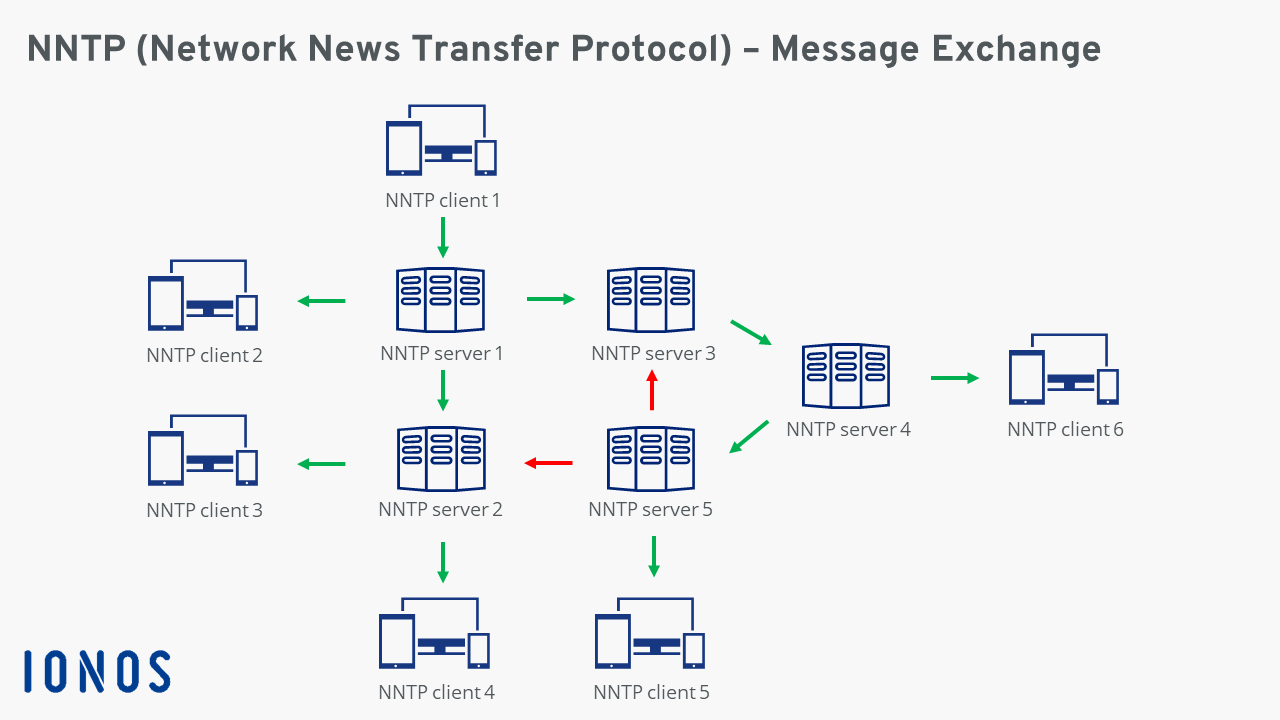
The individual messaging steps that are depicted in this diagram can be summarized as follows:
- The user behind NNTP Client 1 writes a new message (or new article) and sends this data to NNTP Server 1.
- NNTP Server 1 provides the message with a unique message ID and adds its name to the header. It recognizes NNTP Server 2 and NNTP Server 3, and forwards the message onto both.
- NNTP Server 2 receives the message and inserts its name into the header. NNTP Server 3 receives the message as well, extends the header with its name and forwards the message to the NNTP Server 4 (which it knows).
- The message is also received at NNTP Server 4 and processed: The header is enlarged around its name. It then contacts NNTP Server 5, which it knows, and provides it with the data.
- NNTP Server 5 adds its identification to the header. It evaluates the entries in the header and for this reason does not try, in turn, to forward the message to Servers 2 und 3, which it knows (the red arrows are thus for un-attempted forwarding).
- In the meantime, the clients retrieve the message from their personal news server as soon as they are online. NNTP Client 2 receives the information, for example, directly from Server 1; Client 6, in contrast, from Server 4.
An Overview of NNTP Commands and Status Codes
For communicating with the NNTP, clients and servers have recourse to ASCII commands. With every NNTP inquiry a client thus automatically sends one of these commands as well. The server then responds with a status message and sends the client the requested data. The most important commands in NNTP communication are summarized in the following tables:
| NNTP Command | Function |
|---|---|
| LIST | Requests a list of the available newsgroups (including the first and last article number) |
| NEWGROUPS | Asks for all newly-available groups |
| NEWNEWS | Asks for all newly-available articles that were created as of a specific date |
| GROUP | Specifies the group to which an inquiry applies |
| ARTICLE | Enables the request of a specific article with regard to its number in the group or its message ID |
| HEADER | Requests solely the header of an article |
| BODY | Requests solely the body of an article |
| STAT | Is needed for specifying an article’s message ID |
| NEXT | Selects the next article in the newsgroup |
| POST | Informs the server that a new message or article is being transferred |
| QUIT | Terminates the connection to the NNTP server |
The status message that the server sends back as an NNTP response (including the requested data), is a three three-digit numeric code. The first position can be translated as follows:
| NNTP Server Status Code | Meaning |
|---|---|
| 1xx | General information |
| 2xx | Message received, execution successful |
| 3xx | Message received, further information is required |
| 4xx | Message received, execution unsuccessful |
| 5xx | Invalid command |
Meanwhile, the server passes along the following information via the numerical code’s second position:
| NNTP Server Status Code | Meaning |
|---|---|
| x0x | Information about the connection, setup or something else |
| x1x | Information about the selected newsgroup |
| x2x | Information about the selected article |
| x3x | Information about the message transfer |
| x4x | Information about the sent article |
| x5x | Authentication response |
| x8x | Message for extended non-standard commands |
| x9x | Debugging message |