

OSI Model
The Open Systems Interconnection Model (short: OSI model) was designed by the International Organization for Standardization (IOS) as a reference model for open communication through various technical systems. This makes sense when you think about the early days of the internet: at the end of the 1970s, all of the leading manufacturers for network technology were dealing with the problems brought on by proprietary network infrastructures. Following this, devices from ‘manufacturer A’ could only be used within that same company’s own network, as these products were not compatible with the networks of its competitors. At the time, there simply was no incentive in place to encourage engineers to design their products and systems with those of rival companies in mind. The dawn of the internet completely changed this paradigm, since common standards were needed in order to facilitate shared communication and network access.
The OSI model is the result of such standardization attempts and, as conceptual framework, offers a design basis for creating communication standards independently of manufacturers. In order to achieve this, the ISO OSI model subdivides the complex process of network communication into seven levels, also referred to as layers. This is where the term, OSI layer model comes from. When communicating between two systems, specific tasks have to be carried out on each layer. Such tasks include communication control, addressing target systems, or translating data packages into physical signals. This only works, however, when all systems involved with communication adhere to certain rules, which are determined in protocols.
The ISO reference model, on the other hand, is not a concrete network standard. Instead, it describes, in abstract form, which processes need to be regulated so that network communication is able to take place.
OSI model layers
For many users, communication between two computers may appear trivial, but what’s going on behind the scenes is anything but. When transferring data via a network, many tasks need to be taken care of and requirements for important criteria like reliability, security, and integrity also need to be filled. One tried-and-true approach towards this method of network communication involves subdividing these tasks into different layers. Each and every layer is assigned its own defined task area. One standard generally covers just one part of the layer model. This system is organized hierarchically: each layer accesses layers located below them through an interface and makes the superior-located services available. This concept has two major advantages:
- The tasks and requirements that are to be managed/fulfilled within a given layer are clearly defined. Standards for every layer can be developed independently of one another.
- Given that individual layers are clearly separated from one another, changes made to one standard on one layer don’t have any influence on processes running on other layers. This makes it easier to introduce newer standards.
Regarding their tasks, the 7 layers of the OSI model can be subdivided into two groups: application-oriented and transport-oriented layers. These processes, which run on individual layers, are better understood with the help of the following example, which demonstrates an e-mail transfer from a user’s device to a mail server:
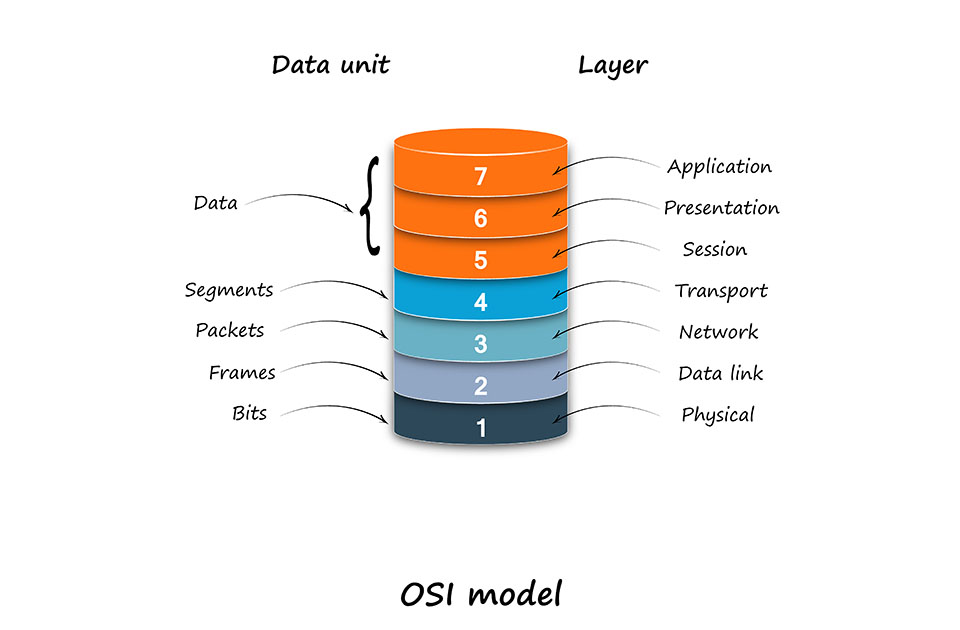
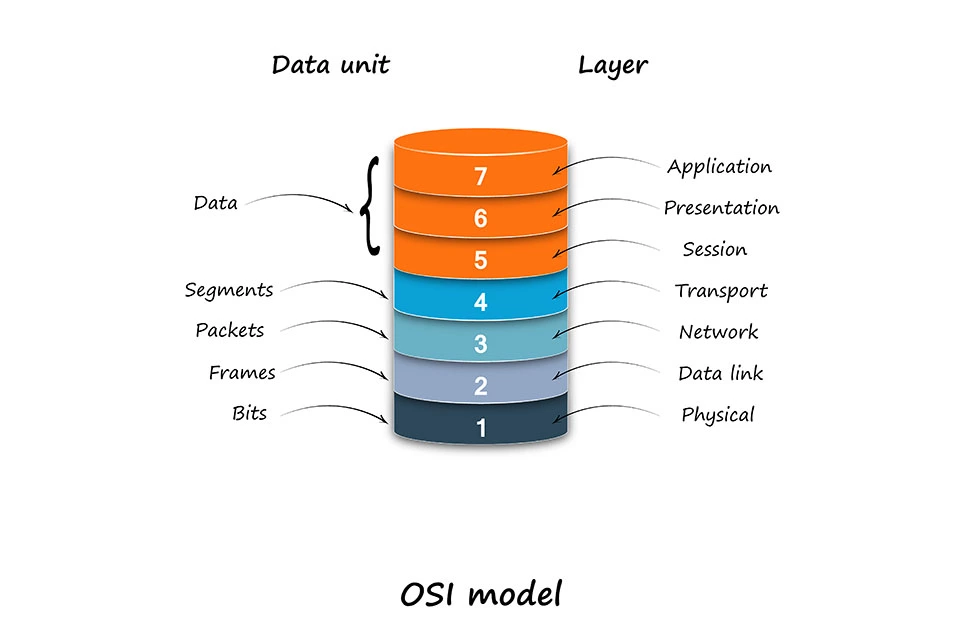
Application oriented layers
The upper layers of the OSI reference model are referred to as application-oriented layers. More specifically, there’s a differentiation made between the application layer, presentation layer, and the session layer.
- Layer 7 — Application layer: this layer from the OSI model has direct contact with applications, like e-mail programs or web browsers. This is where data input and output takes place. The application layers create the connection to the OSI model’s upper levels and keeps application features on standby. An example on how e-mail transfer functions makes this latter point more clear: a user types a message into their e-mail program that’s located on the device in use. This message is accepted into the application layer in the form of a data packet. Here, additional information is added to the e-mail data in the form of an application header; this process is known as capsuling. Among other things, the header contains information indicating that the enclosed data stems from an e-mail program. Additionally, the protocol is defined that’s responsible for transferring the e-mail on the application layer (normally SMTP for e-mails).
- Layer 6 — Presentation layer: a central task for network communication is to make sure that data is transferred in standard formats. This is why local presentations are transferred in standardized formats on the presentation layer. In the case of an e-mail transfer, this is the point when it’s defined how the message is to appear. To this end, a presentation header is added to the data package. This contains information on how the e-mail is coded, in which format potential attachments should be present (e.g. JPEG or MPEGG4) and how the data is compressed or encrypted (e.g. SSL/TLS). This enables the e-mail’s format to be understood and the message to be displayed as it should be.
- Layer 5 — Session layer: organizing the connection between both of the end systems is the main task that’s carried out in the session layer. This is also known as the communication layer. This is where special control mechanisms take effect, which are responsible for establishing and maintaining the connection as well as regulating the connection set-up. Additional information, which is added to the e-mail that’s to be transferred, is required for this communication control (this is done through a session header). The most typical application protocols, like SMTP or FTP, take care of the sessions themselves or, like HTTP, are stateless. This is why the TCP/IP model, a competitor of the OSI model, compiles OSI 5, 6, and 7 into one application layer. Further standards that draw on layer 5’s functions are NetBIOS, Socks, and RPC.
Transport-oriented layers
There are four transport oriented layers that follow the three application-oriented layers. Here, one differentiates between the transport layers, the network layer, the data link layer, and the physical layer.
- Layer 4 — Transportation layer: the transport layer acts as the link between the application-oriented layers and the transport-oriented layers. On this level, the logical end-to-end connection and the transfer channel between the communicating systems is realized. During this step information is also added to the e-mail data. The data packet, which at this point has already had header from the application-oriented layers added to it, receives a transport header. Standardized network protocols, like TCP or UDP are used. This is also when the ports, through which applications on the target system are controlled, are defined. Layer four is also where data packets are assigned to certain applications.
- Layer 3 — Network layer: on layer 3, the data transfer finally reaches the internet. This is where logical addressing of the terminal devices takes place. These are then assigned a unique IP address on layer 3. A network header containing information on routing and data flow control is added to the data packet, like the e-mail data in the example. Here, computer systems fall back on internet standards, like IP, ICMP, X.25, RIP, or OSPF. Generally TCP over IP is used for e-mail traffic.
- Layer 2 — data link layer: on the data link layer, functions designed for detecting errors and managing data flows help transfer errors to be avoided. For this purpose, data packets, including application, presentation, session, transport, and network headers are added to a frame composed of data link headers and data link trails. Layer 2 is also where hardware addressing takes place. To this end, so-called MAC addresses are used. Access to the transfer medium is regulated by protocols, like either net or PPP.
- Layer 1 — Physical Layer: the physical layer is where a data packet’s bits are transformed into physical signal that matches the intended transfer medium. Such signals can only be transferred with the help of some sort of medium, such as copper wire, fiber optic cables, or air. The interface for the transfer medium is defined through protocols and standards, like DSL, ISDN, Bluetooth, USB (physical layer), or ether net (physical layer).
Capsulation and decapsulation
Data packets go through each of the OSI model’s stages on both sender systems as well as target systems. All other devices that data packets pass by on their way to their target destinations rely solely on layers 1 to 3. The e-mail from the example above first passes through the router as a physical signal before it continues on its way through the internet. The internet is only found on layer 3 of the OSI model and, for this reason, only spreads information from the first three layers; layers 4 to 7 are not considered. In order to gain access to required information, the router first has to unpack the capsuled information. This step is often logically referred to as ‘decapsulation’. For this process, the OSI layers runs in reverse.
First, the signal is coded on the physical layer. Next, the MAC addresses are ready out on layer 2 and the IP, as are the IP addresses and routing protocols on layer 3. Based on this information, the router is then able to make a redirect decision. This allows the data packet to then be once again encapsulated and, based on the new information it gained, forwarded to the next station on its way to the target system.
For data transfers, there are generally multiple routers involved, on which processes described above (capsulation and decapsualtion) run; these processes continue until the data packet arrives at its destination; in the case of our text, this is an e-mail server in the form or a physical signal. Here the data packet is also decapsulated (a process that is carried out by running the packet through the OSI model from layers 1 to 7). After this has been done, the message sent via the e-mail client should have reached the e-mail server, where it’s now ready to be accessed through another e-mail client.