

VLAN | What is a virtual local area network?

Virtualization operates with memories, computing power, software and network technology: VLAN describes a virtual, purely logical network based on an actual physical network. How does a virtual LAN work?
What is a VLAN? The basics, explained!
These days, physical networks are mostly based on one or several switches. These are devices that regulate data traffic between participants. This means that all network cables are connected to the switch, enabling communication between the various computers. In the meantime such switches can connect hundreds of devices to each other, ensuring relatively uninterrupted communication. It can also make sense, however, to divide up large networks, without changing their physical installation.
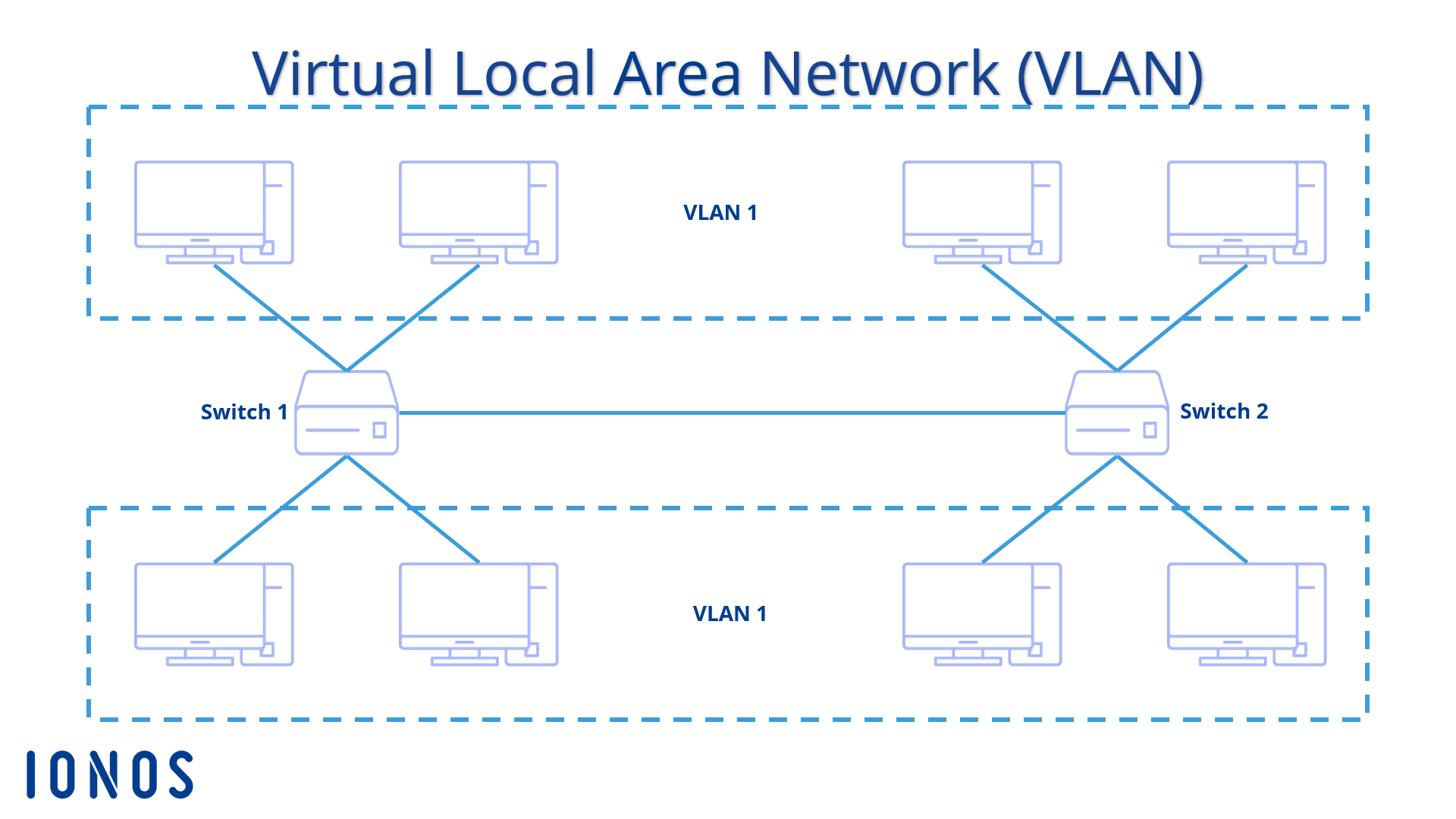
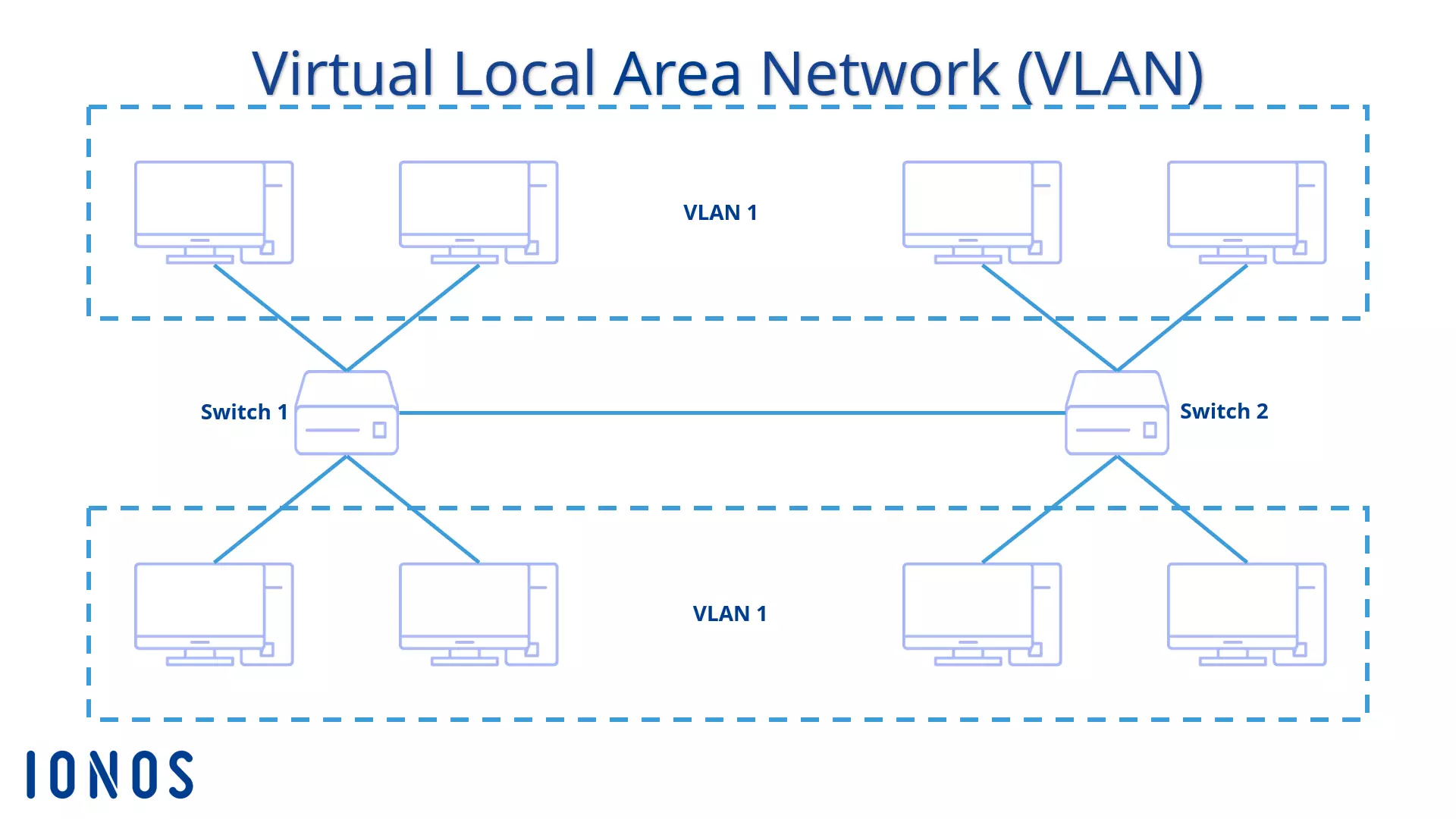
A virtual local area network (VLAN) is a smaller logical segment within a larger, physical, wired network. This means that the various stations are combined as a separate network, irrespective of the site: as long as they are combined within the same LAN, they can all be combined within a single VLAN. It's not a problem if the LAN extends to several switches. The only important thing is that the switch should also be VLAN-enabled. Managed switches are required to establish VLANs.
Unlike unmanaged switches, which are especially used in home networks and are based on the idea of “plug and play”, managed switches for professional use offer far more configuration options. For example, specific IP addresses can be managed, MAC addresses filtered or VLANs established.
Each individual VLAN receives its own broadcast domain: if a participant sends a broadcast within the VLAN, all other participants within this segment, but no others, receive this message. The broadcast is not transmitted beyond the limits of the virtual network. Sometimes the communication of various VLANs may take place on the same cable.
Various VLAN types
VLANs can be set up in different ways. The technology differs, depending on the type. In practice, there are two types: port-based VLANs and tagged VLANs. In many cases, network administrators will use a mixture of these two types to carry out their installations and allocations.
Port-based VLAN
In a switch, each network participant is routed via a port, which is basically a socket into which the corresponding network cable that leads to each computer is then plugged (however, ports are also used to connect switches to each other). If you now want to turn this one physical network into two VLANs, the corresponding ports need to be allocated to the desired virtual network.
Although port-based VLAN installations are mainly used in small networks and are then only created within a single switch, configuration is also possible across several switches. Port 1 to 3 on the first switch and Port 1 on the second switch can be plugged into the same VLAN together. However, this requires the switches to be connected to each other via two cables – a different connection for each VLAN.
This type of connection is known as trunking. Switches have either one or several ports specially designed for this purpose, as defined in their setting options. The type of cable is of secondary importance: It might be a copper or glass fiber cable, or even a wireless connection.
This means that distribution of the packages takes place via the switches themselves. Administrators decide which ports should be allocated to which VLAN, so the VLAN is static. If VLANs are to be differently configured, the ports in the switch configuration need to be reallocated. In addition, each port – and each connected device – can only be part of a single VLAN. For a device from one VLAN to communicate with another, the router forwards the message parcels, as is the case with communication between a home network and the Internet.
Tagged VLAN
For tagged VLANs, allocation to VLANs is more dynamic: instead of being determined in the switch, a tag in the frame of the message package is responsible for allocation. This is why this technology is also known as frame-based, as opposed to port-based networks. The tag contains information about the current VLAN, allowing a switch to detect in which segment communication takes place and route the message accordingly.
A VLAN tag is 32 bits long and appears in the Ethernet frame directly after the MAC address of the sender. The tag starts with a two byte long protocol ID, the tag protocol identifier (TPI), which indicates whether a VLAN ID has been provided. If a VLAN is tagged in the frame, these packets have the value 0x8100. The frame then refers to the priority of the message in three bits. This is followed by one bit for the canonical format identifier (CFI). This position is only used to ensure the compatibility between the Ethernet and the token ring.
The protocol only notes the actual VLAN ID (VID) in the last twelve bits. The length of the frame section means that 4,096 different VLANs are available. Each VLAN receives its own number. Some network interface cards also support VLAN tagging. Linux itself can be used as a switch to support the standard, while Windows users depend on the manufacturer of their network interface card. The VLAN can then be set via the device operator.
The frame principle presented here uses the standard IEEE 802.1q. This is the most frequently used variant. In reality, there are other options for including VLAN tags in a message package. Cisco, for example, uses the inter-switch link protocol (ISL) for its switches. This protocol encapsulates the entire data frame in order to enable several VLANs.
The advantage of a tagged VLAN compared to one that functions via port allocation is the connection between the various switches. Port-based systems require at least two cables between the switches, as each virtual LAN requires its own connection. A single cable suffices for trunking in tagged VLANs, as distribution takes place via the information of the frames. The switch detects the correct VLAN and sends it on to the corresponding second switch. The tag is then removed and the package is routed to the correct recipient.
In practice, a combination of port-based VLAN and tagged VLAN has proven efficient: In this case VLAN communication takes place via allocated ports within a single switch. The connection between the switches is frame-based, however, saving a cable (and also two ports).
VLAN: Advantages of virtual networks
Why make the extra effort to divide a larger LAN into several small VLANs?
Flexibility
If a new participant wants to join a LAN, the device must be wired up to a switch. If an employee within the company changes teams and now has to work in a different network, they will either have to change their workstation or their workstation will need to be rewired. VLANs have a configuration that is entirely based on software. The administrator can flexibly allocate the same computer to another VLAN.
Security
To ensure that unauthorized persons do not gain access to sensitive data, it is a good idea to restrict the network to a small group. In a VLAN, the broadcast domain is restricted to just a few stations, so a broadcast can't reach persons for whom the information is not intended.
Setting up VLANs is not an adequate safety measure. If the virtual networks and the local network on which the VLANs are based are not protected by security measures (e.g. encryption), criminals will be able to intercept the data streams.
Performance
Improved performance is also achieved by reducing the broadcast domain. Broadcast messages no longer have to pass through the entire network. Messages which need to be sent to all network participants, but only intended to reach a certain group of persons, result in unnecessary traffic. A VLAN minimizes unnecessary load on the bandwidth.
VLANs are an efficient and comparatively simple way of dividing large networks into smaller logical groups.
Order
VLANs connect a logical group at different workstations. In a corporate network, for example, there may be employees in a logical group whose workstations are not all at the same site. They may be in different rooms, on different floors or even in different buildings. Connecting these persons and their computers with each other via LAN would require long cables to be routed back and forth across the company’s premises. As several switches can be combined in one VLAN, wiring can be handled in a far more sensible and orderly way.
Price
Instead of several VLANS, it is also theoretically possible to set up several LANs that can then be interconnected via routers to enable communication from network to network. This means additional acquisitions, however, resulting in considerable financial expenditure. Installing parallel networks also takes a lot of time.