

Active Directory

Microsoft Active Directory for Windows networks can be used to centrally manage internal company IT resources, edit rights and policies, and monitor various services. Here, we explain what the directory service is all about and how Windows AD works.
- Simple registration
- Premium TLDs at great prices
- 24/7 personal consultant included
- Free privacy protection for eligible domains
Active Directory: definition
Active Directory (AD) is a directory service developed by Microsoft for Windows networks. AD plays an important role for companies with complex IT resources, user rights, and hierarchical workgroups. Basically, you can think of Active Directory as an address book of sorts, though with many more options for administrators to manage, edit, query, and structure stored user and object data. The IT structure of an organization can be divided into so-called domains with the help of the directory service and can be clearly replicated.
How Active Directory works
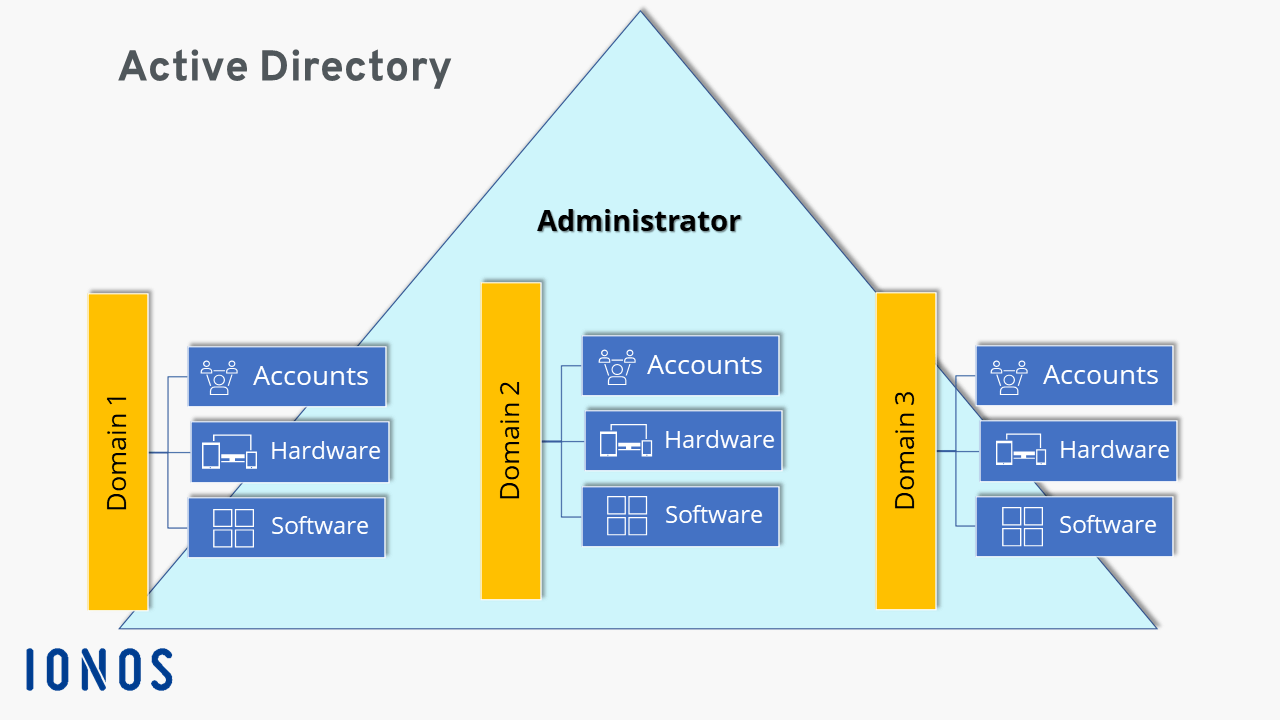
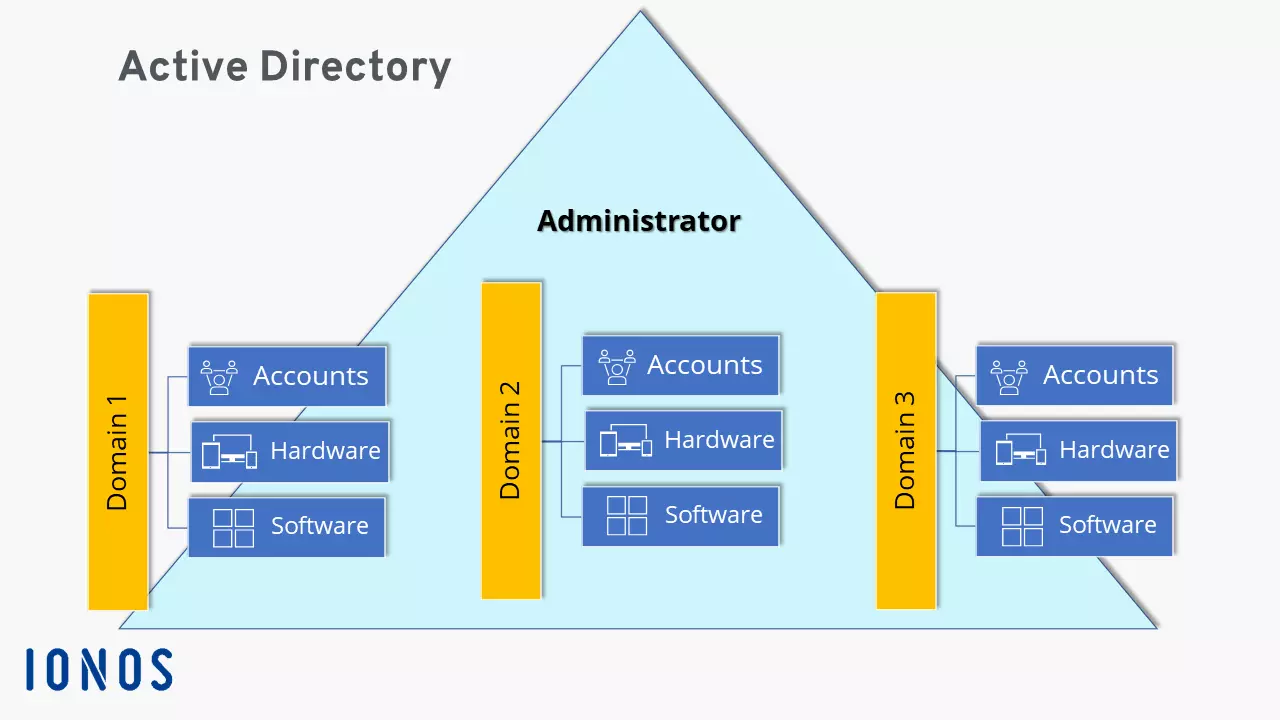
The best way to illustrate how Active Directory works in Windows network servers and what tasks it performs is to use an example: Imagine a large company with 150 employees. All employees depend on the company’s internal IT infrastructure, such as user accounts, printers, scanners, and rights on computers in different work groups. To avoid having to manage IT resources individually for each workstation, Active Directory can map corporate structures, store user and object data, and centrally manage and distribute rights.
For example, a password change doesn’t have to be made on each device, but only once in the Windows AD. System updates and upgrades can also be performed centrally in this way. AD administration and write access to IT resources is in the hands of system administrators. The tasks of the Microsoft Active Directory include:
- Hierarchical organization and mapping of internal IT resources, users, and objects (hardware, software, user roles, and network components/devices/services).
- Management and structuring of storage space.
- Release and blocking of access and application rights (e.g. to directories and services).
- Securing and protecting the corporate network.
Make use of all the benefits of Windows Active Directory for your business, including Microsoft 365 with IONOS, including all Windows services.
Basic structure of AD in Windows networks
An Active Directory basically consists of three central components: schema, configuration, and domain. At the heart of this are domains, which contain all the important information about IT resources and users and map the network. Equally important for the overall structure are the database and its objects. Below, we take a look at the individual components.
Schema
As the name suggests, the AD schema serves as a template for required and permitted classifications as well as types of AD entries. This includes objects and their attributes, classes, and the syntax of attributes. The schema uses definitions to determine which objects are available or can be made available on the network.
Configuration
While the schema defines the possible contents, the AD configuration maps the structure of the Active Directory and all contained objects, user roles, and shares. This includes existing domains that subdivide workgroups in the computer network. In turn, domain-specific content and information is only available via internal domain controllers of the respective domain. These contain a global catalog with all important information and partial information about the schema, configuration, and other domains in the same network. The global catalog can be used to search for and retrieve important partial information across domains.
Domain
Domains are the basis of Active Directory and are used in the hierarchical structuring of objects, workgroups, and users managed by administrators. Like directories and subdirectories, a domain contains all information about objects and attributes that only concern the domain. Domain-specific information can be accessed from other domains only if they are included in the global catalog. All other information is available only on the internal domain controller. A domain is therefore an important structuring element, defining administrative and network units into areas, workgroups, and departments, and hierarchically structuring authorizations. Domain names are assigned in the same way as with classic DNS servers.
Database and objects
The Active Directory database is based on the Microsoft Jet Engine, similar to a Microsoft Exchange Server. It is object-based and hierarchical. The objects represent the respective data sets and group policies for IT resources. Their properties are called attributes and their types are defined accordingly. Objects are subdivided into “accounts” (e.g. service- and user-related accounts for employees, groups, or devices) and “resources” (e.g. shares for applications and services).
Objects are divided into “containers”, which contain further predefined or self-defined objects, and “non-containers”, which don’t contain any further objects and are also called end nodes/leaf nodes.
Four key technical AD components
Four central standards are used to enable uniform communication between computers, applications, services, AD directories, and domains:
- LDAP (Lightweight Directory Access Protocol): protocol for unified requests to Active Directory directories.
- Kerberos protocol: Protocol for centralized, unified authentication and access rights of users in AD servers.
- SMB (Server Message Block): Protocol for access rights like group policies or log-in scripts to files in the AD network and on servers.
- DNS (Domain Name System): System to uniformly address computer names and domains in the Active Directory.
How hierarchy works in Active Directory
If you only take a quick look, you won’t see the Active Directory for the trees. Although it may sound like a bad pun, it’s actually true, because the overall structure of AD is also called the forest and can contain several trees in the form of root domains and subdomains of a DNS space. Containers organized into domains are considered the lowest unit. Joined domains map the organizational structure and resources of the enterprise, but can also be configured independently of physical and logical enterprise structures. In this way, several locations can be united in one domain or different domains can be managed at one location.
Information that can be accessed by all AD users is
- the schema,
- the configuration
- and domain information in the global catalog.
Domain-specific data, on the other hand, can only be accessed via the internal domain controllers already mentioned. A domain usually has two controllers, which prevent data loss through multimaster replication, i.e. backup controllers and AD copies.
User rights, domains, and domain controllers are organized and configured by the responsible administrator.
Active Directory advantages
The advantages of Active Directory for complex Windows networks in companies at a glance:
- Centralized management and configuration of shares, rights, and policies for users, groups, services, and applications.
- Protection against failures and data loss through multimaster replication within the domain structure.
- Mapping and central configuration of the organizational structure of Windows computer networks.
- Flexible extension and scaling of domain structures.
- Information protection through hierarchical demarcation between areas, departments, and workgroups with different access rights.
- Compatibility with other directory services.
- Cost and effort reduction through centralized administration.
- Store, share, and edit data easily
- Backed up and highly secure
- Sync with all devices