

What is a Keylogger?

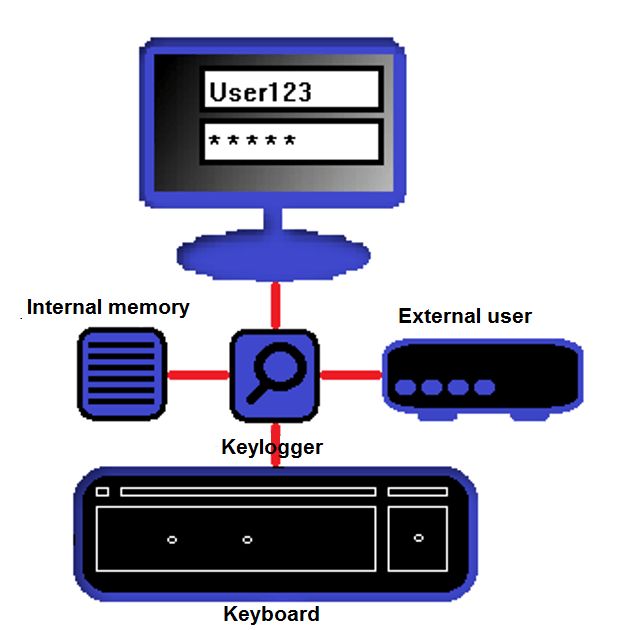
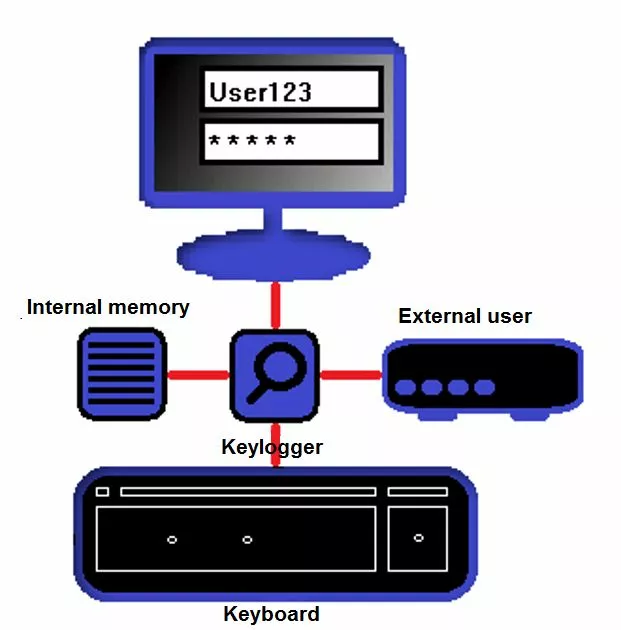
Keyloggers are programs or devices that log keystrokes. Keyloggers are dangerous because they specifically read out login data such as names and passwords, and transmit them to unauthorized third parties. This threatens the security of your e-mail passwords, social media accounts, and online banking data. Keyloggers like these are not only used by individual hackers, but also by investigative authorities and intelligence services to spy on confidential data. The term “keylogger” is often used synonymously with spyware. However, spyware is the generic term for malware that gets its hands on specific user information. The term “keylogger” is more defined, since it is only used to identify keystrokes.
A keylogger is software or hardware that records keystrokes to pass them on to third parties. This jeopardizes data security, since it allows unauthorized people to obtain login data such as passwords, which they can then use to access even more private data.
Not all keyloggers are harmful or illegal. Keylogging can be used to check a user’s behavior on the computer – they aren’t necessarily only used for criminal reasons. Keyloggers also make it easier to document computer use for scientific purposes e.g. collecting data to get insight into how humans behave on computers. Keylogger programs and devices are not necessarily illegal – they only become questionable from a security point of view if they are installed without the user’s consent.
If your e-mail account has been hacked, you may have fallen victim to a keylogger. This article explains what you can do to get access back to your account.
Keylogger software
On the software side, keyloggers often work via unobtrusive background processes that copy keystrokes. Some keyloggers can also take screenshots of the text that’s been entered. This data is then usually passed on online or stored in a file on the victim’s hard drive. In the latter case, the hard drive is then accessed without permission. These types of keyloggers are the most popular and can be effectively avoided if you have a firewall or an antivirus program installed on your computer. Keylogger software is available in many different versions. We present some of them below:
| Keylogger software / principle / technology | Functionality |
| Simple software basis | Computer program that reads keyboard commands via a background process. |
| Hypervisor basis | The keylogger hides behind the operating system using a hypervisor malware program – the operating system itself remains unaffected. As a result, the keylogger functions like a virtual machine and runs independently of the operating system. |
| Kernel basis | The malware hides directly in the operating system and gains access to the root account, which is where keystrokes are logged. These keyloggers can also disguise themselves as drivers and are relatively difficult to detect. For example, antivirus scanners need root access to detect this type of malware. An example of this is the kernel-based trojan, Duqu. |
| API basis | These keyloggers connect to application programming interfaces (APIs) and respond to each keystroke. |
| Form-grabbing basis | This type of keylogger logs online forms and copies the corresponding login data. The software can also access the browser history to determine which pages have been visited. |
| Man-in-the-browser basis (MITB) | Also known as “Memory injection,” these keyloggers hide in the web browser and log keystrokes without the user knowing. For example, these keyloggers collect information sent via input fields and store it in the internal logs of the browser. The logs are then accessed from the outside. |
| Remote access basis | These remote keyloggers allow external access to the malware. The logged keystrokes are “tapped” via e-mail or an upload. These keyloggers also often work in conjunction with appropriate hardware. |
Keylogger hardware
Many internet users don’t even know that hardware keyloggers exist and that it’s not just software that spies on passwords. This type of keylogger can be, for example, in the form of a small USB connector that is attached somewhere between the keyboard and the computer. Connectors like these have an internal memory that stores the keystrokes logs. If you later remove the keylogger, you can then read the saved logs. Hardware-based keyloggers are also available in very imaginative and surprising variants, similar to something James Bond would use. However, private users will rarely come into contact with them.
| Keylogger hardware / principle / technology | Functionality |
| Keyboard additional hardware | Additional hardware is installed between the keyboard and the computer – typically on the keyboard connection cable directly. Also called “KeyGrabber,” these keyloggers are usually designed as small connector attachments with internal memory. The keystrokes are logged in this file. KeyGrabber is available for both USB and PS2 ports. These devices are usually attached directly to the computer connection and are only noticed when the user looks more closely. They can be hard to spot if the computer connections are not directly visible at your desk (i.e. because the tower is underneath on the floor). |
| Firmware basis | These hardware-specific keyloggers log keystrokes at the BIOS level. You often need physical access to the hardware and at least root access. Firmware-based keyloggers are also used, for example, in the form of attachments for hardware circuits. They are not visible until the device concerned is opened. |
| Keyboard and mouse sniffer | These devices read data that is transferred from a wireless keyboard or mouse to the target system. Since wireless communication is often encrypted, the sniffer must also crack this code. |
| Keyboard attachments | Criminals often use this method of keylogging on ATMs. You install an attachment on the machine’s card slot. This attachment is often difficult to recognize and the user presumes it’s an integral part of the machine. When customers enter their PINS and other confidential information, they involuntarily feed it into the keylogger. |
| Acoustic keylogger | These devices evaluate the noises that a user makes with the keyboard. Each key makes a different sound when pressed, although this is indistinguishable to humans. Acoustic keyloggers can be used to gather statistics on human behavior on computers to reconstruct the text entered by the user. However, these instruments require a sufficient sample size of at least 1,000 keystrokes. |
| Collecting electromagnetic waves | All keyboards generate electromagnetic waves with a range of up to 20 meters. Special devices can register and read these waves out. |
| Video surveillance | The term keylogging can also include traditional video surveillance. This is when the keyboard input is observed using a camera and logged externally. |
| Physical trace analysis | This technique is used less often for traditional PC keyboards and more for numeric input fields. Pressing certain keys more often than others leaves a physical trace that can be used to reconstruct a password, for example. |
| Smartphone sensors | Modern smartphones have so-called accelerometers, which can be reprogrammed to special keyloggers. If the phone is near the target keyboard, it can read the vibrations generated when the user types. |
How to protect yourself from keyloggers
Most keyloggers can be kept at bay with a virus scanner and an up-to-date firewall. Of course, new keyloggers are constantly being developed and their signature is not immediately flagged by the protection programs as being harmful. So, how you behave when using your computer is also important if you want to minimize the risk of keylogging. We have put together some tips on how you can protect yourself from keyloggers.
- Make sure your security software is up-to-date. Use high-performance antivirus programs and real-time scanners to protect yourself from keyloggers. Most keyloggers are found and removed by any reasonably good antivirus program. However, you should not scrimp on the quality of the software – especially if you regularly have to enter strictly confidential data such as account data on your computer.
- Special password managers not only help you to get an overview of all your passwords, but also generate highly complex passwords that are difficult for keyloggers to log. In addition, these programs often have an autofill function, so you don’t have to enter your credentials manually. After all, keyloggers can usually only read what you actually type.
- Multi-factor authentication (MFA) is considered extremely secure for login data. The user is not only prompted for a password, but also requires variable factor authentication (e.g. via a cell phone), which is usually interactive. Even if keyloggers crack the actual password, this is useless thanks to MFA alone.
- Keylogger hardware is hardly ever used by private users. But if, for example, you work with highly confidential data at the office that might be of interest to competitors, it can’t hurt to check your connections from time to time. Be on the lookout for suspicious-looking connectors. If you think you are a victim of keylogger hardware, you should inform IT before removing the alleged keylogger.
- A simple trick to prevent keyloggers is to use the virtual keyboard. You can access it on Windows by typing “osk.exe” in the execution box (Windows key +R). Since keyloggers usually only read physical keystrokes, you are better protected when you enter your data using the virtual keyboard.
- There are special tools on the internet that can be used to find and remove keyloggers. The best known tool is Spybot – Search & Destroy which also offers quite a powerful free version. Another tried and tested program is Malwarebytes. Unlike more comprehensive antivirus programs, Spybot and Malwarebytes have been specially developed to fight malware that spies on your data – like keyloggers.
- Extra care must be taken when using public computers. Avoid entering confidential data on them, but if you have no other choice, make sure to check the connections for suspicious hardware. If you enter a password on a website, stop the process, and type in random characters somewhere else before completing your password. This method can be used to trick potential keyloggers. You can also use the virtual keyboard on most public computers.