

What makes website ratings crucial for your site?

Customer website ratings serve as a crucial trust element and significantly influence user behavior. Positive reviews can increase the conversion rate, while negative ratings provide valuable feedback and highlight optimization potential. Ratings are especially credible when they are transparent, up-to-date, and come from verified customers.
- Intuitive website builder with AI assistance
- Create captivating images and texts in seconds
- Domain, SSL and email included
Why are website ratings important?
Customers and website visitors often gain important information through reviews and customer website ratings, allowing them to gauge the opinions of other users before investing money in a product, service, or business. Since a product can’t be physically inspected online as it can in a store, testimonials help bridge this information gap. While online shopping is convenient, practical, and fast, it also involves distance. For this reason, potential customers often feel uncertain about the quality and benefits of online offerings.
If a website contains ratings or a comment box, this distance can be bridged: Customers help each other with purchasing decisions through reviews and provide insights into the function, scope, and added value of a product. Of course, rating the website itself or commenting on non-commercial content is conceivable and useful. Simply having the option to rate signals that you take your users’ desires seriously—this builds trust. Additionally, you engage your website’s visitors when you allow commenting on offers or content.
Through the website ratings on your site, you also receive important feedback: Do the products meet expectations? Are the contents engaging and do they truly offer added value? This information is crucial for the ongoing optimization of your website and your offerings.

What are the different types of website ratings?
Customer website ratings can take various forms, from basic star ratings, similar to a school grading system, to comments in feedback boxes and in-depth reviews. Some websites also let users express their opinions through icons, such as thumbs-up or thumbs-down. The key rating mechanisms include the following:
- Star ratings: They allow users to express their opinions with just a click. The five-star website rating system has become the standard on the internet. While one star represents the lowest score, a full five stars is the usual highest mark.
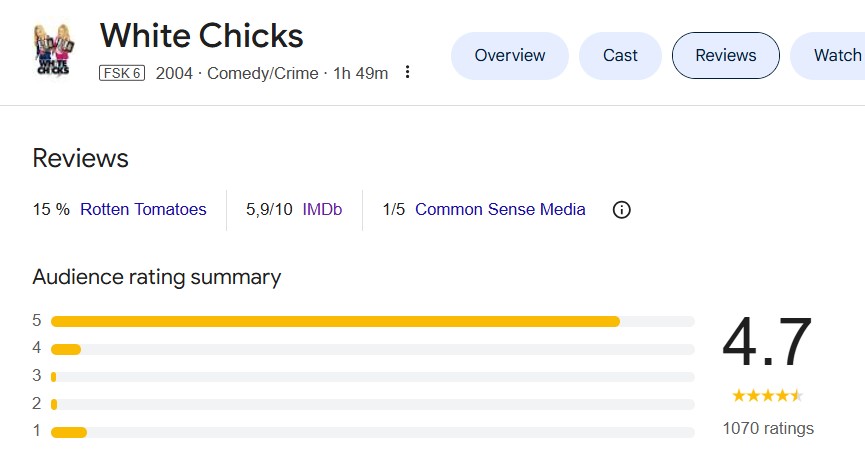
- Upvotes/downvotes: This website rating system has similar pros and cons to star ratings: it provides a very quick and straightforward method for user feedback, but it doesn’t offer an opportunity to delve deeper. There’s only a scale of “like” vs. “dislike”—the “why” remains unanswered.
- Comments: Comments answer the question of “why” in a website rating. They give users the opportunity to provide a brief explanation. Suggestions and improvement requests can also be expressed.
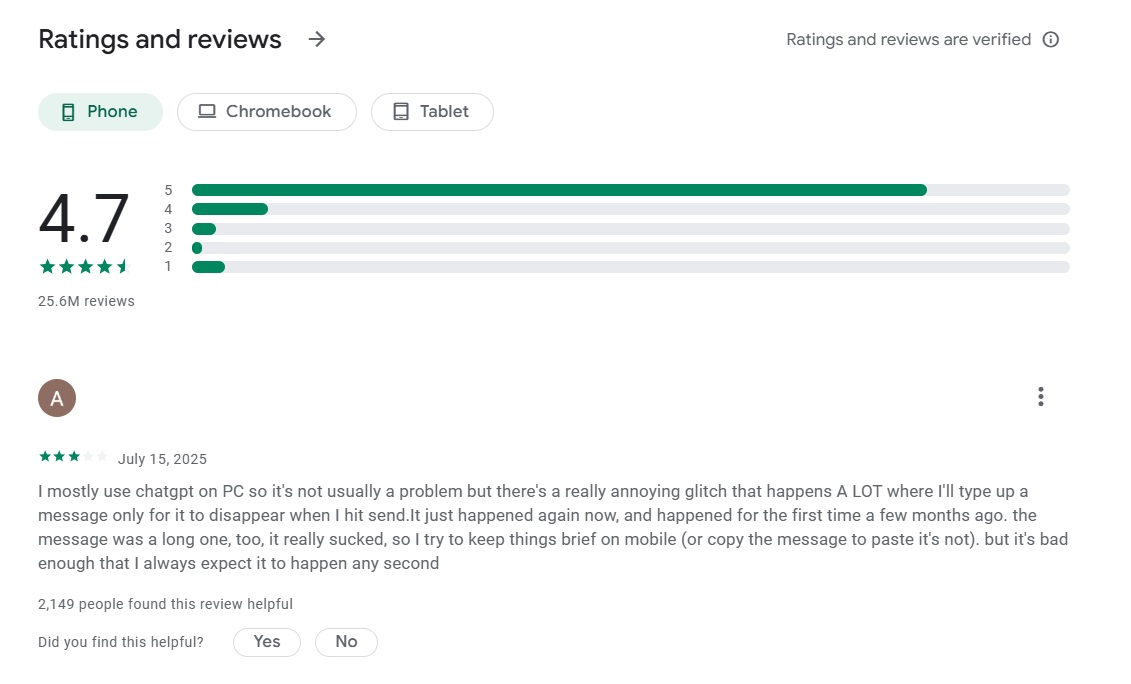
- Reviews: Reviews are primarily offered for products in online shops. Most notably, Amazon has built an impressive and continuously growing review archive for a wide range of products, thanks to its large user base.
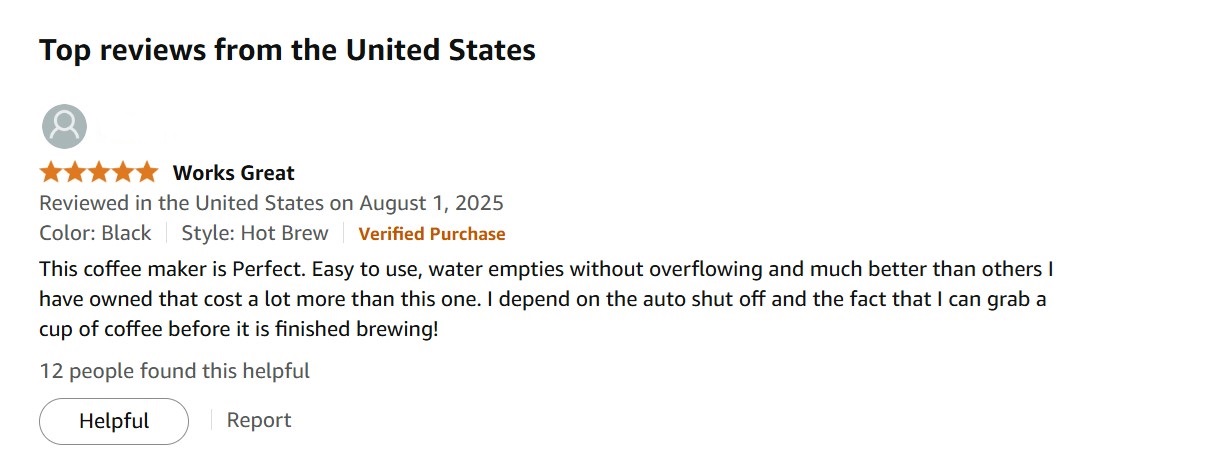
As shown in the last example, there’s a button labeled “helpful.” Amazon provides the option to write detailed reviews and to mark them as “helpful” or “not helpful.” This introduces a system for meta-ratings, serving a critical function: it prevents abuse of the review feature and establishes a control mechanism. Another element that builds more trust in this example is Amazon’s system, which recognizes and verifies the purchases of reviewers.
Best practices for customer website rating systems
The examples show that there are numerous ways to implement a website rating system. These do not have to be mutually exclusive and can easily be combined. The Amazon example illustrates this: the review is also linked to a five-star rating of the item.
Additionally, there is an option to rate the actual review using comments and the “like” system. From these examples, several best practices can be derived:
- Reviews, ratings, and comments must be authentic and truly come from customers.
- You should not delete or hide negative reviews. Instead, it is valuable to respond to the feedback objectively and offer polite assistance.
- Encourage users to provide feedback and actively seek interaction. A higher number of customer website ratings suggests that your offering is very popular.
- The website rating feature must be easy to find and straightforward.
- It may be beneficial to reward the effort and highlight active reviewers.
- Regularly analyze the website ratings, comments, and/or reviews. Only when you take criticism seriously and actually learn from it can you improve the quality of the offering and the user experience.
How can website ratings be integrated into a site?
Depending on the type of review system, there are various ways to integrate website ratings into sites: The easiest option is through built-in features of shop and content management systems (CMS). Many systems have such a feature by default or at least offer separately installable plugins for ratings. Additionally, there are straightforward generator tools that automatically generate the necessary HTML code with a few clicks. The code can then be copied and embedded. Moreover, star ratings can also be written manually.
- Professional templates
- Intuitive customizable design
- Free domain, SSL, and email address
Plugins
There are practical all-in-one solutions for most CMS and shop systems that offer multiple different review systems such as stars, points, circles, or similar icons. Many tools also enable rich snippets in Google SERPs. Installation is typically very easy, depending on the CMS, and the range of possible plugins spans from free to more comprehensive premium solutions. For the world’s most-used CMS, WordPress, there are countless such rating and review plugins.
Plugin solutions are a practical approach for most CMS due to their universal applicability, extensive functionality, and wide availability. Additionally, they are generally easy for beginners to integrate into a website, depending on the plugin and CMS.
Generator tools
If you’re looking for a simple solution for website ratings and prefer not to write the code yourself, you can use a generator tool. An example of such a tool is the Easy Icon Editor from Noun Project. With this tool, you can easily customize existing star icons online. The code is automatically generated, which can then be copied. In addition to standard star icons, you can also upload and use your own graphics.
You also have the option to adjust the text or the number of stars. However, due to limited customization options, such solutions are often only an alternative for very simple websites. Another issue with many of these solutions is that the backend often requires extensive setup (e.g., via a special PHP script) to save user inputs.
Writing code by hand
Of course, you can also write the code for ratings on your website by hand. For a simple star system, you can implement a rating scale with five selectable stars using HTML, CSS, and some JavaScript. The stars can be displayed as SVG graphics or Unicode characters and made clickable. JavaScript saves the selected rating (e.g., in a form field), which can then be processed or stored server-side. If you want to display dynamic ratings with feedback or average values, this can be achieved with database connectivity (e.g., MySQL) and server-side logic (such as PHP, Node.js, or Python).
A simple example of a CSS class for a star rating system might look like the one shown below. However, this code only handles the display of a star rating—a script to capture user inputs and store them is still missing.
1  .rating {
2      unicode-bidi: bidi-override;
3      direction: rtl;
4  }
5
6  .rating span {
7      display: inline-block;
8      width: 1.1em;
9      font-size: 2.8em;
10      color: #ccc;
11      cursor: pointer;
12      text-shadow: 0 0 1px #666;
13  }
14
15  .rating span:hover,
16  .rating span:hover ~ span {
17      color: gold;
18      text-shadow: 0 0 5px #e2e2e2;
19  }
20
21  .rating span:active,
22  .rating span:active ~ span {
23      color: yellow;
24 }Display reviews in Google SERPs
Star ratings on your website have another advantage: if you implement them using schema.org, the ratings can also appear in Google SERPs as rich snippets. This way, they act as eye-catchers even before customers visit your page, potentially generating more traffic. In the following screenshot, a search for the six-time Oscar-winning film “La La Land” was conducted on Google. The SERPs show the following entry from the Internet Movie Database (IMDb) with the average user rating on a scale from 1 to 10, a graphical representation as a star rating, and the number of votes submitted:


Once all annotations have been implemented according to schema.org, you can use various tools like the Google Structured Data Testing Tool to view a preview. This way, you can quickly see if everything is properly annotated and displayed correctly.