

What to do if your email is hacked? Steps to follow asap

If your email account has been hacked, sensitive data can quickly land in the wrong hands. The consequences can be serious, but instead of panicking, you should stay calm. We explain what to do when your email account has been hacked.
For quick readers, here are the three most important immediate actions if you suspect that your email address has been hacked:
- Use tools like Firefox Monitor, the free security test from Firefox.
- Change your password and use security software like malware scanners.
- Remove any malware that’s found and set up new security measures such as two-factor authentication to make your account more secure and prevent it from getting hacked again.
What to do when your email has been hacked
If you’ve done the testing or have noticed unusual activity on your account and know for certain that you’ve been hacked, we recommend following our step-by-step plan below to resolve the situation and regain full control of your account. Here are the steps:
For detailed information on how to determine if your email account has been hacked, take a look at our article “Has My Email Been Hacked?”.
Step 1: Change your password
Try to log into your account as usual. If you can do so without any problems, it means your password has not yet been changed by hackers. You should change it yourself as soon as possible. To do this, go to your email provider’s website and change the password in your account settings. You must then log in on all your devices using the new password, otherwise you won’t receive notifications of incoming mails.
If the password has already been changed by unauthorized persons, you can regain control of your account by answering one or more security questions (this is the case with most email providers). To do this, use the feature “Forgot your password?”. Other providers ask for your cell number or a second email address to check whether they should grant you access. You will then be sent a new password via email. Change this new password (not to the previous one!) to block unauthorized users.
Change your passwords regularly and use a different password for each account. Each unique password should be as long as possible and consist of upper- and lower-case letters, numbers and special characters. A password manager can help you keep track of your different passwords.
Step 2: Find and eliminate the cause(s)
Now you have to investigate the causes. Scan your entire system for malware, ideally with a rescue disc or an online scanner. Rescue disks are available from all major antivirus software developers like Trend Micro, F-Secure and ESET.
The reason for this measure is that if the password for your email account was uncovered with a keylogger, the malicious software may be able to access all the newly changed passwords too. If the scan shows a result, change the password once again after the malware has been removed. Only this way can you be absolutely sure that the malicious software hasn’t stolen your new password.
If no malware is found on your device, there is a high probability that you have been a victim of a phishing email or larger-scale data theft.
Step 3: Get an overview of the damage
Once you have access to your inbox again, your system has been checked, and the password has been changed, you now need to work out what damage the hackers have caused. Obtain an overview of the extent of the hacking attack and, if necessary, get proof. Have spam emails been sent using your email address? Have purchases been made from your account? This has to be determined so that in case of an emergency you can prove that the fraud happened. If you or someone else (e.g., online stores) have suffered financial damage, you should report the case to the police immediately and consult a lawyer if necessary.
In many cases, a hacked email account is usually used for a whole host of criminal activities. It makes sense to inform your contacts about the problem before they click on any links they receive in emails addressed from you.
Step 4: Improve security measures
Finally, you should prepare yourself for the future. It’s best to change all your passwords and to use a password manager that remembers them for you.
In addition, you should also back up your most important accounts with two-factor authentication. This is a double security system, which requires a separate code in addition to a password when you log in. The device can only be authenticated when both the password and the code are entered. Hackers, on the other hand, can only find out the password, but not the code associated with it, meaning they can’t log in to your account.
Want to be able to rely on maximum security and reliability with your email account? Then create your own email address with IONOS and benefit from ad-free inboxes, modern spam filters and optional premium virus protection.
How can an email account be hacked?
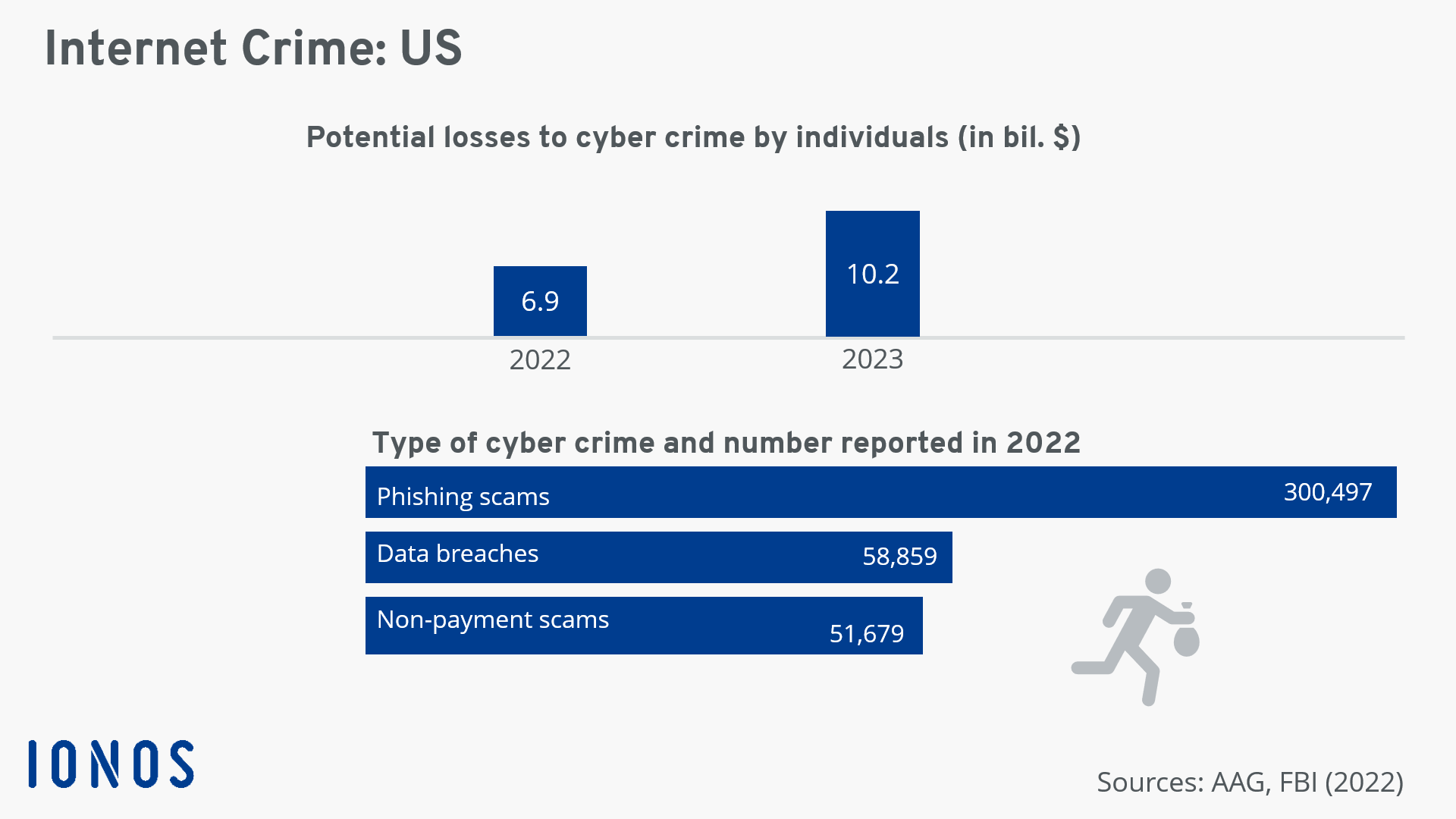
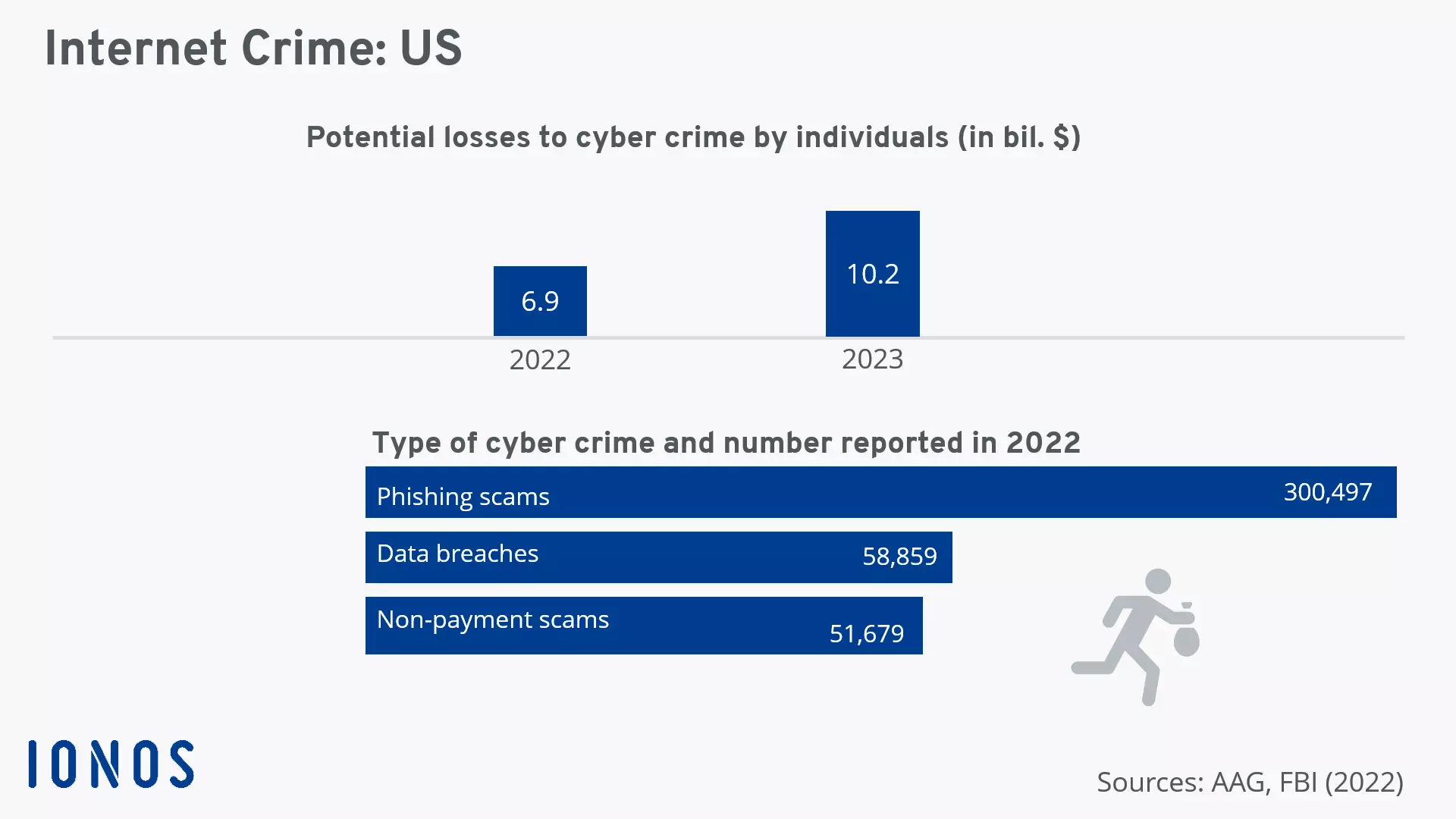
The most important step for stopping an email address from being hacked is prevention. Once you know how an email account is hacked, you can protect it better. Internet criminals use different methods to get hold of email addresses and their passwords. Particularly well-known are hacking attacks on servers of large websites. Phishing and malware are also frequently used to steal user data.
Data theft during server attacks
Large-scale hacking attacks on businesses are constantly making the headlines. Criminals manage to obtain millions of customers’ data and login information. Since many internet users only use one password for everything, hackers only need to crack one password to gain access to countless email and website accounts.
So you’ll hopefully never have to ask yourself what to do if your email is hacked, make sure to use a unique and secure password for each login. The most secure passwords contain random combinations of letters, numbers and special characters. Since hacking attacks are only first discovered when it’s too late, you have to act quickly and change your passwords immediately.
Phishing using fake emails
The second possibility is phishing emails. This is where spambots send out a massive amount of fake emails, which ask the recipients to enter their personal information on fake websites. Legitimate websites, email providers, payment services and online stores never ask for their users’ passwords by email. Don’t give out your information to anyone that asks. If you are unsure whether an email is legitimate, consult the company’s support.
Malware attacks
The third possibility cybercriminals use to get hold of sensitive data is to carry out a malware attack. Malicious programs are usually sent in email attachments with fake file names. If one of these attachments is opened, the malicious software will automatically be installed on the user’s computer just like spyware or a keylogger.
These malware programs run secretly in the background and spy on sensitive data and passwords. Keyloggers, for example, record all keyboard entries on the infected PC and transmit the data to the internet criminals, including any passwords. The most effective protection against spyware is to always have up-to-date antivirus protection and an activated firewall installed on your computer. But as a user, you should also exercise caution. Be skeptical at all times and check an email’s authenticity before opening the attachment.
- Personalized email address
- Access your emails from anywhere
- Highest security standards