

What is an SMTP relay and how does it work?

An SMTP relay is the forwarding of emails from senders to recipients. The SMTP relay server acts as an intermediary to deliver emails reliably and securely, especially when they are sent across different servers or networks. This ensures messages are correctly delivered and not blocked as spam.
- Personalized email address
- Access your emails from anywhere
- Highest security standards
What is an SMTP relay?
The term “SMTP relay” (or “email relay”) is defined quite inconsistently on the internet. Some sources refer to it as a process, others as a service, and still others use the word synonymously with SMTP server or even lump it together with the Simple Mail Transfer Protocol (SMTP). In a way, they are all right but fail to adequately integrate the individual aspects.
Here is a clear definition: An SMTP relay is the process of forwarding emails across the internet from senders to recipients. This process is handled by SMTP relay servers, which operate according to the Simple Mail Transfer Protocol, and can be part of an external service (an SMTP relay service).
- Highest security standards
- Automatic encryption with SSL/TLS
- ISO-27001 certified and geo-redundant data centers
- IMAP & SMTP
What is an SMTP relay server?
An SMTP relay server (also known as a mail relay server or mail transfer agent) is, based on the previous definition, an SMTP server that enables an SMTP relay. This means it accepts emails from the sender and forwards them to third parties. Typically, it is an external third-party server on the internet, positioned between the sender and recipient SMTP servers (along with any additional mail transfer agents, or MTAs). When sending messages within the same mail provider domain, no additional server is involved, so it is not considered an email relay in those cases.
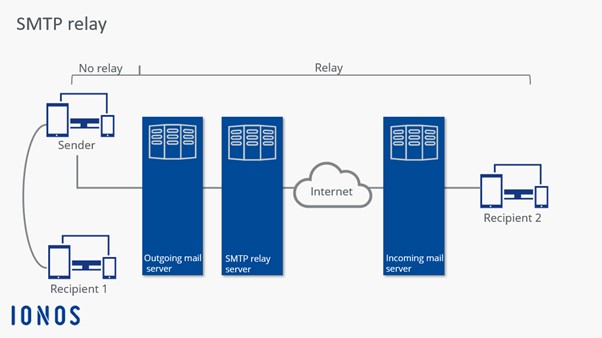
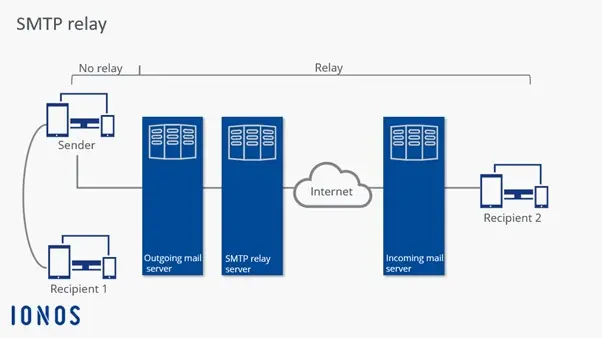
The difference can also be illustrated: If you send a letter to a distant relative, it is first relayed by the local post office to the one nearest the recipient before being delivered (relay); however, when sent within the same town, the local post office delivers the letter directly to the destination address (no relay).
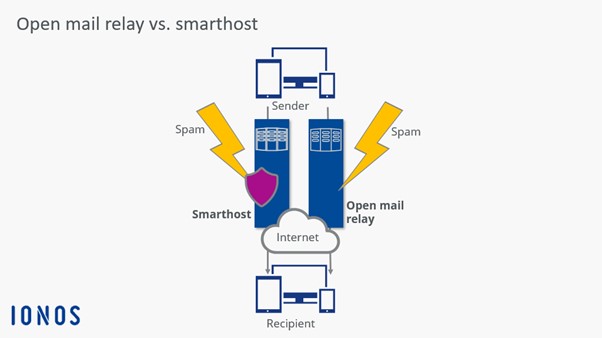
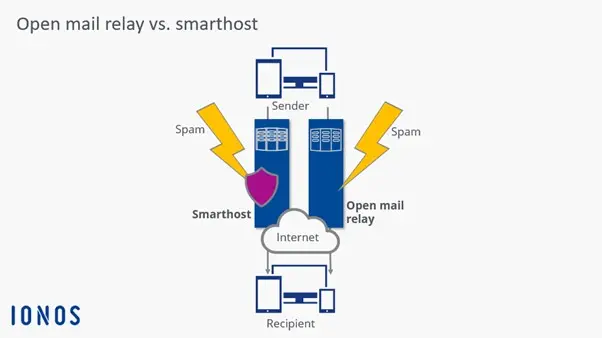
An SMTP relay server can be either “closed” or “open” based on its configuration. In this context, we distinguish between a “smarthost” and an “open mail relay”. Additionally, an email relay placed in front of the sender’s outbound server can perform other useful functions.
Smarthost
A properly configured SMTP relay server is also known as a “smarthost.” It is “smart” in the sense that it only forwards an email if it is responsible for either the sender or the recipient. Emails from unauthorized parties outside the server’s jurisdiction are rejected. This is enabled through various authentication methods such as whitelists, SMTP-after-POP, or ESMTP with the SMTP Auth extension.
Open mail relay
A disadvantage of SMTP is that its basic configuration does not require user authentication. If you don’t manually add the appropriate mechanisms to an SMTP relay server, it is considered poorly configured and thus an “open mail relay.” In plain terms, this means the server will also forward emails for which it is responsible neither for the sending nor the receiving person.
This situation allows cybercriminals to distribute massive amounts of spam on the internet using fake or stolen sender addresses. If such an open relay is discovered, it usually lands on the blacklists of major webmail providers within hours or days. All messages sent through it, even legitimate ones, are then classified as spam and filtered out. As the operator of the incorrectly configured SMTP relay server, you face the consequences: you must fix the security flaw and request removal from the blacklist. For businesses and organizations, this extra work can lead to economic losses.
Uses of SMTP relay servers
Extensions and upgrades of email systems are usually not implemented directly on the sender’s outgoing mail server, but rather through a front-end SMTP relay server. To “retrofit” several functions at once, complete “relay chains” are possible, which process an email in various ways before it is fed into the internet. These additional areas of application include, among others:
- Combating spam with senders: To maintain their online reputation, it is also important for operators of outgoing mail servers to prevent the sending of spam, viruses, and other malware by their own users. Appropriate scanners and firewalls are usually installed on a separate SMTP relay server to offload the actual mail server.
- Backup mail service for recipients: A smarthost can also accept emails for the recipient’s incoming mail server when it is temporarily unavailable for any reason. Once it is back online, the smarthost gradually delivers the accumulated emails.
Further possible applications of SMTP relay servers include:
- the signing and encryption of emails
- the automatic addition of a disclaimer at the end of each message text
- the archiving of emails
- mail routing and rewriting for address changes
- load balancing and scalability


What is an SMTP relay service?
To counteract the daily flood of spam, most internet and email providers limit the number of messages that can be sent per day. Bulk emails, newsletters, and automatic transactional messages like order confirmations, which are to be sent to thousands of recipients, require an affordable, scalable, and reliable delivery platform capable of meeting the specific needs of a growing business.
One option is to set up your own SMTP relay server. However, using your own hardware for large volumes of external business emails can result in bandwidth limitations and hinder internal peer-to-peer correspondence. Another disadvantage is the cost and significant workload associated with server administration. Additionally, emails from foreign SMTP relay servers are often classified as spam, as are those with dynamic IP addresses.
Due to these restrictions, many companies prefer to turn to a professional SMTP relay service, which operates its own server for email forwarding. Mailing packages from providers like mailjet, Brevo, or turboSMTP are specialized in handling large volumes of emails, scalable in their pricing model based on the volume of messages, and typically maintain an excellent reputation with internet and mail providers due to their close collaboration. Once you have set up the respective service, you can continue to use your email application (e.g., Microsoft Outlook) as usual to send and receive messages.
Additionally, many SMTP relay services offer added value, such as a reporting feature: By having the provider’s SMTP relay server automatically insert a link tracker into the body of each email, you can collect economically valuable data such as open, click, and bounce rates, as well as feedback on the sending process or your newsletter (e.g., spam complaints or subscription cancelations). When properly interpreted and utilized, this information can serve as a basis for adjusting and modifying your email marketing campaigns.
How to use the IONOS SMTP relay
To use the IONOS SMTP relay, an email mailbox must be set up as a relay address belonging to the same domain as the corresponding SPF entry. Specifically, this means that the email addresses using the SMTP relay server must also belong to the domain of the relay address. You can easily create an SPF entry for your domain through the IONOS Help Center to ensure successful email delivery. These prerequisites ensure a secure and reliable use of the SMTP relay within your domain.