

Headless CMS vs. traditional CMS

Content management systems (CMS) are widely used for websites. While traditional CMSs are well suited to building an entire website, with a headless CMS, you can concentrate on the backend and the content of your website.
What is a traditional CMS?
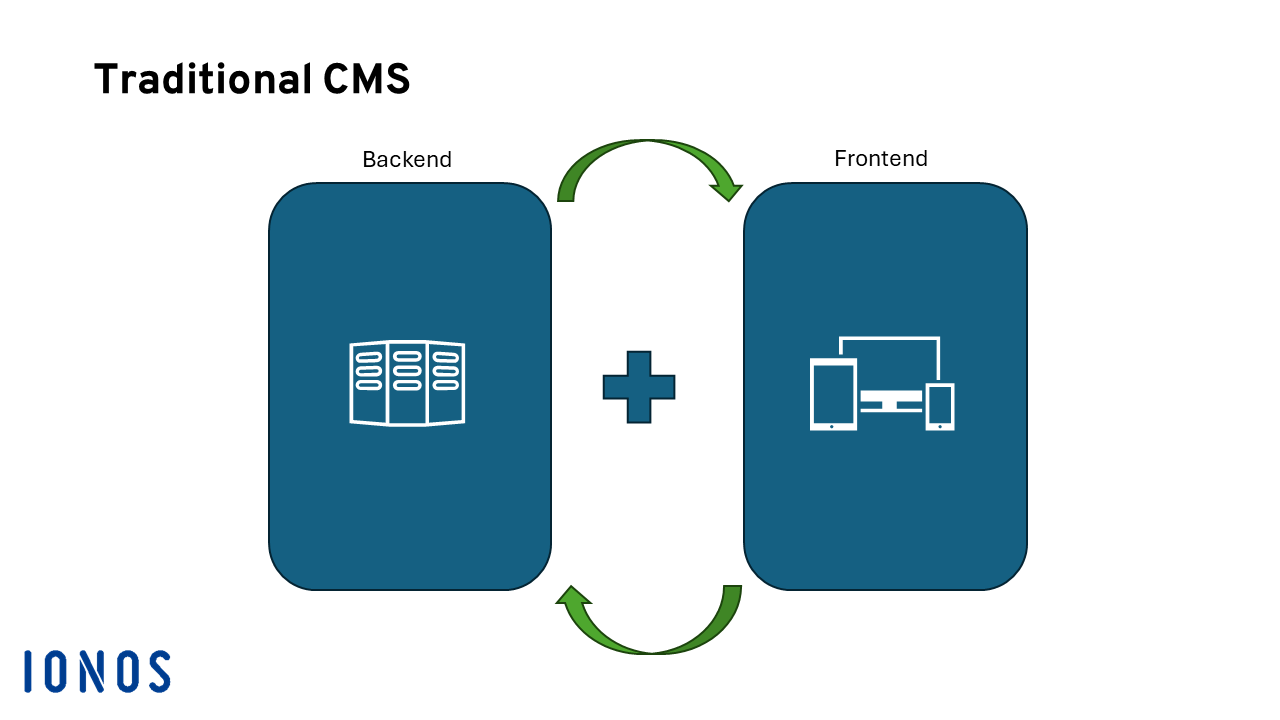
Traditional content management systems like WordPress, Drupal and Joomla have helped revolutionize the web. Once set up, even people without any coding skills can easily add new content to their website or blog. To make this possible, this technology (also known as “Monolithic CMS”) has a frontend (what visitors see) and a backend (where website operators work).
Once the frontend, which includes the UI design, has been set up, new content can be added via the backend. With a traditional CMS, content isn’t stored as individual HTML documents. Instead, all content is stored in a database and loaded from there when the website is visited. The close integration of frontend and backend makes for user-friendly website management. A traditional CMS is ideal when you want to quickly and easily create one website.
Many traditional content management systems are built on the LAMP stack, a stack of software that is free and was popularized by the open-source community. The letters in the acronym stand for:
- Linux: The operating system is best suited for servers.
- Apache: This web server technology is widely used on the internet.
- MySQL: The database management system is one of the most popular technologies on the web.
- PHP: The scripting language enables the creation of dynamic websites.
What are the advantages and disadvantages of a traditional CMS?
| Advantages | Disadvantages |
|---|---|
| ✓ Easy to use | ✗ Is firmly bound to a single frontend |
| ✓ No programming knowledge necessary | ✗ Restrictive in design |
| ✓ Frontend can be designed via the backend | ✗ Performance losses with increasing scope |
| ✓ Self-contained system | ✗ Database queries and server-side rendering per user request |
Headless CMS
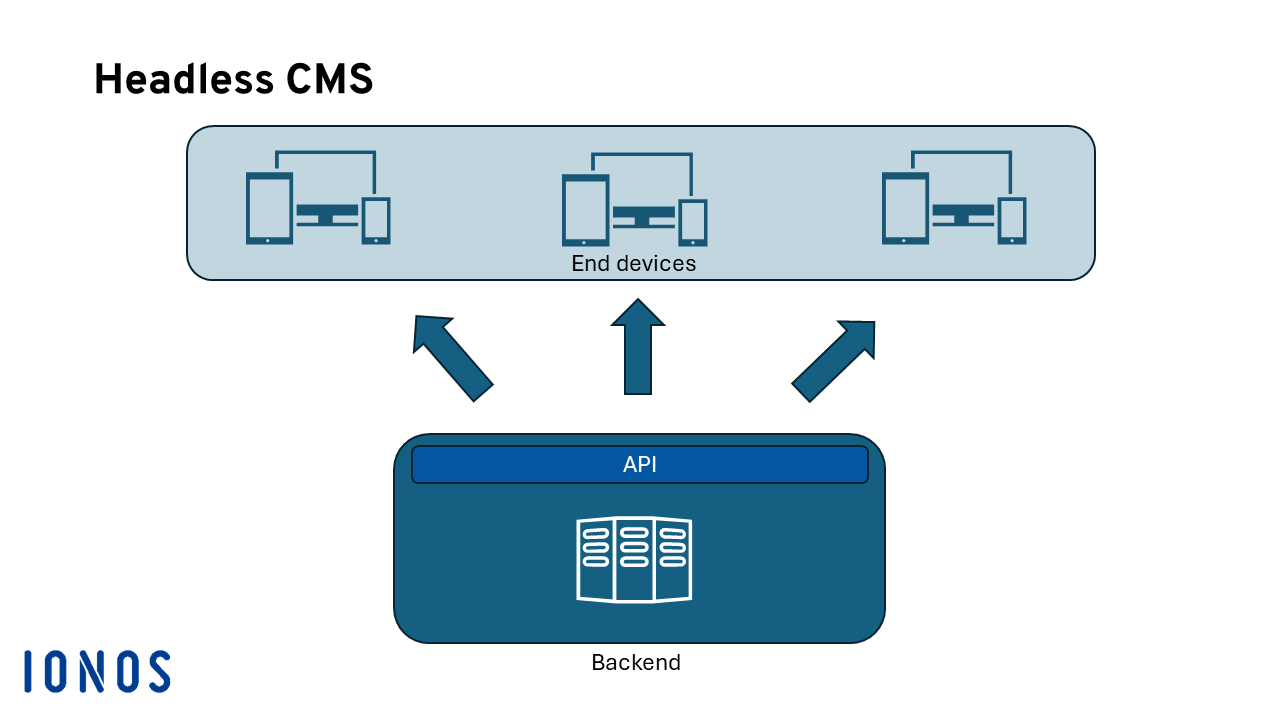
With a headless CMS, there is no fixed frontend. This type of CMS only consists of a backend. Since more and more headless CMSs are being equipped with a graphical user interface (similar to those used in traditional CMSs), content creation is just as simple. In many cases, headless CMSs are also offered as SaaS, which simplifies configuration.
With a headless CMS, the content is also stored in a database. However, the availability of the content is not restricted to a specific website. A wide variety of frontends can access the data via simple APIs. This is possible because modern CMSs follow the Jamstack approach:
- JavaScript: The scripting language can be used to keep websites dynamic. This allows images to be reloaded or user input to be evaluated.
- APIs: Interfaces can be used to exchange content with different frontends. Usually, a REST API is used for this purpose, which is based on simple commands and is understood by different applications.
- Markup: The HTML markup language is the cornerstone of the web. The language is so standardized that practically every application can handle it.
These very simple and highly standardized technologies make it possible to pass on information to a wide variety of frontends. The design of the content is equally flexible. While traditional CMSs usually have restrictive specifications when writing content in order to standardize publishing, headless CMSs are different.
What are the advantages and disadvantages of a headless CMS?
| Advantages | Disadvantages |
|---|---|
| ✓ Compatible with different frontends | ✗ Less beginner friendly |
| ✓ Very lightweight | ✗ Frontends must be created separately |
| ✓ Freedom when designing content | ✗ Many offers only as SaaS (no open source) |
Want to enjoy the benefits of simple and modern architecture? With Jamstack hosting from IONOS, you get fast server infrastructure and a secure SSL certificate!
What are the best CMS providers?
Once you have decided which type of CMS you would like to use, it’s important to figure out which provider is right for you. The table below provides a comparison of CMS platforms, placing traditional CMSs next to headless alternatives.
| Traditional CMS | Headless CMS |
|---|---|
| Drupal | Typo3 |
| WordPress | Umbraco |
| Joomla! | Contentful |
| Squarespace | Strapi |
How to create customer-facing websites with Jamstack
In this whitepaper, you’ll learn about the challenges associated with conventional CMSs and how Jamstack can help static pages become a viable alternative. The paper also looks at how you can ensure leaner workflows and improved customer outcomes with Jamstack.
Build faster websites through prerendering and leaner hosting.
Summary: Headless CMS or traditional CMS?
Determining which content management system is the right one for you depends a lot on your project. If you are just looking for a straightforward solution to implement a simple website or even just a blog, the classic CMS is still a good option.
However, if you are planning to fill more than just a single website with content, it’s worth taking a look at the headless CMS, which offers a wider range of possibilities. Once set up, you can feed a wide variety of systems with your content.
When making your choice, think about the future. Maybe you want to start with a simple website, but later on you also want to use apps? In that case, you should opt for a headless CMS now, so that you can avoid any problems that might occur with having to change systems later.
You don’t necessarily have to use a CMS though. With static site generators, you can create lean and powerful websites. If you’re not that interested in publishing new content frequently, a solution like this could be the right choice for you. With the best static site generators, you can create impressive websites from simple HTML documents.
If you decide to decouple the backend from the frontend and opt for a headless CMS, you will find Deploy Now from IONOS to be a helpful tool. It lets you publish new content quickly and easily via GitHub.