

SOA Records: The Basis of Every Zone File

For any internet user, it goes without saying that they need to enter a website’s URL in the browser in order to arrive at their desired homepage. They don’t notice that the computer actually establishes the connection with an IP address. This is due to the Domain Name System (DNS) and its name resolution function. Here, the domain’s name is resolved into the required number sequence. For the system to function, the name servers must have zone files. In turn, these simple text files contain numerous DNS records that enable the DNS in the first place.
The DNS recognizes more than 100 different types of records. In our detailed article on DNS records, we have listed them all and explain the rationale used to determine them.
The most well-known, of course, are A records. This is because the actual name resolution occurs in these records. In addition, there are also PTR records, which enable reverse DNS, or MX records for email communication. But what are SOA records intended for?
How Do SOA Records Work?
The DNS is a decentralized, hierarchical system: Name servers don’t supply information to just any server on the internet, but to those located in an allocated zone. For this purpose, the DNS server administers zone files. These are simple text files in which all of a zone’s DNS records are listed. In order to establish the different authorities, each zone file must contain an SOA record. SOA thus stands for Start of Authority. The record accordingly provides information on a number of issues, such as whether or not the addressed server is even responsible for the request.
The SOA record is especially important in the case of server clusters. Instead of shouldering the load for all requests, the requests are distributed among different devices. In order for the zone files to remain current on all servers, a zone transfer must be performed regularly. To achieve this, the “slaves” (i.e. servers situated lower on the hierarchy) synchronize their data with that of the “master” server. The way the zone transfer is supposed to proceed is regulated by the SOA record. For this purpose, this type of DNS record receives various types of information.
Record Makeup
DNS records generally consist of several fields. In these you’ll find all the relevant information. In comparison to other types, the SOA record has many fields:
- <name>: zone name
- <class>: network class
- <type>: record type
- <mname>: master name
- <rname>: email address for the responsible administrator
- <serial>: incremental serial number that specifies the zone file version
- <refresh>: time specification when a slave must request the current master version
- <retry>: time specification when a slave is supposed to again perform a failed request attempt
- <expire>: time specification from which a slave does not release further information in the absence of feedback from the master
- <minimum>: time specification for how long information may be retained in a cache
The first three fields are typical for DNS records. The zone name is a domain name in the form of a Fully Qualified Domain Name (FQDN). This means that the specification – different from what you may recognize from a URL – ends with a period. The reason for this is that an FQDN shows the domain’s complete hierarchical structure, which has a root directory at the end. This is of course empty, which is why only the separating period remains. You’ll find this notation in all DNS domain names as well as in the MNAME and RNAME fields.
The class field has only historical relevance and for this reason is simply omitted in many cases. When DNS was being developed, there was also the Hesiod (HS) and Chaos (CH) projects. Both are now obsolete, which is why only the internet with the IN abbreviation can be utilized in this field. The type refers to the kind of DNS record being used, so in this case, SOA.
MNAME is also known as primary master and specifies which server is located above the slave. This is so that the name server is defined through which the subordinate server must attempt a zone transfer. When formatting the email address in the RNAME field, there are some specific features to take into account. An @ symbol is not permitted in the notation. Instead, a period separates the local part (e.g. the user name) from the domain. Should there be a period before the @ symbol in the original email address, one must denote this with a backslash (\).
The serial number must be incrementally increased with each change made to the zone file. Two versions have become established. On the one hand, a simple process can begin at 1 and with each change to the serial number be increased by 1. With this option, the number of changes already made can be read from the serial number.
The other option is choosing a date format: YYYYMMDDVV. One begins with a four-digit year specification, followed by the month and day (each comprising two positions) and ends the specification in turn with a two-digit version number. In this format, one can thus identify the date the version was created. With each change that is made on the same day, the version number increases by one. On a new day, the serial number adjusts to the appropriate place and the version number is reset to 00.
The SOA record ends with three to four time specifications – each in seconds. The first field (“Refresh”) specifies the time lag until the slave again asks the master for a current version of the zone file. Should this request go unanswered, the “Retry” field regulates when a new attempt is to be carried out. It is important for this specification to be smaller than the previous one.
If the server that’s situated lower in the hierarchy receives no further replies, the third time specification (“Expire”) determines how long the zone file may still be used before the server refuses DNS information delivery. Should the server continue to send old zone file data to the clients submitting requests, it may no longer be valid. This may lead to connection issues and security risks.
The “Minimum” field completes the record. This corresponds to the time to live, as you may be familiar with from other DNS record types. It specifies how long a client may hold the requested information in the cache before a new request must be sent. Most of the time, however, the TTL is set for the entire zone with the $TTL directive. Once this is done, it doesn’t have to be performed separately for each entry. The zone name can also be determined as early as the beginning of the file, then assigned the $ORIGIN directive.
The entry always appears at the beginning of the zone file.
<name> <class> <type> <mname> <rname> <serial> <refresh> <retry> <expire> <minimum>The fields can simply be listed one after the one on a line. While this is not very complex with other entry types, the SOA record is rather comprehensive in comparison. In order to create more clarity, the fields are usually arranged in nests and underneath each other.
$ORIGIN
$TTL
@   <class>  <type> <mname> <rname> (
    <serial>
    <refresh>
    <retry>
    <expire>
    <minimum>
)
This notation is used to determine the TTL and domain name upfront. The @ symbol at the beginning of the record refers to the origin directive. In order to nest the time specifications and to divide them among several lines, parentheses are introduced.
SOA Record Example
No zone file is valid without an SOA entry at the beginning. In practice, SOA records look like this:
$ORIGIN example.org.
$TTL 1750
@	IN	SOA	master.example.org admin\.master.example.org (
	2019040502	; serial
	86400		; refresh
	7200		; retry
	3600000	; expire
	1750		; minimum
)
	IN	NS	a.iana-servers.net.
www	IN	A	93.184.216.34
In this zone file snippet, you can see how – in order to make the placement clearer – we have entered more information than just the SOA record. The file begins with the domain name specification (in this case, example.org) and the TTL. This is then followed by the SOA record. Because we have already determined the zone in the $ORIGIN directive, the @ symbol is sufficient here as a reference.
The zone’s (notional) master follows immediately after the network class and record type specifications, which are in turn followed by the admin email address. The period is enabled through the backslash – in this case a masking character. The next period then replaces the @ symbol for the actual address; the following one, as usual, defines the top-level domain (TLD). Using a bracket, you can open the nested area which can then be divided among several lines. However, it is also possible to write all values behind one another and to only separate them with empty spaces.
In this example, we have written the definitions for the specific values behind them. These are only comments that can be selected themselves or simply omitted. In the case of DNS records, a semicolon can be used to mark those comments that are solely intended for human users.
The bracket must be closed at the end of the SOA record.
Subsequently, we have also included a NS record and an A record in the zone file example. You can see that the SOA record must be placed before all the other records – but not before the domain and TTL directives.
SOA Record Check
If you would like to check a website’s SOA record, you can install special software or simply use a web service. With Google Public DNS, the search engine provider’s DNS server, the SOA record check runs quickly and smoothly: You simply enter the relevant domain on the product’s website. On the following page, you already receive a result, though only for the A record. You can therefore select SOA in the appropriate field and run another search at the touch of a button.
Public DNS also offers additional options: EDNS Client Subnet is a function for establishing more efficient connections with DNS. This is currently only being offered by Google and OpenDNS. DNSSEC in turn guarantees that the information received via DNS really comes from the originator. Data that is transferred without these security measures can theoretically be manipulated by third parties. You can leave both options unaltered for a simple SOA record check.
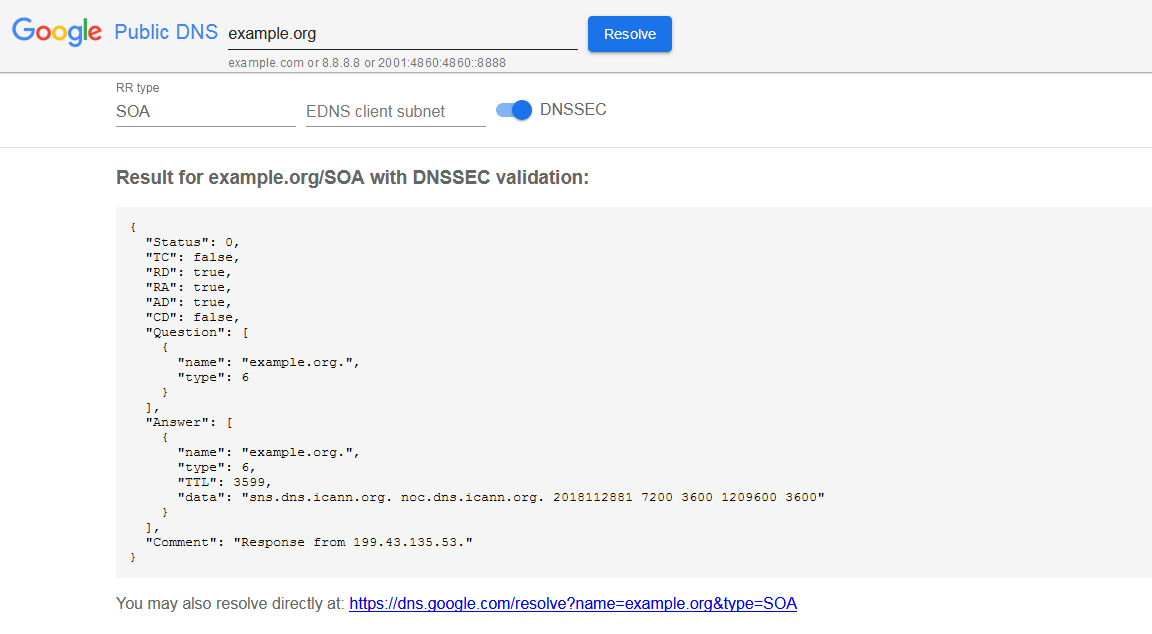
The request is performed under “Question”. The request result can be found under “Answer”. In the answer’s data field, you can recognize the master server, the responsible person’s email address and the time specifications. What is noticeable here is that the last value (minimum) corresponds to the specification under TTL down to a second. This second has presumably already passed, which is why it results in a minimum discrepancy.
The specification under the “type” item illustrates a specific feature: Instead of the SOA designation, you can find the number 6 both in the request and reply. The Internet Assigned Numbers Authority (IANA) has assigned each DNS record type with an individual value. Even record types that are not used or are no longer used have a number. This results in a nearly seamless list of the different types. In this system, SOA records have the number 6.
Anyone who doesn’t want to use the Google service also has a number of other options available that enable an SOA record check, such as MxToolbox, DNS Check, and DNS Lookup.