

Social media marketing: success with Facebook ads

Everyday more than 900 million people login to Facebook. Companies with their own fan pages particularly profit from the enormous reach of the social network. But there’s more than meets the eye when it comes to a successful Facebook marketing strategy, and that means a simple company page on the platform often isn’t enough. Facebook ads also offer wide coverage, and should be considered for every marketing campaign.
Starting a Facebook campaign in just a few easy steps
The only thing required for placing an ad on Facebook is a fan page. Those registered under admin accounts simply need to click on the “creating ads” button in the upper navigation menu. Once you’ve accessed the ad manager page, you need to set up an account. Before you place your first ad, however, payment methods and information need to be entered.
The path to a successful advertising campaign is made up of four easy steps:
1. Select a fitting campaign structure
2. Identify the target group
3. Set a budget and a schedule
4. Design ads and complete the campaign

1. Selecting the right campaign structure
In Facebook’s ad manager, there are many different campaign types to choose from. From placing an ad on your own Facebook page to carefully targeting individuals within a given radius, there are many options for creating the ideal ad.
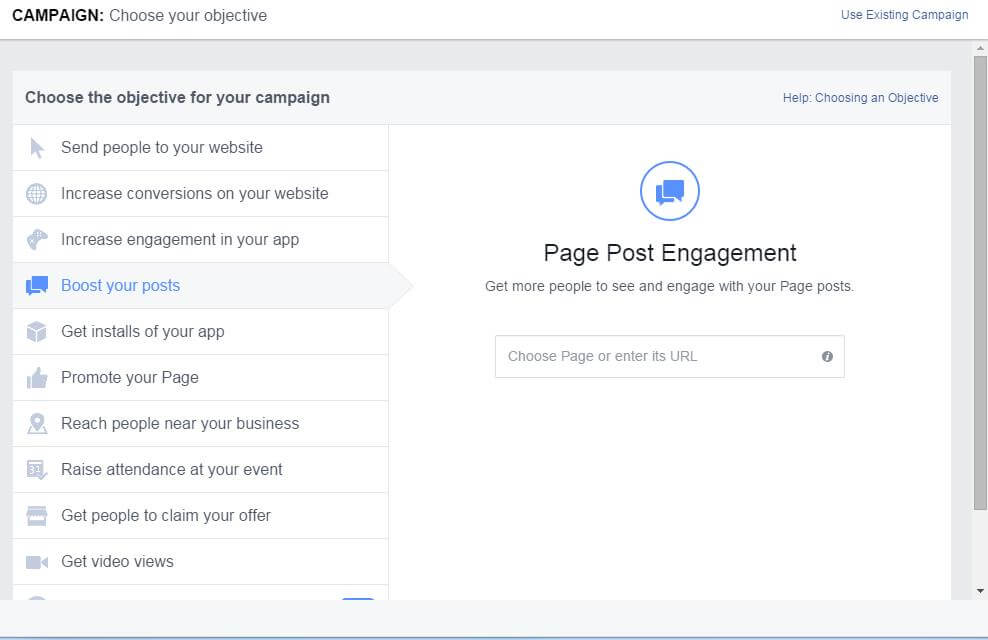
Below we have summarized the biggest differences and most important goals of the various campaigns:
- Advertise your posts: Page Post Engagement Ads advertise individual content that a business has posted on their own fan page. The goal here is to get more people to like and share content with each another, which then increases the traffic of the linked post or page.
- Highlight your page: The objective of Page Like Ads is to attract more visitors to a business’s Facebook page and generate more likes. This type of Facebook ad is geared towards increasing awareness of a Facebook page and finding new fans and/or customers.
- Lead people to your website: Those looking for more traffic on their own website should use Click to Website Ads. With this option, users can select which parts (e.g. the cover page or landing page) of their websites are linked to ads. Tracking the successes of such ads, i.e. sales and bookings, requires a conversion pixel to be created and integrated.
- Increasing conversions on your website: The conversion tracking pixel tool is designed to provide users with additional options for increasing their conversion rate and tracking conversion types. As mentioned above, website operators need to create a conversion pixel to connect ads on Facebook with their individual websites.
- Increase your app’s popularity: Another option for users involves promoting apps with Facebook ads. Advertisements can be created with the program’s app store URL; images and videos can also support these efforts by inviting viewers to click the ‘Install now’ button (‘call to action’). By choosing ‘increase the engagement of your app’, you can target individuals who’ve already downloaded your app, increasing the effectiveness of the placed ads.
- Reach more people in your area: This type of advertising is especially attractive for stores or service providers with brick-and-mortar locations. The method helps business owners find potential customers located nearby and reach a regional target group. Opting for this route makes it possible to target walk-in customers with Facebook ads and increase the awareness of local locations and businesses.
- Increase the number of participants for your event: This function lets users promote events like seminars, conferences, and conventions. Businesses are able to directly contact potential participants. New information about the event as well as changes of dates and times, or cancelations can also be supplied.
- Ensure that more individuals take advantage of your offers: When creating an ad on Facebook, you are able to mark them as offers, which then enables them to communicate discounts, vouchers, and promo codes. With the Offer Claim Ads function, posts can be advertised and reach an even bigger target audience than that found on a simple fan page.
- Increase views of video material: Videos are playing an increasingly large role in online marketing and social media marketing is profiting from this trend. Special video ads allow businesses to share videos on their fan pages, thereby communicating unique, relevant messages to their customer base.
Facebook offers businesses and freelancers alike countless possibilities to create effective and target group-oriented campaigns. By taking advantage of this diverse array of options, users are able to cover many of their advertising-related demands. The next steps focus on defining target audiences. Just whom are you trying to address with your Facebook ads?
- Sell on social media in minutes
- Manage it all from one platform
- Works with any product or service
2. Hitting the right target audience
Making sure to hit the right target audience is by far the most important step when planning an ad campaign. Carefully following this step helps ensure that your ad finds its intended recipient. In order to set up the campaign as efficiently as possible, it is imperative to use individual ad settings and define a custom audience. An alternative possibility involves using Facebook’s targeting options.
Custom Audiences
Custom Audiences defines special target audiences for your Facebook advertisement. This function requires information from former customers, such as telephone numbers or e-mail addresses. By uploading this data to the ad manager, Facebook is able to detect customers that are also Facebook users and with that information, it can automatically create a custom audience.
Website Custom Audiences
Relying on valuable data gathered by your website can prove to be an even more effective choice. With re-targeting, former website visitors that are registered on Facebook are targeted with ads. The main advantage here is the relatively low scatter loss. This is because targeted users have already viewed your website’s content or products and are potentially more interested in them than users who have not accessed those same sites. Re-targeting can be used for Facebook ads by embedding a code excerpt on your website (pixel).
Lookalike Audiences
For those who have already created a custom audience, Facebook is able to detect what’s known as a Lookalike Audience based on the vary characteristics. The goal here is to find additional users that most closely resemble your own customers. Should matches be found in terms of location, age, sex, and above all, interests, then Facebook rates this user as similar to those in the custom audience list. Following this, Facebook ads are then displayed to this new group.
Standard targeting options
Facebook offers those who do not have access to an existing data pool the option of using a targeting tool. Depending on your product or campaign type, you can limit your target audience according to the following criteria:
-
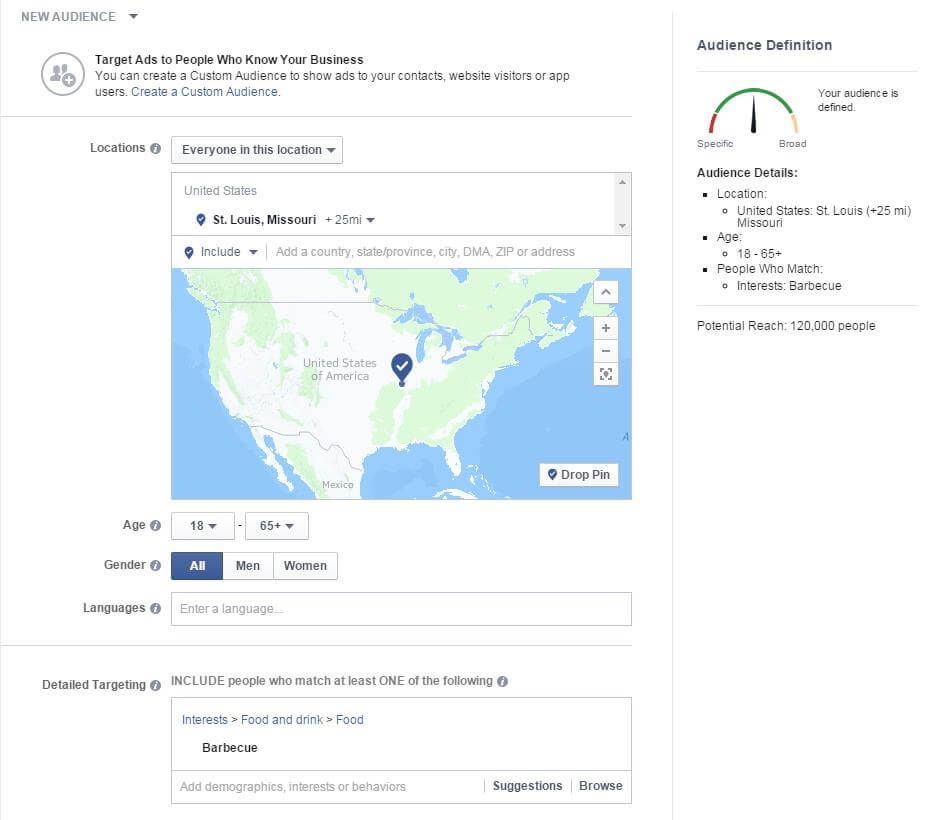
Location: A boutique in Boston aims to reach customers that are either from the area or visiting the city, whereas a nationwide car rental service naturally wants to offer its services beyond its corporate HQ. Facebook lets you address users with ad campaigns in locations and regions that are relevant to your business. Locations can be narrowed down to the country, region, city, or even zip code.
-
Demographic data: For many products, it makes sense to separate users according to factors like age group or sex. By taking advantage of such demographic data, you can avoid large scatter losses when placing an ad. Further characteristics, such as educational background, occupational area, or income level, can also be taken into account.
-
Interests: Define your target audience by selecting your category from a list of predefined interests. Facebook defines such interest categories according to specific user metrics, such as ‘likes’ or ‘check ins’. For a more fine-tuned selectivity, it is worthwhile to select interest-targeting criteria manually. By selecting appropriate categories (e.g. ‘Linux’ instead of ‘software’) a more precise target group is defined.
-
Connections: The proper use of connections is another means for adding to your targeting efforts. Users that ‘like’ special Facebook pages, use certain apps, or participate in an event can easily be included or excluded from your target audience. A further combination of these connections is also possible: friends of those who have liked a particular page, post, or article can be included into the target audience of your Facebook ad.
During the manual targeting process, the Facebook ad manager displays a target group barometer on the right side of the display. This is where data is summarized and a potential advertising range is established. By tinkering with various settings, you can determine whether your selected target audience is too specific or too broad. Once the selection has been accounted for, target audiences can then be saved and used at a later date.
3. Planning your budget and ad schedule
There are essentially three options for laying out the budget of your ad campaign on Facebook:
- Daily budget: Those aiming to run their ads non-stop should consider opting for a budget calculated on a per day basis. Each ad group has a certain budget. Once the allotted money has been used, it’s no longer displayed.
- Lifetime budget: A start and end date can be assigned to ads that are to appear for a limited period of time
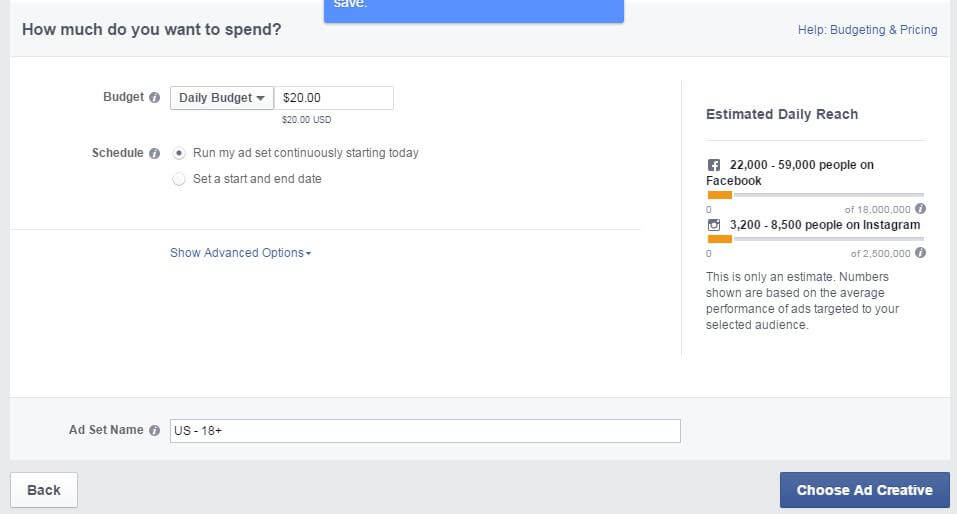
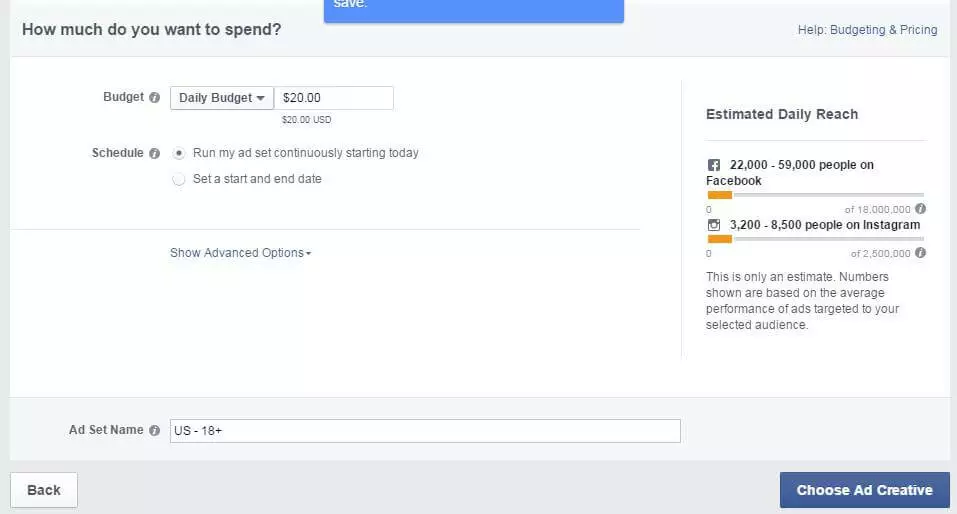
Facebook ads are particularly advantageous in that costs are easy to manage. No more is spent than what was originally accounted for. Under the ‘Further options’ tab, you can enter even more specific details and the ad can be optimized according to various criteria. It’s recommended that beginners rely on Facebook’s automatic optimization and accept the suggested settings. How much do Facebook ads cost?
Under the further options tab, users have the choice of selecting and changing the payment method and whether the bid value is set automatically or manually. Like Google Adwords, Facebook places its ad according to a bidding method. The amount of the bid and the cost of the Facebook ad is determined by a variety of factors. One factor, for example, is the specific target group. Ads placed for common target audiences are understandably more expensive than those representing more niche groups. Facebook also assigns a quality factor known as the Ad Relevance Score. The better the ad, the higher its relevance for the user and the lower the cost of the campaign.
4. Designing ads and completing campaigns
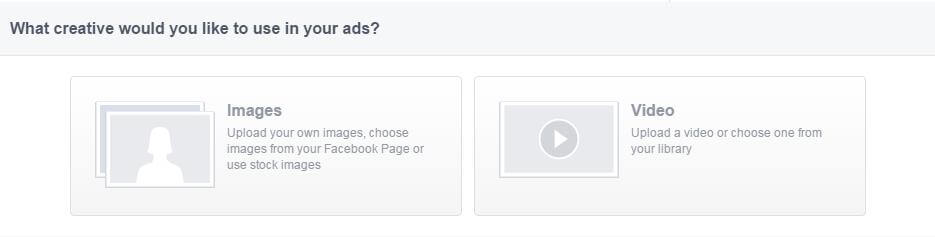
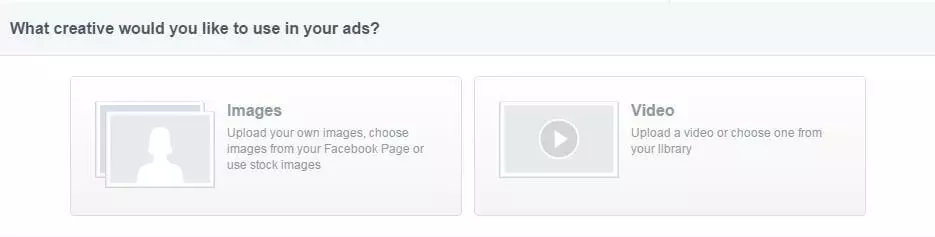
Once the campaign type, target group, and budget have been set up, it’s then time to configure the advertisement itself. With the advertising editor, users can select images, videos, texts, and links. Select images or videos
The first steps involve integrating pictures, graphics, or videos in your ad. The carousel format provides up to 5 images and/or videos per ad and displays these in a sequential fashion. Users have free access to a range of stock images or are also able to upload their own. There’s no need to adjust the size of photos prior to upload as this step is carried out in the editor for you.
Selecting text and links
The next step involves completing the ad’s text and corresponding link. After creating a concise description, set up the title in the right column (if desired) as well as target view (e.g. timeline, map, rating). In the right portion of this function, users can determine where the ad appears (desktop newsfeed, mobile newsfeed, right column of the desktop).
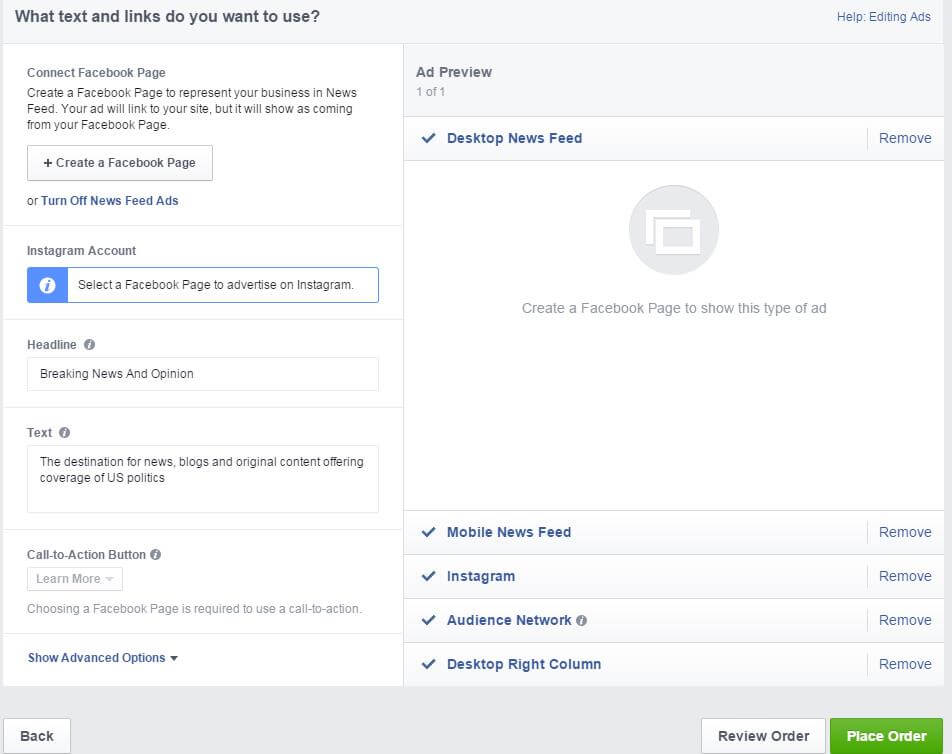
The preview function lets you see how the ad will look once it’s officially been placed. If you’re satisfied with its appearance, then make sure to check your order one final time before sending it away. Following this step, Facebook checks to ensure that your ad is complies with the social network’s advertisement policy. If it does, the ad should appear within hours (sometimes even minutes).
- Sell on social media in minutes
- Manage it all from one platform
- Works with any product or service
An easy start to advertising with Facebook
Thanks to its user-friendly ad manager, it’s relatively easy to get your first Facebook ad campaign up and running. Facebook ads also offer finer, more individual settings that require a bit more practice. Step by step, however, users should be able to easily and effectively take advantage of Facebook’s various advertising options, and gain more traffic in the process.