Network time protocol (NTP): definition and functionality

Computer system clocks show users what time it is quickly and conveniently. System time is relevant not only for the user, but also for the computer itself. Time stamps play a crucial role in the communication between two or more systems, and also in the correct flow of cross-network processes or services. To prevent system complications due to different system times, the so-called network time protocol was published in 1985.
What is NTP?
The network time protocol is the result of the development work of David L. Mills, a professor at the University of Delaware. A first official specification of the protocol, which is part of the internet protocol family, was published in September 1985 in RFC 958. It describes NTP as a protocol for synchronizing multiple network clocks through a set of spread-out clients and servers. Its predecessors are the time protocol, and ICMP timestamp message, whose functions were combined in the network time protocol. NTP is based on the user datagram protocol (UDP), which enables connectionless data transport. The UDP port number for this is 123.
NTP provides the basic protocol mechanisms necessary to synchronize the time of different systems to an accuracy of one nanosecond. It also contains regulations to specify the accuracy and probable sources of error of the local system clock. The protocol only specifies the type of data representation and message formats, but doesn’t provide synchronization and filter algorithms.
NTP (network time protocol) is a protocol for clock synchronization in computer systems described in RFC 958. It is based on the connectionless UDP protocol (port 123) and belongs to the internet protocol family. For the synchronization process, NTP relies on coordinated universal time (UTC), which is obtained from the individual clients and servers in a hierarchical system.
How does the NTP work?
To synchronize the clocks of computers down to a nanosecond, the network time protocol uses the coordinated universal time (UTC), which has been in place since 1972. This is determined by various methods, including radio and satellite systems. Important services such as the global positioning system (GPS) are equipped with special receivers to receive the corresponding signals. Since it would neither be cost-effective nor feasible to equip each computer with this kind of receiver, there are so-called primary time servers, which also have a UTC receiver. Using protocols such as NTP, these servers synchronize the clocks of computers in their network.
In this synchronization process, there are different hierarchically-structured degrees of distance to the UTC source, also known as “strata” (Latin for “layers”). For example, all technical devices that take their time from a primary time server or a satellite navigation system are classified in the stratum-0 category. Examples of this are atomic or radio clocks. A computer that obtains UTC from this kind of atomic or radio clock corresponds to stratum-1, and so on. Each system is both the client of the preceding stratum and server for systems of the following stratum (at least potentially).
Various algorithms are used to eliminate short-term and local time fluctuations during NTP synchronization. For example, time measurement procedures for one packet to travel between destinations (the time a data packet needs to go from source to destination and back again), can compensate for local deviations based on the Berkeley algorithm. For example, the Marzullo algorithm is used for troubleshooting processors.
An overview of NTP’s most important features
The basic features of the network time protocol, which is now available in its fourth version (NTPv4), can be summarized as follows:
- NTP provides a reference clock that acts as a fixed point for all synchronization processes. All clocks are coordinated according to this clock or time. Right from the start, the coordinated universal time (UTC), which is recognized as a uniform world time clock, was used for this purpose.
- NTP is a protocol that automatically searches for the best time sources for synchronization. To minimize any error accumulation affecting the synchronization, several sources can be combined with each other. If possible, the network time protocol recognizes and ignores time sources that temporarily or permanently submit strongly deviating values.
- NTP is highly scalable. There may be several reference clocks in each synchronization network. Furthermore, each network node is able to transmit time information in a hierarchical structure bidirectional (point-to-point) or unidirectional (in one direction).
- NTP is very accurate. Thanks to the possibility of selecting the best candidate for synchronization, a result right up to one nanosecond is possible.
- NTP can bridge temporary network connection problems: for this purpose, the log uses past readings to determine the current time or deviations.
Which operating systems support the NTP protocol?
Originally, the network time protocol was developed especially for UNIX systems, in which the protocol is still implemented in the form of the background process ntpd. This serves both as a client that can synchronize the local system and as an NTP server for other systems. For a long time, this service was also the first choice for implementing NTP in Linux distributions – newer versions increasingly rely on the client application timesyncd, which is part of the system manager. MacOS and Windows operating systems now also use the network time protocol to obtain UTC via the internet with simple system processes and without additional software.
What are the NTP alternatives?
Although NTP is regarded worldwide as the time synchronization standard, it is not flawless, especially in terms of security. For example, because it is based on the connectionless UDP protocol, a hacker could send packets to an NTP server with fake sender addresses through IP-spoofing. The address of the targeted system is selected as the sender address. The server sends its response, which is considerably larger than the request sent by the attacker, back to the alleged sender – the targeted system. If the attacker now does this on a large scale by sending a large number of such manipulated requests, he can overload the target system – more on this can be found in the following article: DoS und DDoS.
As a result, several projects have focused on developing alternative, more secure solutions that can be used in place of the NTP:
- tlsdate: tlsdate was coded by Jacob Appelbaum in 2012, and published on GitHub. Instead of UDP, tlsdate uses the TCP protocol for data transport. The service encrypts the connection establishment via TLS to prevent manipulation of the data packets. In addition, tlsdate uses the TLS functions “ServerHello” and “ClientHello” to synchronize the time. However, the NTP alternative only works with TLS 1.1 and 1.2.
- Ntimed: Ntimed is focused specifically on security and performance. For this purpose, the ntpd’s program code, on which Ntimed is based, was optimized. The software package, which consists of client, server, and master files, is available for free on the official Ntimed GitHub directory.
- NTPsec: NTPsec is also a variant of the classic ntpd service. However, over 175,000 lines of code have been stored compared to the original. In addition, the development team has replaced a number of unsafe string functions such as “strcpy,” “sprint,” or “gets” with secure counterparts. These and other differences can be seen in detail on the official website of the open source project.
Apart from the software alternatives, the precision time protocol (PTP) also offers an alternative. Unlike the network time protocol, the focus of this network protocol for Linux systems is particularly high synchronization accuracy. The synchronization rate with PTP is also down to the nanosecond, which even beats the accuracy of NTP. In addition, the protocol requires minimal processor power and network bandwidth, making it ideal for simple, cost-effective devices.
While there is some freedom of choice between synchronization protocols or services, synchronization itself is a process that is essential for the functionality of various network applications (especially on the internet). For example, database transactions or e-mail communication would fail if the client and server are not on the same time. An even more important role is played by an exact system time in air traffic control, at which values accurate to the microsecond are indispensable for smooth operations.
pool.ntp.org: an internet cluster of thousands of NTP servers
The pool.ntp.org project, initiated by Adrian von Bidder and managed by Ask Bjørn Hansen since July 2005, is a huge virtual cluster of over 4,000 NTP time servers. The majority of the servers distributed around the world, which are used by several million systems, are located in Europe. The NTP pool has grown steadily over time due to the project’s community. Anyone who has a server with a static IP address that is permanently connected to the internet can have it included in the cluster. Despite increasing demand, the service can be used free of charge and without any restrictions.
How UNIX/Linux users can use the NTP pool
If you want to use the NTP server pool to synchronize your device’s system time, you can do this with UNIX or Linux using the ntpd service. For this, you only need to configure the NTP drift file:
driftfile /var/lib/ntp/ntp.drift
server 0.pool.ntp.org
server 1.pool.ntp.org
server 2.pool.ntp.org
server 3.pool.ntp.org
Make sure that the system time is set at least to be roughly accurate. To check the status of the ntpd service, enter the following command after a few minutes:
ntpq -pnThe NTP client will present a list of the IP addresses from the pool of randomly used time servers. If one of these servers is marked with an asterisk (*), the system time is now synchronized as required.
Set pool.ntp.org as time server source under Windows
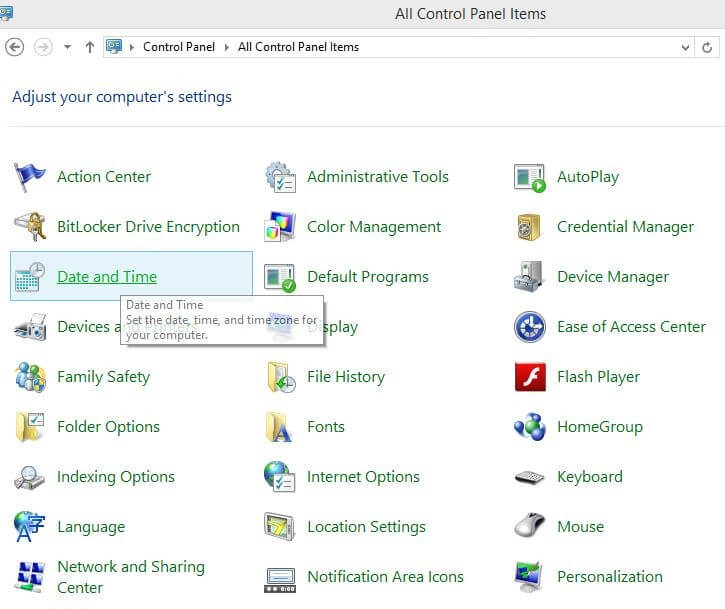
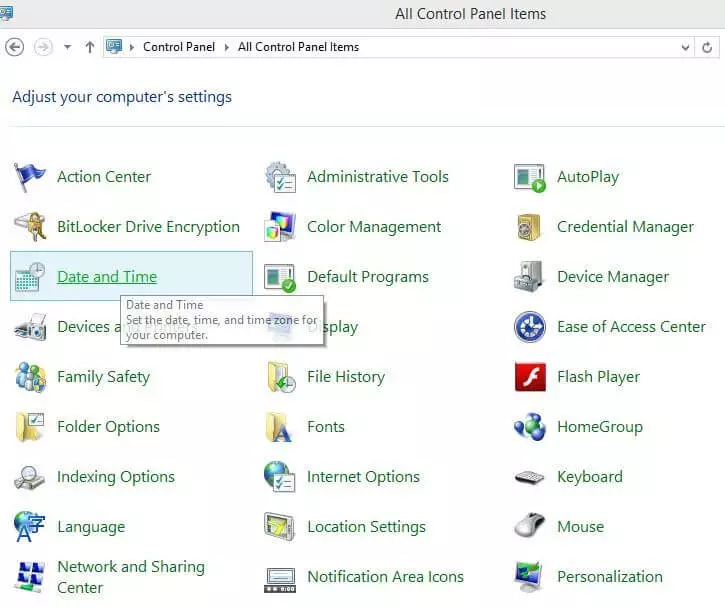
Since the network time protocol is now automatically supported by Windows, the NTP pool is also available to users of Microsoft systems at all times. It is only necessary to enter a suitable address range from pool.ntp.org in the internet time settings. To do this, open the control panel and select “date and time”:
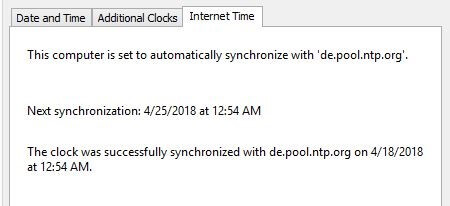
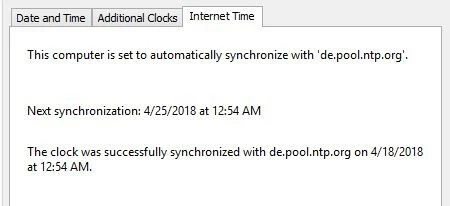
The “internet time” tab takes you to the time server menu, where you can enter the address of your desired NTP server from the pool.ntp.org pool:
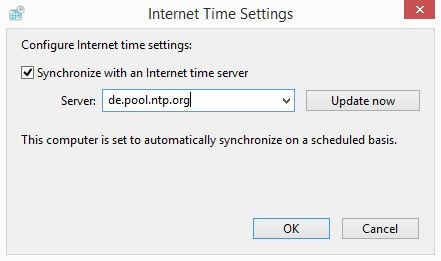
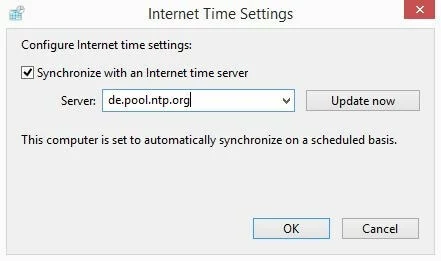
If the changes were successful, Windows will adjust the system time at the next synchronization time: