

Unicast

The network technology knows different methods for receiving a message from the addressee to the recipient(s). While a broadcast allows you to direct your data to all users in a network, unicast helps with a targeted address. Multicast works in a similar way, but with the message going to several specific recipients at the same time. What exactly is a unicast and how do unicast and multicast differ from one another?
What is unicast?
When you make a telephone call, you enter a certain number to be able to speak to a specific person. It would not enter your mind to say the person’s name into the phone in the hope of it connecting to them. This is what also differentiates the broadcast, where all network users receive the message, from unicast, which just makes the contact between two precise users. It doesn't matter if the transfer works in both directions or not. If the addressee becomes a sender themselves, data is sent back and forth (bi-directional); if not the connection is in one direction only (uni-directional). Whenever there is a flow of information between just two network users, this is a unicast.
The majority of data traffic on the internet works via the unicast principle. Every time a website is visited by the user, there is a direct connection between the client and server. E-mail dispatch also usually works via unicast. Another example is direct file transfer: if you download a file or upload to a server, this is carried out via unicast. Only in certain scenarios – for example, streaming – are other methods such as multicast used.
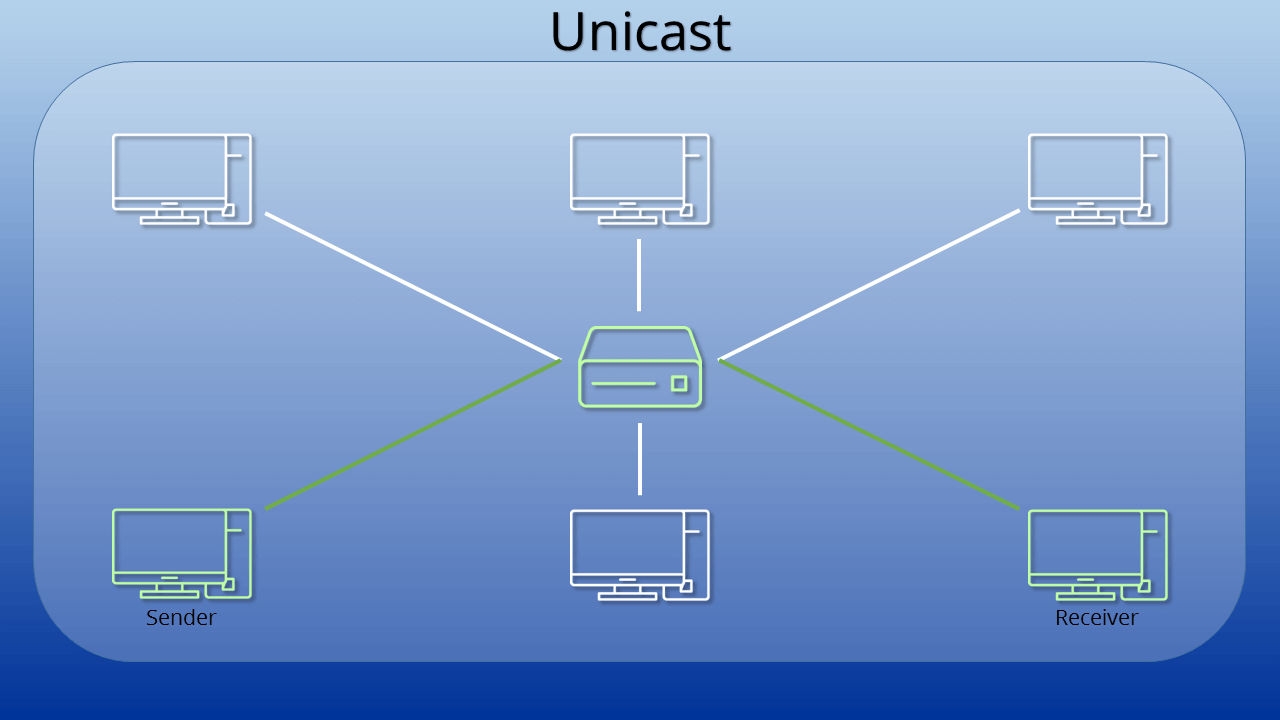
Technical process: IPv4, IPv6 & Unicast
No matter which form of communication you’re using, if you wish to reach a specific contact, you have to know how to address them. Name, telephone number, postal address – they all help us to direct our information to the correct recipients. This is no different with network technology. The IP and MAC address help identify the recipients here.
In the OSI model, the unicast is on the network layer (layer 3) and is therefore a routing diagram. A header with the address data is added to the information that is to be sent, regardless of whether it is an e-mail, a file or a simple website request. For simple procedures, the address of the recipient in the network is located in the header. The packet will be sent in this direction.
However, communication does not always take place within a closed network only where the router can reach each end point directly. Unicasts can also be sent between different (sub-)nets. IP routing technology is relied upon for this. This ensures that every hub knows which path the data packet must take for it to reach the legitimate recipient. Routers (the network hubs) use routing tables for this. To create these, the OSPF and RIPv2 protocols are used in particular.
In contrast to the IPv4 addresses that have been used up to now, the new IPv6 has earmarked a special feature for unicast: specific address ranges are reserved for the various types of communication. Multicast addresses are located in a different address range to the unicast addresses. There is also differentiation between various types of unicast addresses, which are represented by a prefix at the start of the address.
Link local unicast addresses
Link local designates local, self-contained networks. No redirection to other networks by a router is required here; the range fe80::/10 is reserved for this. The first 10 bits of the address are intended for the prefix. 64 bits follow, which are all set to 0. The address ends with a 54-bit long range, which discloses the interface ID. This identifies the client uniquely in the local network.
There is an address range under IPv4, too, which is reserved for the local unicast: 169.254.0.0/16.
Unique local unicast
In contrast to the link local addresses, a unique local unicast can be redirected through a router. Nevertheless, these unique addresses are always assigned internally (in a set network range, e.g. the network of a large company). The Internet Engineering Task Force (IETF) has provided the range fc00::/7 for this. However, only the part fd00::/8 has been provided specifically for the unique local unicast; no decision has yet been made about the range fc00:/8. A 40-bit part follows the prefix, which contains a randomly generated site ID. The end forms a 16-bit long subnet-ID.
The unique local unicast address range corresponds to the IPv4 private address range in its characteristics. It therefore also involves addresses, which any user may assign within their network, without having these approved by an external organization.
Global unicast
With the global unicast, it is also possible to send messages worldwide over unicast with IPv6 . The unique addresses are allocated globally, making it possible to reach someone in a very targeted way. This is virtually the standard case for an IPv6 address. The first part of the address is designated as a location prefix or public topology; it depends on the internet provider. Information then follows on the subnet and the actual client. As with subnetting, the last part of the address (interface ID) may only be assigned once within the subnet. This is the only way it can be ensured that a unicast also actually reaches the correct target.
Part of the global unicast address area (0:0:0:0:0:ffff::/96) is intended for the conversion of IPv4 to IPv6 (IPv4 mapped IPv6 addresses). The last 32 bits of the IPv6 address include the information of the older format here. It is therefore also possible to reach a unicast in the old system via the new protocol.
Unicast vs. multicast
Both types of communication, unicast and multicast, have clear similarities, particularly when you compare them with broadcast. The broadcast has its own address. All users on the network recognize it and can therefore respond to the data packet. Unicast and multicast on the other hand, are directed to specific targets; the other users on the network do not take any notice of the data or respond to it.
Unicast and multicast differ the most obviously in that unicast is only sent to an individual recipient, while a whole group of targets can be addressed by a multicast. But the multicast is not simply a collection of individual unicasts. Instead messages are sent to a special multicast address. This causes redirection via a router or server to all members of the multicast group. This group has to exist prior to data transfer and cannot be created at the time of sending from the source node.
The advantage of the multicast in contrast to the multiple unicast – i.e. the transfer to several unicast addresses – is that the data packet is only sent once. If you use several unicasts, the package is resent to the network each time. When sending data via multicast, it is only multiplied on the distribution list – this saves bandwidth. Multicasts are therefore particularly popular for multimedia streaming. As a large group of clients requires exactly the same data, it is much more practical to only send it once. If the same data were to be sent over unicast to many recipients at the same time, it would be slower.
If confidential data is only intended for one recipient, unicast is the right choice. Website requests and e-mails are sent daily through this protocol. However, if several recipients are to receive the same data, a multicast is more efficient.