

What is a network? Definition, explanation, and examples

When you buy a new computer, the first thing you’ll probably try to do is connect to the Internet. To do this, you establish a connection to your router, which receives the data from the Internet and then forwards it to the computer.
Of course that’s not all: Next, you could also connect your printer, smartphone or TV to the router so that these devices are also connected to the Internet. Now you have connected different devices to each other via a central access point and created your own network.
But what exactly does that mean?
- Simple registration
- Premium TLDs at great prices
- 24/7 personal consultant included
- Free privacy protection for eligible domains
What is a network?
In information technology, a network is defined as the connection of at least two computer systems, either by a cable or a wireless connection. The simplest network is a combination of two computers connected by a cable. This type of network is called a peer-to-peer network. There is no hierarchy in this network; both participants have equal privileges. Each computer has access to the data of the other device and can share resources such as disk space, applications or peripheral devices (printers, etc.).
Today’s networks tend to be a bit more complex and don’t just consist of two computers. Systems with more than ten participants usually use client-server networks. In these networks, a central computer (server) provides resources to the other participants in the network (clients).
A network is a group of two or more computers or other electronic devices that are interconnected for the purpose of exchanging data and sharing resources.
Network example: your home Wi-Fi
The Wireless LAN (Wireless Local Area Network, i.e. the Wi-Fi network) in your home is a good example of a small client-server network. The various devices in your home are wirelessly connected to the router, which acts as a central node (server) for the household. The router itself is connected to a much larger network: the Internet.
Since the devices are connected to the router as clients, they are part of the network and can use the same resource as the server, namely the Internet. The devices can also communicate with each other without having to establish a direct connection to each device. For example, you can send a print job to a Wi-Fi-enabled printer without first connecting the printer to the computer using a cable.
Before the advent of modern networks, communication between different computers and devices was very complicated. Computers were connected using a LAN cable. Mechanical switches were used so that peripheral devices could also be shared. Due to physical limitations (cable length), the devices and computers always had to be very close to each other.
If you need an extremely stable connection you should consider the possibility of a wired connection to the router or device, despite the advantages of Wi-Fi.
What are the tasks and advantages of a network?
The main task of a network is to provide participants with a single platform for exchanging data and sharing resources. This task is so important that many aspects of everyday life and the modern world would be unimaginable without networks.
Here’s a real-life example: In a typical office, every workstation has its own computer. Without a network of computers, it would be very difficult for a team to work on a project since there would be no common place to share or store digital documents and information, and team members would not be able to share certain applications.
In addition, many offices only have one printer or a few printers that are shared by everyone. Without a network, the IT department would have to connect every single computer to the printer, which is difficult to implement from a technical standpoint. A network elegantly solves this problem because all computers are connected to the printer via one central node.
The main advantages of networks are:
- Shared use of data
- Shared use of resources
- Central control of programs and data
- Central storage and backup of data
- Shared processing power and storage capacity
- Easy management of authorizations and responsibilities
How does a network work?
In a typical client-server network there is a central node called the server. The server is connected to the other devices, which are called clients. This connection is either wireless (Wireless LAN) or wired (LAN).
In a typical home network, the router assumes the role of the server. It is connected to the Internet and provides the “Internet” resource for the other devices (computers, smartphones, etc.).
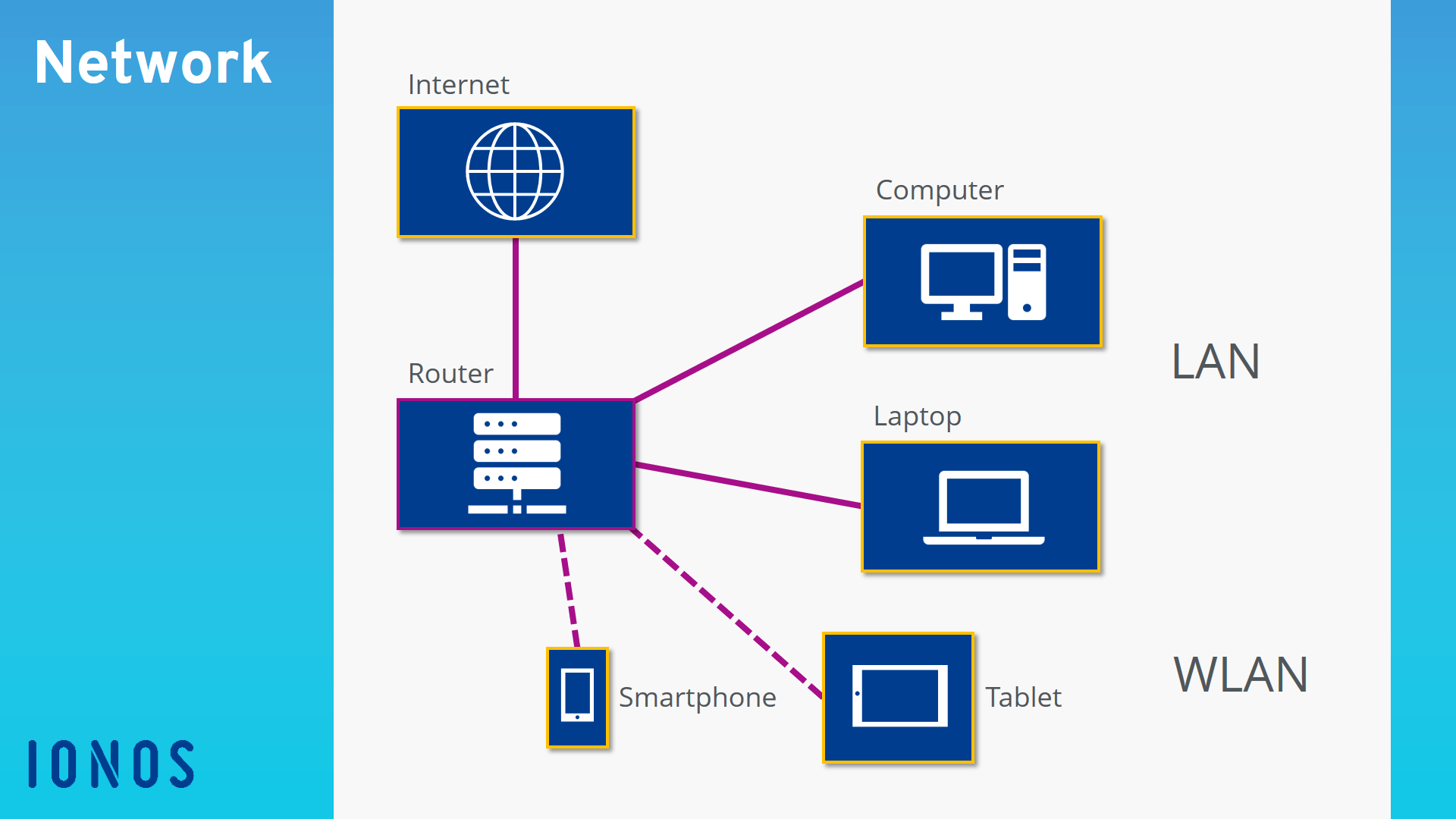
Client-server architecture
In larger networks, such as corporate networks, the server is usually a central computer. This computer is used exclusively for running special server software and services, not regular applications and programs. The server must operate continuously, whereas the other computers (clients) can be switched off.
The server and the client communicate as follows in this server-based network: The client first sends a request to the server. The server evaluates the request and then transmits the response. In this model, the client always connects to the server, never the other way around.
Network protocols
Network protocols ensure smooth communication between the different components in a network. They control data exchange and determine how communication is established and terminated as well as which data is transmitted. There are usually multiple network protocols that each perform a specific subtask and are hierarchically organized into layers.
Network addresses
In addition, it is necessary to ensure that the transmitter and receiver can be correctly identified. Network addresses are used for this purpose. In computer networks, each computer typically has an IP address, similar to a telephone number, that uniquely identifies the computer. This internal IP address is used only for communication between the participants in the local network. For communication on the Internet, external IP addresses are used that are automatically assigned by the Internet provider.
A distinction is also made between IPv4 and IPv6 addresses. IPv4 addresses used to be standard, but only a total of around 4.3 billion of these addresses could be assigned before they were exhausted. Due to the massive expansion of the Internet, additional IP addresses were urgently needed. Therefore, the new IPv6 standard was developed, allowing up to 3.4 x 1038 (340 sextillion) addresses. This should be sufficient for the future.
You can find detailed information on the IP protocol and its important role in computer networks in our article “What is the Internet Protocol ?”.
What types of networks are there?
Networks are usually divided into different network types according to transmission type and range, that is, depending on how or how far the data is transmitted.
Wireless vs. wired
Networks are classified by transmission type as either wireless or wired. Examples of wireless networks include Wi-Fi networks based on the IEEE 802.11 standard, or the LTE networks used for mobile devices and smartphones. Wired networks such as DSL are also known as broadband Internet.
Network range
Networks are typically classified by range as follows:
- Personal Area Network (PAN): A PAN is used for interconnecting devices within a short range of approximately 10 meters. Examples include Bluetooth technology or Apple’s Airdrop ad hoc Wi-Fi service.
- Local Area Network (LAN): Local area networks are among the most widespread networks and are used in households or small and medium-sized companies.
- Metropolitan Area Network (MAN): These types of networks cover cities or single geographic regions.
- Wide Area Network (WAN): The nationwide broadband or cellular network in the US is an example of a Wide Area Network.
- GAN (Global Area Network): The best known example of a global network is the Internet.
Note that there is some overlap between the different network types: As a Wi-Fi user, you are simultaneously part of a WAN and a GAN when you’re connected to the Internet.