

Disaster Recovery as a Service (DRaaS)

Companies are increasingly building their IT infrastructure in distributed cloud environments these days. It’s convenient, but what if something goes wrong? Disaster recovery, as part of business continuity management, has an important role to play in keeping business processes running. With Disaster Recovery as a Service (DRaaS), the backup of critical systems is outsourced to a specialized partner.
- Cost-effective vCPUs and powerful dedicated cores
- Flexibility with no minimum contract
- 24/7 expert support included
What is Disaster Recovery as a Service?
Disaster Recovery as a Service (DRaaS) is a managed IT service. DRaaS is a special case of disaster recovery. “As a service” indicates that the task is assigned to a third party as a service. Disaster Recovery as a Service is one of the most popular and fastest growing IT services in cloud computing.
Disaster recovery is an integral part of business continuity management (BCM). BCM includes plans and preparations to ensure that business processes can continue in the event of a partial or complete failure of critical systems. The task of disaster recovery is to restore systems back to their normal operating state. A Business Continuity Plan (BCP), which describes the components and processes of BCM, is fundamental. Let’s take a look at the three main components of the BCP:
| BCP Components | Explanation |
|---|---|
| High availability (HA) | Provide capacities and processes that allow a company to access data and applications if the local systems fail. |
| Continuous operations (CO) | Ensure operation can continue during malfunctions and planned maintenance. |
| Disaster Recovery (DR) | Have methods ready to rebuild a complete IT system elsewhere in the event of a failure. |
Cloud disaster recovery (cloud DR) is increasingly being used today as part of the disaster recovery strategy. With cloud DR, the data necessary to recover affected systems is stored in the cloud instead of on physical mass storage on site. Cloud disaster recovery offers many advantages over traditional backup methods and is becoming the standard.
When is disaster recovery needed?
A characteristic of disaster recovery (DR) is that a company only needs it in an emergency. If damage or loss occurs, DR needs to be seamless. When everything is operating normally, however, disaster recovery isn’t so important and kind of fades into the background. This means there is the danger of DR being neglected; after all, you don’t need it as long as nothing goes catastrophically wrong.
Poorly planned disaster recovery poses a great danger to companies. If critical systems fail, this can result in high costs. Industry estimates range from $100,000 to $1,000,000 per hour of downtime. There are a number of reasons why systems fail, or data gets lost. Let’s take a look at the most common scenarios.
The following incidents can lead to serious interruptions in operations, which make disaster recovery necessary:
- Power failure on the premises
- Hardware and network failures
- Software and IT system failures
- Failure of the company’s own data center
- Attacks directed against IT security
There can be various causes for this:
- Human error
- Malicious acts
- Natural disasters and fire
- Theft of IT equipment and data carriers
- Defective hardware or software
In all these cases, if a company has not taken precautions, the consequences could be extremely serious.
What are the most important DRaaS concepts?
The most important rule with regard to business continuity management (BCM) and the disaster recovery it involves is that it must be well planned from the outset. If you don’t think about it until the damage has already been done, it’s usually too late. Here’s a simple example to illustrate the point: you have photos with sentimental value stored on your laptop. If the laptop is stolen, the photos are gone. Only if you’ve taken precautions and have carried out regular backups on an external medium or in the cloud, do you still have access to your photos.
The 3-2-1 rule has long been the standard for creating backups. It states that three versions are kept for all data: the original plus two copies. In other words: double redundancy. One copy is kept on a separate data carrier, but on the same premises as the original (on-site backup). The second copy is stored at a physically remote location (off-site backup).
| Copy | Use |
|---|---|
| Original | for current business processes |
| On-site backup | in case of loss or modification of the original |
| Off-site backup | in case of simultaneous loss of original and on-site backup |
Disaster Recovery as a Service focuses on the continuous replication of business data and systems. This goes beyond simply creating data backups and includes all critical infrastructure, systems, applications, and data. The goal is to be able to return to the original state as quickly as possible in the event of failures. After all, persistent failures can result in high costs.
Two metrics have become established to characterize DRaaS approaches. The “Recovery Time Objective” (RTO) and “Recovery Point Objective” (RPO) are determined according to the requirements of the specific company. Appropriate measures are used based on these:
| Disaster Recovery Metrics | Explanation |
|---|---|
| Recovery Time Objective (RTO) | time period from when the loss occurred until the complete recovery of the business processes |
| Recovery Point Objective (RPO) | time period that may lie between two data backups. That is, what is the maximum amount of data that can be lost between the last backup and a system failure? |
To keep the recovery time objective as small as possible, so-called failover sites are used. These are complete mirrors of critical systems that can be used if something happens to the originals. This ensures that business operations can continue until the original systems are back up and running.
How do the most popular DRaaS solutions work?
Many providers nowadays have Disaster Recovery as a Service in their program. Regardless of which provider you obtain DRaaS from, what’s offered can be divided into three major types. DRaaS offerings differ mainly in the degree to which the customer is connected to the provider:
| DRaaS Model | Explanation | Advantages | Disadvantages |
|---|---|---|---|
| Self-Service DRaaS | Vendor provides software and hosts backups | Cheapest | Requires management and planning on the part of the customer; integration with provider must be fully tested |
| Assisted DRaaS | Vendor provides expertise and resources to optimize DR | Useful when there are in-house specialists available | Responsibility lies mainly on the customer’s side |
| Managed DRaaS | Vendor assumes complete responsibility for DR; provides all required systems and resources | Does not require any expertise on the part of the customer | Most expensive; requires close cooperation with provider |
What all DRaaS offerings have in common is that the provider has special disaster recovery tools available. These are aimed at mirroring entire IT environments including all the components. The scope ranges from data and applications to networks and complete systems. Servers and end devices are backed up across operating system boundaries; this includes files, databases, virtual machines, and containers. Once mirrored, the components are made available in the event of damage to replace the systems that are down.
Multiple backup destinations are usually used to back up the data. Following the 3-2-1 rule, at least one of the backups is geographically remote. Depending on the design of the DRaaS model used, the remote backup target is a local data center or a cloud-based storage medium. Furthermore, hybrid approaches can be used. As with backup, data recovery is based on physical, virtualized, or cloud-based storage media, depending on the deployment. Data transferred over the network is encrypted for transport.
In addition to recovering affected data and systems, professional DRaaS offerings often include another essential business continuity feature. With cloud-based “failover environments”, a replacement system is put into operation when a system is down, allowing users to continue working with minimal disruption.
To monitor the protected systems and control the backups and failover environments, most DRaaS offerings have management consoles. These are usually web-based applications that are used via the browser. This means that it is still possible to access the console in the event of loss and this also works from mobile devices. Some DRaaS offerings also include a VPN function for accessing secured data and failover environments.
Since the development of network technology and the connection of servers to public networks such as the Internet, there have been many attacks on company IT infrastructures. Usually, administrators and technicians protect systems against unauthorized access and denial-of-service attacks. In recent years, another particularly worrisome type of attack has emerged where cyber criminals infect a device with so-called ransomware, also known as a “crypto Trojan”. This software nests on the device and encrypts the data there. Once encrypted, the actual users can no longer access the data and are asked to pay a ransom.
Crypto Trojans pose a serious threat today. Even conventional backups do not offer any protection, as they are encrypted and therefore rendered unusable in the event of an emergency.
In the course of the new threat situation, ransomware protection has established itself as an important feature of DRaaS solutions. This involves the use of another copy of all backed-up data. This is marked as “immutable”. Once written, the data can be read again and again, but not changed. This is also referred to as the “Write Once, Read Many” or WORM model.
What are the advantages and disadvantages of DRaaS compared to traditional backup solutions?
Before DRaaS came about, there were already backup-as-a-Service (BaaS) solutions. However, simply backing up data is no longer enough these days. A company should continuously mirror data and systems so that they are immediately ready for use in case of any interruptions in business operations. Like all technological developments, there are advantages and disadvantages to DRaaS. We look at these with particular reference to traditional backup solutions. First, let’s look at the benefits of Disaster Recovery as a Service.
Disaster Recovery as a Service is a centralized approach. All data and systems are backed up continuously. Most of a company’s data is easily forgotten dark data. Backing up all data using consistent methods reduces the risk of data being overlooked during backup or recovery or being lost if something goes wrong. Since multiple versions of backed-up data are usually kept, DRaaS is also an important step toward meeting auditability.
Following the 3-2-1 rule, at least three copies of any data should be kept, one of which should be an off-site backup. Using DRaaS with the cloud as the target of the off-site backups results in a shorter recovery point objective (RPO). As a reminder, the RPO defines the amount of time between two backups of the same data. Using cloud-based failover systems as part of DRaaS results in significant cost savings. Traditionally, to provide comparable capacity, redundant hardware resources had to be kept on hand as a backup in case of disaster.
Unlike Backup as a Service, Disaster Recovery as a Service includes not only the backup of data, but the mirroring of complete systems. In particular, this also includes the backup of virtual machines and application containers, which are the basic building blocks of modern IT architectures. During recovery, the entire system is assembled from these individual components. In order to correctly resolve the interdependencies of the individual components, DRaaS solutions allow the sequence of the individual recovery steps to be defined. This is particularly essential for the widespread microservice architecture.
Now let’s look at the disadvantages of Disaster Recovery as a Service. First, note that DRaaS usually costs more than Backup as a Service. However, DRaaS solutions also perform significantly better, making the direct price comparison lopsided. As with all X-as-a-Service services, DRaaS is at risk of vendor lock-in because you relinquish control to a vendor and become dependent on them. The loss of data sovereignty must also be mentioned as a potential disadvantage of DRaaS solutions. Here, the location of the DRaaS provider plays a decisive role.
How to find the right DRaaS provider?
Disaster Recovery as a Service is available from many cloud service providers. There are also established providers that specialize in disaster recovery and backup solutions. Backup as a service is also provided by managed service providers or in special cases implemented by software houses.
To find the right DRaaS provider, follow these steps:
- The first step is to survey the current situation and determine the scope of the data and systems that need to be backed up.
- The next step is to define your own requirements and goals. In particular, recovery time objective (RTO) and recovery point objective (RPO) for the data, applications, and services involved.
- If you know how your own infrastructure is set up and are aware of your own requirements and goals, you can move on to selecting providers you like the sound of. In addition to the technical capacities, the compliance of the providers with established specifications as well as a fair and comprehensible price structure are particularly important here.
- From the candidates you’ve picked out, the appropriate provider must now be selected. It makes sense to carry out tests to put the providers through their paces and check out their technical capabilities.
Let’s take a look at the key benchmarks that a professional DRaaS provider should meet.
Fundamental to a DRaaS solution is the automatic, continuous backup of critical data and systems. Backup should work across operating systems and cover all critical data types. This includes files, databases, server environments, and end-user devices, as well as virtualized environments in virtual machines and containers. Continuous Data Protection (CDP) backs up the state of an entire data center with granularity down to the second.
Before transferring to the DRaaS provider, the data collected during storage must be automatically encrypted. The backup data and systems should be constantly checked for errors and deviations in an automated manner. Redundant, globally distributed systems should be used to store the data.
In the event of loss, the DRaaS provider should provide at least two services. The first is to restore the affected systems - the recovery must include all essential data, applications, and systems. When selecting a provider, bear in mind that a recovery in multi-cloud environments may be necessary. Secondly, the DRaaS provider should employ failover systems during the recovery so that operations continue with minimal interruptions from the user’s perspective.
Beyond these basic requirements, it is advisable in view of the current threat situation to choose a DRaaS provider whose offering includes anti-ransomware. Customers with exorbitant requirements for the amount of data to be stored should consider this when choosing a provider. Transferring enormous amounts of data over the Internet can take several years in extreme cases. Much too long for a target-oriented recovery. In these cases, special mobile data storage devices are used, such as the famous “Amazon Snowmobile”:
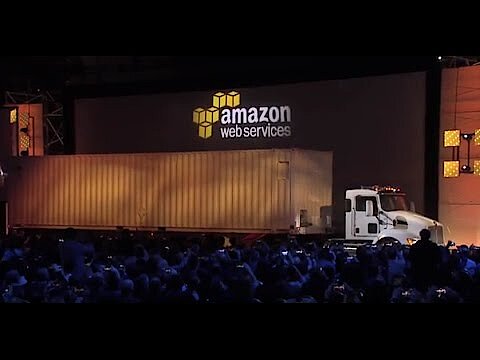 To display this video, third-party cookies are required. You can access and change your cookie settings here.