

What ist Kerberos authentication and how does it work?

In an increasingly digitized world where private and commercial data is stored and transmitted electronically, cybercrime is an ever-growing problem. Through the use of artificial intelligence, hackers are finding more ways to optimize their attacks. For this reason, encrypting data through electronic security procedures is more important than ever. Find out what Kerberos authentication is all about, how it works, and what its strengths and weaknesses are.
- Simple registration
- Premium TLDs at great prices
- 24/7 personal consultant included
- Free privacy protection for eligible domains
What is Kerberos?
Kerberos is an authentication service used in open or unsecure computer networks. Thus, the security protocol authenticates service requests between two or more trusted hosts over an untrusted network such as the Internet. Cryptographic encryption and a trusted third party are used to authenticate client-server applications and verify user identities.
Kerberos is maintained as an open-source project by the Kerberos Consortium. It has its origins in the 1980s when the Massachusetts Institute of Technology (MIT) developed the protocol for its Athena project at the time. Today, Kerberos is the standard Microsoft Windows authorization technology. However, Kerberos implementations exist for other operating systems such as Apple OS, FreeBSD, UNIX, and Linux. Microsoft introduced its version of the Kerberos protocol in Windows 2000. It became a standard protocol for websites and single sign-in implementations across various platforms.
Kerberos authentication got its name from Greek mythology – the legendary three-headed dog Kerberos (also known as Cerberus), which guards the entrance to the underworld. In the tales, Kerberos has a serpentine tail and a particularly aggressive demeanor, which makes it an effective guardian. In the case of the Kerberos protocol, the three heads represent the client, the server, and the Key Distribution Center (KDC). The latter acts as a “trusted third party”.
Users, computers, and services that use Kerberos rely on the KDC, which provides two functions in a single process: authentication and ticketing. So-called “KDC tickets” authenticate all parties by verifying the identity of all nodes – the starting and ending points of logical connections. In doing so, the Kerberos authentication process uses conventional shared-secret cryptography that prevents transmitted data packets from being read or modified. This also protects them from eavesdrop and replay attacks.
Want to use the cloud to access your data anytime, anywhere, without compromising on security? Use HiDrive cloud storage from IONOS that protects your sensitive data with end-to-end encryption and additional two-factor authentication.
What’s the difference between Kerberos and NTLM?
Kerberos and NTLM are network protocols that form a subgroup in the Internet Protocols (IPs) family. Both are authentication methods that use TCP (Transmission Control Protocol) or UDP (User Datagram Protocol). NTLM stands for NT LAN Manager and was developed before Kerberos. It is a challenge-response authentication protocol in which the target computer requests a password, which is then verified and stored as password hashes for further use.
Find out how TCP and IP interact in our comprehensive guide on TCP/IP.
One of the main differences between Kerberos and NTLM is third-party verification. In that way, Kerberos has a stronger encryption function than NTLM because the extra step adds another layer of security. NTLM, meanwhile, can be cracked relatively easily, which is why it is considered insecure these days and should not be used. However, both authentication protocols are still implemented in the Windows authentication module.
The Security Support Provider (SSP) Negotiate, which acts as the application layer between the Security Support Provider Interface (SSPI) and the other SSPs, automatically chooses between Kerberos and NTLM authentication in a negotiation process. If available, the Kerberos protocol is used, otherwise NTLM is used.
While Kerberos is usually implemented in Microsoft products starting with Windows 2000 and Windows XP, there are other common security protocols for web browsing, messaging, and email. For example, the security protocol SSL or TLS encrypts the connection between a web server and a browser. This ensures that all data transmitted remains protected and cannot be read. Just like Kerberos, SSL works with the TCP protocol, but uses a public-key encryption method.
How does Kerberos authentication work?
To help understand how Kerberos authentication works, we'll break it down into its core components. Here are the main components involved in a typical Kerberos workflow:
- Client: The client acts “on behalf” of the user and initiates communication when a service request is made.
- Hosting server: This is the server that hosts the service that the user wants to access.
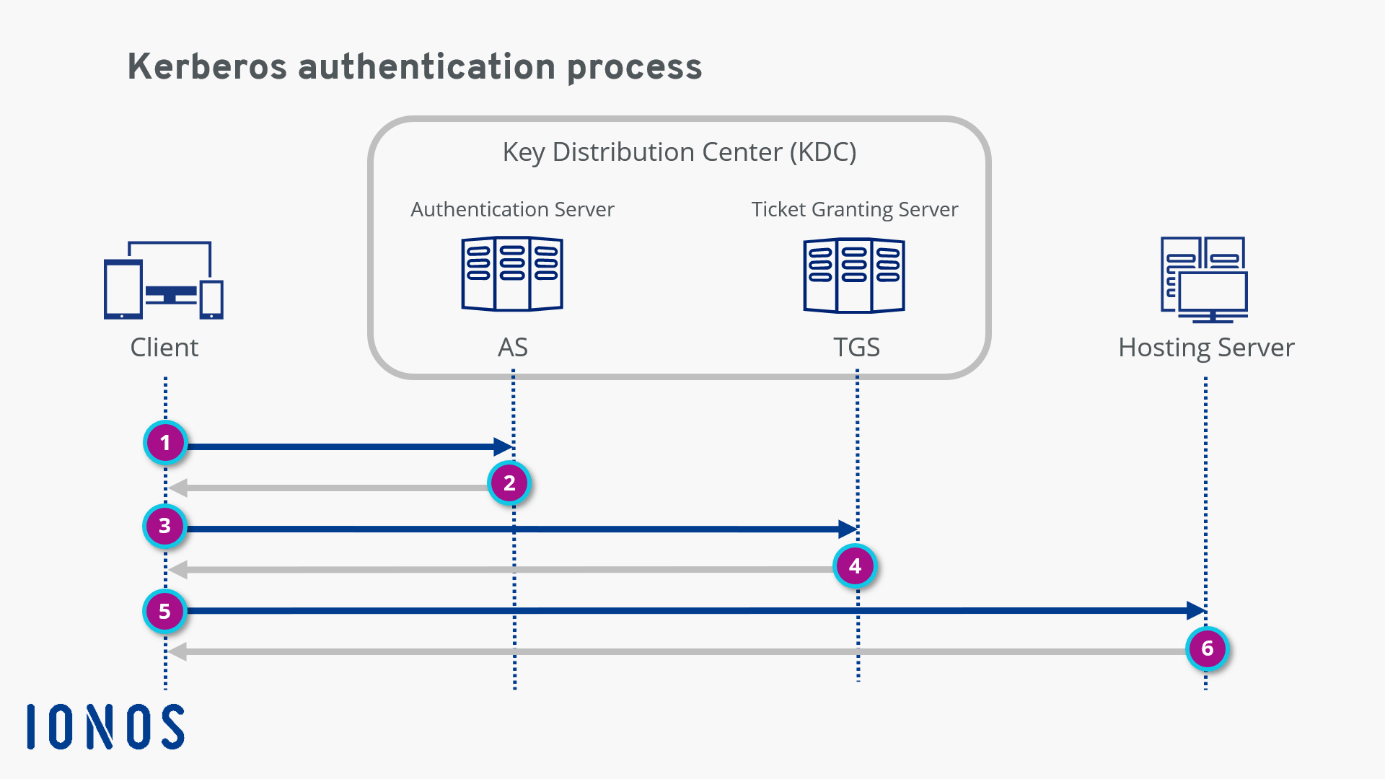
- Authentication Server (AS): The AS performs the desired client authentication. If the authentication is successful, the AS issues a ticket to the client, the TGT (Ticket Granting Ticket). This ticket assures the other servers that the client is authenticated.
- Ticket Granting Server (TGS): The TGS is an application server that issues service tickets.
- Key Distribution Center (KDC): The KDC consists of the Authentication Server (AS) and the Ticket Granting Server (TGS).
Now let’s move on to the protocol flow, which is shown in the diagram.
Step 1: The client makes an encrypted request to the authentication server. When the AS receives the request, it searches the Kerberos database for the password based on the user ID. If the user has entered the correct password, the AS decrypts the request.
Step 2: After verifying the user, the AS issues a Ticket Granting Ticket (TGT), which is sent back to the client.
Step 3: The client now sends the TGT to the TGS. Together with the TGT, the client “explains” the reason for accessing the hosting server. The TGS decrypts the ticket using the secret key shared between the AS and the TGS.
Step 4: If the TGT is valid, the TGS issues a service ticket for the client.
Step 5: The client sends the service ticket to the hosting server. The server decrypts the ticket using the secret key shared between the server and TGB.
Step 6: If the secret keys match, the hosting server allows the client to access the service. The service ticket determines how long the user is allowed to use the service. Once the access expires, it can be renewed with the Kinit command by going through the entire Kerberos authentication protocol again.
Strengths and weaknesses of Kerberos
Kerberos is considerably more secure than NTLM. In fact, third-party authorization makes it one of the most secure verification protocols in the IT world. In addition, passwords are never shared in plain text. “Secret keys” are transmitted in the system only in encrypted form. Kerberos also makes it very easy to track who requested what and when.
Transparent and accurate logs are essential for security audits in organizations of all sizes. They also have excellent access control to the log. What’s more, the service lets users and service systems authenticate each other. At every step of the authentication process, both users and server systems know they are dealing with an authentic counterpart. And over the years, many security experts have tried to hack the open-source project, resulting in continuous improvements.
Naturally, Kerberos has some vulnerabilities. For example, if the Kerberos server fails, users cannot log in. Fallback authentication mechanisms and secondary servers often serve as a solution to this problem. There are also strict timing requirements: The date/time configurations of the hosts involved must always be synchronized within predefined limits. Otherwise, authentications fail because tickets are only available to a limited extent.
Some legacy systems are not compatible with third-party authentication mechanisms. And although the passwords in Kerberos authentication are usually secure, they can now be cracked by hackers through brute force attacks or stolen through phishing attacks. This is one reason why multifactor authentication (MFA) is becoming an increasingly popular means of protecting online identities.
By default, Windows does not perform Kerberos authentication if the host name is an IP address. It then falls back on other enabled authentication protocols such as NTLM, which must be disabled manually. Learn how to find your find IP address here.