

What are Botnets?

Networking devices together allows for greater processing power, which means you can carry out complex tasks more efficiently and quickly. However, the same technology is being used for illegal purposes and botnets have come to be associated with cybercrime. But what exactly is a botnet? What should you do if you find out that you’re part of an illegal botnet, and how can you protect yourself in the future?
What is a botnet?
A botnet is a network of computers used to perform a number of routine tasks. Botnets can be good or bad. Good ones ensure that websites and Internet Relay Chats (IRC) work properly, for example. Botnets are also used as part of large research projects to carry out complex computational processes more rapidly. The best-known example is the SETI@home project run by the University of California, Berkeley that lets anyone share their PC’s computing power to help search for extraterrestrial intelligence.
Botnet: A botnet is a network that draws computing power from networked machines in order to carry out routine tasks such as sending emails or calling up websites. Such networks can be used for legitimate purposes, but they are best-known for their use by cyber criminals.
Malicious botnets are primarily used to send spam or steal user data. Cyber criminals use programs known as web crawlers (which are also used by search engines) to quickly and silently infect other computers with malware. These web crawlers search the web and analyze websites. They identify potential security flaws, which are then analyzed and exploited so that malware can be placed on a website or sent via email.
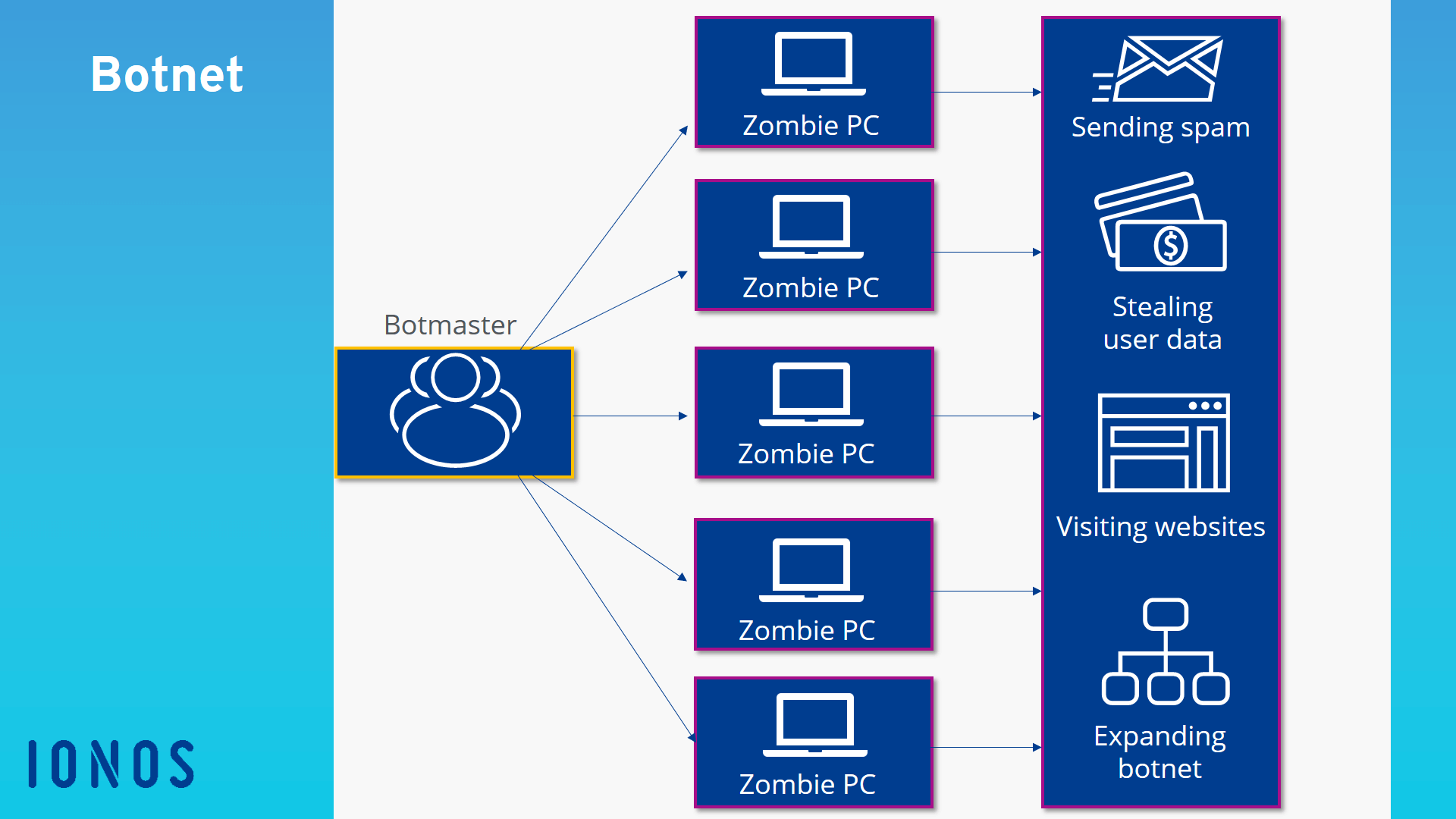
Botnets can spread in four different ways. The first involves distributing the malware by email. Here, the botnet is used directly to expand the network further – the installation program is sent by email and the recipient is asked to download the attachment. As soon as they open the file, the malware is installed in the background and the computer becomes part of the botnet.
Another way for botnets to spread is through “voluntary” downloads. Here, the user downloads and executes a piece of software which appears perfectly harmless, but actually contains a trojan horse. Legitimate programs are increasingly being hacked and turned into carriers for trojan horses.
Thirdly, so-called “exploits” are also used to expand botnets. This technique exploits security holes in operating systems or browsers in order to recruit computers to the network. Some exploits still require the user to actively click on a clink, but “drive-by infections,” whereby malicious code is executed as soon as a site loads, are becoming increasingly common. In this way, popular websites that have no connection to the botnet can also be infected.
The last and least common means by which botnets spread is by manual installation. This usually involves servers, because they have a good network connection and more processing power.
How does a botnet work?
The construction of the network begins when a bot infiltrates an external computer. The bot acts in the background and, in most cases, the user does not even notice it. Via the bot, the botmaster can access the computer and force it to carry out simple tasks. Each individual computer being controlled in this way is called a zombie PC.
These zombie PCs communicate with one another via the internet and receive commands from the botmaster. Since they can only be controlled online, they are only active when they are switched on and connected to the internet.
The botmaster sends the same command to all of the zombie PCs. Commands include visiting a website, sending spam, or launching a DDoS attack.
What are botnets used for?
Botnets aim to harness the processing power of other computers in order to perform routine tasks. The majority of botnets are created for illegal purposes. For example, cyber criminals use them to obtain important information and data which they then either use for their own benefit or sell on the “darknet” – the black market of the internet.
Botnets are ideal for sending spam such as phishing emails, because they allow the spammer to remain anonymous (the illegal activities are carried out via the network of external computers).
Botnets therefore have the potential to cause significant damage. They are often used to carry out Denial of Service (DoS) attacks. Here, the networked computers are used to flood a website with traffic so that the servers are overloaded and the online service can no longer be provided. This kind of attack can cause huge financial losses to the site operator, particularly in the domain of e-commerce.
Once a bot has access to an external computer, it can also retrieve users’ personal data, including information about their interests. The botmaster can then analyze this data and use it to replace banner ads with adverts that are specifically targeted to the user.
How do you spot a botnet?
Because botnets act in the background, it’s very difficult for regular users to spot a them. However, there are certain signs that may indicate that your computer has been infected.
For example, if you notice that your internet connection is much slower than usual or that the load has increased significantly even though you haven’t changed your data usage, you should investigate further. Virus scanning software can detect malware and thus expose botnets. Other warning signs include unknown processes in the task manager and suspicious auto-start entries.
How can you protect yourself from botnets?
Skillful cyber criminals manage to track down even small security flaws, but there are some things you can do to make access harder for them. Prevention is the name of the game! Here are a few tips for making sure your computer has the best possible protection against illegal attacks.
Firstly, it is highly recommended to install anti-virus software. Another important form of protection is the firewall. Check that yours is configured to offer the highest possible level of protection. You should also install updates for your operating system and software as soon as they become available so that you don’t expose yourself to risks due to security flaws in outdated versions. It is also advisable to install browser protection to warn you about phishing sites and malware.
Because many computers are infected via email, you should be aware of how to protect yourself from such attacks. For example, you should never open email attachments that seem suspicious or you did not expect. Ignore emails that claim to come from financial institutions but that contain suspicious links or multiple spelling mistakes.
Finally, it’s generally safer to use a non-administrator account for everyday use of your computer and only use an administrator account when you really need to. This reduces the risk of malware penetrating deeper into your system, because extensive privileges are usually required to change system settings.
Check the authenticity of a IONOS e-mail, find here immediately whether it is phishing attempt and report it to remove the phishing content.
- Validate email
- Easy to use
- Remove phishing