

What is a DMZ (Demilitarized zone) in Network Security?

Every company operating a mail server or hosting their own company site faces the same problem: computers providing web or mail services have to be available via the internet. At the same time, employees from the LAN (local area network) need fast access to these resources. Operating within the same network is no solution, as it is very risky. DNS, web, mail, or proxy servers requiring access to public networks give hackers ample opportunity to launch an attack. If any of these ‘bastion hosts’ are directly connected with the LAN, then there’s a risk that a corrupted server could inflict damage upon the entire company server. A demilitarized zone (DMZ), also sometimes referred to as a perimeter network, offers a solution to this dilemma by outsourcing vulnerable servers.
What is a demilitarized zone?
Equipped with its own IP address area, a demilitarized zone refers to a computer network that acts as a buffer zone between two different networks. These networks are separated from one another through strict access rules. And while DMZs are physically located within the same company, they’re not directly connected with any of the devices in the local network. The system’s highest protection function is the separation it offers between the LAN and the internet; separate firewalls protect bordering networks from one another. A more affordable variant is a set-up whereby all networks are connected to a single firewall with three different connections; this model is known as a protected DMZ.
DMZ with two firewalls
In order to reliably protect company networks against attacks from public networks (WAN), DMZ concepts with two firewalls are generally preferred. This setup can make use of either stand-alone hardware components or firewall software installed on a router. The outer firewall protects the demilitarized zone from public networks while the inner firewall shifts between the DMZ and the company network.
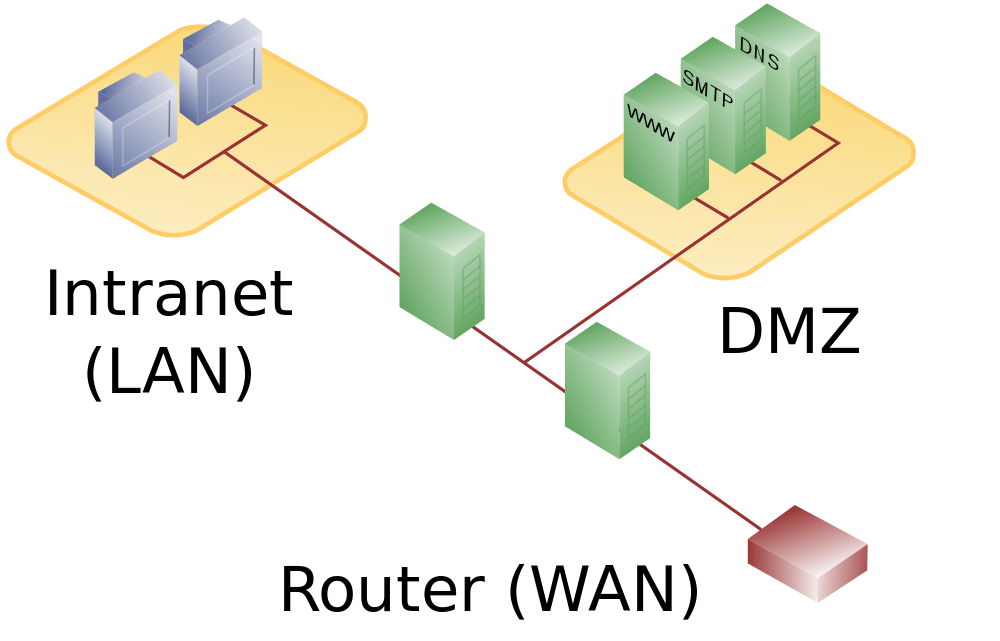
This double-layered security structure enables static routers to be configured in order to regulate data traffic between the networks as follows:
| User located | Access to DMZ | Access to LAN | Access to internet |
| …on the internet (WAN) | allowed | denied | - |
| …on LAN | allowed | - | allowed |
| …in DMZ | - | denied | denied |
While users from the LAN are able to access public networks as well as serves located in DMZ, internet users are only allowed access to the demilitarized zone. Data traffic coming from the DMZ is blocked by both firewalls.
Using firewalls from different manufacturers is also recommended. Otherwise, just one security gap is needed in order for both firewalls to be breached. In order to prevent attacks from spreading from compromised servers to other devices within the DMZ, additional firewalls are placed between these network components. Alternatively, a segmentation in the VLANs (Virtual Local Area Network) is employed for separating.
DMZ with one firewall
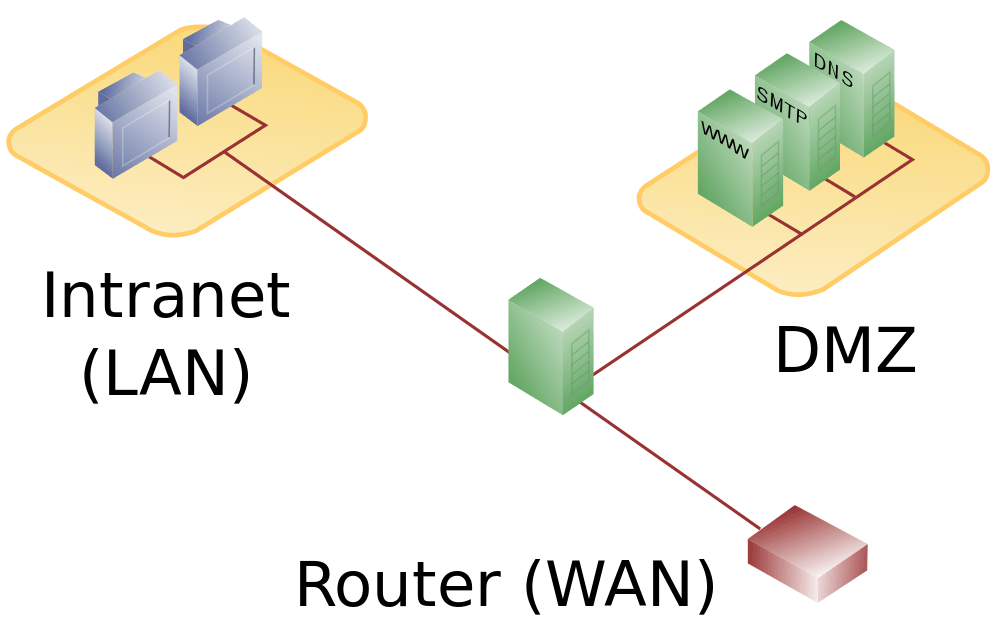
A more affordable solution is to set up a DMZ through one high-performance firewall (or a router featuring a firewall) with three separate network connections: one for the internet, a second for the LAN, and a third one for the demilitarized zone. For this model, all network connections are monitored independently by the same firewall, which makes this firewall the network’s single point of failure. Additionally, firewalls built this way have to be able to handle incoming traffic from the internet as well as access requests from the LAN.
Exposed host
Many routers from lower price ranges advertise the fact that they support a DMZ. But often this means that there’s only an option to configure computers in local networks as exposed hosts. The upstream router forwards all online requests that don’t belong to existing connections. This means that computers ‘protected’ in this way are available to online users. The result of this is that an exposed host doesn’t offer the protection of a true DMZ, since it’s not separated from the LAN.