

What is DNS Hijacking?

Thanks to the Domain Name System (DNS), Internet users can enter a web address into a browser and are redirected to a website without having to specify the IP address. The DNS inquiry is passed directly to the DNS server which auto-responds with the correct IP address. It’s a simple method referred to as name resolution, similar to an automated directory inquiry that matches a name to a number.
The fact that this is such an essential foundation for surfing the World Wide Web, makes it all the scarier how easily DNS can be abused for malicious purposes. Cyber criminals are able to intercept browser requests and return an incorrect response. Consequently, the user is redirected to a wrong or harmful website that could introduce viruses or malware and collect sensitive personal data. Because of this, DNS Hijacking can cause significant damage.
But how does it work? And how can you protect yourself against data breaches? Let’s find out.
- Faster domain resolution to keep you online longer
- Added protection against outages and downtime
- No domain transfer needed
How does DNS Hijacking work?
When you’re trying to launch a website by entering a web address into a browser, a DNS query is made. Websites you’ve visited recently will be stored in your browser’s cache in which case the request is not forwarded to the DNS. In all other cases, the PC or smartphone has to communicate with the name server. These are usually provided by Internet providers, but some users prefer to use Google domain name servers or public DNS services.
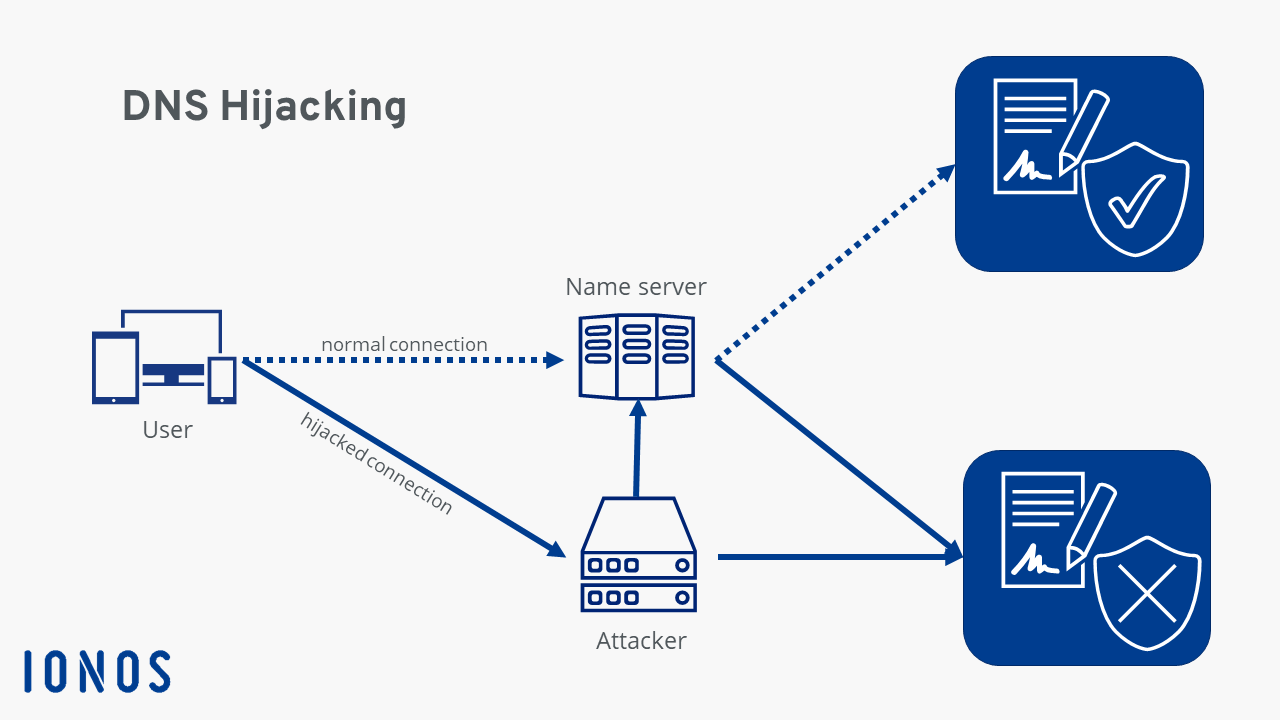
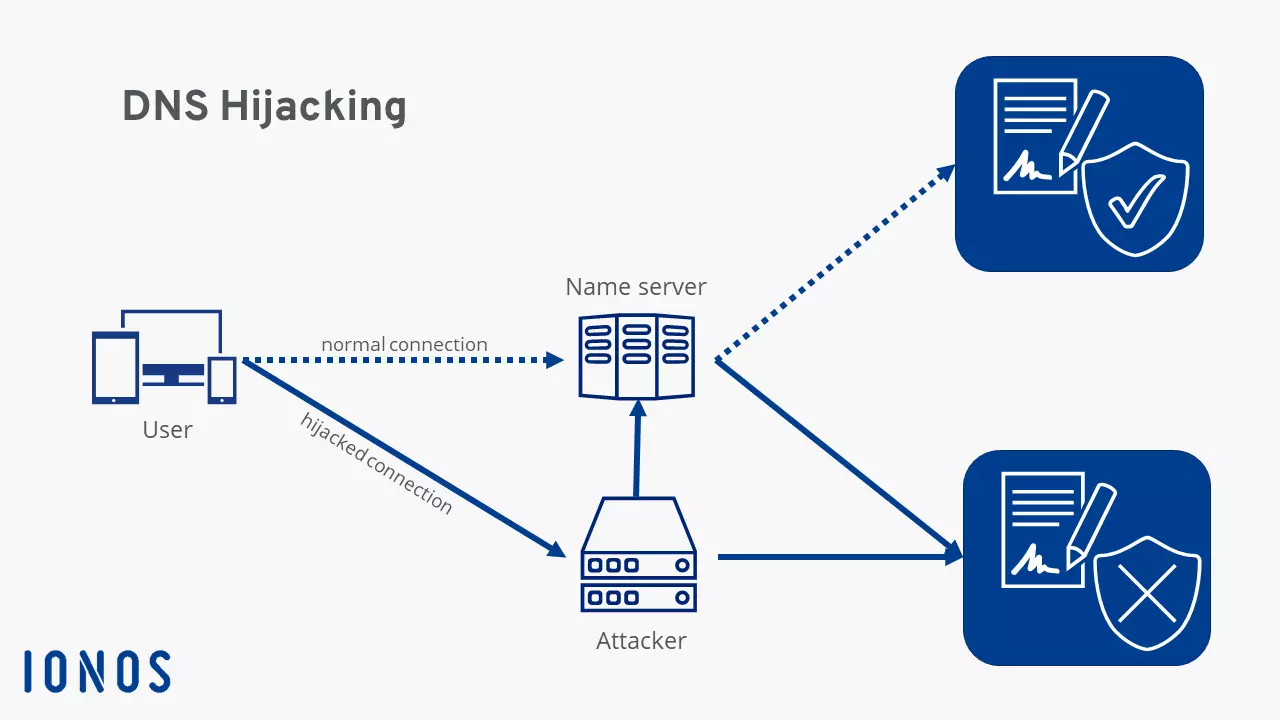
The communication with the server is the risky part because the exchange of query and response often occurs without encryption and is based on our trust in the system. This allows attackers to intercept queries and redirect users.
Router Hijacking
Routers are the first point of attack for many cyber criminals, abusing the fact that few users change their routers’ login credentials. In many households the router is configured to use the username and password the hardware was originally delivered with. Many manufacturers can’t be bothered to individualize the login details for each individual device, which means attackers can gain access to a device using standard login details.
Once logged in, they’re able to modify DNS settings and specify a preferred DNS server. Attackers will usually point to their own server. Name resolution – i.e. the conversion of a web address to an IP address – is then controlled by the offender. From here website requests can be forwarded to a malicious site.
Local Hijacking
This variation affects the user’s computer. The attacker uses a Trojan to access the DNS settings of a device. For example, Windows allows users to enter their preferred DNS server. Criminals can harness this feature and change settings to point to their own DNS server. The computer sends a request directly to the harmful server. Every single website request can be diverted this way. In theory, device owners can check whether their settings have been tampered with, but most people don’t regularly monitor their DNS settings.
Rouge Hijacking
Rouge Hijacking is more complicated. It doesn’t affect a user’s hardware and so can’t be controlled at the device level. Instead, a criminal will hijack an Internet provider’s existing name server. Devices are then technically accessing the correct DNS server, but this is (partially) no longer under the control of the actual provider. Attackers tend to change select entries using Rouge Hijacking.
This type of attack is much harder to execute because most name server providers have adopted very high security standards. However, if a hacker does gain access, an enormous number of users could be affected. Any customer who would execute a name resolution via this server could become a victim of DNS Hijacking.
Man-in-the-Middle Attack
During a Man-in-the-Middle attack, a fraudster intercepts the communication between a client and the server. Due to the lack of encryption of many DNS requests, the criminal is able to read the communication. A user’s website request is manipulated and mapped to a malicious IP address. The original DNS server never actually receives the request.
The dangers of DNS Hijacking
With DNS Hijacking, users are redirected to undesired websites, but what exactly are the harms involved? In theory, users may be redirected to websites where their system is infected with malicious software. However, this type of attack rarely happens in practice. Far more common are two techniques known as phishing and pharming.
Phishing is a form of fraud that tricks a person into accessing a website masquerading as a serious web page in order to steal sensitive user information.
Financial institutions are a top target for phishing attacks. For example, a user may think they’re accessing their bank’s homepage when in reality they’ve landed on a page imitating their bank. When they enter their username and password for online banking, a phisher can save the information and use it to take over the account.
DNS Hijacking is not required in phishing attacks because the latter relies on users accessing manipulated links. However, when the Domain Name System is corrupted, a phishing attack can be even more malicious. Regardless of whether a person entered the correct URL or even clicked through to a website from a bookmark, they will still be redirected to a fake website. Because DNS enjoys huge trust, most users don’t check if they’re actually accessing the desired website or browsing a fraudulent page.
Pharming, on the other hand, is less harmful to the end-user, but can be very lucrative for an attacker. The scam misdirects users to a fake website filled with adverts. These web pages fulfill no real function, but the operator generates revenue each time they are visited – even if a user closes a page promptly after it opens. Money generated this way often flows back to fund other criminal activities.
However, cyber criminals aren’t the only ones using DNS Hijacking. A growing number of governments are now employing the protocol to censor the Internet and suppress political opposition or prohibit online adult content. Users accessing a censored website are informed that the page is inaccessible and are redirected to a different site.
Some Internet service providers occasionally use DNS Hijacking to display error messages where domains do not exist. For example, if a user tries to open a web address that’s not DNS-registered or misspells a URL, an error message referred to as NXDOMAIN is displayed. Before the NXDOMAIN response is displayed, the request passes through all levels of the Domain Name Systems. If no entry exists, the error message is returned.
At that moment, the Internet service provider can use DNS Hijacking to intercept the error message and redirect the query to a different website. Some service providers may redirect users to web pages with lots of advertisements to increase their revenue or their own web shop. While this does not cause any real harm, users may find these ads annoying.
How to protect yourself against DNS Hijacking?
DNS Hijacking patterns are diverse, but so are the security options.
As a starting point you can change the login credentials of your router. It makes sense to choose a secure password, but the most important thing is that you change the default password. Few fraudsters will go through the trouble of trying to crack a password.
In addition, you should keep your router’s firmware up to date. Manufacturers regularly release updates to patch up security flaws.
You can protect your PC from Trojans by using anti-virus software and treating online files with caution. Never download or open files from unknown or suspicious sources.
For added security, you can also install a VPN. A virtual private network (VPN) secures the transport of sensitive data by passing a direct connection between a user and a website through a separate, encrypted server of the VPN service provider. The encryption ensures secure communication of data and renders man-in-the-middle attacks infeasible.
It’s worth treating online content with skepticism and caution. You can also double-check the authenticity of websites that handle sensitive user data such as banks or web shops. SSL certificates offer some clues as to how secure a web page is.
At the same time, name resolution is becoming more secure. DNS over HTTPS and DNS over TLS are enhanced communication protocols that provide additional security through encryption to prevent man-in-the-middle attacks and improve user privacy. But these protocols have yet to be adopted as standards for all systems.
Website operators can now take action: The new IONOS Domain Features help web administrators to protect their websites against DNS Hijacking. Find out more!