

How to create HTML tables

You can use the <table> tag in HTML to structure information in a clear, tabular format. You can place a table anywhere on a web page, and by specifying header cells, rows and data cells, you can also determine how tables are structured.
- Fast page loads while cutting costs by 60%
- Keep your site open 24/7 with 99.99% uptime
- Never run out of space with unlimited storage
What is an HTML table and what is it used for?
An HTML table is a structured HTML element that is used to display data and text in a tabular format. Several HTML tags are used to define and structure tables. The visual styling of HTML tables, is done separately using CSS instructions.
HTML tables organize information into rows (horizontal) and columns (vertical) and can be used as an alternative to lists to present the following types of content:
- Calendar
- Rankings
- Timetables
- Price lists
- Product comparisons
- Statistics
Just getting started with HTML? Check out our HTML beginner’s tutorial to learn the basics of the popular markup language!
Which tags are needed for an HTML table?
Below is an overview of the tags that are used to create an HTML table. While the first three tags are a must, the fourth tag (<th>) is optional and can be used to create HTML table headers:
<table>: The HTML<table>tag is the key element for creating a table. An opening<table>marks the start of the HTML table, while a closing</table>indicates its end.<tr>: To create a new row, the<tr>tag is used. This tag stands for “table row”. Each row must have an opening and closing tag.<td>: The<td>tag stands for “table data”, and is for the actual content of the table. Each time a<td>element is created, a table cell in automatically generated and, in turn, a new column. The data for the cell is placed between the opening<td>and closing</td>tag.<th>: The<th>tag is essentially a specialized version of the<td>tag. It is typically used to highlight header cells (“table heading”) but can also be used to emphasize the first entry in a row.
Want to create an HTML table without having to create rows and cells manually? Tools such as this HTML table generator make creating HTML tables easy.
Simple HTML table example
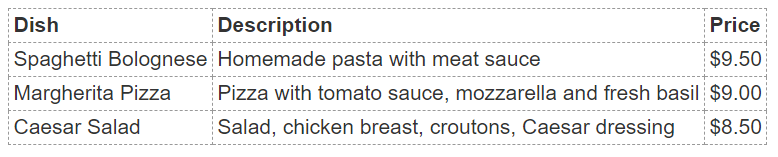
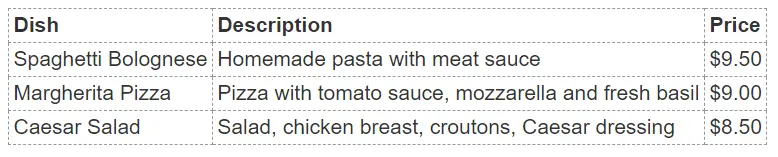
To illustrate the capabilities of table tags, we’ll create a simple HTML table below. In the following example, we’ll include the descriptions and prices for three different dishes. In the header row, we’ll define the three column headers: “Dish,” “Description,” and “Price.” This is followed by three more rows, which each contain information that corresponds to the categories in the headers. The HTML table below consists of four rows and three columns:
<table>
	<tr>
		<th>Dish</th>
		<th>Description</th>
		<th>Price</th>
	</tr>
	<tr>
		<td>Spaghetti Bolognese</td>
		<td>Homemade pasta with meat sauce</td>
		<td>$9.50</td>
	</tr>
	<tr>
		<td>Margherita Pizza</td>
		<td>Pizza with tomato sauce, mozzarella and fresh basil</td>
		<td>$9.00</td>
	</tr>
	<tr>
		<td>Caesar Salad</td>
		<td>Salad, chicken breast, croutons, Caesar dressing</td>
		<td>$8.50</td>
	</tr>
</table>On the website in question, the table looks something like this:
Typical HTML table problems and how to fix them
When creating HTML tables, several issues can occur. Most can be avoided though with care and precision. Below we’ve outlined the most common challenges:
- Readability: Tables are difficult for users and screen readers to read if they don’t have a clear structure. That’s why you should only omit headers if they are absolutely irrelevant for understanding the information.
- Display on mobile devices: Standard HTML tables are often poorly displayed on smartphones and tablets. To ensure that embedded tables can be viewed on mobile devices, you should implement CSS for a responsive design.
- Tables as a layout element: In the past, HTML tables were commonly used to design websites. Today, it’s best to avoid this approach and instead use CSS to manage the layout of your website.
- Missing or inconsistent units: When including numerical values in a table, it’s common to accidentally use incorrect units or forget to add an entry. Make sure to maintain consistency here to avoid confusion.
Another issue when creating HTML tables is the display of special characters. Symbols like <, >, &, " and ' have special significance in HTML and often lead to tables being incorrectly rendered. The solution in this case is to replace the character with its corresponding HTML entity. Here’s an overview of HTML entities for the characters listed above:
| Special characters | HTML entity |
|---|---|
<
|
<
|
>
|
>
|
&
|
&
|
"
|
"
|
'
|
'
|
- Free Wildcard SSL for safer data transfers
- Free Domain Connect for easy DNS setup
Reviewers

Julia Hertler
With over 18 years of experience in content marketing, Julia Hertler has deep expertise in digital communications. For the past 10 years, she has specialized in the areas of domains and hosting at the IONOS Digital Guide, making complex technical topics easy to understand.

Christian Heldmaier
Christian Heldmaier is an experienced online marketing and SEO specialist from Karlsruhe. He has been working as an SEO Manager at IONOS since July 2020.