

How to create Sequence Diagrams

The sequence diagram is a diagram from the Unified Modeling Language (UML). UML is an object-oriented modeling language. This kind of language consists of graphic elements. UML models systems and processes of object-oriented programming, as well as business processes. The aim is to present complex facts in such a way that they will be easily understood. UML has a standardized notation for this purpose. A certain form will always stand for a certain component or a certain behavior. The so-called metamodeling defines language units and their meaning within the UML. This also includes determining how certain elements interact with each other, and which hierarchies exist between language units.
Elements and relationships are represented in UML in the form of diagrams. UML2 distinguishes 14 different types of diagrams. These get assigned to one of three different categories: structure diagrams, behavior diagrams, and interaction diagrams.
Structure diagrams represent a system and its components in a static state. They illustrate the relationships between individual elements or between elements and superordinate concepts. An example of this is the class diagram.
Behavior diagrams represent processes and the behavior of a system. In contrast to structure diagrams, the sequence of processes and time also plays a role in the representation. An example of this is activity diagrams.
- Interaction diagrams are a subset of behavioral diagrams. They are listed separately because they model a specific behavior – namely the interactions between system elements. The basic building blocks of interactions are the so-called “lifelines.” These are objects (the smallest independent building blocks of object-oriented programming) that represent individual participants in an interaction. The most commonly used interaction diagram is the sequence diagram.
Sequence diagrams: uses and special features
The UML sequence diagram displays events in chronological order. This is why it is sometimes referred to as an event diagram or event scenario. The exact order of the events is the most important element. However, you can add restrictions to your model. For example, a time limit for a particular process (such as entering a PIN at an ATM) can trigger the actions for an event (card issuance if no input is made after a certain time).
The sequence diagram basically describes how objects exchange messages in a certain order. Objects are the basic building block of UML diagrams. Depending on the diagram type, they represent certain characteristics of a system element. In interactions, the objects are lifelines.
Requests are made and responses are sent constantly within one system. The recipient makes a decision based on the specific request and the pre-defined rules of the recipient. This kind of network of possible decisions and interactions is usually represented by an activity diagram. If you imagine all possible decisions (yes/no) as a tree diagram, you’ll probably be imagining a highly branched network. The sequence diagram only shows a specific path within this network.
The sequence diagram differs from the UML application case diagram in particular by its detailed order. If a new business process is to be introduced, the application case provides a good overview of the requirements. If, on the other hand, you want to define specific cases and a schedule, you create a sequence diagram. Here, you can display individual subareas in more detail. With this so-called application scenario, you put the logical connections of your application case through their paces.
UML sequence diagrams are also useful when you want to graph complicated processes for better understanding. The clear modeling allows you to quickly identify which stations a single task must go through in order to be successfully completed. This allows you to plan and test your methods before they are implemented in everyday business or in a computer system.
To represent the control structures of a higher programming language, connect several sequence diagrams together in a combined fragment.
Sequence diagrams support logical analysis for parts of systems. If the time sequence of processes plays an important role, this diagram type is very well suited to this. However, it does not make sense to represent a whole system with it. Instead, it is instead better to refer to a suitable behavioral diagram such as the use case diagram, the state diagram, or the activity diagram. These illustrate even larger contexts clearly and simply.
UML sequence diagrams: notation and examples
A UML diagram should help everyone understand complex systems better. The modeling language uses visual symbols for this purpose. UML can be adapted for exceptions and certain application groups. However, it makes sense to mainly use the language specified by the Object Management Group (also known as OMG). Otherwise, the whole point of using a diagram, i.e. to make complex systems understandable, will be lost, as the diagram will be incomprehensible. The following specifications correspond to the UML standard in version UML 2.5.
Lifelines
The lifeline represents the course of time for a process. The head of a lifeline consists of a rectangle. This usually contains the object name and the class name. If the object name is missing, the lifeline stands for an unnamed instance of the object. In this case, you can assume that all objects of the same class act equally in this sequence. The lifeline always stands for a single operand. If the operand has several characteristics, one of them must be selected. Alternatively, it can also be said that the multiplicity is never >1.
In computer technology, an operand is an object that is influenced by an operator. Operands can be constant or variable. For example, a simple operand is the variable X. Operators can be simple arithmetic operators such as "+" and "-". In programming, these components are used for simple functions such as "x = t * 4", as well as sophisticated algorithms.
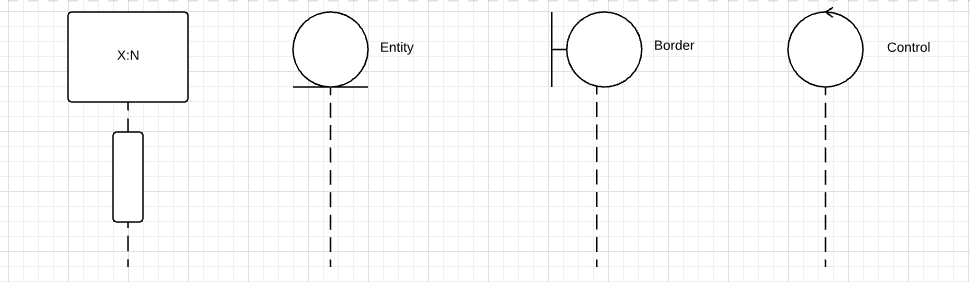
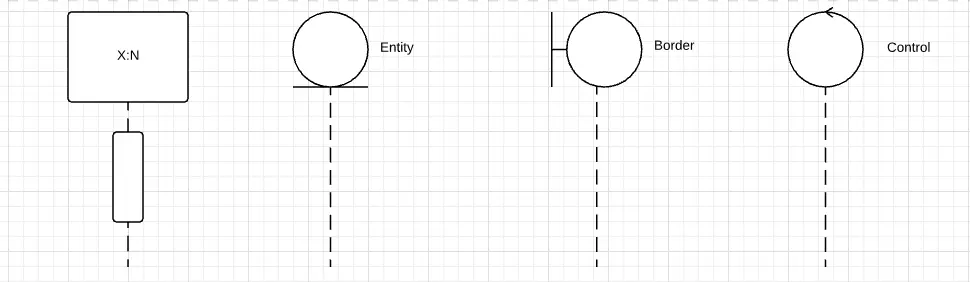
A dashed line goes down from the rectangular head. This line represents the course of time. Time is depicted linearly, moving downwards. Messages are sent and responses given along the timeline. A message to be sent after another message is at the bottom of the timeline. The notation is never about clear times, but always about the order, and messages are always arranged one below the other, unless they exist in parallel combined fragments.
Lifelines indicate how long an object is actively involved in a process. This is shown by how long one lifeline is compared to the others. Some objects are destroyed before the process is over. Objects that are no longer required are marked on their lifeline with an “X” at the point where they should be destroyed.
A sequence diagram is well suited to checking how failsafe your system is. Three class stereotypes of the lifeline can be used for this purpose:
- Entity
- Border
- Control
At the top of the picture you’ll see the three lifelines including notation: The entity has a round head that lies on a horizontal line. At the border, a line goes off the middle of the circle and connects with a vertical line – like an upturned T that goes off to the side of the head. The head of the control consists of an arrow that rotates in a circle. From all these class stereotypes, the dashed lifeline decreases vertically downwards.
If you have already worked out a concept using a use case diagram, the sequence diagram can help you work out the individual steps, taking into account the conceivable actors and objects.
Boundaries stand for interfaces that interact with external actors. These objects can be, for example, user interfaces – in which case the actor would be a person. Entities, on the other hand, stand for data containers or objects that contain system data. For borders and entities to communicate, you need a control element. The control does not necessarily have to be an object. A method attributed to one of the other two elements also works. The control element connects entity and boundary as a mediator. It monitors the signals of both elements and checks them for logic.
- The three stereotypes communicate according to four rules – border objects are the interface responsible for communication with actors. Actors communicate exclusively with borders.
- In contrast, control objects communicate with other control objects as well as with entities and boundaries. In return, they do not interact with actors.
- Borders communicate with control objects and with actors.
- Entities are rooted deepest in the system as data carriers. You only exchange data with control objects.
Messages
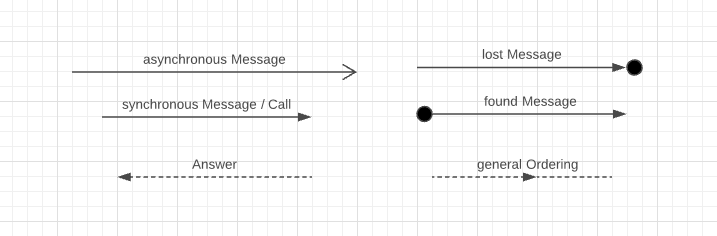
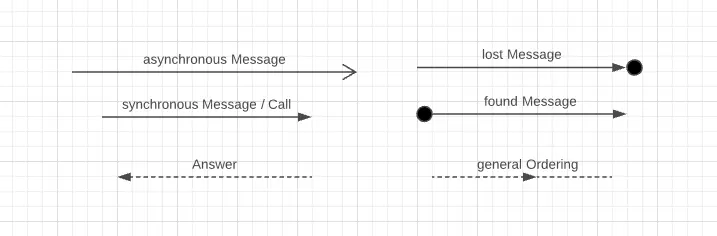
The message is a basic element of a UML sequence diagram. In object-oriented programming, a system consists of objects. UML displays these objects as nodes that are connected by so-called edges (also sometimes known as paths or flows). In UML, these kinds of edges perform different tasks. In the UML sequence diagram they model metaclass messages. The notation specifies a line as the basic form of the edge. Arrows are a special form of edges that represent a directional relationship or a flow of information. In the sequence diagram, they symbolize messages. Various message types are displayed differently, as can be seen in the figure below.
Name the message with a label showing its contents. For simple messages use the following form:
[message name] : [attribute "="] signal name or operation name[arguments] [":" return value]
Valid arguments for messages are:
-
- Constants
- Wildcard values (symbolic values representing a legal value X in the diagram)
- Attributes of the sender
- Parameters of the surrounding interaction
- Attributes of the superordinate class
Messages have a signature which specify the content of the message. The signature refers either to a signal, or an operation and must be named after it. This means that the content of the message either triggers an operation (an activity) at the recipient end, or sends a signal – i.e. only exchanges information. Messages also differ in whether they are synchronous or asynchronous. With asynchronous messages, the sender does not wait for a reply, but immediately resumes its behavior. Synchronous messages wait for a reply and block the channel on which they are transmitting.
These are the standardized message types in the UML sequence diagram:
- Asynchronous messages of the type (MessageSort) asynchCall, connect to an operation and trigger its execution. With asynchronous messages, the system does not wait for a response from the recipient, but continues its processes without interruption. Operation parameters and message attributes must match.
- Notation: You model asynchronous messages as an arrow with a continuous line and an open arrowhead.
- Sending and receiving asynchronous messages: This kind of message results from an asynchronous transmission action of the signal. In this case, the signal attributes determine the message arguments.
- Synchronous messages only request operations, not signals. The message type is synchCall. Synchronous messages wait for a response from the operation before resuming their behavior. Synchronous messages are displayed as an arrow with a filled arrowhead.
- Reply – the recipient of a message sends a reply back to the sender after the operation has come to a result. The symbol for this has an open or a filled arrowhead. The corresponding line is dashed.
- createMessage is a message type that signals a new instance of a lifeline. The system creates a new object in the sequence diagram. This message type is the only one that refers directly to the head of the lifeline. Other messages must point to the dashed life line. createMessage has an arrow with open tip and dashed line like the response, but pointing in the opposite direction.
- deleteMessage signals the point runtime at which a lifeline instance is destroyed. You draw the deletion message as an arrow, with the title <>> (this is optional). It must always point to a destruction occurrence specification. Also called a destruction event, this event occurrence specification marks the destruction of an object on the runtime line with an “X.”
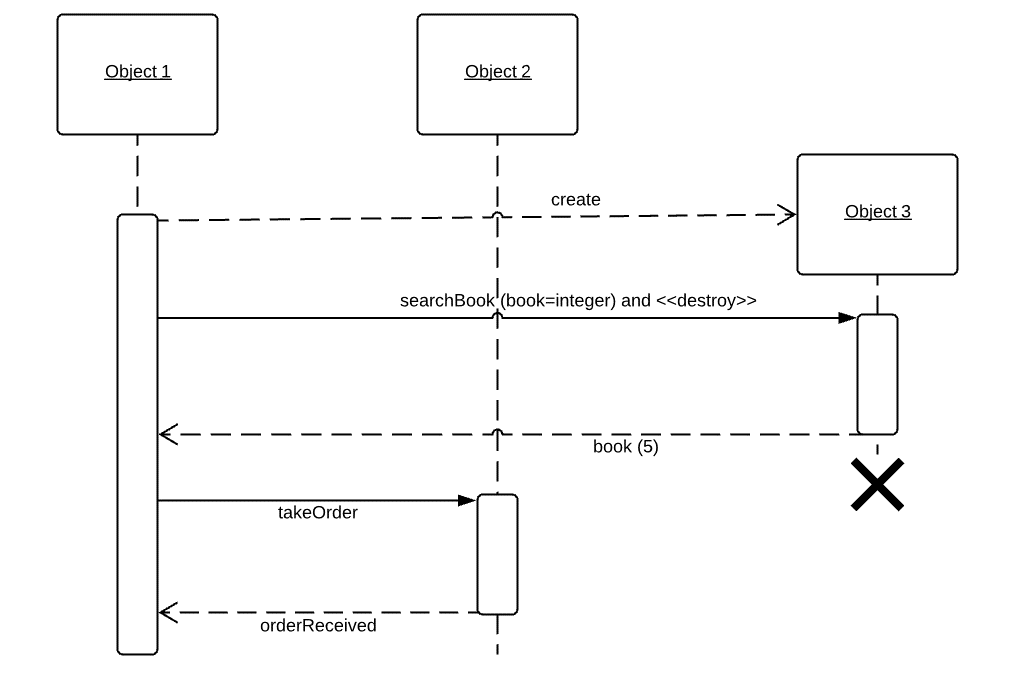
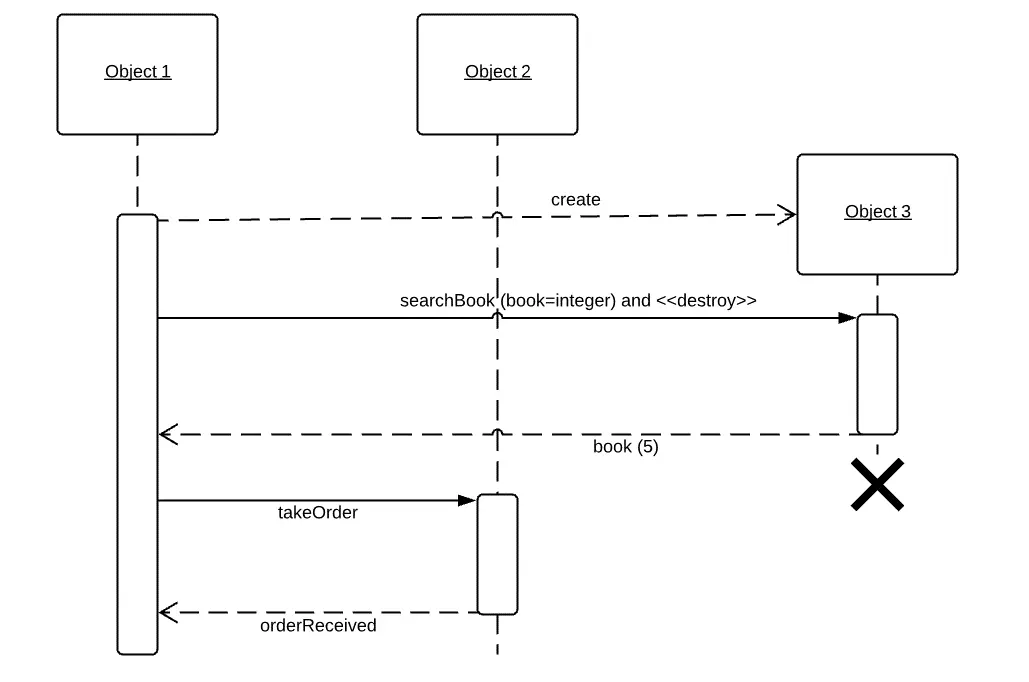
Messages of any type can be missing a sender or recipient – and in this case they are unknown. The UML standardized languages then assumes that the respective instance lies outside the diagram described. If you know the recipient, but not the sender, the message is found. Where you would otherwise model the sender, a small, filled circle indicates this absence. With a lost message, the opposite is true: if you do not know the recipient, model a filled circle at the arrowhead.
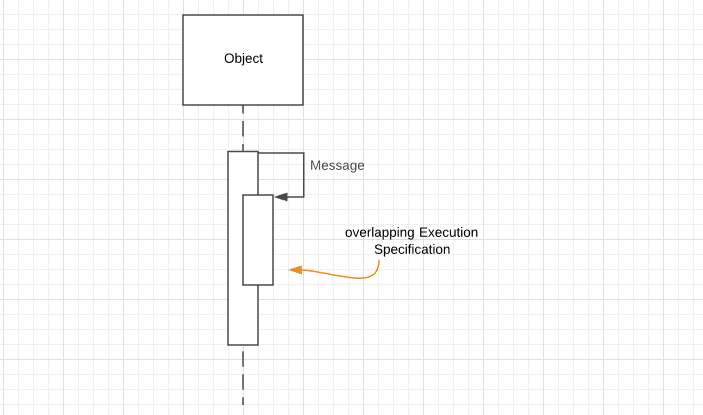
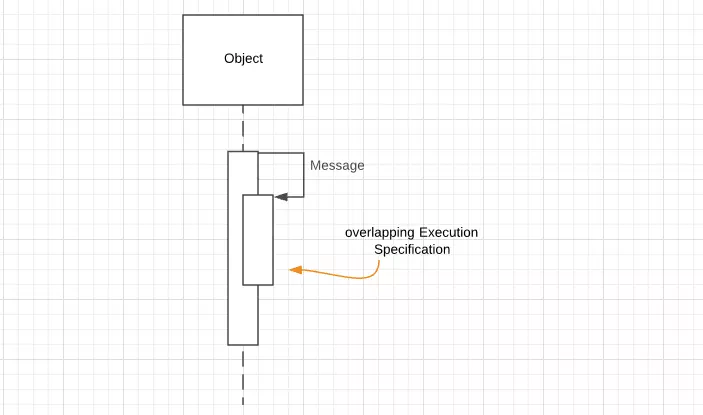
Messages sent on their own lifeline have a special form. The lifeline then sends the recursion from an activity bar. While the activation is still running, a new activation starts on the same lifeline. Their starting point is the sent message, and you use this type of message, for example, if an operation is performed several times. Now, the object must refer to itself. Messages between two lifelines can also cause overlapping activations. The specifications of activations are described in more detail below.
Another important part of the message is its parameter. Parameters are value specifications. The system evaluates the size when it sends a message with a signature. This happens at the stage specification, i.e. at the point at which the message is sent. The result specifies the values for signal attributes or operation input parameters, depending on who the receiver is. The operation then processes the value further and produces an output parameter.
A special feature is the wildcard parameter. If the message lacks all parameters, the syntax requires an empty string. This symbol indicates that the parameter value is not fixed. Nevertheless, it is valid in terms of the recipient's parameters or attributes – acting like a wildcard. Wildcard characters are placeholders for individual letters or entire character strings. Many know the asterisk (*) as a placeholder. In UML, the hyphen ("-") stands for the wildcard parameter.
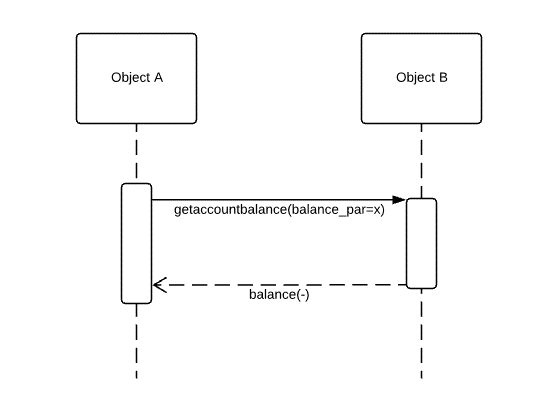
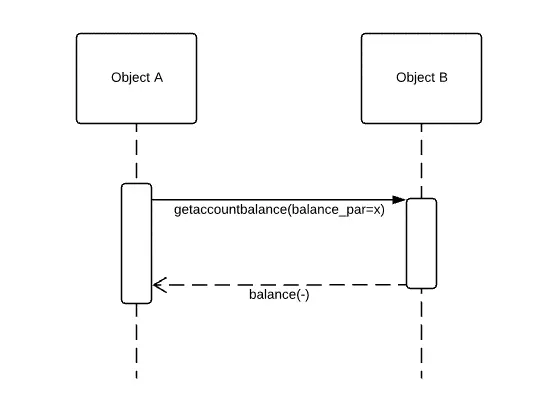
Response messages may only have one expression with a maximum of one operand per parameter. If the sender of a reply does not output any values, the message also has no specific values that it sends. Normally, the message models the output parameters of a sender (values that result from an operation) as operands. Without output parameters, the operand must remain empty. In this case, you simply model the wildcard placeholder, not the rewind value. If there is an operand, the system evaluates this again in the appearance specification. The result of the evaluation specifies the values for the parameters "out," "inout," and "return."
=The parameters IN, OUT, and INOUT specify whether an instance takes or returns values. The IN parameter signals that an instance is receiving and processing values, but is not sending them. The OUT parameter specifies that it does not take values but only outputs them. The INOUT parameter allows both incoming and outgoing values. If you do not define any of these values, the system assumes IN as default.
UML specifies three symbols that determine the recipient of the message as parameter expression. The recipient is the so-called assignment target of the message. The response message assigns it the response value from the sender's output parameter. These are the standardized symbols:
- Unknown
- Interaction parameter
- Attribute
Unknown is an empty parameter and stands for the wildcard. The interaction parameter is an owned parameter of the interaction to which it is inherent. This means that the interaction has the parameter. This has a name. Operation and interaction parameters have the same type. Attributes can be named without restrictions. They represent the name of a context behavior. This behavior determines either the lifeline to which the message returns or the surrounding interaction. If the interaction does not determine any behavior, it acts as context itself.
Gates are simply points at the end of a message. They belong to type MessageEnd. It marks the sender and recipient of a message. Gates illustrate the flow of information and show how messages move between two interaction fragments. More precisely, they represent connection points for messages between interaction benefits and interactions – and between interaction operands within and outside of a combined fragment.
The UML sequence diagram recognizes four types of gates. They differ in the fragments of interaction with which they are associated:
- The actual gateway: Interaction benefits point from one diagram to another. The actual gate opens the connection at the outer edge of the interaction benefit for messages from the interaction to which the interaction benefit refers. The gate has an association to the interaction benefit and accepts incoming and outgoing messages.
- The formal gate: For an interaction to exchange messages with an interaction benefit, it needs a formal gate. The gate is located on the inside of the frame.
- Inner CombinedFragment gate: Within a combined fragment, there is a gate on the frame. It exchanges messages with message ends from the combined fragment with messages with message ends outside the combined fragment.
- Outer CombinedFragment gate: This gate sits on the outer edge of a combined fragment. It forms the opposite pole to the inner gate.
Gates can have explicit or implicit names that must match in pairs. Actual and formal gates must match, as must inner and outer gates for combined fragments. In addition, the messages must go in the same direction and have the same property values and the same MessageSort.
Messages in communication diagrams play a special role. This diagram type is a simple form of the sequence diagram. Communication diagrams model how lifelines interact. Unlike sequence diagrams, they focus on the system architecture and how it determines the flow of messages. Although you can show a detailed architecture, interaction fragments such as combined fragments do not use them. As a result, a force element is missing. Instead, number the messages. Sometimes messages can overtake others. The sequence of outgoing messages then differs from the sequence of incoming messages. However, the UML standard advises against such non-sequential messages in the communication diagram.
The UML notation for communication diagrams prescribes a simple sequence diagram frame. A rectangle with a pentagonal label in the head. In the label, the designation “sd” marks this diagram type. Next to it, note the interaction name. Messages take a different form here – they connect the rectangular lifelines (UML: object nodes) as simple straight lines (UML: edges).
Above this, note the sequence expression, together with an arrow pointing in the direction of the receiver. The sequence name has the following form: [Integer name][Repetition]. The integer specifies the hierarchy for nested elements. If one of the integers (for example 1.2.2 and 1.2.3) differs in two messages, the system sends them one after the other. The name, on the other hand, stands for simultaneous broadcasts. The system sends two messages with the sequence names 1.2.3a and 1.2.3b simultaneously because of the identical integer. The repetition contains either a restriction that determines when the message is sent or a value that determines how often the message is repeated.
Guards
In UML, the guard guards the behavior of an element. The element must either:
- Meet a certain condition
- Not exceed or fall below a certain value
- Confirm an assertion
A guard is therefore a restriction. Only if the restriction is fulfilled can the affected element exert a certain behavior. There are many different elements that can have this kind of guard – actions, attributes, behavior, and others. UML does not prescribe a strict language, but offers OCL, the Object Constraint Language, as a native option. Boolean variables are also often used.
An interaction restriction consists of this kind of Boolean expression. The restriction serves as a guardian for the operand within a combined fragment. If the value of the constraint is true, then the surrounding interaction fragment can start its behavior. Note the restriction in square brackets on the lifeline above an execution specification. Standardization allows combined fragments without restriction of interaction. In this case, the system assumes that incoming messages are true.
Interaction fragments in sequence diagrams
When you create a sequence diagram, lifelines and messages are the most important components. UML2 recommends a frame for this diagram type, but this is not obligatorily. The framework limits a sub-process, the so-called interaction fragment. All the necessary lifelines and messages are within the frame. It consists of a rectangle with a label in the upper left corner. The indicator for a sequence diagram is the abbreviation “sd” which is usually in bold. Next to it, the name of the interaction is entered, as shown in the picture below.
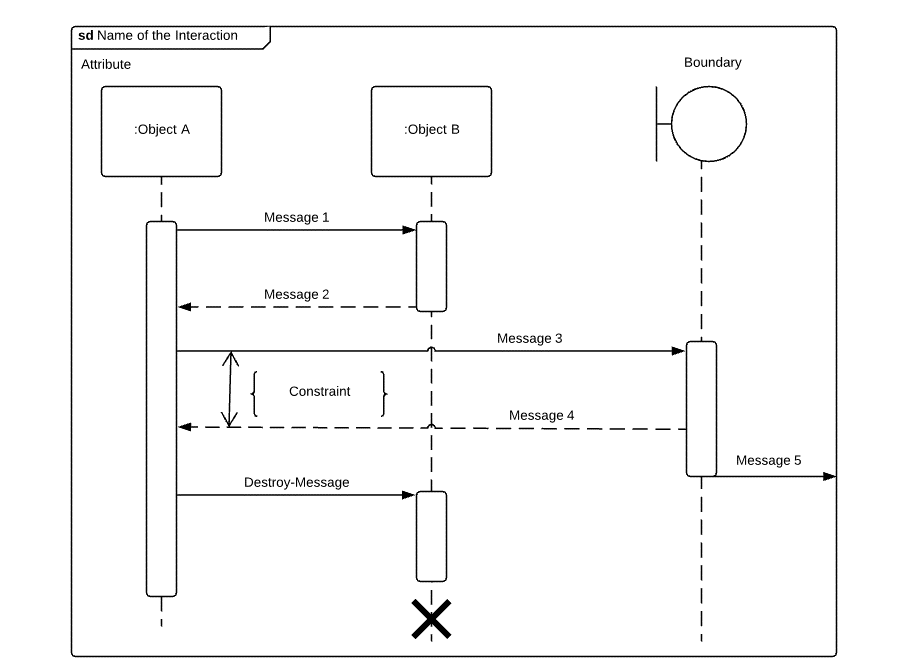
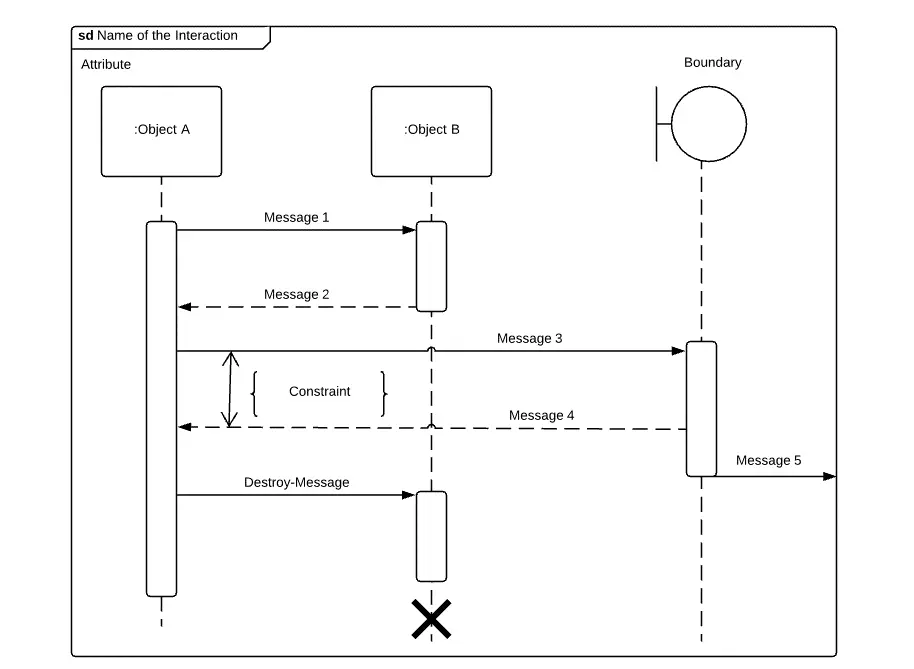
Besides the optical limitation, the frame also serves functional aspects. When you create multiple sequence diagrams (or other interactions), the frame separates these representations. If you want to show that the different interaction fragments communicate with each other, model a message (filled arrow) to the frame line. At the top of the screen, the system sends message 5 to the outside. The point where the arrow meets the frame is called the gate. This element has a function within the diagram, but does not have its own notation.
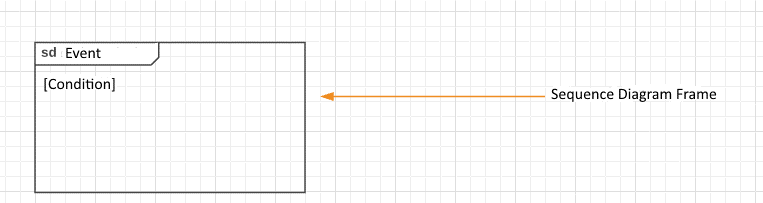
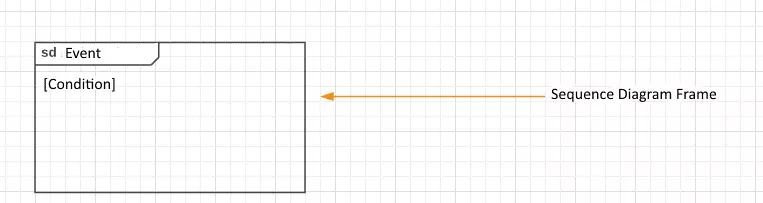
Interaction fragments belong to the nodes in UML. UML specifies the properties and tasks of nodes depending on the diagram type in which a particular node occurs. In general, nodes are model elements within a system or process on which an artifact can be installed. A node connects UML by edges. Edges represent the exchange of information graphically by arrows or by means of simple lines.
In UML, you can create sequence diagrams that contain nested sub-segments. Frames help to display the individual fragments in an orderly manner.
Sequence diagrams can contain interaction fragments interaction benefits, state variants, event occurrence specification, execution specification, and combined fragments.
Interaction
Interactions form a subclass that defines the notation, structure, and behavior of two metaclasses. These metaclasses are interactions, and partial decompositions.
Interactions as metaclasses are interaction fragments that call or use another interaction. If your sequence diagram becomes too complex, use this link to make it clearer. The interaction to which the interaction refers is shown in the current diagram in a black box view. To uniquely identify the called interaction, specify the following syntax in the body (field in which instances perform operations):
- Attribute name (attribute of a lifeline in the interaction utility that receives the return value)
- Collaboration name (identified collaboration benefits those link interactions and collaborations)
- Interaction name of the called element
- io-Argument: in/out arguments of interaction
- Return value (response of the called interaction)
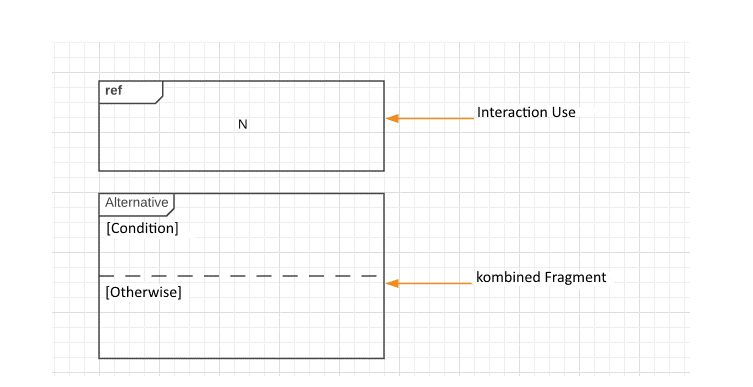
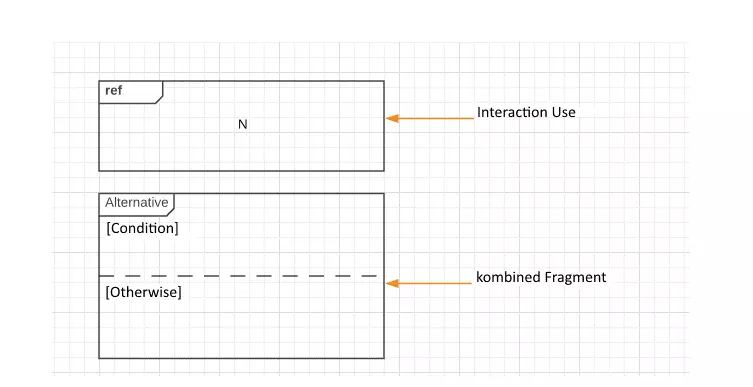
You model the interaction benefit as a rectangle with a pentagonal label in the upper left corner. Enter the abbreviation "ref" in this field.
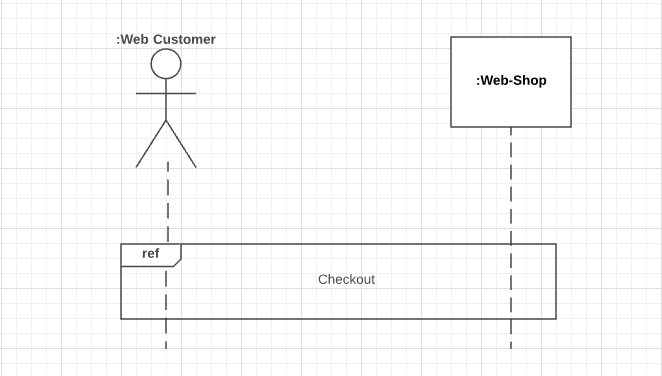
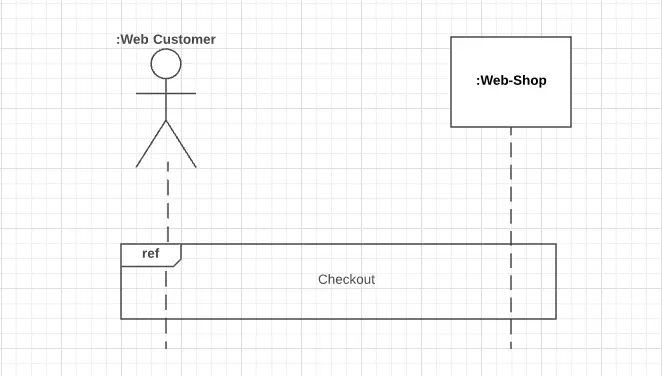
Since interaction benefits refer to other diagrams, these external factors determine their behavior. While the linked interaction has formal gates, the referring interaction has the actual gate.
Part-decomposition is the partial, sequential decomposition of a lifeline within an interaction through another interaction. Using such a decomposition, you can separate details from each other and look at individual sub-functions more closely. When messages enter or leave the disassembled lifeline, they are considered actual gates. These are connected to the formal gates of the decomposition action. Gates and parameters of both elements must match. As an interaction benefit, the partial decomposition also receives the label "ref" and is defined by the associated interaction.
Execution specification
The execution specification stands for the time on a lifeline in which an object executes a behavior or passes through an action. You also use it to model the time it takes for an involved object to either send a message or wait for a response. This is because the execution specification represents an abstract time during runtime. As it applies to the whole diagram anyway, time is not an absolute quantity, but relative. Passive behavior such as waiting for a response must also be entered as activation in the sequence diagram.
The trace semantics of an execution specification is represented by the simple structure <start,end>. The notation for the execution specification allows two forms. Model a long, narrow square with grey filling on the lifeline. Normally, activation in this form does not include a label in the body. Alternatively, draw a slightly wider, white-filled rectangle on the lifeline. There, you have space to give the activity bar a label. If an object performs an action during runtime, enter the action name there.
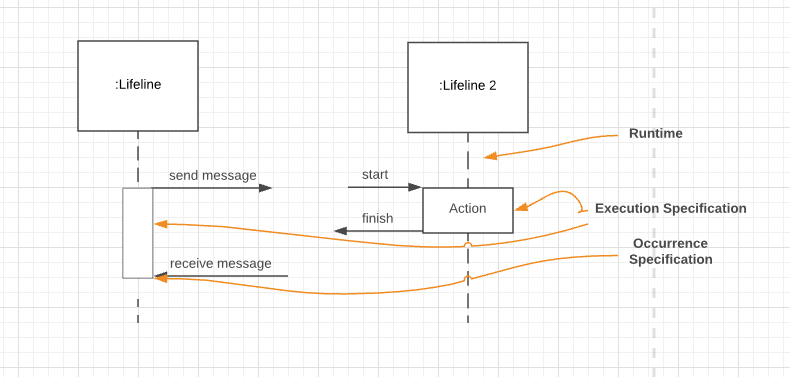
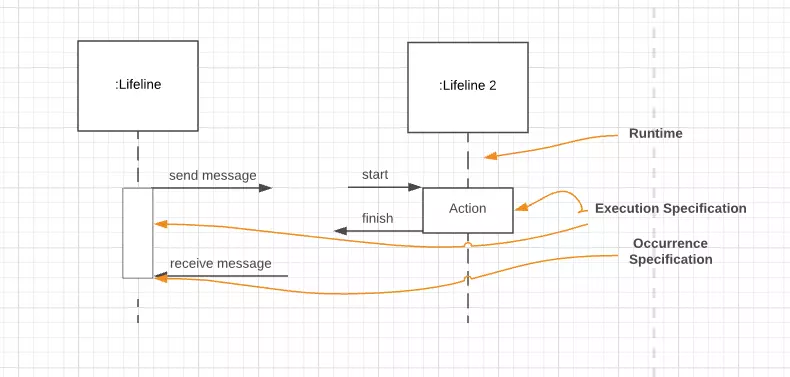
Start and end mark the event occurrence specifications. Activation starts with the start event and ends with the closing event. These fragments represent a single moment and exist on a single lifeline. The event occurrence specification represents the start or end of an action. The message occurrence specification gives the signal to send and receive a message. Their value therefore always depends on the message or action.
Activation has no separate notation. It exists implicitly at the outer edges of the execution specification rectangle. If the execution specification performs an atomic action, start and end associations refer to the same occurrence specification. You can emphasize this with a link line between action and incoming appearance specification.
An atomic action appears like a black box. It is an indivisible sequence of several simple operations that cannot be observed because they are performed extremely quickly. An atomic action therefore appears to be completed immediately.
While other appearance specifications do not require any notation, mark the message appearance specification destruction with a large X. It marks the resolution of an object instance at a specific point on the lifeline. The lifeline ends with it. Subordinate instances or performance specifications at later points in the timeline are then invalid since they no longer exist either after the destruction of an object.
Sometimes, execution specifications overlap. For example, if an object sends a message to itself, an execution specification sends a message to another instance of this class. Both specifications are partly on the same lifeline at the same time. In the UML sequence diagram, you represent this circumstance with overlapping rectangles.
State invariant
The state variant is a runtime restriction. The lifeline represents an object. During runtime, this object changes its state due to the execution specification. The state variant examines the object for its change of state in the execution specification – directly before it executes the next appearance specification. All previous implicit actions within the execution specification are then considered executed.
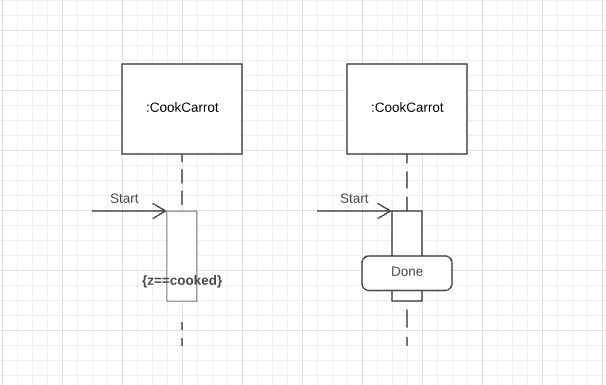
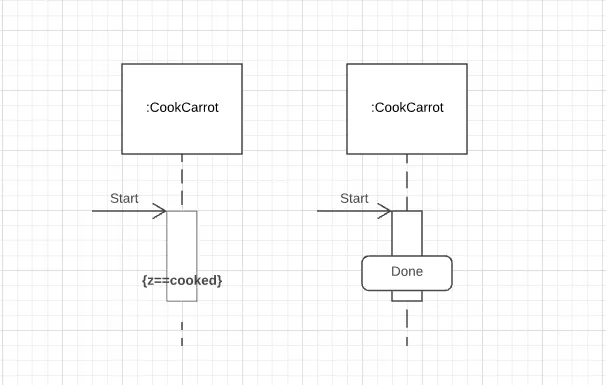
The state variant specifies a restrictive value. If this value is equal to the object state, the track is considered valid. If the object does not meet the restriction, its track is invalid.
According to the UML sequence diagram notation, the state variant is either in curly brackets on the execution specification or you use the rounded rectangle of the state class.
Combined fragments
Combined fragments belong to the interaction fragments. These fragments are abstract elements of the system. They stand for interaction units. This means that they are part of an interaction. On the other hand, they are also small interactions themselves. Combined fragments in a sequence diagram determine the behavior of several interaction fragments. However, they only form the framework. They are defined by interaction operators and interaction operands. Operands contain one or more messages. On the lifeline in front of a combined fragment, a restriction, also called a guard, watches over the included operand.
As already described, operands are constant or variables that run through a process. Operators influence the behavior of operands. For example, the Boolean operator "OR" can specify that operand A or operand B is executed (or both). Within a combined fragment, an operand specifies that a specific message is sent under certain conditions. The operator determines which relationships operands within a fragment have to each other and which relationship they have to the superordinate fragment.
Interaction operators
UML defines 12 interaction operators
Alternative:
Within the combined fragment with the interaction operator "Alternative," a subordinate fragment can only send a message if a certain condition is fulfilled. Otherwise, a competing fragment within the frame will send its message. The image above shows an example of a combined fragment with the operator "Alternative." Use the abbreviation "alt" for the label. You divide the rectangular frame by a horizontal dashed line. The upper area is a condition.
Guard:
The guard checks whether the condition of the operand is fulfilled. If so, the system sends a message in the condition area. If not, it sends a message in the alternative area. An operand within this combined fragment always needs a guard that is judged true to be executed. If the condition operand does not have an explicit guard, an implicit guard is assumed. So this fragment is always an either-or decision.
Option:
This combined fragment is modeled in the sequence diagram like the alternative. It also stands for a decision. However, there is only one operand. The decision is therefore decided on the basis of whether or not the operand should be executed. The operand with a condition must not be empty. Its alternative, on the other hand, is empty. Mark a fragment with the interaction operator "Option" with the label "opt."
Break:
A combined fragment with the interaction operator "break" interrupts the parent fragment. If a lifeline meets the condition of the operand, the system executes the combined fragment. But it ignores the rest of the parent fragment. In order for all lifelines to reach their full life span, you should include each lifeline in the combined fragment. Otherwise, a lifeline may stop in the middle of the process without being properly destroyed. If the break fragment lacks a guard, the decision is non-deterministic. We therefore recommend using a guard.
Non-determinism is a concept in theoretical computer science to simplify modeling. If the initial value is the same, a system has more than one way of achieving a result. In practice, mainly deterministic algorithms with only one calculation method are used. However, a non-deterministic algorithm takes an unpredictable route in the calculation, even if you start the system with the same specifications. Since the algorithm usually produces significantly more different results than a deterministic algorithm, the task at hand should be less complex. Abstract models simplify complex systems. They are therefore suitable to play through different calculations with the non-deterministic algorithm
Loop:
A combined fragment with the interaction operator "loop" repeats its operand. The exact number of passes is determined by the guard. This monitor can include repeat barriers and Boolean variables. Note the repeat barriers in the frame label as follows: loop (X,Y). The variables X and Y each represent a natural number. X is the minimum number of repetitions ("min-int"). Y is the maximum number of repetitions ("max-int"). X must be a non-negative number, Y a non-negative number equal to or greater than the minimum number (i.e. > 0).
You can optionally note the Boolean variable in the frame body next to the label. It further restricts repetition. If the condition of the Boolean variable is no longer fulfilled and the minimum number of repetitions is reached, the loop stops. Note the restriction in square brackets. This restriction applies to external factors such as input from an actor.
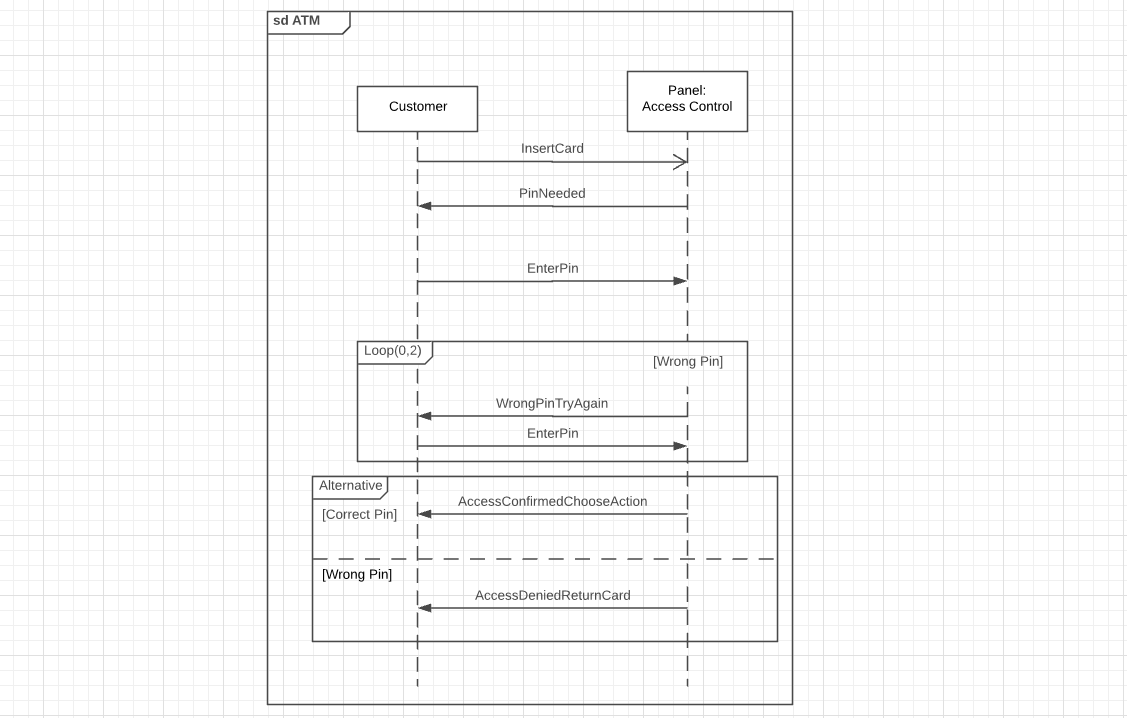
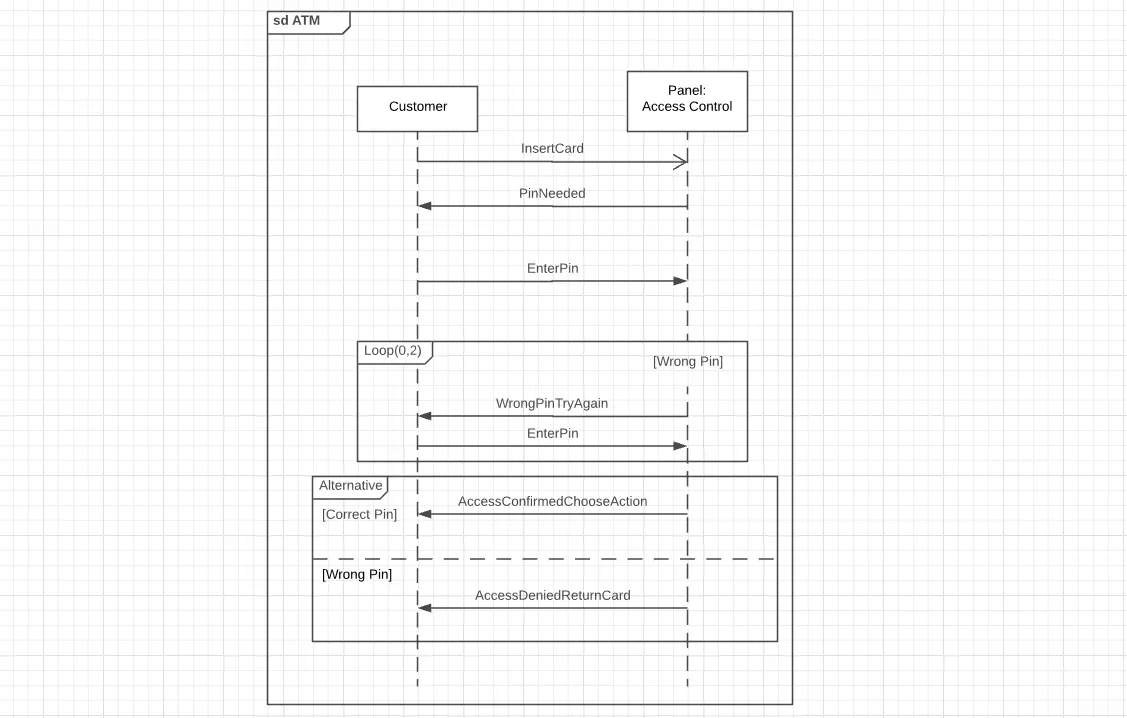
At an ATM, for example, you can enter the correct PIN number three times. If the PIN is incorrect, you will be asked to repeat the entry. In the UML sequence diagram, note the message "PIN entry" and its response "Wrong PIN. Try again with the appropriate arrows. The label has the form Loop (0,2). The Boolean variable is [wrong PIN]. As long as the PIN is wrong, the loop repeats itself twice. If the PIN is correct, the system resolves the loop. If the maximum number of repetitions is exceeded, the loop also loosens, but the process is terminated as invalid.
Do not specify repeat barriers, the minimum is 0 and the maximum is infinite. Enter only one barrier, minimum and maximum have the same value.
Parallel:
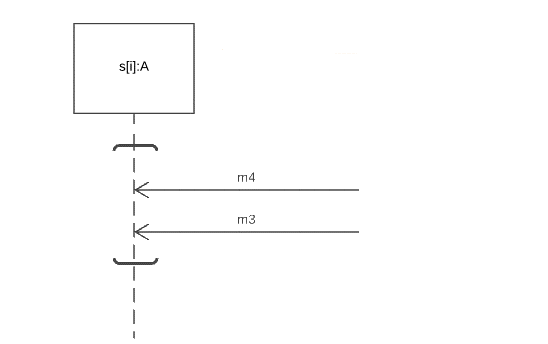
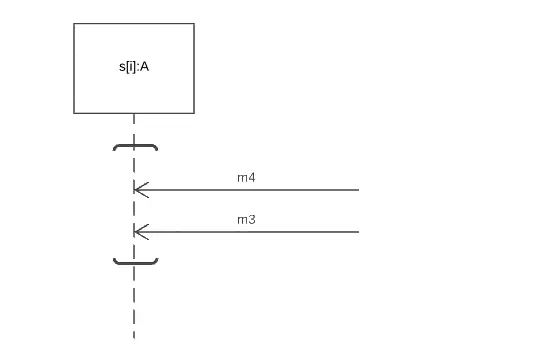
Normally, the position of an arrow on the lifeline in the sequence diagram always prescribes a chronological order. In a combined fragment with the interaction operator parallel, its operands may execute their processes simultaneously. Potentially, the operands intertwine their process order. However, the given order within the operands is always maintained. In the UML sequence diagram, model this combined fragment with a continuous frame. You separate the different operands optically by dashed lines, similar to the alternative. Enter the abbreviation "par" in the label (see illustration under critical region). If operands are to work in parallel on a single lifeline, UML allows an abbreviation: the co-region fulfils exactly this task. To do this, simply enclose the affected event entries in square brackets.
Critical section:
The system uses a critical section to avoid errors that can occur when multiple processes share resources. Within this system area, only one process uses the resource at any one time. In addition, the system prioritizes the respective process. With the label "critical", you define a critical region. This prevents other interaction operators in a superordinate fragment from having any influence. For example, it blocks nested tracks of a parallel, combined fragment in the sequence diagram.
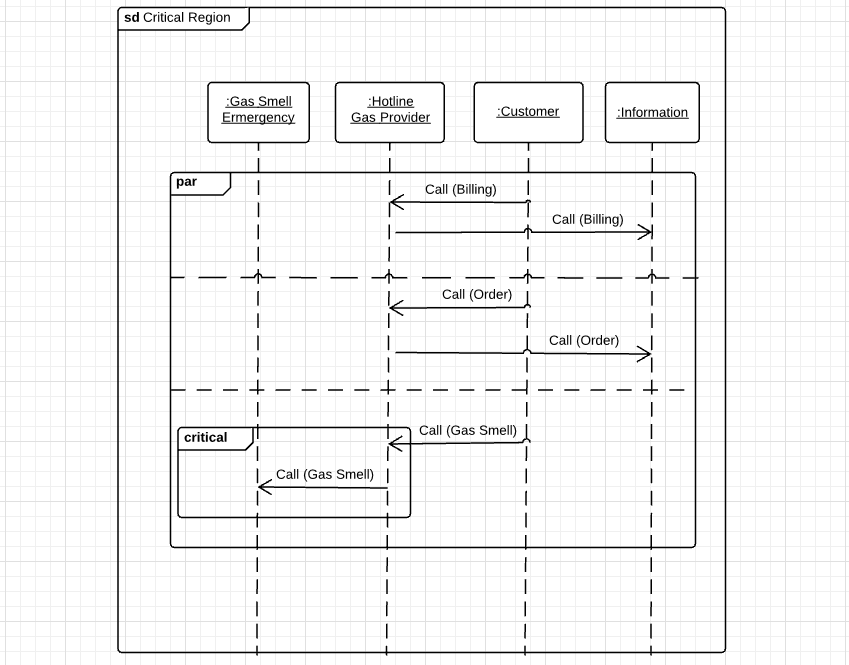
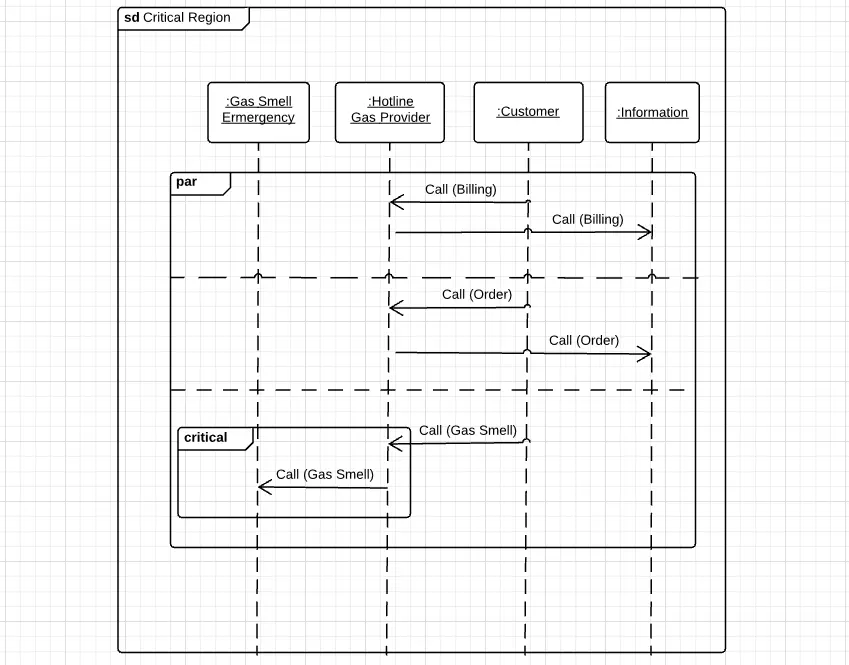
In the graphic above, a gas supplier hotline accepts several calls in parallel and forwards them simultaneously to hotline employees. If an emergency with suspected gas smell is involved, the system prioritizes the message and forwards the call to the emergency service via the critical section. The critical section prevents information streams from the parent fragment from being processed in parallel with the message from the critical section. Only lifelines in the critical section behave like this.
Assertion:
The interaction operator "Assertion" (also Assurance or Backup) determines the state of the continuation. Sequences within an operand with the label assert are considered valid continuations. The claim claims that all sequences outside the fragment end in invalid tracks.
Ignore/consider:
A UML sequence diagram represents a system part in detail. Some messages you do not need for the view. Others want to take you into account. You use the interaction operator "ignore" to exclude certain messages. This information appears on a track in the system, but not in the ignore fragment. The notation prescribes a label in this form: ignore {message1,message2}.
Combined fragments with the interaction operator "consider", on the other hand, consider certain messages in a fragment. All other messages that pass through the fragment are ignored by the system. You can also put messages in braces to consider: consider {Message3,Message4}.
These two operators have opposite tasks. However, both often occur in nested fragments. For example, modelers often combine assert with ignore (in this form: assert ignore {Msg1, Msg2}) or assert and consider (in this form: assert consider {Msg3, Msg4}).
Negative:
To indicate a system error, the interaction operator "negative" is used, meaning the combined fragment contains invalid traces. The operator is used, for example, when you display a log-in procedure using a sequence diagram. Model the lifeline of an actor on the way to time-out, and frame this error message with the negative fragment. Due to the explicit modeling of invalid tracks in the negative combined fragment, all other fragments are considered positive. Your tracks are valid.
Strict order:
Within a combined fragment, it may be important to maintain a strict order. The strict label imposes strict sequencing on its operands. This applies to the first level of the fragment. Operands in further nested fragments are subject to their own order.
Weak sequencing:
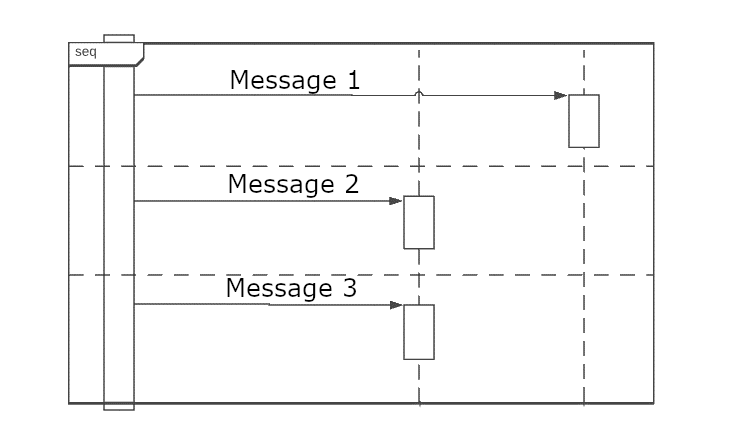
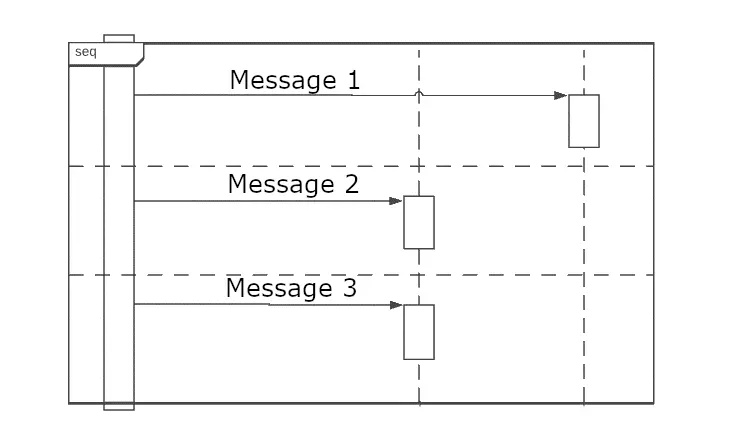
Combined fragments with the interaction operator "sequence" represent a weak order. The behavior between the operands in the fragment influences trace properties instead of the interaction operators. A weak sequencing can therefore act like a parallel fragment. This happens when operands participate on different lifelines. In turn, weak sequencing turns into a strict order when its operands appear on the same lifeline. The label is “seq”.
Tracks with the following properties define weak sequencing:
- Event specifications within an operand keep their order
- Event specifications that act on different lifelines and do not occur within the same operand occur in any order
- If the event specifications act on the same lifeline, but in different operands, their place on the lifeline dictates their order (the first operand comes before the second operand)
Continuation:
The continuation is hardly a fragment in its own right. Only in the combined fragments alternative and weak sequence does it get its own semantics. This prescribes the same form for the continuation as for states: a rectangle with rounded corners. In contrast to the condition, a continuation optionally covers several lifelines.
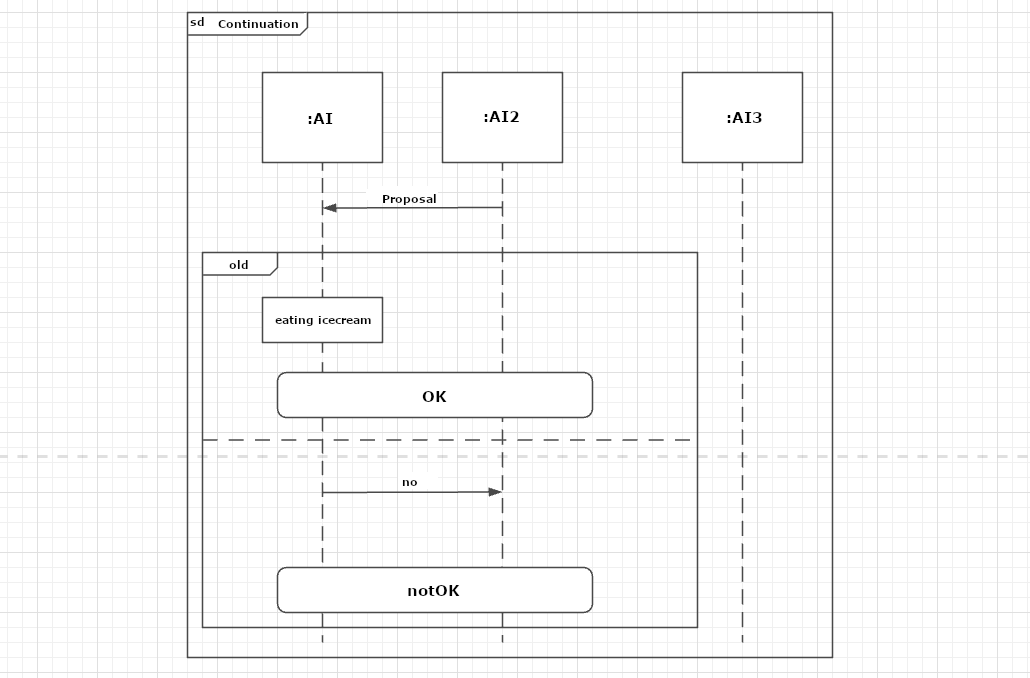
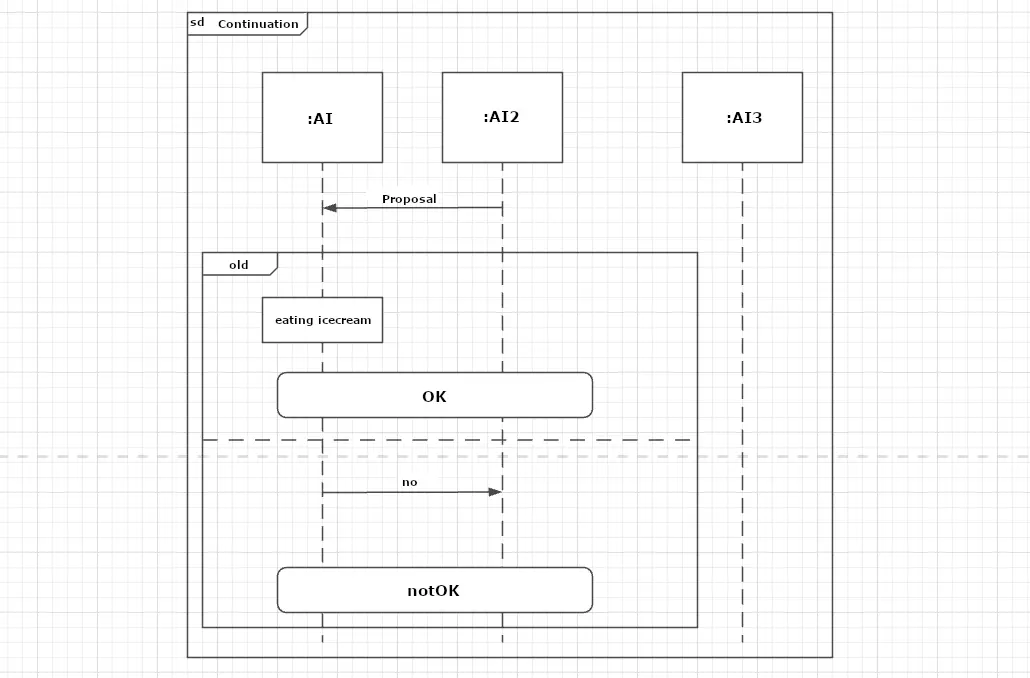
Your task also changes depending on how you arrange the continuation in the sequence diagram. If the continuation is at the beginning of your interaction diagram, you use it to model the behavior of the continuation. If the continuation is at the end of your interaction fragment, it forwards the process. If you name your continuation (as in the example: notOK), the next fragment on the lifeline must have a continuation with the same name (notOK) or it may not model a continuation. If the continuation is in the fragment alone, this corresponds to a continuation at the end of the fragment.
If you want to show application examples in detail or check the logic of a system, create a sequence diagram. The notation allows you to model the flow of messages over the entire lifetime of an object. Even complex operations are clearly represented with the help of nested interaction fragments. The sequence diagram is one of the most used UML behavior diagrams.