

Owner, Admin-C, and Tech-C: requirements in domain registration

If you’re looking to register a domain, it’s not enough to simply record your own contact details on the Whois database: you also need to name an administrator and a technician. These are referred to as Admin-C and Tech-C. Additionally, if a name server is delegated for the registered domain, then the respective contracting authority (the registry) also requires the contact information for a zone administrator (known as Zone-C). We’ll take you through the tasks that these different roles have as well as their rights and responsibilities.
- Free Wildcard SSL for safer data transfers
- Free private registration for more privacy
- Free Domain Connect for easy DNS setup
Domain owner
In the eyes of the registry, the domain holder is seen as a contract partner in domain registration. If you decide to register a web address, then you receive ownership of the domain and so hold the rights to this material. But a domain owner doesn’t necessarily have to be an actual person. If you want to register a web address for your business, for example, then you can list the company name as the domain holder. Shared ownership is also possible. But if you do choose to register your domain under your business rather than a person, the name listed must be the company’s full legal title. Other requirements in addition to the domain owner’s name include a registered address, a telephone number, and an e-mail address. Simply giving a mailbox won’t suffice.
Admin-C
After the domain owner has been listed, you’ll need to name a real person as the administrative point of contact for the domain. This Admin-C is appointed by the domain owner and receives full access rights to the domain. This means that the admin is entitled to control of the domain operation and granted the corresponding responsibility to decide matters without needing permission from the domain owner. In cases of private domain registration, it’s quite typical for the domain owner to also take on the role of Admin-C as well. But other companies may choose to leave this task to a specialized service operator, allowing an expert to handle their domain administration. The required information for registering an Admin-C on the Whois database is exactly the same as is needed for registration of a domain owner: a registered address, a contact number, and an e-mail address.
Changing the Admin-C
As the domain holder, you reserve the right to change the Admin-C for your domain. To make this change, you simply have to contact the internet service provider with whom you registered the domain. They’ll usually have a form available for this, which you can simply fill out. In some cases, charges for processing this information may apply. In cases of an Admin-C change, it’s only the administrative contact that needs to be altered and rewritten. The ownership of the domain can be left unchanged.
Liability
In general, since the Admin-C has full access rights and no restrictions, he or she is seen as acting on behalf of the domain owner. As a result, the administrative contact person is often held accountable for rights violations, even those associated to the domain itself. The question of the extent to which the Admin-C can be liable for infringements of license in the registration of a domain name and the content of a website is a difficult topic that has been debated many times in court – with differing outcomes.
Want to find out who owns a particular domain? Use our free IONOS WHOIS domain lookup.
Tech-C and Zone-C
The contact for technical queries relating to a domain is known as the technical contact (Tech-C). This role can be a named individual, but it can also serve as a general term for a group of people (like the IT department at a company). Although the Tech-C does need to be determined by the domain holder, unlike the Admin-C, this role carries no liability and offers no control over solutions and domain transfers. And the tasks assigned to the Tech-C are often taken on by the internet service provider. Replacing the registrar data, administrative information, as well as the technical contact details of a website with that of the internet service provider’s, carries a great advantage; personal information remains completely anonymous and not only does this provide protection against spam, but it also prevents information from being misused by third parties. Benefit from this great function with IONOS’s private domain registration.
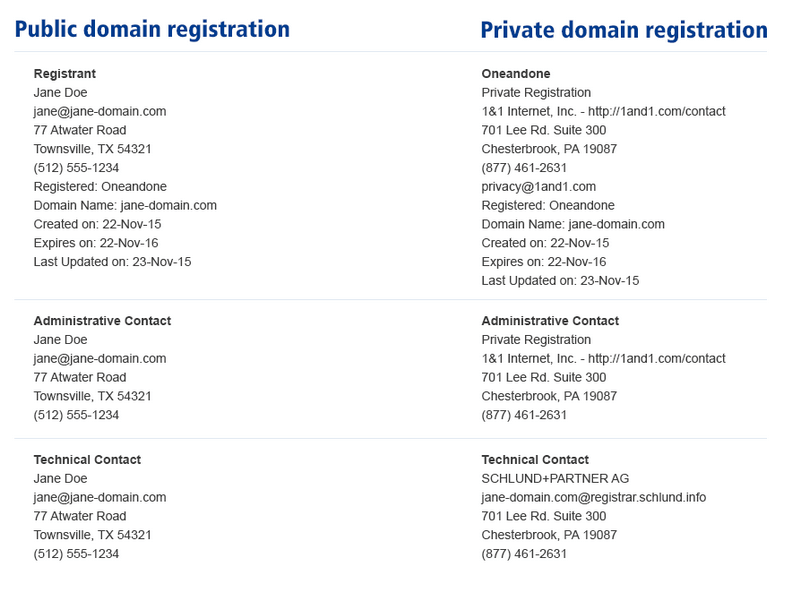
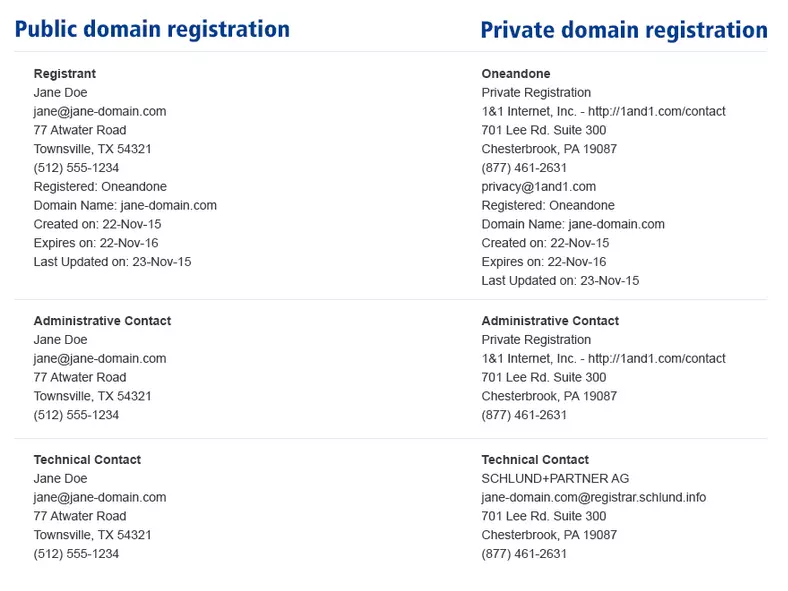
The role of zone administrator for a domain is referred to as Zone-C. This role involves being responsible for the maintenance of the domain name server, and so the Zone-C is contacted for information related to a domain’s DNS records. If a domain hasn’t been delegated its own name server, then the internet service provider handles this. The Whois records for the Tech-C and the Zone-C require the same information as for the domain owner and the Admin-C: a name (the official legal name if it’s a company name), a postal address as well as a telephone number and an e-mail address.
Thanks to the General Data Protection Regulation which was implemented in the EU in 2018, there have been changes in some European countries when it comes to contact information about domain holders being public. In Germany, for example, .de domains are regulated by DENIC, who have decided to replace Tech-C, Zone-C and Admin-C information, instead providing two non-personal email addresses for any queries. There will be no more personal holder data shown in the whois output for data protection reasons.