

What is a subdomain?

All website URLs consist of the transmission protocol (HTTP or HTTPS), a second-level domain, and a top-level domain. For example: example.org – “example” is the second-level domain (the domain name), while “org” at the end represents the top-level domain. In addition to these essential components, a URL can also contain a subdomain. But what is a subdomain?
Subdomain explained in detail
A subdomain allows you to divide your website into separate sections. The subdomain name appears before the domain name and the top-level domain, separated by a dot. The following image illustrates this:
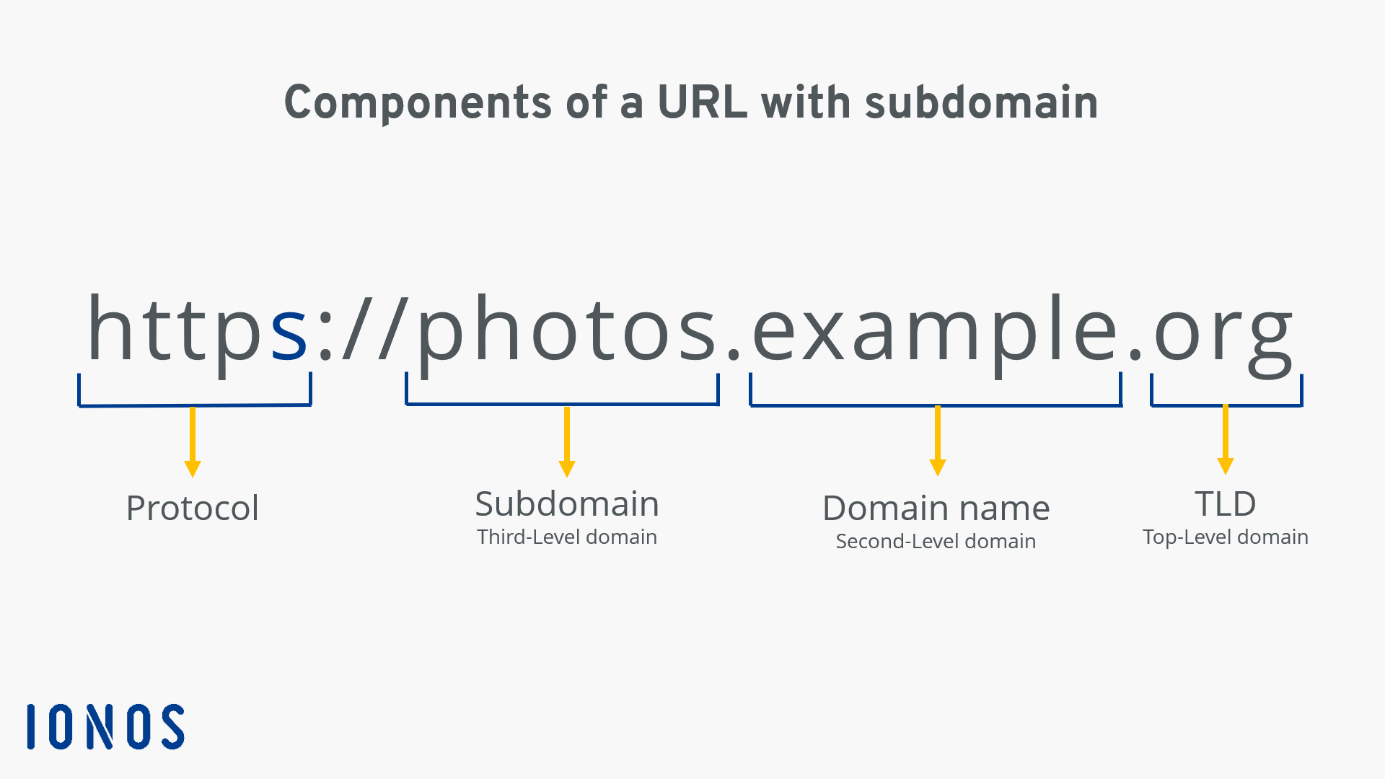
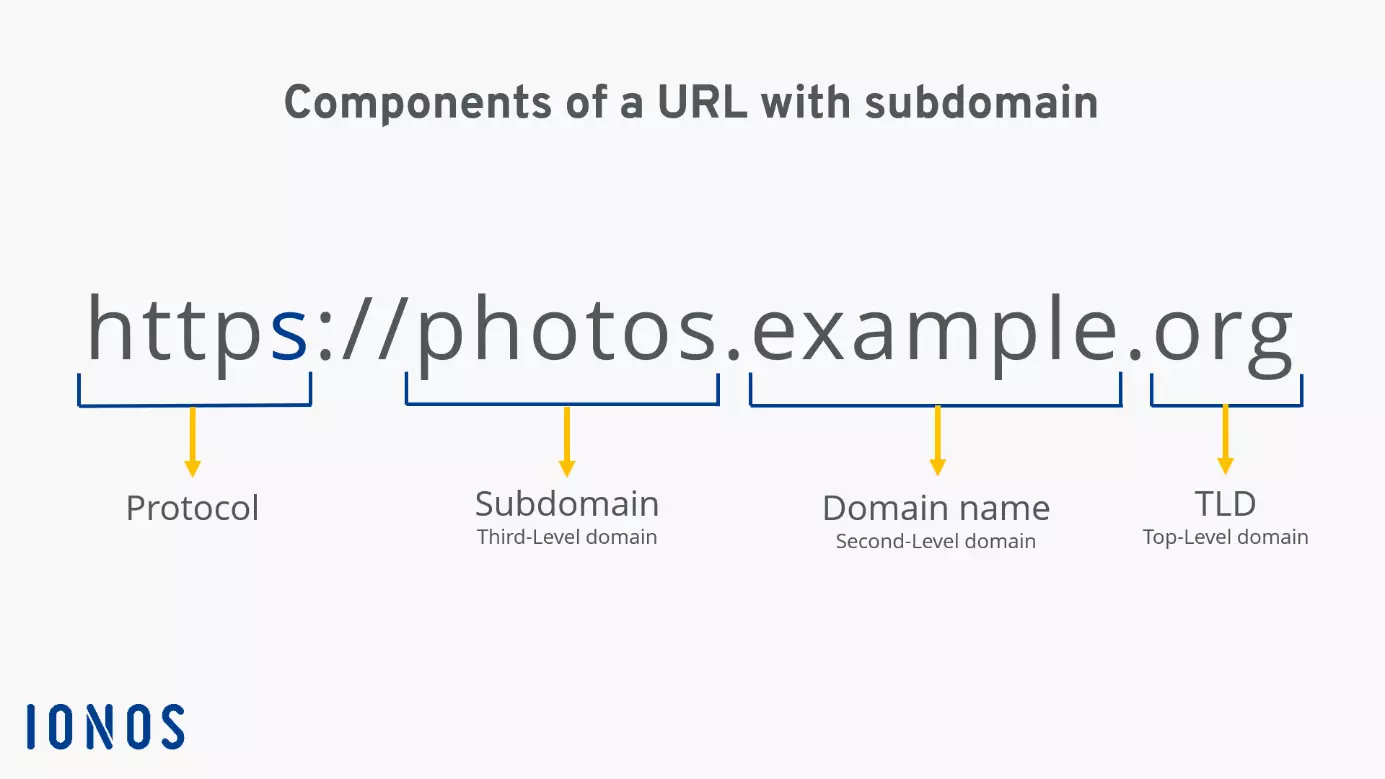
In this example, “photos” is the subdomain of the main domain “example.” This allows a website owner to create a standalone section, such as one featuring photos from various events, and separate it from other content on the site.
- Free Wildcard SSL for safer data transfers
- Free private registration for more privacy
- Free Domain Connect for easy DNS setup
Why use subdomains?
Now that we’ve answered the question “what is a subdomain?”, the next question is: why should you create a subdomain? The primary purpose of a subdomain is to separate different areas of a website and structure the content more effectively. Because all sections share the same domain name, users can clearly see that they belong to the same company, product, or project. This not only improves user-friendliness but also helps highlight specific topics or services.
Subdomains are particularly useful for large businesses with multiple locations. If each location has unique responsibilities and information that the company wants to present on the website, it makes sense to create a separate subdomain for each one. This allows companies to provide targeted information for each location via its own subdomain.
Other practical uses for subdomains include:
- Multiple languages: It’s common to separate different language versions of a website using subdomains. For example, the English version might be at
en.example.org, while the Spanish version is available ates.example.org. - Customer and partner areas: Subdomains like
customers.example.orgorpartners.example.orgcan offer secure areas for specific user groups. These might include invoices, offers, or documentation – often accessible only with a login. - Landing pages: Marketers use landing pages to attract potential customers. These pages are tailored to specific offers and optimized to convert visitors into customers. To avoid cluttering the main site hierarchy, landing pages are often hosted on a subdomain. This maintains the company association while allowing the marketing team flexibility in layout and design.
- Technical services: Subdomains are also useful for technical services such as email (
imap.example.org) or FTP servers (ftp.example.org).
How to create a subdomain
You must have a main domain in order to create a subdomain. Once you own or have registered a domain, you can create subdomains using a DNS entry. To do this, simply create a DNS record with the desired subdomain name and point it to the server that will host the subdomain. Subdomains are created via the provider that manages your domain’s DNS settings. In most cases, this is your web host, though it could also be your domain registrar depending on your setup.
Web hosting providers make it easier to create subdomains with built-in tools, so you don’t always have to create DNS records manually. Often, entering a name is all it takes – the provider handles the rest. The setup process can vary depending on the hosting provider.
If you’re thinking about creating a subdomain, keep in mind the option of a wildcard subdomain. This type of subdomain allows you to redirect all requests to undefined subdomains to a specific page, helping you avoid error messages.
Already have a domain with IONOS and want to create a subdomain for it? No problem! Check out our separate article on how to create subdomains.
- Zero downtime
- Free SSL
- $0 transfer fee, plus great offers
SEO relevance of subdomains
When expanding a website, website owners often wonder whether to use subdomains, directories, or new domains. So how do subdomains impact SEO?
Subdomains are considered separate domains by search engines and are not automatically linked to the root domain. As a result, the main domain doesn’t transfer link power or trust to its subdomains. This means that each subdomain needs to be optimized individually for keywords and requires its own link-building strategy. One advantage is that if a subdomain is penalized by Google’s algorithm, the main domain and other subdomains aren’t affected. The reverse is also true: despite being treated as separate domains, subdomains can have a positive impact on overall brand presence when supported by strong internal linking and clear thematic structure.
Additionally, search engines typically display only one result per domain in search results. By using subdomains, you can place multiple listings, thereby increasing your click-through potential.